The phrase “without a website” usually means without an existing multi-page site. Technically, the published landing page is itself a web presence and can function as a one-page site. What matters is whether it gives visitors enough information and a complete way to do the intended task.
Guides Karan Singh BhakuniUpdated 3 Nov 2026
Can You Have a Landing Page Without a Website? Yes—Here’s How
Karan Singh BhakuniUpdated 3 Nov 2026- 10 min read
- 8 sections
- 3 comparison tables
- 7 questions answered
The short answer
Yes. You can publish a standalone landing page without first building a larger website. Use a hosted landing-page tool, a website builder with a single public page, or your own page on a suitable host. The page still needs hosting and a reachable URL. A provider’s address may be enough; owning a custom domain is a separate choice.
Want the site rather than the reading? Build one free with Grigora
Contents8 sections
Read nextHow Many Questions Should an FAQ Page Have?
Decide whether one page is enough
A campaign landing page is organized around an audience, offer and primary action. It can introduce a workshop, invite a quote request, deliver a guide, present a focused service or explain a product launch. It can stand alone or sit within a larger site; its purpose does not depend on a particular number of navigation links.
| One page may be sufficient when… | Add supporting pages or a larger site when… |
|---|---|
| The reader has one clear decision and the page can answer the necessary questions. | Different audiences need substantially different services, policies or explanations. |
| The offer, responsible business and next action can be understood together. | Visitors need an extensive catalogue, documentation, editorial library or account area. |
| The form, booking or purchase workflow can be completed with a suitable connected service. | The product requires a real application, restricted access or operational system beyond the page. |
| Someone owns updates, inquiries and any campaign end date. | The information has become too long or complicated to navigate accessibly on one page. |
A hypothetical bicycle-repair workshop page could show the skill level, date, location, price, what to bring, organizer and registration route. A label such as “Request a place” must not suggest a confirmed reservation if an organizer still needs to approve it. This is a planning example, not evidence of measured conversion results.
Choose hosting and a URL deliberately
Look for a publishing route that supports your actual action and ongoing budget. A good template alone does not establish that forms work, a custom address is permitted or the page stays online after a trial. Confirm those details before sharing the link.
| Publishing choice | What to check |
|---|---|
| Hosted page builder | Publishing URL, plan duration, branding, traffic/form limits, integrations and what happens after a trial. |
| Single page in a website builder | Hosting, domain connection, form delivery, mobile editing and the selected plan’s limits. You can add pages later if needed. |
| Your own HTML on a host | HTTPS, deployment, updates and a real form/backend or connected service. Static files alone do not supply every business function. |
| Existing domain or subdomain | Who controls DNS, which records are required and whether a change would affect an existing website or email. |
You do not necessarily need to buy a domain. A hosted publishing address can work for an early test or a limited project, subject to the provider’s terms. A domain you control gives you an address you can use consistently if the service changes, but registration and renewal cost money and do not replace hosting.
If the business already has a website or email, avoid changing its main domain records casually. Use the provider’s current connection instructions and have the responsible person check the effect on existing services. For a campaign with an end date, also plan its retirement using the temporary website guide.
Write the page around the visitor’s decision
Start with a concrete headline: who the offer is for, what it provides and the useful next step. Match the promise made in an ad, email, social post or referral. If the visitor expected a workshop outline, do not send them straight into an unexplained payment form.
- State the offer, important eligibility or location limits, and the actual price or how a quote is determined.
- Show the information needed to decide: dates, inclusions, process, availability and relevant limitations.
- Identify the organizer or business and provide a usable contact route.
- Use relevant original or properly licensed visuals; label a mockup or concept honestly.
- Use genuine proof with permission and context. Do not invent testimonials, client logos, reviews, availability or countdown deadlines.
- Keep the primary action clear while preserving useful contact, privacy and other necessary information.
The page can be concise without withholding important terms. A focused CTA does not require trapping visitors or removing every support link. If people need a detailed comparison, refund condition or safety instruction, make it available at the point where it matters.
Connect the action beyond the button
Choose the receiving system before styling the form. The MDN form-submission guide explains that an HTML form sends data to a server for handling. An attractive form or a visual “thank you” message does not by itself establish that a request was stored, delivered or fulfilled.
| Intended action | What must work beyond the page |
|---|---|
| Guide download | The actual file is available and the visitor receives the promised access by the stated method. |
| Inquiry or lead | The request reaches the intended system; the responsible person can find and handle it. |
| Event registration | Eligibility, capacity, date/time zone and confirmation status match the actual registration service. |
| Booking request | The visitor knows whether a slot is confirmed, held or merely requested. |
| Purchase | The checkout, payment status, order record and delivery/access process work together; a click is not a completed sale. |
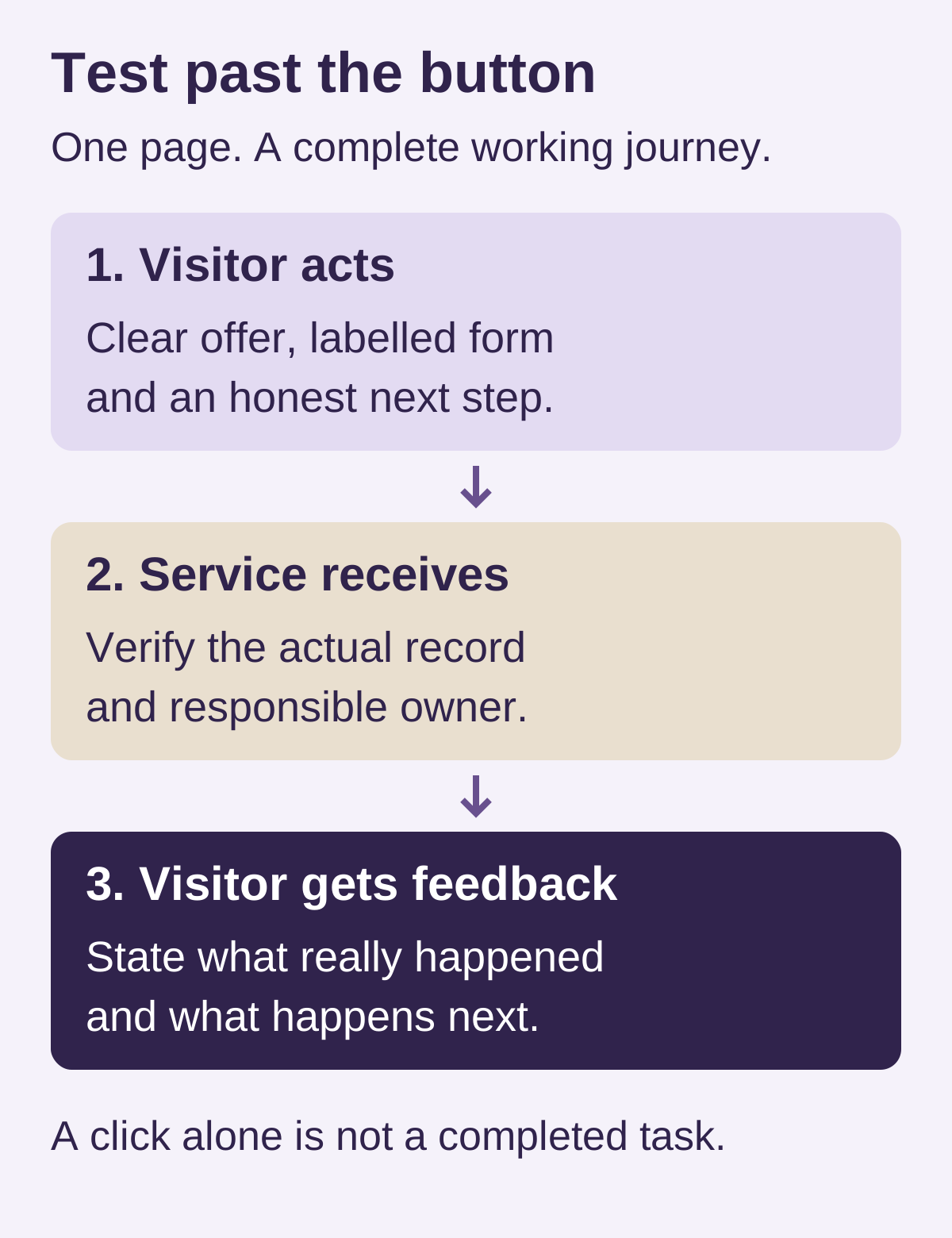
Use field labels and explain what the information is for. Ask for what the task needs, route access to the appropriate people and plan sensible retention. Treat sending the requested resource and signing someone up for future marketing as distinct purposes. Applicable consent, privacy and tracking obligations depend on the audience, service and jurisdiction; a builder does not make those decisions for you.
The W3C WAI form-notification guidance recommends clear success and error feedback. Explain how to correct an error and state the real successful outcome. “Request received—we will reply within the stated service hours” is different from “Your appointment is confirmed.”
Also worth readingHow to Create a Career Page: Roles, Applications and Checks
Build and publish with a suitable tool
In Grigora, start with the AI website workflow or a classic template, depending on the editor you intend to use. Give the first draft the actual offer, audience and action; then review the generated content, links and images. A draft may include invented details or a button without a finished operational workflow.
Use the supported form or a suitable connected booking/payment service for the task, and verify its requirements separately. Check current Grigora plan details for publishing, domain connection and allowances. Hosting, SSL and CDN are included in paid website plans; registration of a domain and connected providers’ services may be separate. A 14-day publishing trial is an evaluation period, not permanent free hosting.
Use the builder’s real preview and publishing controls, then open the final public URL signed out. A saved editor preview is not proof that a stranger can use the published page. Keep account credentials and private operational records out of the public content.
Test before sending people to the page
Run a controlled test using test data and the provider’s appropriate test mode. Decide which person will verify receipt and clean up the test record. Do not submit real customer information, buy your own product or send messages to other people casually just to check the layout.
- Open the exact public URL in a signed-out browser and on a narrow phone screen. Check HTTPS, readable content, loaded images and no obstructed primary action.
- Use a keyboard to reach links and fields. Check visible labels, understandable instructions and useful error feedback.
- Follow every CTA. Verify the correct destination and that any external service returns the promised status.
- Submit an appropriate controlled form test, then check the actual receiving record and any intended notification or resource delivery.
- Test incomplete/invalid input and a failed or unavailable destination. The page must not report a confirmed booking or payment when that has not happened.
- Check the date, time zone, price, real availability, contact details, necessary notices and the planned campaign end state.
For a sale or booking, use the provider’s supported test process and confirm how success is determined in its system. Avoid collecting card information in an improvised public form. The website planning checklist helps define responsibility for content, testing and support.
Bring relevant traffic and measure the real outcome
A standalone page does not require paid advertising. Visitors can arrive from a direct link, an appropriate email, social posts, partner referrals, offline materials or search. Choose channels where the intended audience has a reason to care, and use a consistent message between the source and the page.
Being a single page neither guarantees nor automatically prevents a search ranking. Make the page useful and accessible to the intended audience, with a descriptive title and relevant content. Publishing many near-identical pages or repeating keywords is not a substitute for distinct useful information. Add further pages when separate visitor needs justify them.
Define the outcome you actually care about: a received inquiry, eligible registration, confirmed booking or completed order. A page view and button click are different measurements. Where you use analytics, check that it measures the intended event, respects applicable tracking choices and does not receive unnecessary personal information. Compare similar traffic and time periods; a tiny or changing sample can mislead.
After launch, use actual questions and failures to improve the page. If you test a variation, record what changed and how you will assess it. No template, headline or number of pages guarantees conversions. Expand to a larger site when visitors need more than this focused journey can sensibly provide.
Standalone landing page FAQs
It can function as a one-page site. In this question, “without a website” usually means without first building an existing multi-page site. You still need a publishing service, a reachable URL and the systems needed for the intended action.
Not always. Some providers supply a public address, subject to their terms and publishing limits. A custom domain is a separate choice involving registration, renewal and correct connection to the host.
Yes, with an appropriate working form and receiving system. Verify receipt, access, follow-up and relevant privacy/marketing requirements. A form’s appearance or success animation alone is not evidence that the lead reached the responsible person.
Yes, if a suitable checkout and fulfillment/access workflow support the offer. Verify payment status and order handling in the provider’s system. The landing-page design itself does not process, deliver or confirm a sale.
No. Keep the primary task clear while retaining the contact, privacy, terms or supporting information visitors need. Removing every link can make a page less trustworthy or useful.
A useful, discoverable single page can appear in search, but no particular ranking is promised. Scope and content should match the query and visitor’s task. Page count and keyword repetition are not a reliable plan for becoming number one.
Add pages when distinct products, audiences, documentation or other information become difficult to explain and navigate on the one page. Keep existing useful URLs and the operational journey in mind when expanding.
Practical writing on building a site, growing an audience and sending email people open. No more than one a week.

Karan Singh Bhakuni
118 articles on the Grigora blog
More on Guides
Guides
How Many Questions Should an FAQ Page Have?
There is no correct FAQ count. Use real questions, clear grouping and a format people can navigate. Check the current role of FAQPage markup after Google’s rich-result removal.
23 Sept 202613 min read
Guides
How to Create a Career Page: Roles, Applications and Checks
Build a career page candidates can use: current roles, clear job details and a reliable application route. Use a practical checklist for privacy, access and delivery.
8 Sept 202310 min read
Guides
11 Reasons Why Every Doctor Should Have a Website
A doctor’s website should help people verify qualifications, understand services and contact the right team. These 11 practical reasons, page plan and launch checklist focus on useful patient tasks…
9 Dec 202311 min read