A useful first project has a clear audience, a manageable set of pages and an owner who can keep the information accurate. A product category or an attractive template is a starting point; it does not establish that every operational requirement is already configured. The examples below are planning options, not reports of customer outcomes.
Product Karan Singh BhakuniUpdated 3 Nov 2026
Grigora Use Cases: What to Build and What to Check
Karan Singh BhakuniUpdated 3 Nov 2026- 10 min read
- 9 sections
- 2 comparison tables
- 9 questions answered
The short answer
Grigora can provide public websites, blogs, portfolios, directories and online stores. Its AI and visual editing workflows help you create and update those pages. Choose a use case by the information visitors need and the action they should complete, then check any payment, email, booking or private-access service that action requires.
Want the site rather than the reading? Build one free with Grigora
Contents9 sections

Read nextWhat Is Grigora? Features, Plans and Getting Started
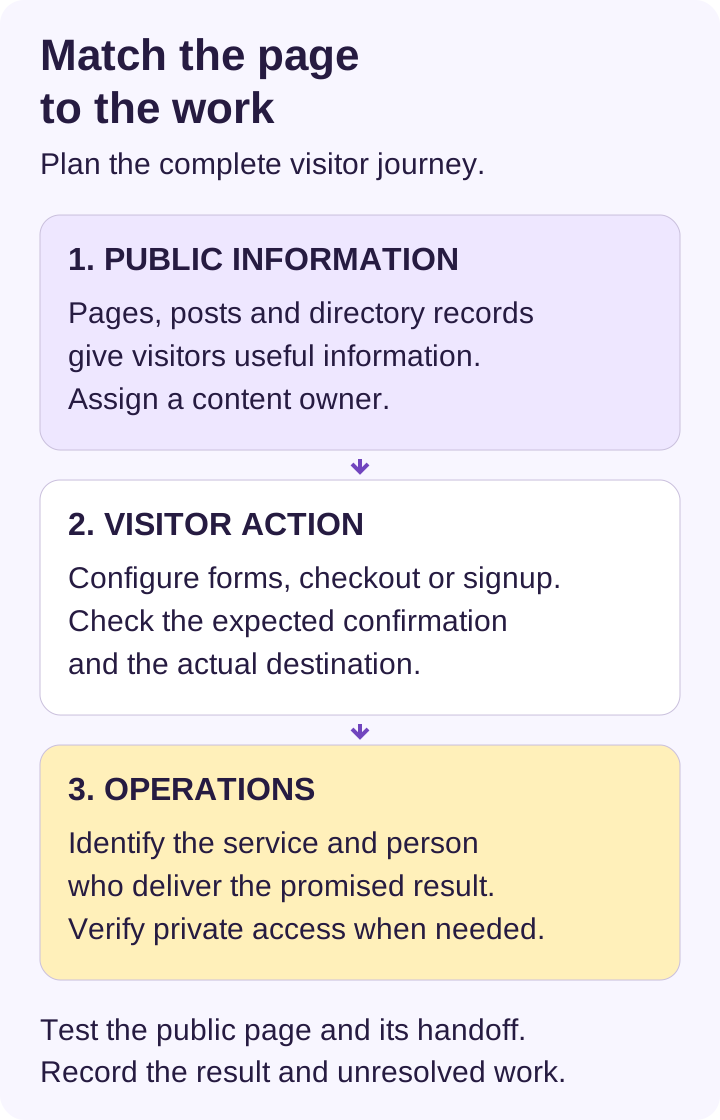
Start with the visitor’s task
| Visitor needs to… | Start with… | Check before launch |
|---|---|---|
| Understand a service and request help | Service pages, useful examples and contact route | Where inquiries arrive, who responds and what a request confirms |
| Read a publication or inspect work | Posts, categories, author pages or a portfolio | Content accuracy, navigation, rights, readable media and update ownership |
| Browse structured records | A directory collection and suitable page templates | Required fields, current records, filters and individual item pages |
| Buy a product | A configured catalogue and supported checkout | Provider eligibility, payment states, delivery, refunds and ongoing costs |
| Enter a private workflow | A verified authenticated service suited to the task | Access permissions and the handoff from the public site |
For a directory, define the fields before adding dozens of records. For a store, define what happens after payment before promoting a product. For a simple service business, a working inquiry route may be sufficient. Choose the smallest site that completes the actual task, rather than adding a forum, store or newsletter because a feature exists.
Blogs, travel writing and product reviews
Personal blogs can organize original stories around a clear subject and an understandable archive. Decide whether writing is intended for the public or a restricted audience before choosing the publishing route. Read the blog privacy guide before relying on search visibility settings to protect information.
For travel blogs, make place names, visit dates, transport details and photo context easy to find. Separate what you personally observed from what you researched. Set a review date for costs, opening arrangements and access information that can change. A map or a beautiful image does not replace those details.
Product review sites need a repeatable evidence record: exact product/version, how it was obtained, what was actually tried, observed results and limits. Distinguish a researched comparison from a hands-on review. Identify relevant commercial relationships clearly; do not publish generated customer stories or unsupported product results as experience.
Grigora’s CMS and collection workflows can supply article and category pages. Check the editor available in the specific project: classic post editing, scheduling and permissions differ from an AI site’s collection and page workflow. Review one real post, its image, author details and phone layout before building a large archive.
Small businesses, professional services and freelancers
For small businesses, start with the offer, service area, important limitations, credible examples and contact details. A consultant may need a service description and inquiry form; a trade business may need clear job scope and a quote request. Explain whether a submission requests a conversation or actually reserves a service.
Professional services can publish relevant qualifications and processes without implying that a website creates expertise, licensing or client eligibility. Keep sensitive case records out of public pages. If clients need a private portal, connect a verified service designed for that work and check the signed-out experience.
Marketers and freelancers can use landing pages, case studies and posts to explain a specific service. State your role and permission to show each example. Separate observed work from a sample concept and distinguish a measured result from an expectation. Assign responsibility for inquiries, renewals and content updates when handing a site to a client.
Portfolios, writers and researchers
An artist or designer’s portfolio should make selected projects easy to inspect. Include a short brief, your contribution, useful images and a contact route. Check image detail and captions on a phone, and provide text that explains the work without requiring visitors to decipher a screenshot. Public presentation and private source-file delivery may need different arrangements.
Writers and researchers can publish essays, project summaries and source-led explanations. Record authorship, dates, citations, permissions and material corrections. A post or directory entry can organize a research write-up; it does not replace the review, approval, preservation or access controls required by a particular institution.
If several people contribute, check the actual role permissions. Classic visual sites have Administrator, Editor, Author and Contributor roles. AI sites currently offer Administrator and Editor with shared website access; do not assume the Editor label restricts a colleague to drafts. Choose access suitable for the project and maintain a clear editorial approval process.
News, magazines and company publications
News websites need clear bylines, publication and correction information, source verification and an editor responsible for each story. Prepare navigation for ongoing topics and urgent updates. Use media only when you can verify its context and rights. A fast publishing interface does not verify a breaking-news claim.
Online magazines can group features, interviews and reviews into manageable sections. Decide who commissions, checks and updates content. Test the archive and individual article templates with both short and long entries, including tables, quotes and media. Avoid creating numerous empty categories just to make a publication look established.
Companies can publish useful product explanations, announcements and research through a blog while keeping core service and contact information on stable pages. Measure the reader task you care about, such as an informed inquiry, alongside traffic. The blog SEO guide explains why publishing volume or a changed date alone does not establish improved search visibility.
Also worth reading11 Reasons to Use Website Terms and Conditions
Education, events and niche communities
For educational websites, public pages can explain a programme, show authorized resources and link to the institution’s approved learning tools. Plan accessibility and the audience’s actual access needs. Do not upload student records or describe a product listing as a learning-management system with enrolment, lesson progression and grading.
For event websites, publish the date, time zone, location, access details, organizer contact and cancellation information. Decide how registrations, capacity and payments will be handled. A submitted form is a request until your process confirms acceptance; keep wording and confirmation messages consistent with that process.
Niche community sites can publish a shared resource library, moderated articles, events or a public directory. An interactive forum, authenticated member area or recurring paid community needs an appropriate working service. Newsletter signup locks and hidden navigation should not be treated as proof that private content is protected. Choose moderation and member support before opening participation.
Stores and paid offers need a complete delivery process
Grigora Commerce works alongside website content and supports physical products and digital downloads through connected Stripe, Razorpay, PayPal or Paddle accounts. Current storefront checkout supports one-time payments and eligible pay-what-you-want offers; subscriptions and recurring billing are not available yet. Provider onboarding, eligibility, terms and charges still apply.
Course, service and membership product labels can describe an offer, but do not automatically supply teaching, appointments, private access or software licence issuance. Arrange and test the delivery process you promise. Protected file delivery currently permits one distinct protected product or variant per order, with a download link valid for 14 days and 5 downloads; plan a bundle accordingly. See the digital product guide for the fuller checkout and fulfillment checks.
For physical orders, confirm stock, shipping settings, tax configuration, customer communications and manual fulfillment responsibilities. A website builder is not the carrier or your tax adviser. Use permitted test modes or controlled checks appropriate to the connected provider before accepting real orders; this article does not report an actual purchase test.
Choose a plan and prove one journey
Check the current website plan comparison against your expected websites, team, storage, AI usage, files, audience and traffic. Hosting, SSL/CDN, domain connection and website export are included in paid website plans. Domain registration/renewal, business mailboxes, external services and payment-provider charges are separate. The 14-day website trial is temporary.
Newsletter audience management is different from unlimited email delivery. Confirm sending setup, provider limits and the relevant audience capacity. For a large publication or unusual traffic pattern, obtain suitable capacity and service terms instead of treating an included feature or marketing statement as an uptime commitment.
| Blank launch record | What to write down |
|---|---|
| Audience and task | Who visits, what they need and the single main action |
| Content and owner | Pages/records required, evidence and person who maintains them |
| Connected service | Form recipient, booking provider, checkout or private portal actually used |
| Expected outcome | What a visitor should see and what the responsible team should receive |
| Observed check | Date, device, result, unresolved issue and owner |
| Ongoing trigger | Changed facts, provider terms, failed requests, renewal or delivery problem |
- Open the published site while signed out and follow the main journey from the landing page.
- Check the real destination of forms, contact links, payment and portal links; confirm the actual resulting record or message.
- Read content and media at desktop and phone widths, and check keyboard navigation, labels and errors.
- Record what was tested and fix important failures; do not label a preview or a template as a completed operational test.
Start with one complete journey and a clear owner. Add more content or services when they serve an identified need and can be maintained. Grigora can help publish the site; readership, sales, hiring and other outcomes depend on the work and audience as well as the platform.
Frequently asked questions
Yes. Suitable public projects include business sites, portfolios, landing pages, publications, directories and stores. Define the required visitor action and verify any connected service, permissions and delivery workflow.
A course or membership listing is not automatically a learning-management system, forum or authenticated member-access workflow. Verify and arrange the services that actually deliver your course, access and moderation. Current storefront recurring checkout is not available.
Paid website plans include hosting, SSL/CDN, domain connection and the supported website features in the current comparison. Website, storage, team, file and AI allowances apply. Domain registration, business mailboxes, external services and processing fees are separate.
The current website offer is a 14-day trial with no card required. Review the paid plans and relevant allowances before relying on a site for continuing business use.
Plan an explicit review process and inspect actual permissions. Classic visual sites have Administrator, Editor, Author and Contributor roles; AI sites currently offer Administrator and Editor with shared website access. Role labels alone do not establish a restricted approval workflow.
Supported importers can bring over specified blog content and images from supported platforms. They do not reproduce an entire site’s pages, design, settings or connected services. Inventory and verify the actual migration and redirects; do not assume unchanged traffic or zero downtime.
No. The administrator ZIP has different visual-site and AI-source contents; hosted CMS, commerce and other Grigora backend services are not recreated. Check the export scope and any additional records you need for a move or recovery plan.
Website collaboration is different from attendance and time tracking. Use a suitable service for those requirements, and obtain specific capacity, support and availability terms for a critical site rather than inferring them from the feature list.
List the public information, visitor action, private operations, responsible owner and recurring costs. Build and verify one complete journey during evaluation. Resolve unsupported requirements before expanding the project.
Practical writing on building a site, growing an audience and sending email people open. No more than one a week.

Karan Singh Bhakuni
118 articles on the Grigora blog
More on Product

Product
What Is Grigora? Features, Plans and Getting Started
A practical overview of Grigora’s website workflows, current USD plans, included features and separate services, with a first-project evaluation worksheet.
16 Jul 20239 min read
Guides
11 Reasons to Use Website Terms and Conditions
Clear terms help explain a service, its rules and customer expectations. Learn eleven practical uses and how to prepare a draft for appropriate legal review.
18 Sept 202310 min read

Guides
How to Create a Poetry Website Readers Can Actually Use
Give your poems a readable home. Choose what to publish, preserve the shape of each poem, and build a simple route from a first reading to your wider work.
11 Sept 202311 min read