For a conventional blog with posts and an archive, start with a hosted service such as WordPress.com or Blogger. For professional articles, consider LinkedIn or Medium. For posts that also go to subscribers by email, consider a newsletter platform. Choose by the kind of publishing you need and the costs you can maintain.
Guides Karan Singh BhakuniUpdated 2 Nov 2026
3 Ways to Start a Blog Without a Domain
Karan Singh BhakuniUpdated 2 Nov 2026- 10 min read
- 9 sections
- 1 comparison table
- 6 questions answered
The short answer
Yes, you can start a blog without buying a custom domain. Use a hosted blog’s free address, publish articles on an existing platform, or start a newsletter with a public web archive. You still have a web address; the platform supplies it. A custom domain can be added later if your chosen service supports it.
Want the site rather than the reading? Build one free with Grigora
Contents9 sections
Read nextHow to Start a Blog Without Building a Website: 5 Ways
What does “without a domain” actually mean?
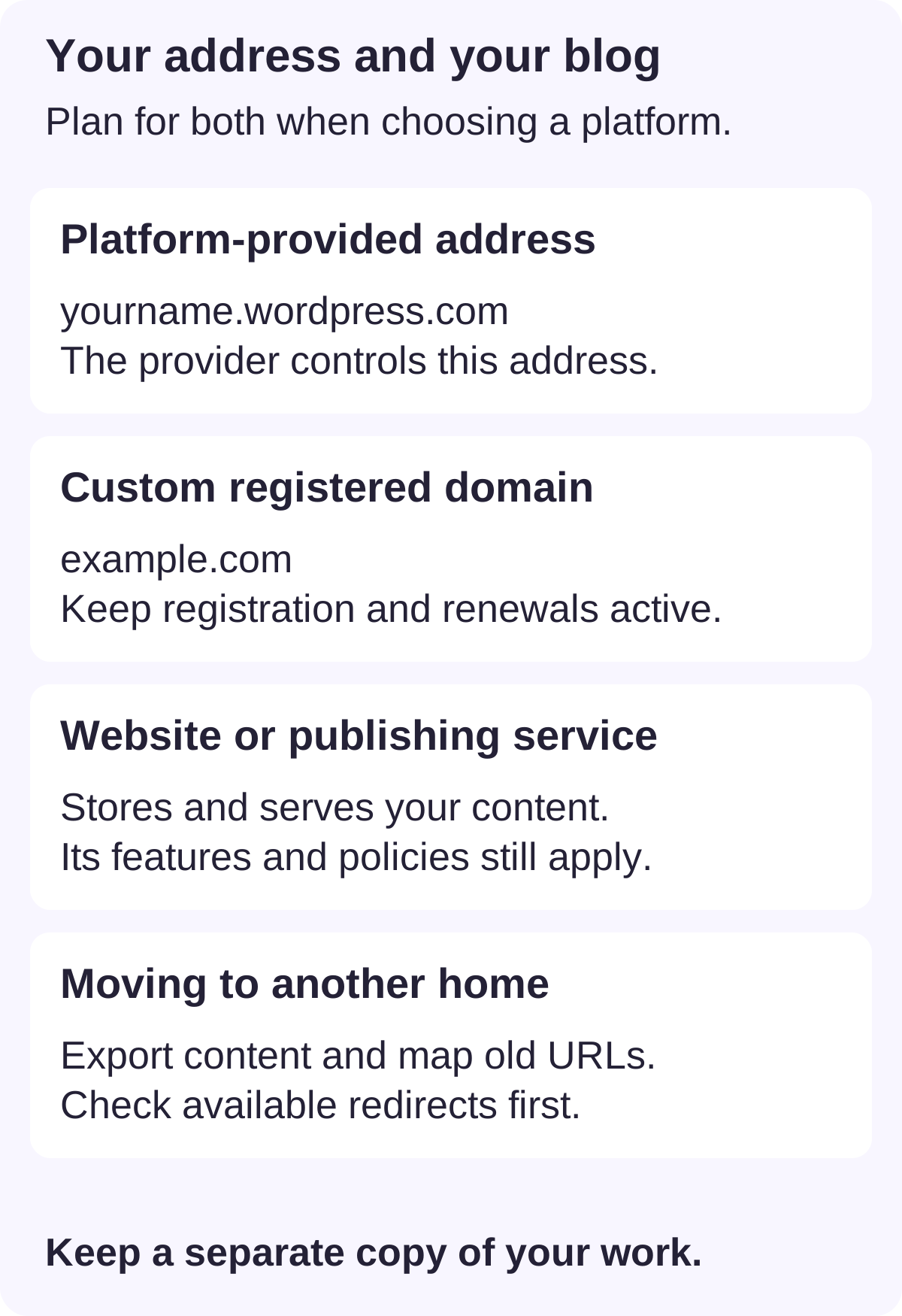
A platform address such as yourname.wordpress.com is a subdomain of the provider’s domain. An article at a platform profile may use a path instead, such as a page under a shared publishing site. A custom domain such as example.com is an address you register and renew separately. Hosting or a publishing service stores and serves the actual posts.
These are separate decisions. Registering a name does not automatically supply a blog, remove platform restrictions, enable monetization or improve rankings. You can also keep a registered domain while changing hosts, provided you maintain the registration and configure the new destination. Your content, design and old links still need a migration plan.
1. Start a hosted blog on the platform’s address
This is the closest option to a traditional website. You create a site, choose an available platform-provided address and publish posts with an archive and navigation. The service handles hosting. You can start writing before configuring DNS or paying for a custom domain.
- WordPress.com: a site includes an address such as
yourname.wordpress.com. Its domain guide explains that connecting a custom domain requires a paid plan. Check the Free plan’s current feature, storage and advertising limits before choosing it. - Blogger: Google’s setup guide takes you through naming the blog and choosing an available address. A
blogspot.comaddress can be used before you buy a custom domain. - Grigora: the 14-day website publishing trial needs no card and can use a Grigora address. A paid website plan is required to keep publishing after the trial; domain registration and renewal are separate. This is a trial option, rather than a permanent free website plan.
Choose this route when you want a recognizable blog home, categories and room for other website pages. Confirm whether the plan supports the design, embeds, selling tools and export format you need. Having a platform address does not mean every provider gives you the same features.
2. Publish long-form articles on an existing platform
LinkedIn and Medium let you publish without setting up a separate website. Your articles live within the platform and its reading experience. This can suit a professional portfolio, personal essays or testing a topic with an existing network. Access to a platform’s audience does not guarantee that people will see your work.
LinkedIn’s current article guide says all members can publish articles and describes the Write article option on the desktop homepage. The feature is not available in its mobile app. Medium’s help guide says a paid membership is not required to write. A Medium publication and participation in earning programs have their own requirements.
Check what someone sees when they open your article while signed out. A profile, follower list or platform archive is not automatically portable to a different service. Keep your original text and images separately, and check export options before investing heavily in one platform.
3. Start a newsletter with a web archive
A newsletter platform can publish posts on the web and send selected posts to subscribers. This makes sense when your readers want regular editions in their inbox as well as an archive they can browse. It still gives your work a web address without requiring a custom domain.
Substack’s current publishing guide describes publishing through a profile or website, with a handle-based profile URL and an optional yourname.substack.com website. Its pricing explanation says publishing free content is free; paid subscriptions incur platform and payment-processing fees. Review the current terms before enabling payments or buying a custom-domain option.
Choose whether each edition should appear on the public web, go by email, or do both. Confirm how you can export posts and subscriber data. An export feature is useful, but it does not turn every follower into an email subscriber or remove consent and privacy obligations when moving a list.
Which route should you choose?
| Your immediate goal | A practical starting route |
|---|---|
| Learn blogging with no domain purchase | A free hosted blog on WordPress.com or Blogger; check its current free-plan limits. |
| Build a professional writing portfolio | LinkedIn articles or Medium stories; check signed-out access and export options. |
| Send regular editions and keep an archive | A newsletter platform with public posts; inspect subscriber/export and paid-subscription terms. |
| Try a website with room for pages and a store | A website-builder trial such as Grigora; budget for the paid plan after the trial. |
| Keep one address across future providers | Register a custom domain when you are ready, while planning hosting and content portability separately. |
Guest writing is another way to publish without your own site, but it produces an article on somebody else’s publication rather than a blog you control. Agree on bylines, editing, reuse rights and links with the publisher. It can complement any of the three routes above.
Also worth readingHow to Start a Devotional Blog: Plan, Write and Publish
How to start without purchasing a domain
- Choose one audience and subject. Write down whom the blog is for and three questions you can answer from experience or reliable research.
- Pick the publishing route. Choose a hosted blog, an article platform or a newsletter archive based on how readers should find and follow your work.
- Check the ongoing plan. Confirm that you are selecting a free plan or understand the trial end date. A free address and free publishing are separate offers.
- Select a stable name. Use an available handle or platform address that you would be comfortable sharing. Avoid repeatedly renaming a published blog.
- Set up the essentials. Add a short author profile, relevant navigation and a contact route appropriate to your needs. Use images you have permission to publish.
- Publish one useful post. Give it a clear title, readable headings, sources where needed and descriptive image text. Open the published link while signed out and on a phone.
- Keep a backup and a simple schedule. Save your text and original media separately. Publish at a pace you can sustain, and use reader questions to improve the next post.
If your article opens only for you, check draft, private, coming-soon and audience settings before assuming that you need a paid domain. For example, WordPress.com’s visibility controls distinguish Public, Coming Soon and Private sites. A draft or restricted page cannot serve the same purpose as a public post.
Can a blog on a free address rank or earn money?
A custom domain is not a prerequisite for having a public page that search engines can discover. Check whether the provider exposes the post publicly, allows indexing and supplies stable links. Answer the actual reader question, use a descriptive title and connect related posts. Publishing or buying a domain does not guarantee indexing, impressions or a particular Bing position.
Earning depends on the platform’s rules and your audience, rather than domain registration alone. Check eligibility for advertising or a partner program, permitted affiliate links, paid subscriptions and selling features. Some options require a paid plan or supported payment account. Disclose commercial relationships where required and do not assume a new free blog will generate income. Our guide to whether starting a blog costs money separates initial choices from ongoing costs.
Adding a custom domain later: two different moves
Keep the same service and add an address. If your platform supports custom domains, register a name and follow its connection instructions. This can keep the existing posts and editor. For example, Blogger documents custom-domain setup and a redirect from the Blogspot address. WordPress.com lets paid-plan users make a connected domain the site’s primary address.
Move to a different publishing service. Check the actual export/import formats, original media, design, comments, subscriber handling and redirects before moving. WordPress.com exports include content and links to media, rather than the actual media files or the theme. Medium exports stories as HTML in a ZIP. Neither format promises a one-click copy of the whole reader experience.
Keep a list of old URLs and test where each important link lands. A provider-controlled subdomain can require a paid redirect option or offer limited redirect control. WordPress.com’s Site Redirect is a separate option for leaving the service; connecting a custom domain while staying there is a different operation. Do not delete the old blog until content, media and any available redirects have been checked.
A custom address is worth considering when you have a name you intend to keep, need it for branding, or want to reduce dependence on a provider-owned URL. Budget for renewals and ongoing publishing costs. You do not need to postpone your first useful post while deciding.
Blogging without a domain: FAQs
Yes, a free hosted blogging or publishing option can let you publish without buying a domain or separate hosting. Check the provider’s ongoing free-plan rules; a trial is time-limited and optional upgrades or payment fees can still cost money.
A hosted blogging service already supplies hosting under its plan. Registering a custom domain is a separate purchase, and connecting it may require an upgrade. A self-hosted blog needs a suitable hosting arrangement as well.
No. The platform controls its domain and the address format it offers you. A custom domain is registered to you under registration terms and must be kept active, including renewals. Content ownership and platform licenses are separate terms to review.
Often, if the current service supports custom domains. Check the plan requirement, DNS instructions and handling of the original address. Changing hosts is a separate migration with additional checks.
It can give your blog a consistent branded address, but it does not guarantee better rankings. Public access, useful content, crawlability and other factors still matter; measure your actual search performance.
Grigora offers a 14-day website publishing trial with no card required. A paid website plan is needed to keep publishing after that trial, even if you use a Grigora address. Domain registration and renewal are separate.
Practical writing on building a site, growing an audience and sending email people open. No more than one a week.

Karan Singh Bhakuni
118 articles on the Grigora blog
More on Guides
Guides
How to Start a Blog Without Building a Website: 5 Ways
Publish through an existing platform or choose a managed blog if you want to avoid hosting and code. Compare routes, check control and delivery, and prepare one useful post.
7 Oct 202310 min read
Start a Blog
How to Start a Devotional Blog: Plan, Write and Publish
Define who the devotional is for, choose a text and reflection format, check quotation permissions, and publish a first post with care. Includes an editorial plan, a reusable writing outline and a…
1 Nov 202312 min read
Start a Blog
How to Start a Blog as a Teenager: A Practical Guide
Choose a topic, plan your first post and set up a blog you can manage alongside school. Check account rules, privacy and payment conditions before launching.
27 Oct 202310 min read