Choose the smallest setup that handles a real task and that you can maintain. An experimental show can begin with a reliable public show page and correct listening links. A research-heavy interview series may benefit from an episode archive with accessible text and source links from the start. Neither a separate domain nor a larger site guarantees listeners, search visibility or sponsors.
Guides Karan Singh BhakuniUpdated 3 Nov 2026
Do You Need a Website for a Podcast? When It Helps
Karan Singh BhakuniUpdated 3 Nov 2026- 10 min read
- 7 sections
- 3 comparison tables
- 8 questions answered
The short answer
You do not need a separate custom website just to publish a podcast through a suitable hosting and distribution service. A website becomes useful when listeners need one stable place for episode resources, transcripts, several listening options, contact or other work connected to the show. Your host’s included show page or a page on an existing site may already meet that need.
Want the site rather than the reading? Build one free with Grigora
Contents7 sections
Read nextHow to Make a Website Mobile Friendly: 7 Fixes
Separate audio hosting, distribution and website publishing
For a conventional RSS-distributed podcast, the audio host stores the media and provides or supports the show’s feed. The RSS feed identifies the show and episodes; listening services use the relevant distribution/submission process. A website presents public pages and can link to the show or embed a supported player. One provider may supply more than one role, but the roles are still different.
Apple’s podcast RSS requirements cover a publicly accessible feed, episode enclosures and stable identifiers for that workflow. Spotify for Creators says its hosted feed is created after the first episode is published; enabling RSS is needed to share it on other listening platforms, which require submission rather than automatic distribution by Spotify. Check the workflow of the actual host instead of treating every app as interchangeable audio hosting.
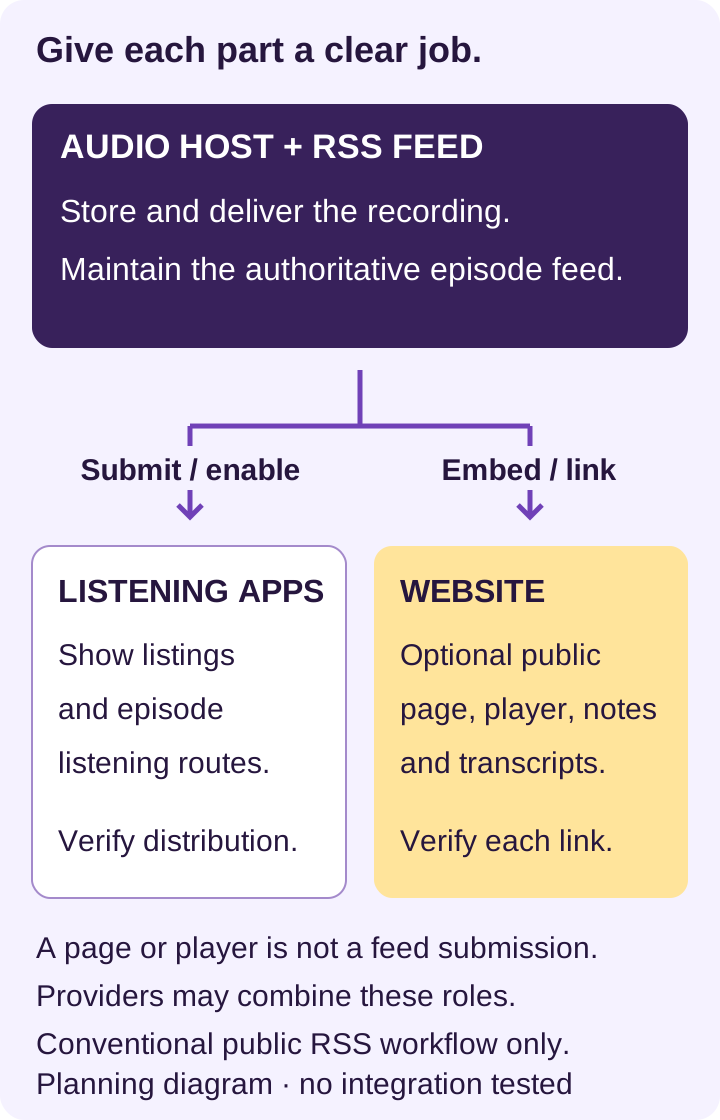
Uploading an MP3 to an ordinary webpage is not automatically the same as configuring a podcast feed, media delivery and directory submission. Likewise, embedding a player does not move the audio into the website builder. For a video-first, private or subscription show, check the specific platform and audience-access rules rather than applying a public RSS diagram universally.
Choose a site around the missing listener task
| Situation | Suitable starting point | Reason to expand |
|---|---|---|
| Testing a show with little supporting material | Host-provided public show page and correct listening links. | Listeners need resources, a better archive, contact or a stable branded address that the page cannot provide. |
| Show attached to an existing business or publication | A clear show/episode section on the existing site. | The show needs genuinely independent ownership, identity, maintenance or audience paths. |
| Interviews, research or instruction | Episode pages with useful notes, sources, accessible transcript and relevant listening choices. | The archive becomes hard to browse; add meaningful topic/search navigation based on actual content. |
| Commercial work connected to the show | The necessary offer/contact pages with accurate disclosures and verified provider flows. | Add only the sales, membership or sponsor workflow the business can actually operate. |
A useful website gives a listener something beyond a duplicated title and player: the cited report, guest’s relevant work, a correction, an accessible text version or a clear way to find an earlier discussion. You do not need a forum, store, course and daily blog merely to look established. Each additional feature brings its own content, access and support responsibilities.
Build a minimum useful public page
- Explain the show: who it serves, subject, host and what a new listener can expect. State an actual release pattern only if it is accurate.
- Give a starting point: latest episode, trailer or a genuinely useful start-here choice, with a descriptive title and short summary.
- Offer listening choices: verified links to the actual show on supported services, plus a player when it improves the page.
- Provide supporting text: relevant notes, resources and a transcript or clear route to it; separate a transcript from an editorial summary.
- Provide contact and relevant information: a monitored route for corrections/inquiries, appropriate privacy information and commercial disclosures when applicable.
If using your own domain, keep registration, billing and recovery under the correct owner’s control. Choose an address that is easy to say aloud and check for naming conflicts; availability alone does not establish rights. You can initially point a domain at an appropriate simple page, subject to the provider’s actual domain/redirect support. A domain and an exportable archive can help continuity, but do not make a site independent of hosting, account or provider terms.
Use embed code supplied by the actual service for your show or episode. Apple and Spotify document their own embed workflows and limitations. Check the published page on a phone and signed out: correct episode, usable controls, responsive size and a plain listening-link fallback. Avoid autoplay; do not assume a successful preview verifies playback everywhere.
Use an episode page that adds real information
The following is a reusable page outline to fill from an actual recording and its supporting records. It is not a transcript of a real episode, an invented interview or an example of measured performance. Keep details consistent with the host’s published episode metadata.
| Page field | What to supply |
|---|---|
| Title and identification | A specific topic plus actual show/episode number where useful; publication date and relevant content notice. |
| Summary | A few accurate sentences explaining what is discussed and who it helps, without invented outcomes. |
| Listening | The correct episode player and verified service links; fallback if an embed fails. |
| Guest and context | Accurate name/role, agreed relevant link and any relationship or disclosure readers need. |
| Notes and sources | Useful outline and source/resource links actually referenced; timestamps only when checked and helpful. |
| Transcript | Reviewed speech and relevant non-speech information, identified speakers and clear editorial additions. |
| Corrections and access | Correction/contact route and any relevant version or availability information. |
| Next step | One relevant choice: another episode, a resource, a voluntary update subscription or an accurately described offer. |
A transcript helps people who cannot use the audio or prefer text. The W3C WAI transcript guide explains that prerecorded audio-only needs an equivalent text alternative for WCAG Level A and gives practical formatting advice. Identify speakers, include meaningful non-speech information and correct transcription errors. Label additions so they are not mistaken for words actually spoken. Put the transcript or an obvious link near the player; show notes alone are usually not equivalent to the whole recording.
A blog section is optional. Turn an episode into a separate article only when editorial work makes it useful in that format. Titles, helpful text and internal links can make the material understandable and navigable; they do not make a page automatically rank. Google’s SEO starter guide explains the limits of best practices for indexing and search performance. Do not repeat competitor claims that podcast-platform pages are universally invisible to search.
Also worth readingWebsite Audit Cost: Prices, Scope and a Quote Checklist
Budget for the website and the publishing work
| Cost or responsibility | Check in the actual setup |
|---|---|
| Website and domain | Included host page versus separate plan, domain registration/renewal, billing term, trial expiry and export/redirect options. |
| Audio and distribution | Host plan, storage/delivery/usage limits, distribution terms and the actual feed/account owner. |
| Episode production | Notes, transcription review, source/permission checks, artwork, corrections and publishing labor. |
| Extra workflows | Email, store/membership, payment/provider charges, privacy/consent work, account access and ongoing support. |
Do not buy a second hosting product or a plugin solely because a generic checklist lists one. Compare the entire workflow and renewal terms, not an introductory monthly figure. Hosted software can handle some technical work, but someone still needs to own content, links, account recovery and support. Security threats are a reason to manage updates and permissions appropriately, not evidence that every show needs a custom technical stack.
Grigora is one option for public show and episode pages. Depending on the builder, supported provider embeds can be added through the AI Editor or a Custom HTML block on a classic template site; verify the chosen player in the actual published output. It is not a claim of native podcast-audio hosting, RSS syndication or automatic episode import. Check current plans and builder-specific features, including the temporary website trial, paid hosting and separate external-service costs.
There are optional avenues for monetization, such as an accurately described product, voluntary support or sponsor inquiry. They depend on audience fit, provider eligibility, delivery, disclosures and customer obligations. A website alone does not create a sustainable commercial model. Do not fabricate audience totals, testimonials, sponsor relationships or conversion results to fill a media kit.
Test one real episode, then maintain the path
Before launch, check one complete listener journey on the actual published page. These are checks to perform, not tests already run by this guide. Record the device/browser, date, result and unresolved issue. Keep a fallback contact/listening route for an embed or provider failure.
- Can a new visitor understand the show and reach the intended episode without guessing?
- Do player controls and listening links work on phone/desktop and signed out, without unwanted autoplay or horizontal overflow?
- Can a keyboard user reach controls and contact routes, and can a reader find an accurate transcript?
- Do notes, names, sources, permissions and relevant sponsor/affiliate disclosures match the recording?
- If there is a form or voluntary subscription, does it go to the intended recipient, explain its purpose and provide the promised confirmation/choice?
- Are current pages publicly visible as intended, with accurate titles, links and an assigned update owner?
Make updating the content part of the episode-release checklist: publish/verify the host episode, prepare the page, review text/resources, check the listening routes and correct any later errors. If changing audio hosts or site providers, preserve important records and plan feed changes, old links and redirects with the relevant services before canceling anything. Website page views, player starts and host/listening-platform metrics measure different events; report actual data and its limits rather than calling every visit a listener.
Frequently asked questions
Yes. A suitable podcast host and the relevant distribution/submission process can publish a show without a separately built custom site. A useful public show page and correct listening routes may be enough initially.
No. A public website, audio storage/delivery, the RSS feed and listening-app distribution are distinct roles. Some providers combine them. Verify the actual service rather than assuming an embedded player supplies audio hosting or RSS syndication.
Yes, if it supports your current listener tasks, accurate information and a reliable listening route. Consider expansion when resources, transcripts, contact, archive navigation or continuity needs exceed what it provides.
Not necessarily. A clear show section on an existing relevant website can be practical. A separate domain adds ownership, renewal and maintenance considerations; choose around actual identity and audience needs.
Both services document supported player embeds. Use the actual show/episode code, respect its limitations and verify the published page with a plain link fallback. This article does not claim a live player was tested.
No. Notes summarize and link to resources. A transcript represents the recording’s speech and relevant non-speech information. Review it for accuracy, identify speakers and label editorial additions.
No. A useful site can support resources, contact and discovery, but audience growth, search visibility and commercial opportunities depend on many factors. Do not present a site purchase as an outcome guarantee.
Identify one missing listener task, choose the smallest page that handles it, and test one actual episode path. Add features only when their purpose, budget and update responsibility are clear.
Practical writing on building a site, growing an audience and sending email people open. No more than one a week.

Karan Singh Bhakuni
118 articles on the Grigora blog
More on Guides
Guides
How to Make a Website Mobile Friendly: 7 Fixes
Test mobile layout, zoom, menus, forms and performance, then work through seven focused fixes. Includes current tool limits, a small worksheet and Grigora editor guidance.
18 Sept 202621 min read
Guides
Website Audit Cost: Prices, Scope and a Quote Checklist
Compare website audit costs by scope and deliverables. Separate free checks, software licenses and professional review, then budget for implementation and retesting.
26 Oct 202311 min read

Guides
How to Find Bugs in a Website: 30 Practical Checks
Work through 30 website checks covering links, forms, mobile layouts, accessibility, content and reliability. Capture expected versus actual behavior, then verify each fix.
25 Oct 202312 min read