There is no universal nine-week redesign. Reusing a template for a small brochure site is different from moving hundreds of URLs, rewriting content, integrating a CRM and changing checkout. Estimate the work you intend to deliver, define what “ready to launch” means and keep post-launch monitoring on the plan.
Guides Karan Singh BhakuniUpdated 3 Nov 2026
How Long Does a Website Redesign Take? Plan the Real Timeline
Karan Singh BhakuniUpdated 3 Nov 2026- 10 min read
- 9 sections
- 3 comparison tables
- 7 questions answered
The short answer
A small visual refresh may fit into days or a few weeks; a substantial content, structure or platform rebuild can take many weeks or months. Treat that as a starting scale, not a measured industry average or a quote for your project. A defensible launch date comes from the actual scope, available people, content, dependencies and review time.
Want the site rather than the reading? Build one free with Grigora
Contents9 sections

Read nextHow Long Should a Product Description Be? The Real Limits
Define the type of redesign and its finish line
| Scope | What changes | What must be proven before launch |
|---|---|---|
| Focused refresh | Selected styling, layout or content, largely within the current structure and platform. | Important tasks still work, content is accurate and shared changes have not broken other pages. |
| Structural rebuild | Templates, navigation, content model or important visitor journeys. | New routes and content are complete, representative templates are tested and changed URLs are handled deliberately. |
| Replatform or migration | Hosting/CMS, data, integrations or domain/URL structure as well as design. | Content/data transfer, system behavior, permissions, redirects, deployment and recovery are verified. |
List inclusions and exclusions. Count unique templates as well as URLs: 100 similar articles and ten different interactive page types create different work. Identify languages, products, files, forms, member areas, search, booking, payments, CRM connections and any information that changes during the build.
Write acceptance criteria in ordinary terms, such as “an eligible visitor can send an inquiry and the team receives it” or “every retained product URL opens the correct product.” “Looks modern” is too vague to decide whether development and testing are finished.
Audit the existing site before quoting the schedule
Record the current URLs, content, media and important visitor tasks. Identify what to keep, rewrite, merge or retire. Preserve a baseline for important pages and actions so that you can compare the replacement with something concrete. Keep access to the domain, hosting, CMS and connected systems under the responsible owner’s control.
- Inventory public pages, posts, products, downloads and media; identify owners and approval needs.
- Record useful search/referral destinations and important inbound links before changing addresses.
- Document working forms, order/booking flows, notifications, analytics and integrations.
- Identify content gaps, outdated claims, image rights, accessibility barriers and technical problems that actually need fixing.
- List account access, vendor dependencies, specialist reviews and anything the team cannot yet estimate confidently.
The Website Font Detector can help record font families declared by a public page’s HTML and CSS. It does not render the page, prove which font every visitor sees or establish that you hold the necessary license. Check the actual font files, relevant license and browser result separately.
Estimate work packages, owners and handoffs
For each work package, record the input it needs, responsible person, estimated active work, review window and completion evidence. Put waiting time on the calendar. Ten hours of work spread across several part-time people and approval rounds is not automatically two working days.
| Work package | Inputs and decisions that affect its duration |
|---|---|
| Discovery and scope | Current-site audit, business/user tasks, decision-maker and agreed inclusions. |
| Structure and design | Content requirements, navigation, representative layouts, brand assets and consolidated feedback. |
| Content and media | What can be reused, what must be written/translated/photographed and who approves it. |
| Build and integrations | Approved structure, real sample content, system access, provider constraints and tested technical assumptions. |
| Migration | Export/import behavior, URL/data mapping, media transfer and reconciliation of changing records. |
| QA and fixes | Available test environment, critical tasks, browser/device coverage and time to fix and retest findings. |
| Launch and follow-up | Deployment access, final approval, monitoring owner, recovery plan and handover. |
Use the website design-hours guide for effort questions. For the redesign deadline, also account for dependencies: which work must finish before another item can proceed, and which tasks can run in parallel with separate capacity?
Build the timeline from dependencies
Content research can often begin alongside early design. Production layouts should still be tested with realistic content, and the final release depends on approved material and working systems. Do not simply add every phase duration if some work overlaps, or assume parallel work is possible when the same person must do both tasks.
Here is an illustrative calculation only, not a recommended duration or an agency benchmark. Assume one small agreed scope, available people, independent design/content capacity, approvals included in the task estimates and no extra waits or rework.
| Illustrative task | Duration | Dependency |
|---|---|---|
| Scope and audit | 2 working days | Starts the example. |
| Layout work | 3 working days | After scope; runs alongside content. |
| Content preparation | 5 working days | After scope; runs alongside layout. |
| Build | 4 working days | After both layout and content are ready. |
| QA and fixes | 2 working days | After the testable build. |
| Release checks | 1 working day | After acceptance. |
The example’s controlling sequence is 2 + max(3, 5) + 4 + 2 + 1 = 14 working days. Adding every row would produce 17 days and ignore the assumed overlap. If a required approval adds two non-overlapping working days on that controlling sequence, the earliest finish becomes 16 days. Holidays, availability and extra rounds must then be reflected in the actual calendar.
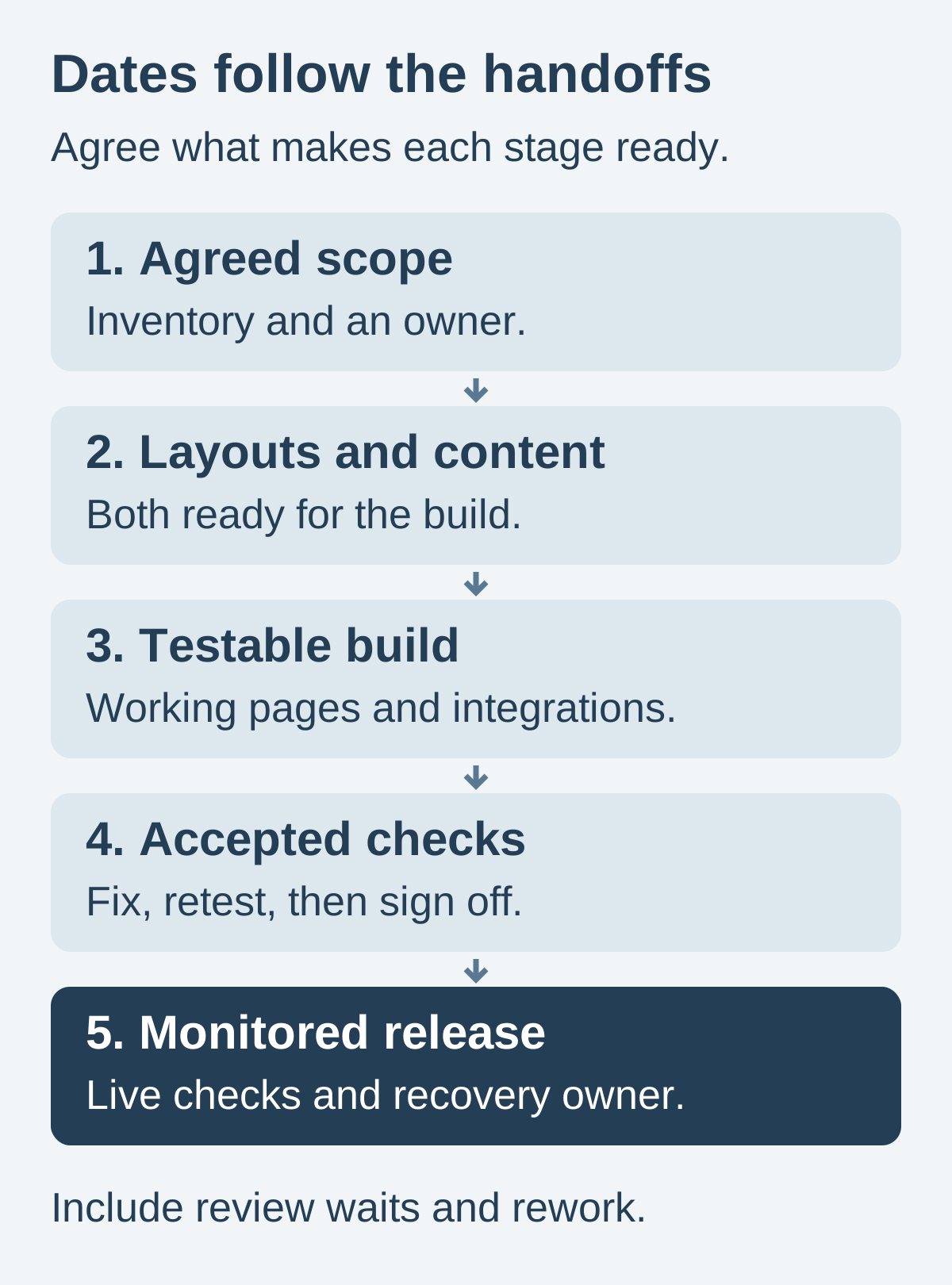
For uncertain work, estimate a range and state the assumption behind it. A booking integration that has not been investigated should be a named uncertainty with an owner and a decision date, not an invisible addition to the build. Update the forecast when that uncertainty is resolved.
Give content and approvals real dates
Set content owners and due dates early. Separate carry-over text from factual updates, new writing, translations, product information and new photography. Approval can involve subject experts, operations or legal review; reserve their actual availability instead of assuming immediate feedback.
Use one person to consolidate feedback and make the final decision within the agreed scope. Record review dates, who can approve and what happens if a response is late. New requirements need a visible choice: move the date, add justified capacity or defer a defined part of the scope.
A template, AI-generated draft or no-code editor may reduce a specific task. It does not remove content verification, image permission, system integration, migration or acceptance. Validate tools with a representative page and workflow before using their advertised build speed as the project deadline.
Also worth readingHow Many Hours Does It Take to Design a Website?
Include migration and search work in the estimate
A visual redesign does not require every URL to change. Preserve useful addresses where practical. If URLs do change, map each old resource to an appropriate new destination, test the redirects and update internal links and relevant metadata. Include images and downloads, not just the pages visible in navigation.
Google’s site-move guidance recommends preparing and testing the new site, mapping URLs and monitoring the move. It also warns against redirecting unrelated old pages to the homepage and against accidentally retaining development indexing blocks. This guidance is scoped to Google; a redesign is not a guarantee of maintained or improved rankings on Bing or any other engine.
Confirm what the selected platform’s import actually transfers. A supported blog import does not establish that page layouts, accounts, orders, forms and every integration move with it. Check the current Grigora migration and export scope, test a representative sample and list the work that still needs rebuilding or manual review.
For a live business, plan how to handle records created while the new site is being built. Decide who controls the final transfer, when edits or transactions may be restricted and how records will be reconciled. A visual preview cannot prove data completeness. Coordinate any downtime with the people affected.
Reserve time to fix and retest
A redesign is ready when its agreed acceptance checks pass and any remaining non-blocking issues have an owner and an explicit decision. Avoid promising a bug-free site across every device. Specify what was tested and leave time to correct failures instead of treating the first test as sign-off.
- Check the public/private state of staging and keep confidential material behind appropriate access controls; a hidden URL or noindex rule is not authentication.
- Verify retained content and migrated records against the inventory, including images, downloads and important old URLs.
- Test each important template and business-critical journey on the agreed browser/device set, including narrow screens and keyboard use.
- Use controlled test data or provider test modes to verify forms, receipt, notifications, booking/payment states and delivery/access where applicable.
- Check headings, labels, text alternatives, readable contrast, zoom and useful error/success feedback.
- Verify live deployment settings, relevant canonical/indexing rules, redirects and expected analytics behavior.
The W3C WAI Easy Checks are a useful starting review and explicitly do not establish complete accessibility. Agree whether the project needs a more thorough expert assessment or user testing and include that work in the plan. The website testing guide helps turn findings into reproducible checks.
Plan launch, recovery and ownership
Choose a release window with the necessary people available. Record the deployer, final approver, monitoring owner, escalation route and conditions for delaying or reversing the change. Verify backups and the appropriate recovery process before the release; do not blindly restore an old database over genuine new orders or registrations.
Test the final live domain again after publishing. A successful staging page does not verify live domain routing, credentials, integrations or cached assets. Check real receiving systems with the agreed controlled process and watch for broken URLs, failed tasks, content mistakes and unexpected access/indexing changes.
Distinguish operational launch from search stabilization. Search engines can take time to process substantial URL changes, and Google’s move guidance does not give every site a fixed crawl schedule. Keep monitoring and support on the calendar, then hand over current account ownership, documentation, content responsibilities and the next review date.
Website redesign timeline FAQs
No. A fixed number is not reliable without scope, content, systems, capacity and approval assumptions. Estimate the actual work and its dependencies, then include testing, migration, release and follow-up.
A tightly scoped refresh with ready content and available reviewers may fit a short window. A promise based only on the number of pages can conceal integration, migration or approval work. Define the deliverables and acceptance tests before committing.
Usually you can build and test a replacement separately while the current site continues serving visitors. Any necessary edit freeze, data transfer or downtime depends on the system and must be planned. Keep private staging material appropriately restricted.
Late required content, unresolved decisions, added scope, unavailable reviewers, integration surprises and failures needing rework can affect the controlling sequence. Record the dependency and revise the forecast rather than hiding the delay in a generic launch date.
Extra capacity helps only when the work can be split and the people have the necessary context and access. AI or templates may accelerate a draft or layout, but do not automatically finish approvals, migration, real workflow testing or factual review.
Define the milestones separately: accepted build, successful live release, completed handover and agreed follow-up. Launch is not proof that every search engine has processed all URL changes or that ongoing maintenance is complete.
Use actual user, business, accessibility, security or platform needs rather than an arbitrary replacement interval. Routine content and technical maintenance may solve the problem without a wholesale redesign.
Practical writing on building a site, growing an audience and sending email people open. No more than one a week.

Karan Singh Bhakuni
118 articles on the Grigora blog
More on Guides

Guides
How Long Should a Product Description Be? The Real Limits
Use 50–300 words as a starting point, then answer the buyer’s questions. Separate full-page copy from feed requirements, summaries and search snippets.
23 Sept 202614 min read

Guides
How Many Hours Does It Take to Design a Website?
There is no reliable hour total without a defined scope. Use this task-based worksheet and clearly labeled 30-hour planning example to separate design effort, build work and calendar delays before…
22 Oct 20239 min read

Guides
Real Estate Website Cost: Build, IDX and Renewal Budget
A brochure site, an IDX search site and an integrated brokerage platform have different costs. Compare dated primary prices, identify bundled and extra services, and use a worked hypothetical…
14 Sept 202310 min read