A political campaign site is a place to verify who is standing, what they have published, how to contact the team and where to find current announcements. Clear information and working services matter more than a complicated design. A website cannot guarantee attention, donations or an election result.
Guides Karan Singh BhakuniUpdated 3 Nov 2026
How to Create a Campaign Website: Setup and Launch
Karan Singh BhakuniUpdated 3 Nov 2026- 10 min read
- 10 sections
- 2 comparison tables
- 5 questions answered
The short answer
To create a campaign website, define the public information it must provide, choose a platform and a campaign-controlled domain, build the essential pages, then test publishing, contact routes and any approved fundraising integration. Give each ongoing task an owner before you launch.
Want the site rather than the reading? Build one free with Grigora
Contents10 sections

Read nextHow to Start a Dog Blog: Content, Setup and Launch
1. Write a short website brief
Record the campaign’s official name, office or purpose, jurisdiction, approved contact details and launch date. Identify who can approve factual copy, photos, legal notices and fundraising arrangements. These may be different people. Confirm an approval route when the usual editor is unavailable.
Plan around public visitor tasks: find the candidate’s background, read a position, check an event, contact the team or open a permitted donation service. Use readable language and an accessible layout for everyone. You do not need to build profiles of individual voters to explain these basics.
- Scope: Which pages and services are needed at launch, and which can wait?
- Ownership: Who controls the domain, platform account, inbox and any third-party services?
- Review: Who checks facts, permissions, legal requirements and changes?
- Operations: Who receives requests, corrects errors and maintains the site after launch?
2. Choose a platform and keep control of the domain
Compare a general website builder, a campaign-specific service and a custom build against your actual requirements. Check publishing access, mobile editing, forms, exports, support, renewal costs and the integrations you need. A long feature list is less useful than a workflow your team can operate. Confirm that each provider permits your intended campaign activity.
Choose a domain that is easy to read and type and clearly identifies the campaign. Check the exact spelling before putting it on print materials. Include the registration and renewal in the campaign’s account records, with an accountable owner and recovery route. Do not leave the only access with a temporary volunteer’s personal account.
List the full cost: domain renewal, hosting or builder plan, design work, email, integrations, payment processing and maintenance. A quoted website subscription may not cover all of these. Ask how you can export content and records or transfer the domain if you change suppliers.
If you use Grigora, check the editing workflow available in your project. The Classic CMS guide covers post creation, details and scheduling; the newer AI editor has a different workflow. Confirm your form and payment requirements separately rather than assuming that a page builder supplies a campaign-compliant fundraising system.
3. Build only the pages you can keep accurate
Start with the information people need, then decide whether it needs separate pages. A small launch site can combine sections; a larger one can use clear navigation. The following is a planning guide, not a mandatory page count.
| Page or section | What to include | Check before publishing |
|---|---|---|
| Home | Campaign name, candidate/organization, office or purpose, and routes to key information | Identity is readable as text; navigation works without relying on a large image |
| About | Accurate biography, relevant background and approved photographs | Names, dates, credentials and photo permissions |
| Issues or positions | Current statements in clear language, with sources where factual claims need support | Approved wording, source accuracy and a way to correct or update it |
| Events and updates | Confirmed location, date, time zone, access details and changes | An owner can update cancellations and remove expired notices |
| Contact or volunteer | A suitable contact route and only the fields needed for its stated purpose | Labels, privacy information, delivery, storage and follow-up owner |
| Donate, if applicable | A permitted provider and the information required for this campaign | Treasurer/legal review, eligibility, records, receipts and applicable notices |
Publish media resources only if you can maintain them: approved photographs, a short biography and a monitored press contact can be enough. Keep original files and reuse permissions. Do not imply that stock or illustrative images document a real event. Obtain approval before publishing endorsements or quotations.
4. Make the design readable on a phone
Keep the visual elements of your website consistent: a small color palette, readable typography and a clear heading hierarchy. Put identity and navigation where they can be found easily, without forcing every detail into the first screen. Use descriptive links such as “Event details” rather than several indistinguishable “Learn more” buttons.
Check the actual content at narrow widths. Long names, translated text, dates and form errors can wrap differently from short sample copy. Resize images for their displayed purpose, preserve readable text in diagrams and avoid autoplay media that competes with the page. Provide useful text alternatives for informative images and captions or transcripts where the media requires them.
Use keyboard navigation as well as a pointer. Check focus visibility, readable contrast, menus, dialogs and forms. A responsive template is a starting point for testing the finished pages, not evidence that every customization or embedded service is accessible.
5. Test forms through to the person doing the work
A contact form is useful only if the request reaches the right place. The W3C accessible-forms tutorial recommends clear labels, instructions, validation and feedback. Collect only the fields needed for the stated task and explain what happens after submission. Make error messages specific enough to correct the problem.
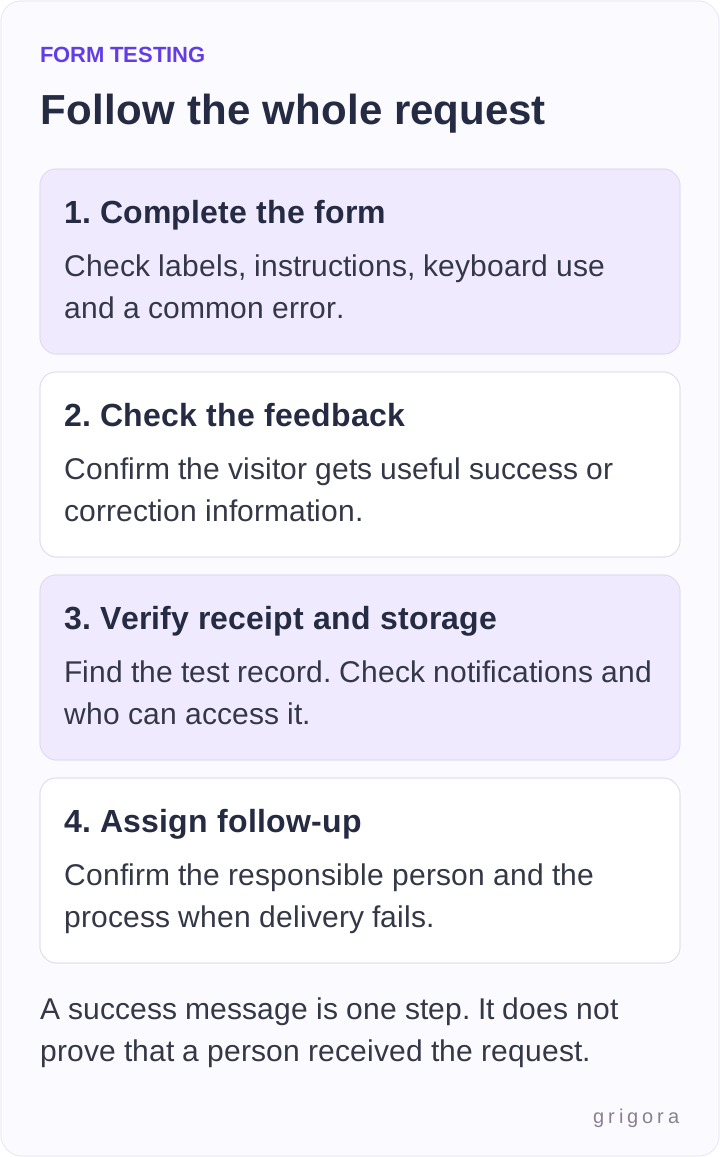
Use non-sensitive test details and an agreed test process. Try a valid submission and a common error on both phone and desktop; check keyboard operation. Verify the confirmation, inbox or system record, notification recipients and access permissions. A success message alone does not prove that someone received the request. Confirm what to do if a service or notification is unavailable.
For newsletter subscriptions, distinguish a contact request from permission to receive ongoing email. Describe the subscription and follow the applicable consent and unsubscribe requirements. Do not silently turn every volunteer or contact submission into a mailing-list subscription.
Also worth readingHow to Create a Website in South Africa: A Practical Launch Guide
6. Review fundraising and legal requirements before enabling them
Requirements depend on the country, jurisdiction, campaign entity and activity. Have the responsible treasurer or qualified adviser confirm the rules that apply before enabling fundraising. Verify that the payment provider permits the campaign, supports required information and records, and has a suitable receipt and reporting process. An ordinary contact form is not a payment-processing or contribution-compliance system.
As a U.S. federal example, 11 CFR 110.11 covers disclaimers on political committees’ public websites and specifies different wording for different payor and authorization circumstances. It also requires clear, conspicuous presentation. This is not a universal disclaimer template for every campaign or jurisdiction.
The FEC’s federal campaign-fundraising guidance explains that online fundraising still involves contribution rules, recordkeeping and review responsibilities. Check the actual applicable requirements rather than copying another campaign’s form. Do not remove necessary fields, notices or eligibility checks to meet an arbitrary “two-tap” target.
Review privacy information, data access and retention for the information you collect. Campaign contact details and submissions can be sensitive. Use an approved payment test mode where available; do not create live contributions merely to test a button. Recheck the destination URL and required information after changing an embedded service.
7. Protect accounts and plan recovery
HTTPS protects data in transit between the browser and server. It does not establish that every person with account access is authorized, that stored records are protected or that the whole site meets legal requirements. Keep account security and access controls separate from the presence of a padlock.
The FBI and CISA’s October 2026 campaign cybersecurity guidance recommends strong account protection, including phishing-resistant multi-factor authentication where possible, unique passwords, software updates and limited access. Prioritize the email accounts used to reset other services, as well as domain, publishing and fundraising accounts.
- Give editors their own accounts and only the access they need; remove access when roles end.
- Keep recovery details current and store them through an approved process.
- Know what the provider backs up, what you must export and how restoration works.
- Test recovery or restoration using an appropriate non-production process; a backup label alone is not a recovery test.
8. Run a pre-launch checklist with recorded results
Use a pre-launch checklist to turn “the site looks ready” into specific observations. Assign an owner and record the date, device or browser, expected behavior, actual result and any fix. The rows below are a blank test plan, not claims that your site has passed.
| Check | Expected result to verify | Record |
|---|---|---|
| Identity and pages | Approved names, office/purpose, current copy, notices and source links | Reviewer, date, corrections |
| Phone and keyboard | Readable page; usable navigation, controls and form feedback | Device/browser and observed issues |
| Contact request | Feedback appears, request is received/stored and an owner can respond | Test reference and responsible person |
| Donation route, if enabled | Approved provider destination and required workflow work in test mode | Treasurer/provider review and test evidence |
| Domain and publishing | Preferred public address works; HTTPS, redirects and shared links open correctly | URLs checked and account owner |
| Recovery and handover | Access, renewals, exports and incident contacts are documented | Owner and next review date |
Check links from other channels as well as the home page. A shared event or announcement link should open the relevant current page. If you publish voting dates or registration information, verify it with the relevant official election authority and link to that authority; do not rely on an old campaign post.
Before announcing the address, remove test submissions and placeholder copy as appropriate, confirm that public pages are actually published, and check that private drafts or records are protected by the platform’s access controls. Hiding a link or omitting a page from navigation does not make it private.
9. Maintain the site during and after the campaign
Regular blog posts can provide dated announcements and explain current work, but publish when there is useful, checked information. Use specific titles, logical headings, relevant internal links and accurate descriptions. Repeating keywords or changing a date does not guarantee search visibility.
Measure what the available analytics can actually establish: a page visit, an opened link and a confirmed completed form are different events. Review collection and consent requirements before adding analytics. Do not treat traffic as proof of votes, support or donations, or assume a platform supplies a particular metric without checking its current reporting.
Regular maintenance and updates should include event changes, broken links, expired notices, form delivery, access and software or provider updates. Name the person responsible for each. Keep a record of substantive corrections so the team knows which version is current.
After the campaign, agree what remains public and what should be archived or removed. Confirm record-retention obligations before deleting records, review fundraising and contact routes, transfer responsibilities and remove unnecessary accounts. Decide how renewals and inquiries will be handled rather than abandoning the domain or inbox.
Frequently asked questions
Budget for the domain, hosting or builder subscription, design/content work, email, integrations, processing fees and maintenance. Ask for current renewal prices and export terms. A provider’s advertised starting plan may not include every service your campaign needs.
Yes, if it clearly provides the necessary identity, current information, contact route and applicable notices. Separate pages can help as the material grows. Do not enable unfinished services just to fill a menu.
A website builder can support page creation without writing code. You still need accurate content, appropriate integrations, account ownership and actual testing. Confirm the workflow and requirements of your chosen service before committing.
No. Requirements and wording depend on jurisdiction, entity, payor, authorization and activity. Get the applicable text reviewed by the responsible qualified person rather than copying another website’s footer.
A working site can make information and contact routes available, but traffic, donations, support and election outcomes depend on many factors. No design, platform or publishing schedule guarantees those results.
Practical writing on building a site, growing an audience and sending email people open. No more than one a week.

Karan Singh Bhakuni
118 articles on the Grigora blog
More on Guides

Start a Blog
How to Start a Dog Blog: Content, Setup and Launch
Choose a dog-blog niche, build a simple site and publish useful original work. Use observation, source and review checks before promoting or monetizing it.
28 Oct 202310 min read

Guides
How to Create a Website in South Africa: A Practical Launch Guide
Choose a manageable route, register an appropriate domain and build clear pages. Includes South African payment and data-handling checks, a budget worksheet and a concrete launch test.
17 Aug 202311 min read

Start a Blog
How to Start a Book Blog: Setup, Reviews and Launch
Choose your reading focus and platform, build a useful review format, and publish a small launch collection. Includes a review worksheet, budget checklist, spoiler policy, and first-month plan.
3 Feb 202617 min read