You do not need a forum, shop, membership or a large archive to begin. A useful first version can contain an introduction, several poems you are free to publish, a short biography and a contact route. Add more features when they serve your writing and you can maintain them.
Guides Karan Singh BhakuniUpdated 3 Nov 2026
How to Create a Poetry Website Readers Can Actually Use
Karan Singh BhakuniUpdated 3 Nov 2026- 11 min read
- 9 sections
- 3 comparison tables
- 7 questions answered
The short answer
Create a poetry website by choosing its purpose, selecting a platform, building a few clear pages and publishing a carefully checked selection of work. Put the reading experience first: the words should be readable text, intentional line breaks and stanza spaces should survive publication, and readers should be able to find another poem without getting lost.
Want the site rather than the reading? Build one free with Grigora
Contents9 sections
Read nextWebsite Tutorial: Create, Edit, and Publish with Grigora
Decide what your poetry website is for
Choose a primary purpose. An author portfolio helps editors, event organizers and readers understand your work. A poetry blog publishes a growing sequence of poems or notes. A literary magazine publishes multiple contributors and adds editorial, permissions and submission responsibilities. These are different projects, even when the pages look similar.
| Purpose | Start with | Additional responsibility |
|---|---|---|
| Poet’s portfolio | Selected poems, biography, publications, books and contact. | Keep credits, links and availability accurate. |
| Personal poetry blog | A readable archive with categories or collections. | Decide what to publish and maintain a manageable schedule. |
| Community or literary magazine | Editorial scope, contributor process and publication pages. | Permissions, submission handling, moderation, credits and contributor communication. |
| Readings, workshops or sales | Clear event or product information and a reliable next step. | Booking/payment/delivery arrangements, terms and support. |
Write a simple brief such as: “Readers can discover a selection of my nature poems, hear an optional reading and find my published collection.” That gives the site a clearer direction than trying to appeal to every poetry reader. Your style can remain varied; the navigation simply needs to explain what visitors will find.
Choose which poems you can publish
Make a publication inventory before copying your whole notebook online. For each poem, record the title, current version, ownership or permissions, previous publication and any restrictions from a journal, anthology or publisher. Keep this working inventory private; the public poem page only needs appropriate credits and useful context.
| Record | Question to answer |
|---|---|
| Text and version | Is this the intended final text, spelling, punctuation and lineation? |
| Rights and permissions | Did you write it, or do you have permission or another valid basis to publish it? |
| Publication history | Has it appeared in print, on a website or on social media? What credit or link is appropriate? |
| Submission plans | Would public posting conflict with a target journal’s current eligibility or agreed rights? |
| Media | Do you have permission for any image, music, recording, translation or performance? |
Check a publication’s current rules before posting work you hope to submit. For example, Poetry magazine’s submission guidance says work that has appeared online, including social media, is previously published and should not be submitted. That is a specific publication’s rule, not a rule for every journal. Removing a poem later may not undo its publication history.
In the United States, the Copyright Office explains that copyright protection for original expression begins when it is fixed; registration is a separate question. Do not assume that crediting another poet grants permission to reproduce their work, or that an online poem is free to republish. Publication agreements, translations, third-party material and other jurisdictions can need more specific review.
Choose a platform by testing a real poem
A general website builder, a CMS or a simple static site can all work for a poetry portfolio. Compare what matters to your project: formatting, editing, navigation, domain support, accessibility, backups or export, ongoing costs and who maintains the site. A long feature list is less useful than a successful test with your own representative poem.
- Publish a private draft containing short lines, long lines, stanza breaks and any intentional indentation. Preview it on a small phone and with enlarged text.
- Check whether the editor retains your intended formatting after saving and reopening. A pasted document can behave differently from what the editing screen suggests.
- Verify how archives, individual poem URLs, categories, media controls and contact options work on the actual current plan.
- Review domain renewal, storage/media limits, maintenance and export or handover options before committing. A free entry plan can still have limits or later costs.
Grigora can be considered for public pages and blog content; check its current plan scope and preview the actual poem layout. This guide does not establish that every poetry format, submission workflow, membership or workshop function is built in. If a required feature fails your sample, change the approach or choose a tool that supports it.
A domain based on your author name or a distinctive publication name can provide continuity as your work changes. Check availability and potential naming conflicts, keep the registration account under your control and record renewals. You can also begin with an appropriate hosted address while you confirm the project’s direction.
Build a small set of useful pages
| Page | What it should help a reader do |
|---|---|
| Home | Understand whose work this is and begin reading a selected poem. |
| Poems or Writing | Browse a manageable archive by title, collection or useful theme. |
| Individual poem | Read one complete work, see the author/credit and continue to related writing. |
| About | Find an accurate short biography, relevant publications and approved author image if wanted. |
| Books or Events, if relevant | Understand the actual edition or event and find current purchase/booking details. |
| Contact | Use a clear author or professional inquiry route without unnecessary personal information. |
Use stable descriptive links for individual poems so readers can cite or share the right work. Keep drafts separate from the public archive. A collection page can introduce a group of poems without forcing every visitor through a long chronological feed. Avoid making readers open a PDF just to discover what your writing is like.
For a collaborative magazine, define contributor rights, editorial authority, submission status, response expectations and how personal information is handled before opening submissions. A contact form is not automatically a complete editorial system. Begin with your own portfolio if that is the actual scope; a public community need not be part of the first release.
Also worth readingHow to Create a Campaign Website: Setup and Launch
Preserve line breaks without making the page unusable
A poem’s line endings and spaces can carry meaning. They deserve deliberate treatment, but a rigid desktop layout can create tiny text or horizontal overflow on a phone. Distinguish an authored line break from a line that wraps because the screen is narrow. Test the longest and most visually demanding poem, not only a short example.
Use selectable text as the main reading format. Images of poems are difficult to resize, search, select or adapt, and a long alternative-text field is not a good replacement for a readable poem page. If a visual or concrete poem needs an image to communicate its arrangement, provide an appropriate textual alternative or explanation alongside it.
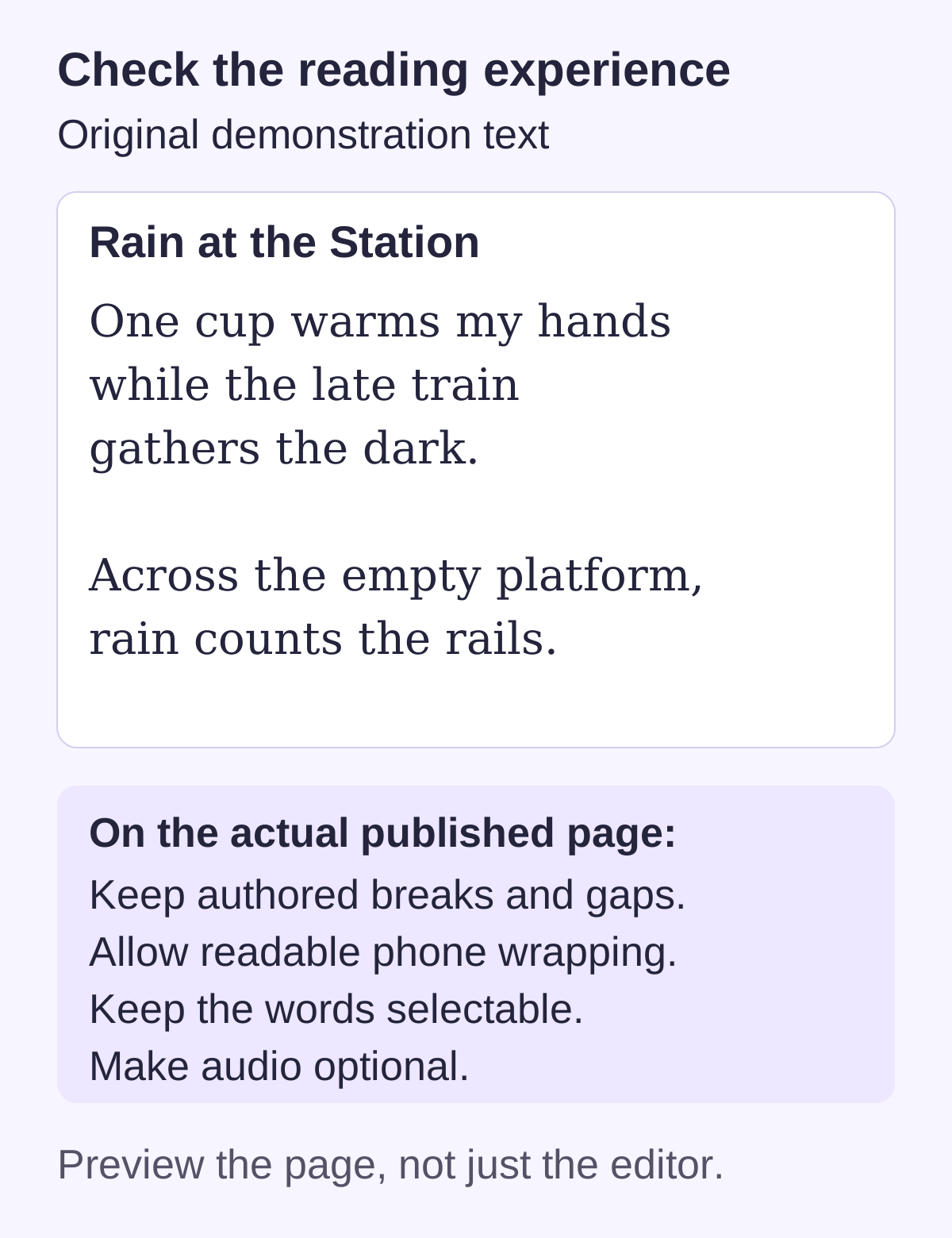
For developers, CSS whitespace behavior matters: MDN’s white-space reference explains that pre-wrap preserves whitespace while allowing wrapping, whereas pre preserves it without normal wrapping. These are implementation options, not instructions to paste unsupported styling into every builder. Use the platform’s supported formatting and verify the result. Avoid manually inserting many spaces just to imitate a desktop layout.
Choose readable type, sufficient contrast and comfortable spacing. Decorative fonts can suit a heading while making several stanzas tiring to read. Keep menus and promotional panels from competing with the poem. Support enlargement without clipping words or covering lines with sticky controls.
Add context and optional audio carefully
An individual poem page can include the title, author or pen name, poem text, relevant publication credit, optional context and a clear next-reading link. Context should help rather than explain away every interpretation. Label an excerpt as an excerpt and link to the authorized full publication when appropriate.
- Audio: Let the reader choose whether to play it. Provide controls and a text equivalent; identify who is reading and whether the version differs from the displayed poem.
- Video: Provide captions and relevant text alternatives. Do not make an autoplay background video the only way to access the work.
- Images: Use your own or appropriately licensed material and meaningful alternatives where needed. An attractive image does not need to accompany every poem.
- Credit: Identify translators, performers, photographers and previous publishers accurately, according to the relevant agreements. Keep a private permissions record.
The W3C’s accessible-writing tips are a useful starting point for headings, meaningful links, image alternatives and multimedia text. Applying a few tips is not a complete accessibility audit, so include actual keyboard and reading tests in your launch review.
Help readers return without turning the poem into an advertisement
Use accurate poem titles, clear author information and useful collection introductions. Link naturally between related works. A title should represent the poem, not force a search phrase into an artistic title. A concise page description can introduce the work, but search engines decide what appears in results and no metadata change guarantees readership.
If you offer a newsletter, explain what subscribers will receive, use an appropriate permission process and provide a working unsubscribe route. A professional contact inquiry should not silently become a newsletter subscription. Comments are optional; enable them only when you can moderate them and handle the associated data and abuse risks.
Books, digital collections, commissions, workshops or ticketed readings can be possible offers. Describe what the buyer receives, the price and currency, rights or license, timing, cancellation/refund terms and support. Verify the actual payment and fulfillment flow. A workshop listing does not automatically supply booking, live teaching or attendee access, and publishing poems does not guarantee sales. The first-offer guide can help evaluate one manageable offer.
Test the site and keep your archive trustworthy
- Compare each live poem with the approved source: words, punctuation, intentional line endings, stanza spaces, credit and links.
- Use a small phone, larger text and keyboard navigation. Check long-line wrapping, menus, media controls and whether anything obscures the poem.
- Follow every collection, next-poem, book, event and contact link. Verify old event dates and unavailable offers are clearly handled.
- Test contact or subscription flows with controlled data and confirm the intended receipt and unsubscribe behavior; do not collect extra information without a purpose.
- Keep a copy of your texts, media permissions and publication records outside the live site. Check account recovery, renewals and the platform’s actual backup/export options.
The website testing guide can help you record a formatting or navigation problem with reproducible steps. Keep your publishing pace sustainable. Update when there is new work, a correction, a publication credit or an event change; do not post unfinished poems merely to satisfy an arbitrary search schedule.
Poetry website FAQs
A builder or hosted CMS can support a simple portfolio or blog. Test a representative poem, archive navigation, mobile layout and required features on the current plan before choosing. Complex visual poems, contributor systems or special workflows may require additional work.
No. Curate a selection you want to share and are free to publish. Keep drafts, rights records and submission plans in mind. A small accurate archive can be more useful than publishing everything without reviewing versions or agreements.
Use the platform’s supported text formatting and preview intentional breaks, stanza gaps and long-line wrapping on narrow screens. Compare the saved live page with the source. Developer CSS choices can help, but a rigid non-wrapping block can create phone overflow.
Use readable selectable text for ordinary poems. If visual arrangement is essential, an image may be part of the presentation, with an appropriate text alternative or explanation. An image-only archive makes reading and adapting the text harder.
It can. Check each publication’s current eligibility rules before posting. Poetry magazine, for example, treats work appearing online or on social media as previously published. Other journals have their own rules and agreements; removing a post later may not erase that history.
You can plan an appropriate collection, book, commission or event offer, but confirm payment, delivery or booking, rights, terms and support. A website alone does not establish demand or income, and an event page is not automatically an attendance-management system.
No. They add moderation and data responsibilities. A readable portfolio, accurate contact route and optional well-managed newsletter may fit the project better. Add interactive features only when you can support their actual purpose and operation.
Practical writing on building a site, growing an audience and sending email people open. No more than one a week.

Karan Singh Bhakuni
118 articles on the Grigora blog
More on Guides

Guides
Website Tutorial: Create, Edit, and Publish with Grigora
A practical first-site walkthrough: gather facts, create an AI or template draft, make focused edits, test the preview, publish and verify the public address.
10 Jul 20239 min read

Guides
How to Create a Campaign Website: Setup and Launch
Plan, build and test a campaign website with accurate public information, working contact routes and clear account ownership. Use a practical launch and maintenance checklist.
18 Oct 202310 min read
Guides
How to Create a Classroom Website: A Practical Teacher’s Guide
Build a useful public classroom hub, decide what belongs in a private school system, and test the pages families actually need.
12 Sept 202312 min read