You can begin with a simple information site rather than a store or custom system. A .co.za address is one option, not a requirement for every project. This guide uses current primary domain, payment and privacy sources checked November 3, 2026; it does not claim a real local project, transaction test or legal compliance certification.
Guides Karan Singh BhakuniUpdated 3 Nov 2026
How to Create a Website in South Africa: A Practical Launch Guide
Karan Singh BhakuniUpdated 3 Nov 2026- 11 min read
- 10 sections
- 3 comparison tables
- 8 questions answered
The short answer
To create a website in South Africa, define what visitors need to do, choose a platform and domain, prepare accurate pages, and test the finished site. If you collect personal information or accept payments, verify the actual data flow, local provider eligibility and applicable obligations before launching those features.
Want the site rather than the reading? Build one free with Grigora
Contents10 sections

Read nextHow to Create a Campaign Website: Setup and Launch
1. Define the audience, purpose and next step
Write one useful task: a visitor should understand your service and send an inquiry, view your portfolio, find community information or buy a specified product. List the location, languages, contact preferences and access needs of the people you actually serve; do not assume every South African visitor has the same needs.
If you want to showcase your artistic talents, a portfolio with real work, captions and a contact route may be enough. A service business needs accurate scope and service areas. A shop additionally needs stock, fulfillment, payments and customer support. Building your website is easier to plan when these workflows are separate.
| Site purpose | First useful pages | What must work |
|---|---|---|
| Portfolio or information | Home, work/information, about and contact. | Readable content, permitted media and current links. |
| Service inquiries | Services, area/fit, process and contact. | Clear inquiry routing and next-step expectations. |
| Online shop | Product details, delivery/collection, terms and support. | Actual stock, payment, fulfillment, confirmation and refund processes. |
| Community or editorial site | Purpose, articles/resources and contact. | Sources, updates, moderation and any signup process. |
2. Choose a build route with named responsibilities
| Route | Who handles the work | Check before committing |
|---|---|---|
| Hosted website builder | You prepare content; platform handles defined hosting services. | Current plan, domain connection, export options and actual local provider compatibility. |
| Self-hosted CMS | You or an agreed maintainer manages hosting, software and extensions. | Update/backup/restore responsibilities, licenses, support and total renewal cost. |
| Freelancer or agency | A contractor delivers an agreed scope. | Account ownership, revisions, acceptance tests, handover and ongoing support. |
Use a sample page and the hardest required workflow to compare options. A gallery, inquiry form, online payment and a booking engine are not interchangeable features. A supplier should identify the actual provider, plan and limitations rather than promising “all integrations.” A custom build is not automatically better than a clear, well-maintained template.
Grigora provides public pages, images and CMS publishing. Starter currently costs US$15/month or US$144 paid annually, equivalent to US$12/month. Paid plans include hosting, SSL/CDN and domain connection; domain registration/renewal and outside services are separate. Check the current trial and plans; website publishing after the temporary trial requires a paid plan.
Those are US-dollar prices, not a fixed Rand quote. Confirm your actual payment method, billing currency, applicable tax and any card conversion charges. For a proposed local gateway, CRM, booking or delivery integration, verify the exact setup rather than assuming it is native to Grigora.
3. Register an appropriate domain and keep control
Choose an address people can recognize and type. A local .co.za address may suit a South African audience; .com or another suitable ending may fit a different scope. Check possible name conflicts and the exact spelling. Domain availability is not proof of trademark or business-name clearance.
The official ZARC .co.za information says registration uses an accredited registrar and domains have registration and renewal fees. Retail owners obtain pricing from the registrar; a registry wholesale fee is not your retail quote. Check the actual first term, renewal, transfer conditions and included services.
- Confirm the registrant/account owner, billing details and recovery route before payment.
- Keep contact information current and record the renewal date.
- Connect the domain using the exact records supplied by your website provider. Save the existing DNS configuration first.
- Do not overwrite email-related records blindly; identify which records support your current mailbox or other services.
- After changes, check the public website and any affected email route. DNS changes and provider processing can take time; do not assume instant propagation.
A domain, website plan and business email mailbox are separate services even when sold in one bundle. Identify who supports each and which bills renew. Keep a record the next editor can understand.
4. Budget the actual term and workflow
Ask providers and contractors for a dated, itemized quote in the currency they charge. Compare matching deliverables and distinguish cash due today from a monthly equivalent. Avoid adding a second hosting or SSL allowance when the same service is already included.
| Cost line | Record before buying | Possible ongoing cost |
|---|---|---|
| Domain | Exact address, registration term and retail quote. | Renewal and optional services. |
| Platform/hosting | Plan, billing currency, term and what is bundled. | Renewal, usage or higher-plan charges. |
| Build/content | Pages, copy, photos, languages and revisions. | Agreed content changes and new material. |
| Outside features | Provider, setup, compatibility and eligibility. | Subscription, per-location or usage charges. |
| Payments/fulfillment | Transaction, payout, refund, delivery and other contracted fees. | Actual volume-dependent charges. |
| Support/maintenance | Named tasks, response coverage and recovery process. | Retainer, licenses and owner time. |
Record VAT treatment and any currency-conversion costs from the actual quote; do not mix tax-inclusive and tax-exclusive amounts. Keep optional marketing spend separate. A free plan can be a useful experiment, but inspect its address, branding, features, limits and renewal/upgrade conditions before treating it as the permanent solution.
5. Prepare clear pages and practical local information
Write the service or purpose directly near the top. Include accurate contact details, opening hours, actual service area and relevant prices or quote process. If you do not operate a public office, do not invent an address. Use the languages your intended audience needs and arrange competent review of important translations.
For products, describe the actual item, price basis, stock, delivery/collection area, timing and customer support route. State what happens after an inquiry or order. A request form does not confirm a booking or a payment. Keep fees and limitations near the decision they affect.
Use real or properly licensed images with appropriate captions and text alternatives. Do not use generated premises, staff or product photos as evidence of a real business. Keep original files and permission records. Make important details available as readable page text rather than only in a poster or download.
Design for the devices and connections your audience actually uses: readable type, clear navigation, modest image sizes and visible controls. Test on a phone and a slower connection where possible. A local domain or server location alone does not establish speed, uptime, data residency or suitability.
Also worth readingHow to Create a Classroom Website: A Practical Teacher’s Guide
6. Verify payments before choosing a commerce route
If the site only explains your work, you may not need online payment. If you sell, first check the provider’s merchant country, settlement bank, identity/business verification, allowed activities, currency and refund requirements. A platform showing a gateway logo is not proof that your account is eligible or that the specific integration works.
As one local provider example, Payfast’s current primary pricing/FAQ says payouts require a South African bank account. Its Aggregation card component is 3.2% plus R2 per transaction; its R500 example gives R18 excluding VAT. Payouts, refunds and other terms can add charges; Gateway pricing is separate. Check your actual plan and agreement rather than assuming every fee is captured by that rate.
The arithmetic is R500 × 0.032 + R2 = R18 before VAT. This illustrates the published fee component only, not a complete merchant quote, profit calculation or tested order. No Payfast integration with Grigora is claimed here. Confirm any link, plugin, hosted checkout or embed using the provider’s current supported setup.
- Verify the exact product, price/currency, delivery area and any tax/tip/fee treatment.
- Use an authorized provider test flow before live use, then an agreed controlled live check if required.
- Check successful, failed, cancelled and duplicate-payment behavior.
- Verify customer confirmation, the merchant’s actual order record, fulfillment notification and payout visibility.
- Assign refund, support and failed-integration responsibilities. Do not collect card details through a general contact form.
Grigora’s current commerce supports one-time and eligible pay-what-you-want checkout; recurring subscription checkout is not active. A public website plan does not establish a native booking calendar, local courier connection or complete membership/LMS workflow. Verify those separately if needed.
7. Map personal information and review POPIA duties
Before adding a form, newsletter or analytics provider, draw the actual data path: what is collected, why, where it goes, who can access it and when it is removed. The security of your website depends on accounts, providers and operating practices as well as HTTPS.
For data protection in South Africa, review the Information Regulator’s POPIA guidance. Section18 addresses collection information, including the responsible party, purpose, relevant recipients and rights. Match notices to real practices; a copied privacy page does not establish compliance. Consent is not the only possible processing basis.
Section69 sets conditions for unsolicited electronic direct marketing. Consent or the conditional existing-customer exception may apply; the latter concerns your own similar offerings and objection opportunities. Provide an effective way to stop messages and keep appropriate records. An ordinary inquiry is not automatic permission for a newsletter. Check the full guidance and your actual situation rather than relying on this short summary.
Keep public forms proportionate. A quote inquiry should not ask for identity documents, banking details or unnecessary sensitive information. Check provider contracts, security, retention, relevant cross-border processing and any information-officer or other duties with the responsible person or qualified adviser. Tax, consumer, sector and other business obligations also require their own review; a website launch checklist is not a complete legal assessment.
8. Run a launch acceptance check
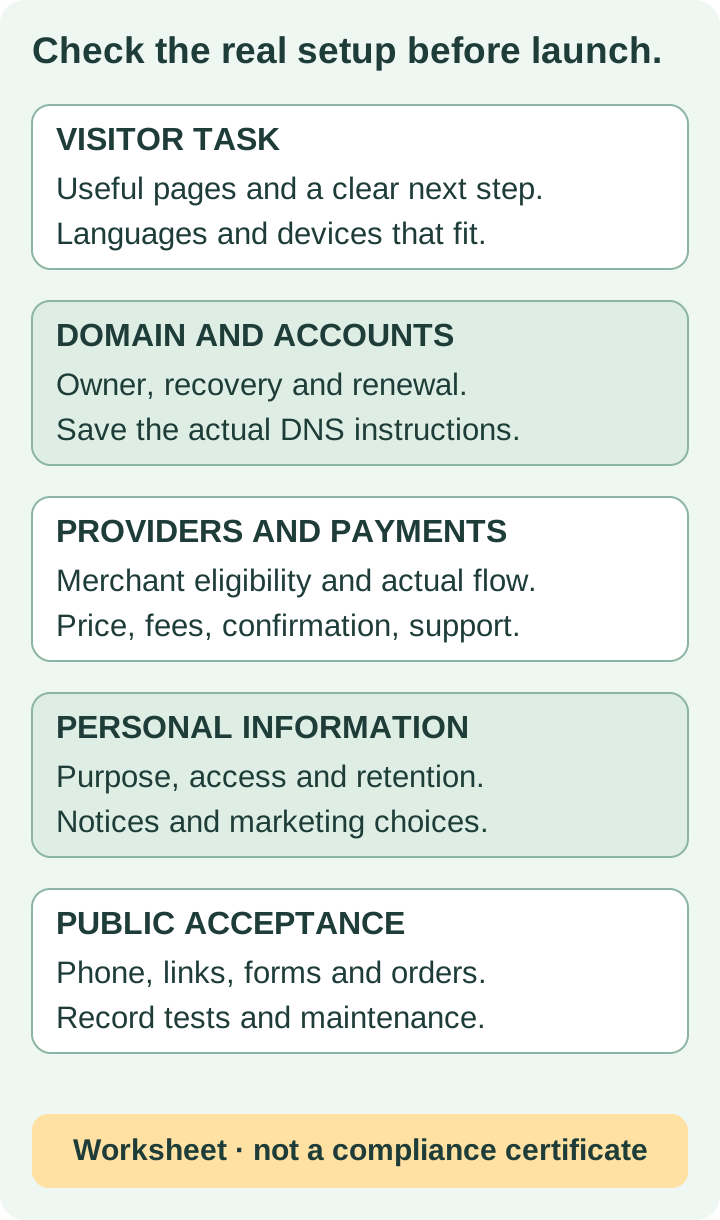
- Confirm correct public domain and HTTPS, intended page visibility, no placeholder claims and current contact details.
- Read every page on phone and desktop; check navigation, keyboard access, images, tables and downloads.
- Test an authorized inquiry end to end and verify the right person receives it; check the confirmation.
- For payments, use the agreed provider tests and check order/fulfillment/refund responsibilities.
- Match privacy notices, marketing choices and provider settings to actual data flows.
- Confirm the site/domain/billing owners, access permissions, recovery details and any demonstrated restore/export procedure.
- Save approved content, original media, provider details and the launch record.
9. Publish, share and maintain the facts
Search Engine Optimization starts with a clear subject, accurate titles/descriptions, meaningful links and public content that answers real questions. For local pages, describe the areas and services you actually provide. Do not copy the same page for multiple towns or expect a .co.za address to guarantee rankings.
Share the site through relevant professional profiles, communities or customers when appropriate and allowed. Keep marketing consent and community rules in mind; do not import contacts into campaigns simply because the website is live. Measure real tasks, such as a delivered inquiry or a completed order, separately from page views.
Assign ongoing owners for content, prices, availability, provider changes, security/account access and renewals. Recheck the workflow when you change a form, domain, bank, payment plan or fulfillment process. Keep a correction and recovery route so a small change does not leave visitors with stale or broken information.
Frequently asked questions
No. A hosted builder or a contractor can help with the pages. You still need accurate content, account ownership and testing of the actual forms, payment or other provider workflows.
No. Choose an appropriate address for the audience and identity. For .co.za, use an accredited registrar and check retail terms. A local ending does not guarantee search placement.
No. Registration covers a term and requires renewal if you want to keep using the domain. Confirm the registrant, retail renewal price and recovery details.
Not without checking the actual exchange and billing terms. Keep the original currency, upfront term, applicable tax and conversion charges visible in the budget.
No. Check merchant eligibility, settlement bank, verification, allowed activities and the exact platform/provider setup. Test through an authorized workflow before promising live checkout.
No. Review real collection, use, access, retention and providers against applicable duties. A notice must reflect practice; this article does not provide a compliance certification.
No automatic permission follows from an inquiry. Electronic direct marketing has specific conditions; review the Information Regulator guidance and the actual relationship and choices.
This guide does not establish one. Grigora provides public pages/CMS and current supported commerce, but any proposed local gateway, booking or delivery workflow needs specific verification. Recurring subscription checkout is not active.
Practical writing on building a site, growing an audience and sending email people open. No more than one a week.

Karan Singh Bhakuni
118 articles on the Grigora blog
More on Guides

Guides
How to Create a Campaign Website: Setup and Launch
Plan, build and test a campaign website with accurate public information, working contact routes and clear account ownership. Use a practical launch and maintenance checklist.
18 Oct 202310 min read

Guides
How to Create a Classroom Website: A Practical Teacher’s Guide
Build a useful public classroom hub, decide what belongs in a private school system, and test the pages families actually need.
12 Sept 202312 min read

Guides
How to Create an Anonymous Blog: A Practical Privacy Plan
Publish under a pen name while understanding who can still identify you. Plan your boundaries, check the actual public output and review privacy as the blog grows.
3 Oct 202313 min read