If you mean “without buying a domain or arranging hosting,” a managed blog is another option. It is still a website, even when the service handles the technical setup and provides an address. Decide which task you want to avoid before choosing a platform.
Guides Karan Singh BhakuniUpdated 3 Nov 2026
How to Start a Blog Without Building a Website: 5 Ways
Karan Singh BhakuniUpdated 3 Nov 2026- 10 min read
- 7 sections
- 1 comparison table
- 5 questions answered
The short answer
You can start blogging without building or maintaining a website of your own. Publish through a hosted writing platform, a professional profile, a newsletter service, social posts or an established publication. The provider supplies the publishing system; you supply the work and remain responsible for what you publish.
Want the site rather than the reading? Build one free with Grigora
Contents7 sections
Read next3 Ways to Start a Blog Without a Domain
Five ways to publish without managing your own site
| Route | When it may fit | Check before starting |
|---|---|---|
| Hosted articles, such as Medium | You want an article editor and a profile/archive | Formatting, public access, terms, export and any earning eligibility |
| LinkedIn articles | You want to publish professional material from a profile or Page | Publishing access, intended account, audience and current editor support |
| A newsletter service, such as Substack | You want posts, subscriptions and optional email distribution | Public web/archive, delivery settings, permissions, export and fees if paid |
| Social or microblog posts | You want brief updates, photos or connected posts | Limits, visibility, media descriptions, moderation and account portability |
| Guest contributions | You want to contribute to an existing publication | Editorial fit, rights, payment if any, approval and later reuse terms |
These are examples, not a ranking of the best service for everyone. A platform’s existing user base does not guarantee anyone will see your work. Review its current official features and terms for the workflow, location and business model you need.
1. Publish articles on a hosted writing platform
A service such as Medium can provide an editor, a public profile and article pages without a separate hosting purchase. Its documented first-story workflow covers drafts, formatting, images, supported embeds and publishing. Monetization is conditional on the applicable program and settings; publishing a story is not itself an earnings guarantee.
Keep a local copy of the text and source files. Check preview images, headings, links and the published view, including what a reader without your account can access. A platform profile is a publishing route, not a promise of distribution or a substitute for understanding its rules.
2. Write LinkedIn articles for professional topics
LinkedIn’s article guide explains publication from a personal profile or an appropriately administered Page. Articles differ from short feed posts. Confirm which identity you are publishing as and use the supported editor; the current guide notes that article creation is not available in the LinkedIn mobile app.
This can suit a checked professional explanation, project reflection or useful analysis. Respect employer, client and confidentiality obligations. Avoid publishing private work or inventing credentials to make an article sound authoritative. You do not need to make every piece a sales pitch.
3. Use a newsletter service with a public publishing presence
A newsletter can deliver writing to people who choose to subscribe, and a service may also supply a public archive or profile. Substack’s current publishing guide describes profile and website publishing plus subscriber management. It therefore offers more than email alone; check which web and delivery settings you want.
Before publishing or scheduling, review the selected audience and whether the action will also send email or app notifications. Use an appropriate preview or controlled test supported by the provider. Do not assume that updating a web post changes a copy already delivered to an inbox. Publishing to the web and contacting subscribers are different actions.
4. Publish brief updates or connected social posts
Social captions, image sequences and short text updates can communicate ideas without a separate site. Threads on X are connected posts from one person; a thread can supply context across several pieces. Check that a reader opening one item can understand the relevant context and find the rest.
Choose the medium because it explains the subject. Provide useful descriptions for informative images and captions for video where needed. A short format still needs fact checks, permissions and appropriate qualifications. No hashtag, posting time or thread structure guarantees virality or an audience.
5. Contribute to an existing publication
A guest article, community newsletter or edited publication can give your work a home without a site of your own. Read the actual submission requirements, propose a relevant piece and agree on editing, credit, rights and any payment before delivery. Keep a record of the accepted version and ask what reuse or republication is allowed.
A byline or author link can help readers find your other work where the publisher permits it. Do not treat a guest contribution as a way to buy ranking links or assume that every publication accepts promotional material. Publication and payment are subject to the specific agreement.
If you only want to avoid hosting and code
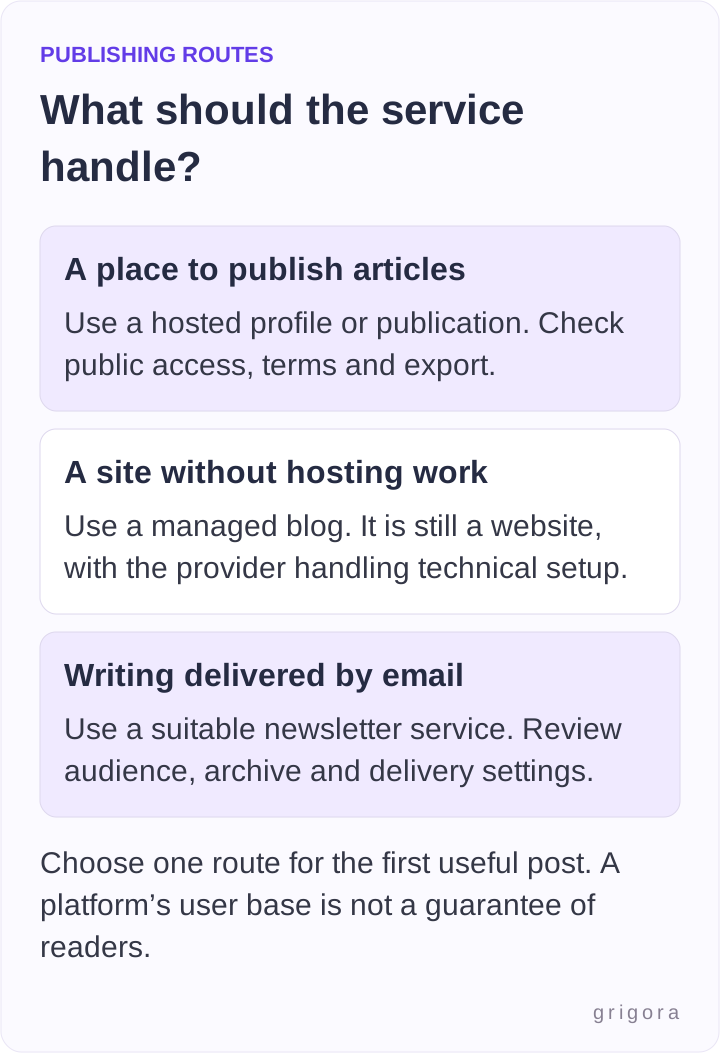
A managed service can build and host your blog while you edit its content. WordPress.com offers a free starting plan, with its own limits and upgrade options. A hosted blog address and a custom domain are different choices; compare the current plan rather than assuming you must buy a domain to publish.
Grigora also provides a website and blog workflow, so it fits the “without managing hosting or code” goal. It does not mean that no website exists. Use the editing workflow available in your project; the Classic CMS guide covers creating and preparing posts, while the newer AI editor differs. Confirm current plan, address, media and export options before choosing.
A managed blog can be useful if you want your own navigation and a growing archive. A profile-based route can be enough if you only need a place to publish a few articles. Neither choice automatically gives total control over providers, moderation decisions, audience data or search visibility.
Also worth reading25 Things to Consider When Building a Website
A practical first-post checklist
- Choose one question: State who the post helps and what it will answer. Check whether you can support that answer.
- Choose one route: Match the format to the work and review current terms, access and costs.
- Prepare the draft: Give it a clear title, useful structure, original explanation and appropriate source links.
- Check the media: Use material you may publish, add suitable alternatives and keep original files/permission records.
- Review publication settings: Confirm identity, public or restricted audience, paywall if any and any email/notification action.
- Inspect the published version: Open the actual URL, check phone readability and links, then save the address and final copy.
For example, if you write about interior design, start with one supported explanation or a clearly identified project you may share. Do not imply you visited a room, used a product or completed a client project unless you did. More general advice needs suitable sources; a dramatic image does not establish the claim.
A short launch record can prevent confusion: keep the platform, account owner, post URL, publication date, saved source file, relevant permissions and next review trigger. Update the post when facts change and correct a material mistake visibly where appropriate. A regular schedule can follow once you know the real workload.
Understand control, rights and portability
Platform control, copyright, audience access and export are separate questions. Read the rights and licence clauses instead of assuming a hosted platform owns every word or that an independent domain removes every dependency. Check which exports contain text, images, metadata, URLs and subscriber information, and what would need rebuilding after a move.
For example, Substack documents subscriber CSV export, including a current limitation on names. An export capability is useful, but it is not proof that every aspect of a publication can be moved without change. Keep subscriber data secure and use it only as permitted; a social follower is not automatically an email subscriber.
Protect account recovery, use available multi-factor authentication and keep copies of valuable work. If you publish sensitive material, examine actual access controls rather than relying on an obscure URL. Remember that people who can read a post may be able to copy or share it.
Can you earn money without your own site?
Possibly, through a suitable platform program, paid subscriptions, services, sponsorships, products or referrals. Eligibility, fees, supported countries, payment arrangements and content rules vary. A dedicated website is not a universal requirement for every business model, and a hosted account does not guarantee steady income.
Affiliate marketing requires a relevant program and supported recommendations. Under U.S. FTC guidance, material connections should be clear with the recommendation and claims must be honest. A platform label or a disclosure hidden at the end may be insufficient. Check the rules relevant to your activity and audience.
Calculate actual fees and production costs before making promises to paying readers. Do not start paid publishing merely because a platform makes a payment switch available. Make clear what you can deliver and keep an achievable process for publication, support and corrections.
Use feedback without treating it as a promise
Look at the relevant measures your platform provides, such as actual reads, useful replies, verified sign-ups or transactions. Likes and follower counts are different from completed reading or income. Search, feeds, recommendations and direct sharing can all contribute to discovery; none guarantees it.
Share work where it is relevant and permitted, answer questions when you can maintain the channel, and avoid unsolicited mass promotion. Choose the next post from useful reader questions and work you can support. You can add a managed site or custom domain later when it solves a real need.
Frequently asked questions
Yes. Hosted platforms and managed services may provide a profile or site address without a separate domain purchase. Check the current service and plan. A custom domain can be added where supported, but is not necessary for every publishing route.
No. You publish using their platform and controls, although rights and licences depend on the terms. Review content rights, account access, audience data and export separately. Buying a domain also leaves dependencies such as hosting and registration.
Yes, a suitable newsletter service can supply the publishing interface and public profile/archive. Check whether each publication action also sends email or notifications and confirm the intended audience before proceeding.
It may offer discovery features, but an existing user base is not guaranteed distribution. Helpful work, relevance and actual reader response matter, with results varying by topic, platform and circumstances.
Consider it when you need navigation, design, integrations, a coherent archive or an address that justifies the additional responsibility and cost. Review export and redirect options before moving; a migration can change links and the reader experience.
Pick one route and finish one useful, checked post. Keep its source files and public address, then decide what the next piece needs before adding more platforms or services.
Practical writing on building a site, growing an audience and sending email people open. No more than one a week.

Karan Singh Bhakuni
118 articles on the Grigora blog
More on Guides
Guides
3 Ways to Start a Blog Without a Domain
You can publish without buying a custom domain. Compare three routes, check free-plan and trial limits, publish your first post, and plan for exports and redirects if you move later.
7 Dec 202310 min read
Guides
25 Things to Consider When Building a Website
Turn 25 website considerations into decisions you can verify. Define the visitor’s task, assign content and account ownership, test essential features, and use a launch record to distinguish…
22 Oct 202310 min read
Guides
How to Start an Interior Design Blog
Introduction Design is not just what it looks like and feels like. Design is how it works. Steve Jobs The Growing Popularity of Interior Design Blogs In recent years, the world has seen a significant…
6 Oct 20239 min read