The display name, domain address and description do different jobs. They can support each other without matching character for character. You do not need to cram a profession, location and every service into the address, and no name guarantees clients, recruiters or search rankings.
Guides Karan Singh BhakuniUpdated 3 Nov 2026
How to Name Your Portfolio Website: Patterns and a Shortlist Test
Karan Singh BhakuniUpdated 3 Nov 2026- 11 min read
- 9 sections
- 3 comparison tables
- 8 questions answered
The short answer
A useful portfolio website name helps people recognize whose work they are viewing and find it again. Start with your professional name if the work is built around you. Consider a studio or project name when you need a separate identity, team brand or privacy boundary. Then test the shortlist for clarity, spelling, confusion and room to grow.
Want the site rather than the reading? Build one free with Grigora
Contents9 sections

Read nextHow Many Pages Should a Portfolio Be? PDF and Website Examples
1. Choose a personal, studio or project identity
Decide whether the portfolio represents one person, a continuing business or a defined body of work. Think about how you introduce yourself now, who will receive the link and whether collaborators or future services should fit under the same identity.
| Approach | When it may fit | Trade-off to consider |
|---|---|---|
| Professional name | Freelancer, performer or individual whose reputation travels with the work. | Common-name confusion, spelling and your preferred public/private boundary. |
| Name plus discipline | Individual who wants immediate context, such as a writer or designer. | A narrow specialty may become inaccurate as your practice changes. |
| Studio/brand name | A business identity that may include collaborators. | Explain who is behind it; do not imply a larger team or credentials you do not have. |
| Project/collection name | A particular research, art or editorial body of work. | Make the creator and project purpose clear so the title does not obscure ownership. |
Portfolio websites do not all need a studio-style brand. A clear name with a precise role line can be enough. If you use a chosen or professional name, plan how it stays consistent with the profiles and contact route you actually want to make public; you do not need to publish personal information just to fill a template.
2. Separate the name, address and role line
The display name is what the reader sees in the site header. The domain is the address they type. The role line explains what you do. Keeping those jobs separate often makes the whole identity simpler.
Fictional illustration only: “Mira Rowan” could be the display name, “Editorial illustration and visual essays” the role line, and a short, checked variation of the name the domain. This is not a real client, an available-name recommendation or a claim that any particular address is free. Check every candidate before using it.
In particular, a domain cannot contain a space or an ampersand in the same way a printed name can. Write down the exact address form you would use and read it as one string. A clever phrase may become hard to parse without spaces; a beautiful logo does not solve that problem.
3. Generate candidates using clear patterns
Use these patterns to create a small set of different approaches. Brackets are placeholders, not literal domain text. The examples are brainstorming forms, not names checked for availability, trademark rights or suitability in your market.
| Pattern | Illustrative form | Question to ask |
|---|---|---|
| Full professional name | [Given name] [Family name] | Will someone who knows me recognize it? |
| Name plus work | [Name] Design; [Name] Writes; [Name] Photography | Is this still accurate if my work expands? |
| Initial plus surname | [Initial] [Family name] | Can people distinguish me from someone else? |
| Surname plus studio | [Family name] Studio; [Family name] Works | Does the presentation explain the actual team? |
| Concept plus discipline | [Concept] Illustration; [Concept] Sound | Does the concept add meaning rather than vagueness? |
| Project title plus creator | [Collection title] by [Name] | Can the visitor find who made it? |
| Name plus broad context | [Name] Creative Practice; [Name] Selected Work | Is the broad wording useful or merely generic? |
Try several spellings only when they remain easy to communicate. Initials, puns, unusual word joins and a location can work for some people, but each introduces a question to test. Do not add a city unless it is relevant and accurate, or add “award-winning,” “official” or a protected professional title without a proper basis.
A name generator or AI draft can widen the list. It does not establish that suggestions are original, available or lawful. Keep only candidates you would be comfortable saying aloud to a client, printing on a résumé and using as an email address.
4. Run a short spoken-and-typed test
Ask a few people who resemble the intended audience to try the shortlist. This is a small usability exercise, not a statistically representative brand study. Use the same prompt for each candidate and record what happens rather than asking only which name they like.
- Say the proposed name once without showing it. Ask the person to type what they heard.
- Show the exact domain and ask them to read it aloud. Note ambiguous word boundaries or characters.
- Show a plain header and role line, then ask whose work they expect and what kind of work it is.
- After a short unrelated task, ask what name or address they remember.
- Ask whether it reminds them of another person, organization, meaning or unwanted phrase.
Keep the results concrete: spelling corrections, mistaken identity or uncertainty about the offer. If the name requires repeated explanation, try a simpler form or a clearer role line. A personal preference poll alone does not show that people can find the right person.
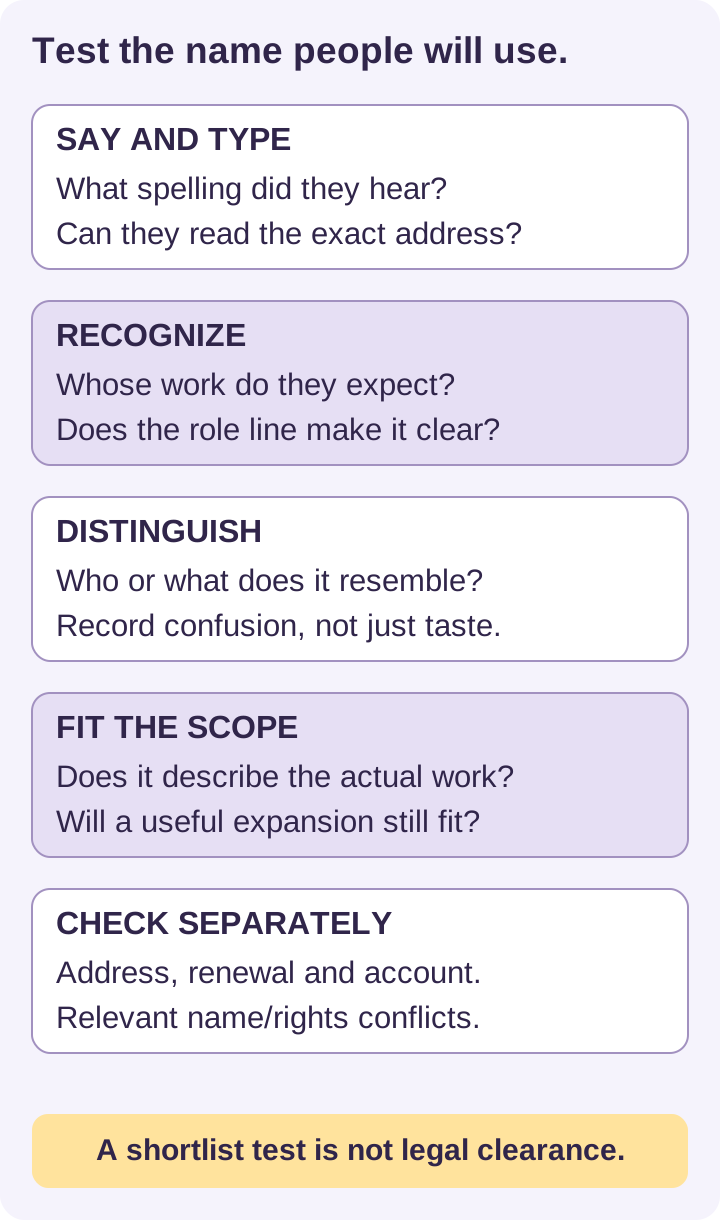
5. Keep a shortlist record with a separate conflict check
Compare a few finalists in a simple worksheet. A score can organize observations, but it is not a scientific measure of memorability or a reason to overlook a conflict. Use pass, revise or unresolved and write a short reason.
| Check | Record the evidence | Decision |
|---|---|---|
| Recognition | Do viewers identify the right creator or business? | Pass/revise/unresolved. |
| Say and type | What exact spelling errors or ambiguities occurred? | Pass/revise/unresolved. |
| Meaning and scope | Does the role line and name match real work and future plans? | Pass/revise/unresolved. |
| Confusion | Similar people, businesses, meanings and search results found. | Resolve concerns before commitment. |
| Address and cost | Registrar result, ending, term, renewal and exact spelling. | Recheck at purchase; availability can change. |
| Rights/requirements | Relevant jurisdiction, trademark/business checks and advice needed. | A separate decision; not overridden by a favorable name score. |
Search for the name and close variants, including similar spellings and sounds in related work. Look beyond an exact-match domain check. A domain being available does not prove you may use the same words as a business identity, and an unavailable domain does not by itself prove someone has trademark rights to every use of the name.
For a US trademark search, the USPTO’s clearance guidance recommends multiple resources and confusingly similar marks used with the same or related goods/services, including common-law use. A database search with no exact match is not legal clearance. Check the appropriate jurisdiction and get qualified advice when a conflict or meaningful investment is involved.
Also worth readingHow to Create a Temporary Website and Close It Properly
6. Check the domain and ongoing ownership
Compare an address you can communicate reliably with the actual registration and renewal terms. A familiar ending may suit your audience; another ending may be appropriate if the whole address remains clear. Do not assume a clever ending or keyword will deliver search visibility.
Google’s SEO Starter Guide says domain keywords alone have hardly any ranking effect and recommends choosing for the business. Its advice about country targeting is separate from a generic preference for .com. Use the page title and useful content to explain the work instead of buying a long keyword-heavy address.
- Check the exact spelling, registration term, introductory price and renewal price.
- Identify the registrant/account owner, billing owner and recovery route. Keep control rather than relying solely on a contractor’s account.
- Check relevant privacy options and what information may be public; do not assume registration guarantees anonymity.
- Confirm transfer/cancellation conditions and how the address will connect to the site.
- Look at appropriate social/professional handles for consistency, but do not buy unnecessary domains or join every platform just to match.
Keep a dated record of the name and domain decisions, renewal dates and any permissions or professional advice. A name decision, domain registration, business registration and trademark application are different actions; this article does not complete any of them for you.
7. Check how the name looks in a real portfolio
Your portfolio website should identify you clearly even without a logo. Try the name as ordinary text in the header, phone navigation, page title, résumé link and professional email signature. Keep enough contrast and space, and ensure the full identity remains understandable if a logo fails to load. The role line should clarify the work instead of repeating the same name.
These existing Grigora template previews illustrate presentation patterns, not real client success stories. Their demonstration names and text are examples; replace placeholder biography, contact details and claims with your own accurate material. The screenshots show layouts, not a test of current template availability or live functionality.
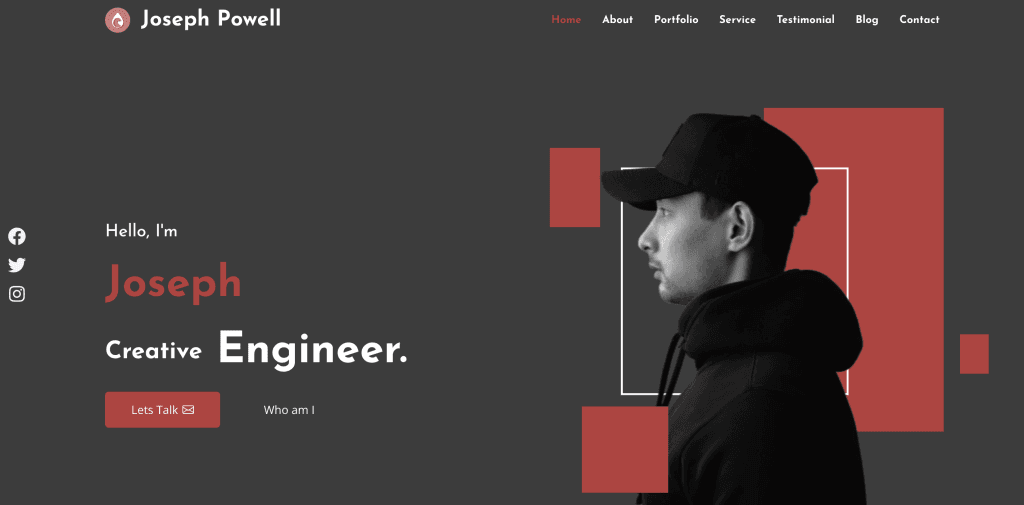
The Joseph Powell preview uses a full name in the header and a shorter introduction. The useful lesson is the division of jobs between identity and role; you do not need to copy the name, photo or profession.
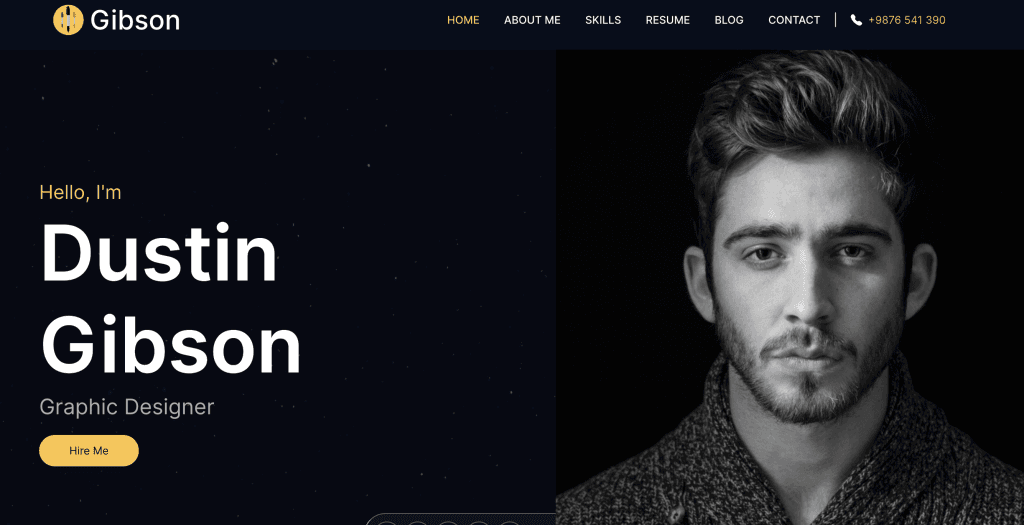
The Gibson preview uses a shorter header with a full name in the main introduction. Test whether your own shortened form remains recognizable, especially when visitors land on another page without seeing that introduction.
Choosing an innovative platform does not resolve name conflicts or domain ownership. Grigora provides pages, images and CMS editing for your portfolio; use it to apply the chosen identity consistently, then inspect the public result. Check current plans and actual domain connection steps rather than assuming a naming or keyword-research tool has cleared your choice.
8. If you rename an existing portfolio, plan continuity
You may be able to change the display name while keeping the same domain. If the address must change too, list the old pages, downloads, email routes and professional profiles before moving. Plan appropriate redirects and update the links people actually use. Avoid abandoning a working address simply to chase a keyword.
Communicate the new name where appropriate so existing contacts can recognize the same creator. Keep the old and new identity relationship clear during the transition, without exposing personal history you choose to keep private. Check billing, licenses and rights separately; a visual rebrand does not transfer an account or trademark.
Frequently asked questions
Often it is a clear choice for individual work, particularly when people already know your professional name. A studio or project identity may fit a separate business, collaboration or privacy boundary. Explain who is behind the work.
Try a clear professional-name variation, initial, relevant discipline or another suitable address ending. Test recognition and spelling and check for confusion. Do not assume the closest available string is the best or legally cleared choice.
No. A printed name can include spaces and styling the address cannot. Keep the relationship recognizable and test the exact domain as one string. The role line can explain the work separately.
No. A discipline can clarify your offer, but keyword-heavy naming does not guarantee ranking. Choose for recognition and accurate scope; use useful page content and a clear title to explain the work.
No. Domain availability is a registration fact, not trademark or business-name clearance. Search similar names and related work in the relevant jurisdiction; obtain professional advice where appropriate.
No. Treat suggestions as brainstorming. Check meaning, confusion, availability and relevant rights independently. Do not claim a generated name is unique or available without checking.
Usually a small spoken-and-typed usability exercise is a more practical start. Record actual mistakes and interpretation. Do not treat a few preferences as a statistically validated branding result.
Yes. A display-name change and domain move are different decisions. Preserve useful URLs when possible, plan redirects and profile/contact updates if moving, and help existing contacts recognize the transition.
Practical writing on building a site, growing an audience and sending email people open. No more than one a week.

Karan Singh Bhakuni
118 articles on the Grigora blog
More on Guides

Guides
How Many Pages Should a Portfolio Be? PDF and Website Examples
Follow the recipient’s brief first. Use a worked 12-page PDF example and a clear website structure to plan relevant work without treating page counts as universal rules.
19 Sept 202311 min read

Guides
How to Create a Temporary Website and Close It Properly
Build a focused short-lived page, test the real visitor task, and plan its retirement before sharing the link. Temporary does not mean it closes itself.
31 Aug 202310 min read

Guides
Can You Patent a Website Idea? A U.S. Preparation Guide
Identify the asset you want to protect, document the actual invention and disclosure history, and understand provisional applications before making filing decisions.
30 Aug 202311 min read