A rewrite can be a small correction, a substantial revision or a decision to combine overlapping pages. It does not require changing every sentence. This guide includes a page-audit worksheet, a complete fictional before-and-after example and a release checklist.
Guides Karan Singh BhakuniUpdated 3 Nov 2026
How to Rewrite Website Content: A Worked Example and Checklist
Karan Singh BhakuniUpdated 3 Nov 2026- 11 min read
- 10 sections
- 2 comparison tables
- 8 questions answered
The short answer
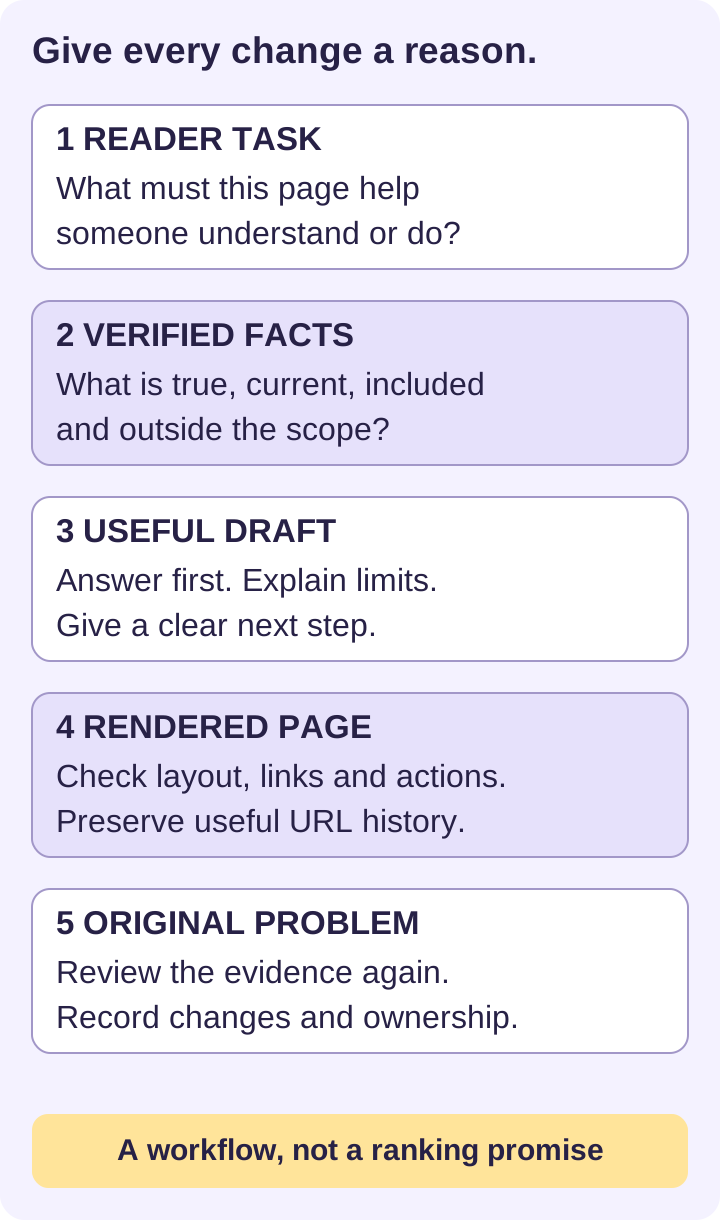
To rewrite website content, first identify the reader’s task and the specific problem with the existing page. Keep accurate, useful material; replace unsupported or outdated claims; then improve the order, wording and next step. Check the finished page before publishing and measure it against the problem you set out to solve.
Want the site rather than the reading? Build one free with Grigora
Contents10 sections
Read nextWebsite Audit Cost: Prices, Scope and a Quote Checklist
1. Decide whether the page needs a rewrite
Start with a reason you can observe: readers keep asking a question the page omits; an offer has changed; instructions no longer match the product; or search visitors arrive for a task the page barely answers. A traffic decline is a reason to investigate, not proof that the wording caused it.
| What you find | Appropriate action | What to preserve |
|---|---|---|
| Accurate page with one changed detail | Correct that detail and affected summaries. | Useful examples, working links and the existing URL. |
| Relevant topic, confusing or incomplete answer | Restructure and add the missing explanation or evidence. | The reader task and verified material. |
| Two pages serving the same task | Compare their unique value and consider one clearer destination. | Useful information and a reviewed redirect/link plan if a URL is retired. |
| Obsolete offer or a different purpose entirely | Decide whether to replace, archive or remove it with the responsible owner. | Any information readers still need and an appropriate route forward. |
Avoid rewriting a useful page simply because its publication date is old. Google’s people-first content guidance explicitly warns against changing dates or adding/removing content merely to make a site seem fresh. An accurate explanation can remain useful for years; a price or procedure may need attention as soon as it changes.
2. Record a baseline before editing
Save the current text, title, description, URL and relevant screenshots in a dated working copy. Record any important links, downloadable files, forms and image permissions. Confirm how you would restore the previous version; a CMS may have version history, but check your actual setup rather than assuming it does.
For search traffic, compare equal-length periods with the same filters and note seasonality or incomplete recent data. Look at the affected page and queries, clicks, impressions and position where available. A drop in broad impressions with stable visits has a different meaning from a broken page that has lost its relevant queries. Also check indexing, redirects and availability before deciding copy is the cause.
Use a compact audit record rather than a vague instruction to “make it better”:
| Field | What to record |
|---|---|
| Page and reader | URL; intended audience; one task the reader needs to complete. |
| Observed problem | Exact confusing sentence, missing answer, failed step or mismatched query. |
| Useful material | Accurate definitions, original examples and evidence worth keeping. |
| Baseline | Dated observations and comparable performance data, with filters. |
| Owner and decision | Who verifies facts, who approves the change and what success would look like. |
3. Write a brief from verified facts
A brief prevents a polished rewrite from accidentally changing the offer. Gather current product documentation, policies, service terms, actual customer questions and subject-matter input. Prefer the source responsible for a fact. Record the date, scope and limitations of prices, statistics, availability and legal or health statements.
- Reader: Who is this page for, and what do they already know?
- Task: What question should they be able to answer or action should they be able to take?
- Verified facts: What is included, excluded, available and conditional? Link the evidence.
- Voice and terms: Which familiar words fit the audience? Define necessary specialist terms.
- Next step: What happens after a click, submission or purchase, and who handles it?
- Limits: Which claims, prices, testimonials or examples cannot be used without further confirmation?
If a claim cannot be verified, remove it, qualify it accurately or leave it out of the publishable draft until its owner answers. Do not turn an aspiration into an existing feature. Rewriting another site’s description is not a substitute for knowing what your own business actually provides.
4. Build an outline around the reader’s decision
Put the direct answer or service description first. Follow with the details readers need to judge fit: scope, evidence, limitations, process and next step. A tutorial needs prerequisites and steps in execution order; a comparison needs explicit criteria; a service page needs a clear offer and an honest inquiry or booking process.
Use headings that describe their sections, rather than repeating “Introduction,” “Benefits” and “Conclusion” on every page. The W3C’s writing guidance recommends informative titles, semantic headings, meaningful link text and clear language. These changes help people scan and navigate; a larger bold font alone does not create a heading.
5. Study this complete before-and-after example
Fictional exercise: The service and facts below are invented to demonstrate editing. They are not a Grigora offer, a customer case study or measured conversion results.
Before: “Welcome to our world-class document solutions! We leverage innovative expertise to transform all your documents quickly and affordably. Our expert team delivers exceptional quality for every need. Get started now!”
The paragraph gives no usable scope, file format or process. “World-class,” “all,” “quickly” and “affordably” create claims without evidence. Swapping those words for synonyms would leave the reader with the same unanswered questions.
Example brief: The reader is a small team with a draft report. The invented service formats supplied text of up to ten pages into an editable DOCX file, using heading styles, consistent spacing and page numbers. Copyediting and fact-checking are excluded. Price and turnaround are confirmed after review. Sending an inquiry does not reserve a delivery date.
After — Report formatting for small teams
Get a consistently formatted, editable DOCX report from the text you supply. This example service covers drafts of up to ten pages and includes heading styles, spacing and page numbers. Copyediting and fact-checking are outside the scope.
To request a quote, send your page count, current file type and required date. The team reviews the scope before confirming a price and delivery date. An inquiry does not confirm a booking; work begins after the quote is accepted.
Example button: Request a formatting quote
The revision answers who it is for, what is included, what is excluded and what happens next. Its specificity comes from the brief, not from stronger adjectives. If any of these facts were different in a real business, the copy would have to change.
Also worth readingHow to Make a Weather Website: API Example and Launch Checks
6. Edit for clarity without inventing originality
Write a fresh draft from the outline and verified facts, then compare it with the original. Remove repeated openings, vague superlatives and sentences that do not help the reader act or understand. Keep necessary conditions close to the claim they limit. Read it aloud to find awkward joins and unexplained terms.
Preserve distinctive evidence: an actual tested procedure, a carefully explained example, original reporting or a useful decision worksheet. Do not invent first-hand experience, customer quotations or test results to make the page appear more authoritative. If you use another source’s ideas or data, attribute them and add your own relevant explanation; attribution alone does not create permission to copy.
Grammar tools can suggest edits, and similarity tools can flag text for review. Neither proves factual accuracy, copyright permission, uniqueness or search eligibility. If an AI tool helps draft or critique, verify every factual addition and avoid sending confidential material to it without authorization. Keep a person responsible for the final page.
7. Preserve useful search and accessibility details
Keep the existing URL when the page still serves the same purpose. A more fashionable slug is not by itself a reason to move a working page. If a URL must change, plan an appropriate redirect and update links; do not silently leave the old destination broken. Bing’s webmaster guidelines recommend clear, useful content, appropriate updates and stable URLs.
- Write a page title that accurately identifies this page’s subject. Make its description a faithful summary; do not promise an answer absent from the body.
- Use audience vocabulary naturally. Repeating a target phrase in every heading makes the page harder to read.
- Check links to products, evidence, related guidance and downloads. Use descriptive text and remove stale destinations.
- Check image relevance, permissions, captions and text alternatives. Decorative images do not need a redundant description.
- If the page has structured data, verify that it still matches the visible content and actual page type.
Treat updated content as a controlled website change: check the navigation and related pages as well as the edited text. A correct article can still confuse visitors if a menu, pricing page or download contradicts it.
8. Review and publish the rendered page
Ask the fact owner to review the offer and a person unfamiliar with the draft to try the intended task. Instead of asking whether the writing sounds good, ask them to identify the scope, find an important limitation and explain the next step. Their answers can reveal gaps that proofreading misses.
- Confirm names, dates, amounts, units, calculations and all conditional claims against the source log.
- Check desktop and phone layouts, heading order, tables, images, keyboard access, links and downloads.
- Test relevant forms or action links through a controlled submission and verify the confirmation/receipt, when authorized. Remove test data afterward.
- Confirm the public URL loads correctly and the intended indexability, canonical destination and redirect behavior remain appropriate.
- Save the approved version and change record. Use a truthful update date for a substantive change; retain the original publication history.
In Grigora, apply the approved text in the relevant page or content editor, then check the public result. Do not assume the editor view proves every layout or linked action works. Previewing, approving and publishing are separate steps in a responsible workflow; the exact controls depend on your site and access.
9. Measure the result and assign the next review
Return to the problem in the audit record. Did readers find the missing answer? Is the process accurate? Does the action reach the correct destination? For search, compare relevant page/query data over comparable periods after discovery and processing, while accounting for other site changes and demand. No fixed waiting period proves that a rewrite succeeded or failed.
Record what changed, when it went live and any unresolved questions. A useful review trigger is a changed product, policy, price, source or repeated reader problem. A calendar reminder can help an owner check for those changes, but it is not a requirement to rewrite accurate text each month.
Frequently asked questions
No. Audit pages individually. Correct a small error directly, substantially revise a page that fails its reader task, and preserve accurate material that still helps. Prioritize important problems rather than changing every sentence.
No. Content quality, demand, competition, indexing and technical conditions all affect visibility. Better evidence and clearer answers are useful improvements, but they do not guarantee impressions, clicks or conversions.
Usually, when the page still serves the same purpose. Avoid unnecessary URL changes. If a move is needed, review redirects, internal links and the intended canonical destination as part of the change.
Paraphrasing changes wording. A useful website rewrite also checks the reader task, facts, scope, structure, examples and next step. Merely replacing words can preserve the original weaknesses.
No. A similarity report can flag matches for review, but cannot establish factual accuracy, copyright permission, originality or search eligibility. Keep source records and editorial responsibility.
Yes. Supply the page brief, verified facts, access boundaries, examples of your voice and acceptance criteria. Agree who checks facts, who approves and who publishes. Keep site and billing account ownership under your control.
When facts, offers, user needs or evidence show a meaningful problem. Review time-sensitive pages more closely, but do not rewrite a useful page just to satisfy an arbitrary frequency.
Keep the original publication history. If the page is substantially revised, record an accurate update date and what changed. Do not make unchanged material appear newly written.
Practical writing on building a site, growing an audience and sending email people open. No more than one a week.

Karan Singh Bhakuni
118 articles on the Grigora blog
More on Guides

Guides
Website Audit Cost: Prices, Scope and a Quote Checklist
Compare website audit costs by scope and deliverables. Separate free checks, software licenses and professional review, then budget for implementation and retesting.
26 Oct 202311 min read

Guides
How to Make a Weather Website: API Example and Launch Checks
Start with one location and a suitable data source. Use a small prototype, then check timestamps, units, error states, privacy and provider terms before adding features.
10 Oct 202310 min read

Guides
Why Have a Wedding Website? Benefits and a Guest Checklist
Keep wedding details together, give guests a reliable response route and decide what stays private. Use a practical checklist before sharing the site.
16 Sept 202311 min read