Use it to solve practical questions, not to add another elaborate project to the wedding. A simple site can complement printed invitations and personal messages. If your celebration is small and another communication method already works for everyone, you may not need one.
Guides Karan Singh BhakuniUpdated 3 Nov 2026
Why Have a Wedding Website? Benefits and a Guest Checklist
Karan Singh BhakuniUpdated 3 Nov 2026- 11 min read
- 9 sections
- 2 comparison tables
- 6 questions answered
The short answer
A wedding website gives guests one place to check the schedule, directions, travel details and response instructions. It can also share your story, photos and registry links. It is most useful when someone keeps the information accurate and guests have a reliable way to use it. A website is optional, and important changes still need direct communication.
Want the site rather than the reading? Build one free with Grigora
Contents9 sections

Read nextCan You Use Any Image on Your Website? A Permission Checklist
Why have a wedding website?
1. Keep the important details together
A clear schedule and a single place for travel information can reduce repeated questions. Separate arrival time from the ceremony start, label locations accurately and explain practical details such as parking or transport. When guests travel across time zones, make clear which local time applies.
2. Make responses easier to collect
An appropriately configured RSVP form or dedicated service can record attendance and relevant choices. The benefit comes from the working response process, not from the presence of a button labeled RSVP. Confirm how households, event invitations, declines, edits and duplicates are handled before using it.
3. Give guests a place to recheck updates
A website can hold the latest agreed information after invitations have been sent. Put a clear update near the affected detail. For an important change such as a location or start time, also contact the affected guests through a reliable route. Editing a page does not mean everyone has seen or been notified of the change.
4. Share personal details and useful links
Your story, selected photos and introductions to the wedding party can make the site feel personal. These sections are optional. Get appropriate permission for images and other people’s details, and keep the schedule and response route easy to find. A registry can usually be reached with an ordinary link; deeper integrations depend on the service.
5. Reduce some printed material, if that suits your plans
You may use a website for detailed inserts or online replies while retaining paper invitations. Whether it saves money depends on your actual printing, postage, platform, domain and optional feature costs. Reducing paper does not by itself establish the overall environmental impact of a wedding or website.
Decide what guests actually need
Begin with the questions an invited guest must answer to attend. Keep a short list, then assign someone to check each fact with the venue, planner or other responsible person. Do not publish unconfirmed room rates, transport promises or accessibility details as settled arrangements.
| Section | Useful details to consider |
|---|---|
| Welcome and date | Names as you want them displayed, date and a clear route to the practical information. |
| Schedule | Confirmed event names, local dates/times, arrival guidance and who each event is for. |
| Locations and travel | Accurate addresses or directions, parking/transport information, accommodation links and any verified booking deadlines. |
| RSVP | Who should respond, the deadline, the working response route and an alternative for help. |
| Guest questions | Dress guidance, relevant venue/access information and a private contact route for individual needs. |
| Optional personal sections | Your story, a small photo selection, wedding-party introductions or registry links. |
Not every guest is invited to every related event. Do not expose a private rehearsal dinner or another limited gathering in a general schedule simply because the template has a section for it. Check which information the platform can show to different groups, or use a separate appropriate communication route.
Choose a response system that fits the guest list
A general contact form, a spreadsheet and a wedding-specific RSVP service behave differently. Decide whether responses should be open or restricted to invited names, whether one person replies for a household, and how additional guests or individual events are managed. Confirm that the chosen tool actually supports the method you need.
As one concrete example, The Knot’s own RSVP documentation distinguishes open responses from a guest-list-only setting. Do not assume another provider, or a basic form on your site, has the same controls. Check the current settings and test the guest-facing result.
Ask only for the information needed to organize the event. Meal, allergy or accessibility requests may contain sensitive personal details; handle them privately, restrict access to people who need them and agree with relevant suppliers what must be shared. Do not display responses or an attendance list publicly by default.
Keep a clear organizer record, including replies received by phone or on paper. Decide how changes after the deadline are handled, how duplicates are resolved and how to provide the final information to the venue. A page view is not an RSVP and a form animation is not proof the organizer received the response.
Protect private details with the right controls
Look for robust security features that match what you intend to share. If event information should be private, confirm suitable password protection or other access control before publishing it. A shared password can be forwarded; it limits access to those who have it rather than proving who each visitor is.
Search visibility and access are different. Google explains that noindex content can still be visited directly by someone with a link. Hiding a page from search engines is not a lock. Test the site while signed out and check relevant files or embedded services too, rather than relying on what the owner account can see.
For a provider-specific example, The Knot documents a wedding-site password setting and recommends checking the guest view in a private window or another browser. Other platforms and individual event or form permissions may work differently. Confirm the actual scope of the protection you choose.
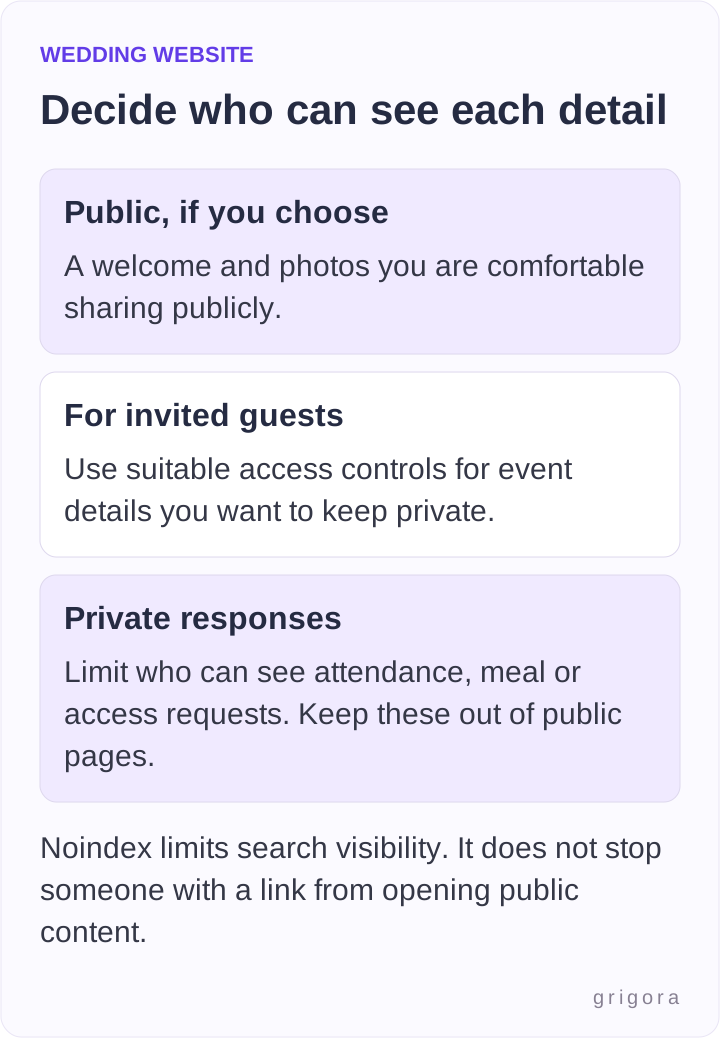
Keep private home addresses, guest contact lists and individual requests off public pages. Agree with your partner what you want to share about your story and photos. You can provide useful information without publishing every personal detail or keeping it online indefinitely.
Also worth readingHow to Rewrite Website Content: A Worked Example and Checklist
Make the website usable for your guests
Use readable text, clear headings and labels such as Schedule, Travel and RSVP. Do not put all essential information inside a decorative image that is difficult to read on a phone. Keep key information available as text, describe meaningful images and give visitors control over music or video.
Try the site on a phone and a larger screen, including the response form, directions and contact route. Check keyboard use and that instructions, errors and confirmation messages are understandable. A responsive template is a starting point; it does not establish that your specific photos, text and form are usable.
Offer a phone, paper or personal-contact alternative for anyone who cannot or does not want to use the site. Avoid assuming this is only an age issue. Make sure offline replies and important updates reach the same organizer record. If you print a QR code, include a readable address as well and test the code from the actual printed proof.
Pick a platform by requirements
Compare the functions you need before spending time on a design. A wedding-focused service may provide a guest-list workflow; a general website builder may offer more control over information pages and require an external response tool. Check current features and limits in the actual plan.
- Guest access: which pages, files, events and forms can be restricted, and how guests recover access.
- Responses: invitation/household rules, confirmation, edits, duplicates and export or organizer access.
- Publishing: a stable address, simple navigation, phone readability and any registry or map links you need.
- Costs and duration: platform/domain renewals, optional features, storage, support and what happens after cancellation.
- Control and records: who can edit, how to keep a backup of important content and how to remove guest information afterward.
You can use Grigora for the information and layout through the page-building controls available in your account. Set up the schedule, travel guidance, FAQ and optional personal sections, then connect or link a suitable response route. Check actual form delivery and guest-management needs; a general form is not automatically a complete RSVP or seating-planning system.
A memorable custom domain is optional. A short platform address may be sufficient. If you buy a domain, check the price, renewal and the plan needed to connect it. Keep the address stable once it is printed or sent to guests, and avoid assuming a link will remain available after a plan or domain expires.
Test one complete guest journey before sharing
Use a test entry and walk through the process as a guest. These are checks to perform on your chosen setup, not claims that a particular platform has passed them. Remove test responses before relying on the real guest record.
| Check | What a successful result should establish |
|---|---|
| Open the shared address while signed out | A guest sees the intended welcome or access prompt, not an unpublished page or owner-only view. |
| Find the schedule and directions | The correct event, local time, address and practical instructions are readable on a phone. |
| Try the intended invitation or household | Only the appropriate events and permitted people can be answered for, if that restriction is part of your chosen system. |
| Send an attendance or decline response | The guest gets an understandable result and the organizer can verify the stored response. |
| Try an edit, duplicate or error | The actual behavior is clear, and you have a way to resolve mistakes without losing the record. |
| Check a private question or request | The response goes to the intended organizer and is not exposed on public pages or broadly shared files. |
| Use the alternative contact route | A guest who cannot use the form can still reply, and the organizer records the answer consistently. |
Maintain the details before and after the wedding
Assign an owner for the site and agree a manageable review routine around real changes and deadlines. Check dates, addresses, booking links and the response deadline before sharing the link. Keep a contact route available for urgent questions; do not rely on guests refreshing the page at the right moment.
After the wedding, you may choose to post a small photo selection or a thank-you message. Check image rights and guests’ privacy before doing so. Export or save content you want to keep, remove information you no longer need, and review upcoming renewals. A hosted website is not a promise of a permanent archive.
The best reason to have a wedding website is that it makes something easier for your guests and the people organizing the event. Start with accurate details and a reliable response route, then add personal touches that you both enjoy.
Frequently asked questions
No. It is useful when a central place for details and responses helps your guests and organizers. A small event or another reliable communication method may not need a website. Choose what works for your situation.
It can complement invitations and hold current details. Decide how your guests will receive the original information, and communicate important changes directly. Publishing an update does not prove everyone saw it.
Not automatically. Confirm invitation and household rules, event restrictions, delivery, confirmations, edits and organizer records. A general form may only collect submissions; use a suitable dedicated tool or another process if you need more.
No. Noindex and search-visibility settings do not prevent direct visitors from opening public content. Use appropriate access controls for private details, check the signed-out view and keep individual responses private.
Only if it is useful to you. A platform address may be enough. Compare initial and renewal costs and the plan needed to connect a domain, and keep the shared address working for as long as guests need it.
Decide what to retain, save a separate copy of important content, remove guest details you no longer need and check renewals. You may keep a private keepsake or a limited photo page, but do not assume hosting or access lasts forever.
Practical writing on building a site, growing an audience and sending email people open. No more than one a week.

Karan Singh Bhakuni
118 articles on the Grigora blog
More on Guides

Guides
Can You Use Any Image on Your Website? A Permission Checklist
Check the rights before publishing an image. Compare stock, Creative Commons, public domain and original work, then record the permission and any conditions.
6 Sept 20239 min read
Guides
How to Rewrite Website Content: A Worked Example and Checklist
Decide what needs changing, draft from verified facts and test the published page. Includes a copyable rewrite brief and an annotated fictional service-page example.
4 Sept 202311 min read

Guides
Can Real Estate Agents Have Their Own Websites? Approval Checklist
Separate owning a domain from operating an approved real-estate advertising site. Includes a broker-review worksheet, listing and inquiry checks, budget questions and a brokerage-change handover plan.
1 Sept 202311 min read