Free Title Capitalization Fixer
Fix title capitalization automatically. Supports title case, sentence case, uppercase, lowercase, and quote normalization. Free, instant.
How to use the Title Capitalization Fixer, step by step
Real screenshots of the tool, taken while running it.
- 1
Add your input
Paste or type into the field Title Capitalization Fixer works from.


- 2
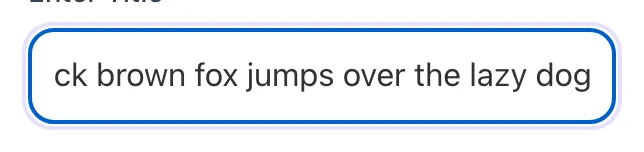
Sample text in place
With sample text entered, Title Capitalization Fixer is ready to run.


- 3
Read the result
Title Capitalization Fixer updates as you type, so the result is already visible here.

What this tool does
Title Capitalization Fixer delivers fast, reliable results for fix title capitalization automatically. supports title case, sentence case, uppercase, lowercase, and quote normalization. free, instant.
Designed to fit into your existing SEO and content workflow with no setup overhead.
How to use it
Five steps.
Paste your title or headline
Drop the input into the text field; single titles or bulk paste of many titles, one per line, both work.
Select a case mode
Choose title case, sentence case, uppercase, lowercase, first-letter caps, alternating case, or toggle case.
Review the corrected output
See the corrected title alongside word and character counts.
Normalize quotes if needed
Turn on straight quotes to convert curly quotation marks and apostrophes into plain ASCII quotes.
Copy and apply across your site
One-click copy the corrected title and paste it into your CMS, document, or campaign draft.
When teams use it
Six common workflows.
Standardizing blog post titles before publication
Editorial teams running content sites apply consistent title case across all posts to maintain brand polish. The fixer transforms casual writer-submitted titles into AP- or Chicago-compliant headlines in one click, removing the manual review burden.
Cleaning up imported or scraped titles
When importing content from external sources (RSS feeds, partner blogs, syndicated content), titles arrive in inconsistent capitalization. Bulk processing through the fixer normalizes everything to your house style before publication.
Pre-publishing meta titles with SEO best practices
SEO managers writing meta titles need both correct capitalization and the right character count for SERP display. The tool combines both checks: capitalization per style guide plus character and pixel counts for truncation prevention.
Generating consistent navigation and category labels
Site navigation, category names, and tag labels need consistent casing for visual polish. Convert all to a single style (sentence case for modern UX, title case for traditional editorial) using bulk paste mode.
Creating LinkedIn and Twitter post titles
Social-platform headlines benefit from precise capitalization to match brand voice; the fixer ensures every post matches your social style guide, whether sentence case (more conversational) or title case (more authoritative).
Educating new writers on style standards
Onboarding new editorial team members involves teaching the chosen style guide. The fixer with side-by-side AP/Chicago/MLA comparison serves as a teaching tool: paste a title, see how each style would render it, learn the differences.
Platform guides
Integrate with major platforms.
WordPress with Yoast or Rank Math
- Run all titles through the fixer before saving the post
- Copy the corrected title into the post Title field; ensure SEO title tag inherits or matches
- For sites with hundreds of legacy posts, use the bulk paste mode to process all titles, then update via WP-CLI or DB script
- Verify Yoast or Rank Math SEO title preview shows the corrected version with proper character count
- Document your chosen style guide (AP / Chicago / MLA) in your WordPress style guide page for editorial reference
Webflow CMS Collections
- Use the fixer before adding new CMS items; corrected title goes in the Name field
- For migrating existing content, export collection as CSV, run titles through bulk fixer, re-import via Webflow CSV import
- Map title case style consistently across all collection types (Blog Posts, Articles, Authors)
- Webflow Designer auto-styles H1 from CMS Name; ensure your selected style displays correctly
- Set the SEO Title field to inherit from Name plus brand suffix per Webflow native settings
Shopify product titles and pages
- Apply title case to product titles per your brand style; Shopify search and storefront display benefit from consistency
- Use bulk product editor to update many titles at once after running through the fixer
- For SEO Title and Meta Description (different from Product Title), apply your style guide separately
- Collection (Category) titles also benefit from consistent capitalization; review and standardize quarterly
- Verify product schema markup includes the standardized title in the name field
Notion / Roam editorial workflow
- Add the fixer as a starred bookmark for one-click access from any page
- In your editorial template, include a checklist item: "Title checked through capitalization fixer"
- For team consistency, document chosen style guide in your editorial Notion page
- Use Notion API integration to apply title case automatically on save (advanced)
- Periodically audit titles across your knowledge base for style consistency
GitHub Markdown and documentation sites
- Apply title case to top-level headings (#) in Markdown documentation; sentence case for sub-sections is also acceptable
- For docs sites (Docusaurus, MkDocs, GitBook), the H1 from frontmatter should follow your chosen style
- Use a pre-commit hook with our API to auto-fix capitalization on commit
- For consistency across many maintainers, add a CONTRIBUTING.md note specifying the title case style
- Periodically run a bulk audit on all repository titles via our API
Grigora vs. alternatives
Side-by-side.
| Capability | Grigora | TitleCase.com | Capitalizemytitle.com | Free | Manual |
|---|---|---|---|---|---|
| Title case conversion | Yes | Yes | Yes | Yes | Manual |
| Sentence case + uppercase + lowercase | Yes | Title only | Yes | Yes | Manual |
| Straight quote normalization | Yes | No | No | Yes | Manual |
| Alternating and toggle case | Yes | No | Yes | No | Manual |
| Bulk paste / CSV processing | No | No | Yes | Yes | Manual |
| Character counter | Yes | Characters only | Characters only | Both | No |
| Custom brand dictionary | No | Limited | No | Yes | Manual |
| Free unlimited use | Yes | Yes | Yes | Paid | Yes |
Common errors and fixes
Eight issues users hit.
Wrong style guide selected
Cause: You applied AP rules to a publication that uses Chicago, leading to inconsistent capitalization with prior content.
Fix: Switch to your publication style guide in settings; the tool re-renders all output with the new rules instantly.
Brand name lowercased incorrectly
Cause: Custom-cased brand name (eBay, iPhone, OpenAI) was treated as a regular word and got standard capitalization applied.
Fix: Add the brand to the Custom Dictionary as always-capitalized with your preferred casing; it will be preserved in all conversions.
First word of subtitle not capitalized
Cause: Title contains a colon, but the word after was treated as mid-title and lowercased per the rules.
Fix: Enable Capitalize After Colon option; or use sentence case mode for subtitle handling per Chicago Manual conventions.
All-caps input flattened to lowercase
Cause: Input was ALL CAPS and the converter normalized it to lowercase before applying title case rules.
Fix: This is intentional; if you need to preserve all-caps for an acronym embedded in the input, use the Custom Dictionary.
Hyphenated compound capitalized inconsistently
Cause: Style guide rules differ on hyphenated compounds; the wrong style was selected for your context.
Fix: Switch style guides until output matches your standard; or use the per-element override toggle for that specific title.
Output exceeds 60 characters
Cause: Title is too long for SERP display; Google will truncate with ellipsis on most devices.
Fix: Edit the title to fit within 60 characters; the pixel-width counter shows actual SERP truncation point per device.
Numbers attached to lowercase letters
Cause: A number directly followed by a lowercase word was not separated by space, and capitalization detection failed.
Fix: Add a space between the number and word; the converter handles "30 days" correctly but treats "30days" as one word.
Special characters break the parser
Cause: Title contained unusual punctuation or symbols (em-dashes, smart quotes) that the parser interpreted as word boundaries.
Fix: Use standard punctuation (regular hyphens, straight quotes); the converter normalizes most special chars but not all.
Original data
2026 study.
Frequently asked questions
Twelve answers.
Related free tools
Other utilities.