
Create Your Nutritionist Website with AI in Seconds
Create a professional online presence that attracts clients and showcases your expertise with Grigora's intuitive builder.
Or start from a Nutritionist brief
Nutritionist AI templates to start from
Explore designs for a Nutritionist site. Open one to preview it, or describe your site above and let the AI build one from scratch.
How to build a nutritionist website
A nutritionist website explains who you help, what a package includes and how to get in touch, and Grigora builds one for dietitians and nutrition coaches from a description of your practice. The AI drafts pages, copy and images from 130+ templates, and you edit visually with no code. Recipes fit a directory collection with typed fields for prep time, calories and diet type, which keeps them browsable instead of buried in a blog feed. Sell meal plans and e-books as digital downloads, consultation packages as one-off products, and ongoing coaching as a monthly Stripe subscription, all paid into your own Stripe or Razorpay account. Grow a list with a signup form, gate a starter guide with a content locker, and send newsletters from the same place. Paid plans start at $15 a month billed annually after a free trial.
Show your nutritionist the way people want to see it
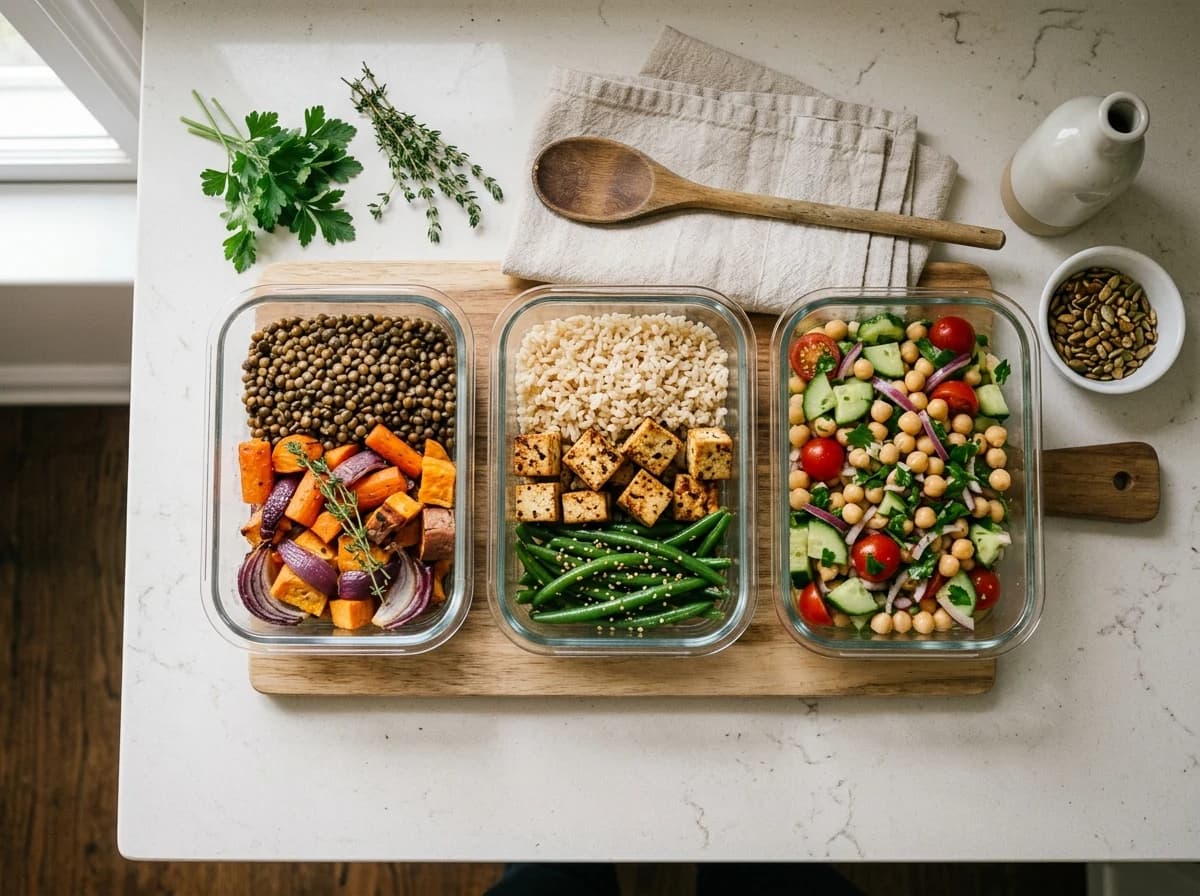
Photography carries a nutritionist site further than any layout does. Grigora gives every image a place to sit, keeps it sharp on a phone, and loads it without slowing the page.



Why Nutritionists choose Grigora over generic builders
Generic tools like Wix or Squarespace aren't built for health professionals. We are. See the difference a dedicated platform makes.
Wix, Squarespace, etc.
All-in-one Platform
Get found when clients search 'nutritionist near me'
Grigora automatically handles advanced technical SEO, including Schema.org markup and Core Web Vitals optimization, to help your nutritionist website rank #1.
Local SEO Auto-Pilot
Automatically optimize for local searches, ensuring potential clients in your area find you first.
Health & Wellness Schema
Implement specific Schema.org markup for health professionals, boosting your visibility in rich search results.
Nutritionist Website Guide
What Every Nutritionist Website Needs to Succeed
For nutritionists and dietitians, your website is your professional clinic, crucial for building trust, showcasing expertise, and attracting clients seeking guidance on health and wellness. It needs to establish authority and clearly outline your approach, differentiating you from generic health advice found online.
Services & Specializations
Clearly outline your nutrition services, such as personalized meal plans, dietary counseling, weight management, or specific health condition support (e.g., gut health, sports nutrition). Detail your unique approach.
About Me & Credentials
Establish your authority and build rapport. Share your educational background, certifications, philosophy on nutrition, and personal journey. A professional photo helps clients connect with you.
Client Success Stories & Testimonials
Showcase measurable results! Feature testimonials from satisfied clients, highlighting their transformations and health improvements under your guidance. Real-life success stories are powerful trust-builders.
Booking & Consultation Process
Make it easy for potential clients to schedule an initial consultation. Clearly explain your booking process, what to expect during the first meeting, and any forms they might need to complete beforehand.
Pricing & Packages
Be transparent about your fees. Outline your consultation rates, package deals, and any insurance information. Clear pricing helps manage client expectations and reduces barriers to booking.
Nutrition Blog & Healthy RecipesEstablishes authority and attracts clients!
A blog is vital for positioning yourself as an expert. Share evidence-based nutrition tips, healthy recipes, debunk common myths, or discuss current health trends. This attracts organic traffic and provides immense value to your audience.
Blogging Platform3 Mistakes Nutritionists Make With Their Website
Vague Service Descriptions Without Benefits
Listing 'meal planning' isn't enough. Clients need to understand the 'why' and the 'what for.' Websites that don't explain the benefits (e.g., 'reduce bloating,' 'boost energy') or target specific needs struggle to attract clients.
Lack of Personal Connection/Credentials
In a crowded health space, clients seek trust. A website that hides the nutritionist's qualifications, personal philosophy, or lacks a professional photo fails to build the essential rapport needed for a client-practitioner relationship.
No Clear Call to Action for Consultation
If visitors are interested, they need an obvious next step. Websites that don't prominently feature a 'Book a Consultation' or 'Inquire Now' button, or make the contact process confusing, will lose potential clients.
Ready to nourish your online presence and attract more clients?
Grigora's intuitive drag-and-drop builder, AI website generator, and powerful blogging platform help nutritionists create authoritative, client-converting websites.
Start Building for FreeNo credit card required
Everything you need to run a modern nutritionist
Grigora isn't just a website builder. It's a complete operating system for your online presence.
Meal Plan & Recipe Sharing
Easily upload and share custom meal plans, healthy recipes, and nutritional guides with your clients.
Integrated Blog & Resources
Share your knowledge and establish authority with a built-in blog, featuring articles, tips, and downloadable resources.
Testimonial Showcase
Feature success stories and client testimonials prominently to build trust and attract new clients.
SEO Optimized for Local Search
Ensure your website ranks high for 'nutritionist near me' and related health searches, bringing in local clients.
Secure Client Data Management
Handle sensitive client information with peace of mind, thanks to robust security and privacy features.
From concept to client bookings in minutes
Drag & Drop Design
Choose from stunning templates tailored for nutritionists and customize with ease – no coding required.
Add Your Services & Expertise
Showcase your specialties, client testimonials, and offer online booking for consultations.
Launch & Grow
Publish your professional website instantly and start attracting new clients with built-in SEO.
Add commerce to the website you build.
When selling fits your business, add products, publish branded product pages, take payments, and manage orders through Grigora Commerce.
Flexible catalog
Sell physical goods and digital products with collections, variants, SKUs, pricing, and stock controls.
Checkout that fits
Use connected Stripe or Razorpay checkout, or route buyers through an external checkout URL.
Operational controls
Track inventory, customers, orders, and manual fulfillment; configure shipping and tax settings, discounts, and invoices.
Merchant-controlled operations
Connect your own payment account while keeping carrier, delivery, and tax-compliance decisions in your hands.
Payments are processed by your connected provider; fulfillment and tax compliance remain your responsibility.
Commerce
Overview
Products
Catalog
Variants & stock
Orders
Manage
Payment & fulfillment
Customers
Track
Purchase history
Recent orders
Sample storefront activity
Digital product
Protected download
Physical product
Manual fulfillment
Template product
Delivery complete
Powering thousands of websites and growing







Loved by the health & wellness community
Join thousands of nutritionists and health professionals growing their business with Grigora.
"I started using Grigora because I was tired of juggling different tools for SEO and content creation. What really amazed me was how smart the AI is. It didn’t just build my website, it actually optimized it for me. From keyword suggestions to schema markup, meta tags, and analytics, everything was taken care of."

Hemal B.
"Our website went down unexpectedly, and Grigora made it really easy to get back online quickly. The setup was simple, the dashboard is easy to navigate, and support was responsive when I needed help connecting the domain. Everything’s been working smoothly since."

Firm For The Culture
"Our team trialled Grigora CMS to see if we could speed up client site launches, and we’ve been impressed. The platform offers a solid feature set, templates, flexible content models, and a clean editor, all of which help us deliver projects faster. Deployments are smooth and the built-in performance optimizations keep pages loading quickly."

Mark Dalton
"Grigora is fast, reliable, and incredibly easy to use, even for someone building a website for the first time. The interface feels smooth and intuitive, and the AI Builder can generate beautiful websites in minutes. I’m also impressed by the team’s transparency and responsiveness."

Satoshi K.
"Easy to use! 5 stars."

Jenna Milesi
"I’ve been genuinely impressed. The platform is blazing fast, intuitive, and extremely easy to use, even for someone who doesn’t have a technical background. Grigora makes building websites feel effortless. I highly recommend Grigora to freelancers, entrepreneurs, and agencies."

Adam Bri
"Easy Setup to produce a professional-looking website in under an hour using drag-and-drop tools and smart templates. All-in-One Platform that hosts, SSL, CDN, and SEO tools are built in, no need to manage separate subscriptions. Helpful support team assists with questions."

Matthew R.
"This platform is incredible! It combines the power of AI with the intelligence of a standard website builder. It's truly powerful for creating and tweaking pages. I'm so happy I got it."

Barry Pelkey
"I moved my wordpress blog site to Grigora, since wordpress got to complex to maintain. Compelling argument: Grigora can import all your posts from wordpress. The Grigora team is really innovative. They integrated SEO as part of the fabric of the system."

Richard de Laat
"After years of juggling WordPress, plugins, and separate tools for SEO, email, and hosting, discovering Grigora felt like a revelation. The interface is clean and fluid, the drag-and-drop builder is intuitive, and the loading speed is outstanding."

Paul Stefan Jureschi
"I've used a lot of website builders, but it's always taken me a lot of time to get things integrated. Grigora offers website building and hosting, email marketing, and basic keyword research in a single interface. It's easy to use and offers migration from Wordpress."

Jessica B.
"Grigora brings together web development, SEO, and email marketing in one powerful ecosystem. This one stands out for how smoothly it integrates AI into the creative process. The ability to auto-generate FAQs and blog posts with built-in schema markup saves me hours of manual optimization."

POCHOLO G.
"I am not very experienced with web designing, but Grigora has proven to be a very helpful website builder with AI features. I no longer have to rely on other web developers for my hotel business, as I can now create and manage my website on my own. It also allows me to handle SEO, which saves both time and money."

RAVINDER A.
"Grigora positions itself as an all-in-one platform designed to make website creation radically faster. It blends the simplicity of Webflow or Squarespace with the depth of WordPress, but with an emphasis on speed, built-in SEO, and AI-driven content automation. It feels refreshingly unified."

Kai White
"The ease of building a site. The intuitive interface allows me to quickly customize layouts, add images, and arrange content exactly how I want it. The drag-and-drop functionality operates so smoothly and quickly that it turns the design process into an enjoyable experience. I don't see myself going back to wordpress."

Michael W.
"The ease of use and the excellent onboarding experience from the Grigora team, as well as the intuitive user interface and excellent website design elements makes Grigora a standout. The websites I've generated with them are the best I've ever created."

Herman Louw


Frequently asked questions
Grigora offers a user-friendly drag-and-drop editor with over 50 customizable blocks and 50+ ready-made templates, perfect for nutritionists. You can design a professional, mobile-friendly website to showcase your services, expertise, and client testimonials. Custom domain support, free SSL, CDN, and hosting are included, ensuring a secure and reliable platform for your practice.
Yes, Grigora's intuitive drag-and-drop editor allows for quick and easy content updates. You can add new service descriptions, update pricing, or share healthy recipes through the built-in blogging platform. The directory maker can also be used to list different meal plans or program details, keeping your site fresh and informative.
Grigora includes comprehensive SEO tools to boost your local search visibility. You'll find built-in on-page SEO suggestions, a keyword research tool to target relevant terms like 'nutritionist near me' or 'diet plans,' meta tag customization, and URL optimization. Google Search Console integration also helps you monitor your site's performance.
While Grigora doesn't have a built-in booking system, you can easily embed widgets or links from popular third-party appointment scheduling services (e.g., Calendly, Acuity Scheduling) directly onto your website. This allows clients to book consultations seamlessly, connecting external tools with your Grigora-built site.
Absolutely. Grigora's AI tools can be very helpful. Use the AI website generator for a quick site draft, the AI blog writer to create engaging posts on healthy eating or wellness tips, and AI image generation to create appealing visuals. The AI paragraph rephraser can refine your service descriptions or client success stories.
Grigora's interactive form builder allows you to create custom lead capture forms for inquiries or initial consultations. You can also implement newsletter subscription forms and popups to build an email list. Use the built-in newsletter system to send out health tips, workshop announcements, or special offers, keeping clients engaged.
Use a directory instead of the blog. Grigora's directories are structured content collections built for exactly this: set up a recipe directory with typed fields for image, rich text instructions, dietary tags (option field), prep time, and more, so every recipe follows a consistent structure and clients can browse by category rather than scrolling a feed.
Yes. Grigora Commerce supports digital downloads with protected delivery, so a purchased meal plan PDF or recipe e-book is only accessible to the buyer after checkout through Stripe or Razorpay. If you'd rather price a guide by what a client can afford, pay-what-you-want pricing is also supported.
Yes. List consultation packages as products with one-time purchase pricing, or Stripe subscriptions for ongoing coaching, and take payment through Stripe or Razorpay checkout. If you already use a separate scheduling tool for appointments, you can point a product at an external checkout URL instead, so payment and booking happen wherever makes sense for your workflow.
No. Grigora automatically migrates existing Wix sites over, along with Webflow and Blogger, so your current pages and content move across instead of you rebuilding from scratch.
They serve different jobs. Grigora Mail is a professional inbox on your own domain, like hello@yourpractice.com, starting at $5/month, for one-to-one client email with up to 10 aliases and a built-in AI assistant for drafting replies. The Newsletter and Email Builder is for broadcasting to your list, sending a weekly recipe or nutrition-tips newsletter to everyone subscribed, and it's a separate tool on the same platform.
What people ask about nutritionist websites
Can I charge a monthly fee for ongoing nutrition coaching?
Yes, using Stripe subscription checkout for the recurring payment. Grigora bills the client but does not host a member area, so check-ins, plan delivery and messages happen over email or the tools you already use. Razorpay covers one-time payments such as a single consultation, but not recurring ones.
What should a registered dietitian's website include?
Your credentials and the state you are licensed in near the top, who you work with, whether that is gut health, sports nutrition or diabetes, what each package includes and costs, a short bio with a photo, recipes or articles that show how you think, and one obvious way to enquire.
How do I collect intake details from a new client?
Use a short form on the site for the basics: name, email, goal and how they found you. Keep detailed health history off it, since Grigora is a website platform rather than a health records system and has no client portal. Send your full intake through the secure tool your practice already uses.
How much does a nutritionist website cost?
Starter is $15 a month billed annually, which is $144 a year, and Pro is $25 a month. There is a free trial, not a free forever plan. Meal plan and consultation payments go through your own Stripe or Razorpay account, so their processing fees are charged separately.
Common searches related to nutritionist
- nutritionist website builder
- how to sell meal plans online
- sell pdf diet plans on my website
- website builder for registered dietitians
- nutrition website with recipe directory and blog
- migrate wix nutrition site to new website
- best website platform for nutrition coaches
- accept subscription payments for nutrition coaching website
Other types of websites you can create with AI
Ready to attract more clients to your practice?
Join thousands of nutritionists and health professionals growing their business with Grigora. Launch your stunning, high-performance website by tonight.
14-day free trial • No credit card required • Cancel anytime