
A Nicepage alternative for a hosted website with publishing tools included
Grigora is a Nicepage alternative for teams that want a managed website, CMS, newsletter and store from $12/month billed annually. Nicepage is better suited to offline design and exporting HTML, WordPress or Joomla designs, with plan-dependent commerce features. Choose according to where the site will run and who will maintain the design, CMS and hosting.
Published by Grigora · Updated · Sources and method
Is Grigora the right Nicepage alternative?
Grigora is a Nicepage alternative for teams that want a managed website, CMS, newsletter and store from $12/month billed annually. Nicepage is better suited to offline design and exporting HTML, WordPress or Joomla designs, with plan-dependent commerce features. Choose according to where the site will run and who will maintain the design, CMS and hosting.
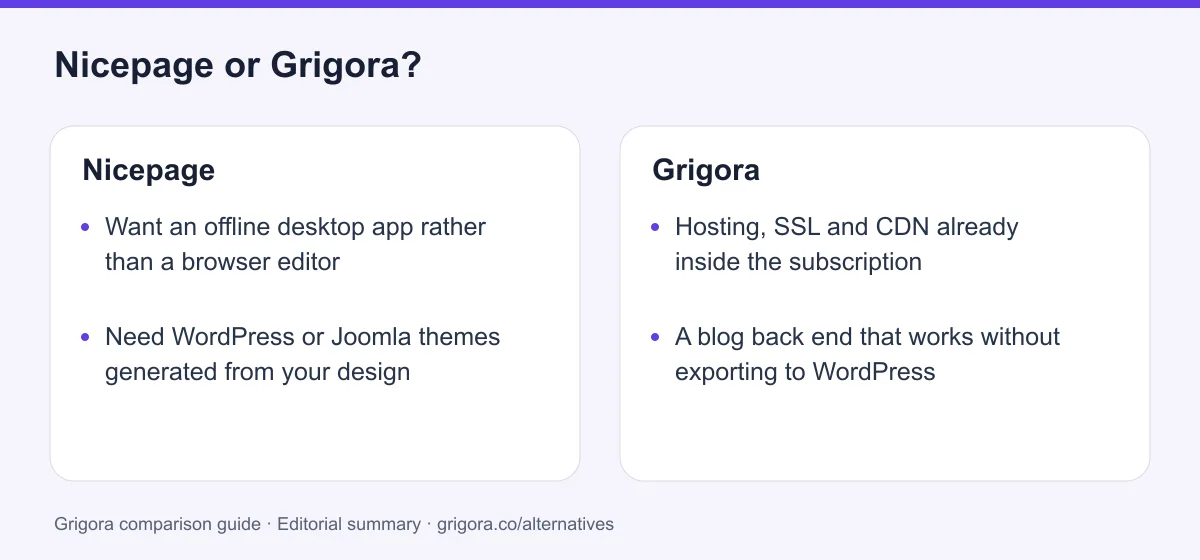
Choose Grigora if you want…
- Hosting, SSL and CDN already inside the subscription
- A blog back end that works without exporting to WordPress
- A checkout that finishes on your own site at 0% platform commission
- A subscriber list and campaigns, not just a form that routes somewhere
- One dashboard instead of a design app plus a host plus a CMS
Stick with Nicepage if you…
- •Want an offline desktop app rather than a browser editor
- •Need WordPress or Joomla themes generated from your design
- •Build many sites and prefer a one-time licence to a subscription
Nicepage or Grigora: the decision in one view
Nicepage alternatives at a glance
How Grigora compares with Nicepage and the platforms people end up exporting into.
Swipe the table sideways to see every column
| Platform | Best for | Free access | Starting price | Sales fees | Data and site portability |
|---|---|---|---|---|---|
| Grigora | Site, CMS, store and email in one hosted plan | Free trial | From $12/mo billed annually | 0% platform fee; Stripe/Razorpay fees apply | Posts/content; rebuild design |
| Nicepage | Offline design, then export to HTML or WordPress | Yes (nicepage.io subdomain) | From $6.75/mo billed annually | Not published; checkout handed off | HTML, WordPress, Joomla |
| WordPress.org | Self-hosted publishing with plugins | Software is free | Hosting extra | Depends on the plugin | Full, self-hosted |
| Wix | Templates and an app market | Yes (Wix ads) | From $17/mo | 0% (processing only) | No |
| Weebly (Square) | Simple sites tied to Square payments | Yes | From $13/mo billed annually | Processing fees only | Static HTML; blog/store data separately |
| Webflow | Designer-grade builds with a CMS | Yes | From $15/mo | 0% except 2% Ecommerce Standard; processing extra | Static code on eligible Workspace; CMS/store separately |
Nicepage figures read on nicepage.com/premium on 11 September 2026. Other list pricing is as of September 2026, billed yearly where offered. Payment-processor fees apply wherever a store exists. Verify current pricing on each provider's site.
Sources for the overview table
- Grigora: official reference 1
- Weebly: official reference 1, official reference 2
- Webflow: official reference 1, official reference 2
Reasons to consider moving from Nicepage to Grigora
Consider these trade-offs against your existing setup before planning a move.
The export still needs a landlord
An exported WordPress or Joomla site needs hosting and software maintenance. Nicepage also offers hosted HTML sites within plan allowances; choose which operating model suits the project.
The blog only works after it leaves
Nicepage's own answer is that blogging is CMS functionality and not its job. On an HTML site you hand-build a page per post. The moment you want categories and pagination you are installing WordPress.
The cart stops at someone else's checkout
Add to cart works. Then the line items go to PayPal or Stripe and payment completes there, with no shipping rates, no tax handling and no stock tracking on the Nicepage side.
The list was never in the product
Forms route to an inbox, a Google Sheet or a Mailchimp form action. Sending anything to those people is a separate tool, a separate bill, and on Personal you only get 250 submissions a month to collect them with.
What Nicepage does well
- A genuine offline desktop app for Windows and macOS
- Exports static HTML, WordPress themes and Joomla templates you own
- Freehand placement with per-breakpoint control, no CSS required
- A one-time licence option and very generous project counts
Where Nicepage falls short
- No blog or CMS for sites Nicepage hosts
- The store ends at a PayPal or Stripe handoff
- No email marketing of any kind
- Visits, storage and domains are metered per site, and support is ticket-only
Grigora vs Nicepage at a glance
Where the design finishes, and what you still have to arrange yourself.
| Feature | Nicepage | Grigora |
|---|---|---|
| Starting paid plan | $6.75/mo billed annually | $12/mo billed annually |
| Offline desktop app | Yes | No |
| Exports a WordPress or Joomla theme | Yes | No |
| Hosting for the finished site | HTML sites only, metered per site | Included with SSL and CDN |
| Blog back end on the hosted site | Needs WordPress or Joomla | Built in |
| Online store | Cart, then PayPal or Stripe handoff | Native checkout, 0% commission |
| Email marketing | No | 2,500 to 25,000 subscribers |
| robots.txt | You create it yourself | Handled |
| Free SEO tools suite | No | Free tools |
Grigora vs Nicepage: feature by feature
A category-by-category breakdown, pricing, AI, design, e-commerce, email, SEO, performance, and support.
The offline desktop app
Fit: NicepageStart with the thing Grigora simply does not have. Nicepage ships a real application for Windows and macOS. Projects sit on your own disk, you can design on a train with no signal, and the same premium plan covers the desktop app, the online builder, the WordPress plugin and the Joomla extension. Grigora is a browser product and always will be.
| Feature | Grigora | Nicepage |
|---|---|---|
| Windows and macOS application | No | Yes |
| Design with no internet connection | No | Yes |
| Project files on your own machine | No | Yes |
| Browser editor | Yes | Online builder as well |
| One plan covers app, plugin and extension | Not applicable | Yes |
Takeaway: If working offline matters to you, this comparison is already decided and Nicepage wins it.
What Nicepage exports, and where it lands
Fit: NicepageThe second honest concession. Nicepage doubles as a theme generator: one design comes out as static HTML, a WordPress theme and page templates, Joomla articles and templates, and on the upper plans WooCommerce and VirtueMart product pages. Grigora has no code export at all. What Nicepage does not do is host the result properly, which is the whole subject of this page.
| Feature | Grigora | Nicepage |
|---|---|---|
| Static HTML export | No | Marked limited on free, full on paid |
| WordPress theme and page templates | No | Yes |
| Joomla articles and templates | No | Business and above |
| WooCommerce and VirtueMart product pages | No | Pro and Ultimate |
| Export your written content | Yes | Yes |
| Host the finished result anywhere | No | Yes |
Takeaway: Nicepage hands over files you own. That is genuinely rare, and it is also the point at which the work starts again.
Freehand placement versus block layout
Fit: NicepageNicepage lets you drop text, images and buttons anywhere on the canvas instead of confining you to sections and columns, then adjust each breakpoint by hand. For a designer who wants pixel control without writing CSS, that is a real capability Grigora's block editor does not offer. Reviewers do flag the trade-off: loosely anchored elements can hurt readability on unusual screen sizes.
| Feature | Grigora | Nicepage |
|---|---|---|
| Drop an element anywhere on the canvas | No | Yes |
| Adjust each breakpoint separately | Phone, tablet and desktop containers | Yes |
| Section and block grid | Yes | Yes |
| Bundled library size | website templates | Reported at around 15,000 templates and blocks |
| Chance of a layout breaking when someone edits it | Low | Reviewers flag absolute positioning |
Takeaway: Nicepage favors flexible positioning; Grigora favors block-based editing. Test the mobile layout in either workflow.
Where the blog posts actually live
Fit: GrigoraNicepage has a Posts panel and Blog Posts blocks, but its own forum guidance is that it does not create blog functionality, because that is CMS functionality. On an HTML site you build a page per post and link them by hand. Categories, tags and pagination arrive only once the design is inside WordPress or Joomla, which is a second platform to host and patch.
| Feature | Grigora | Nicepage |
|---|---|---|
| Blog back end on the hosted site | Yes | No |
| Categories, tags and pagination | Yes | Needs WordPress or Joomla |
| A separate page per post, linked manually | No | Yes, on HTML sites |
| Moderated comments with admin replies | Yes | No |
| Author profiles and directories | Yes | No |
| AI writing for posts | Yes | Not offered for posts |
Takeaway: A Nicepage blog is a WordPress blog wearing a Nicepage theme, and you are the one hosting it.
The cart, and where the checkout finishes
Fit: GrigoraNicepage has products with variations and a working add-to-cart widget, so the shopping part looks right. The checkout is a handoff: the cart popup passes the line items to PayPal or Stripe, or emails the order, and payment completes on their side. The documentation describes no shipping rates, no tax calculation, no stock tracking and no discount codes, and orders arrive as a list in your Nicepage profile.
| Feature | Grigora | Nicepage |
|---|---|---|
| Checkout completes on your own site | Yes | Finishes on PayPal or Stripe |
| Product cap | Catalogue on every paid plan | 10 on Personal, 50 on Business, unlimited on Pro |
| Shipping rates and tax | Yes | Not in the documentation |
| Stock tracking | Yes | Not offered |
| Where orders appear | In the site dashboard | A list in the Nicepage profile |
| Platform commission | 0% | Not published either way |
Takeaway: Nicepage builds the shop window. Somebody else runs the till, and there is no e-commerce at all on the free plan.
Form routing versus a subscriber list
Fit: GrigoraThere is no newsletter, campaign, automation or broadcast feature anywhere in Nicepage. What exists is form routing: a submission can go to one or more email addresses, a Google Sheet, a URL or PHP script, Contact Form 7, a Joomla form, or a Mailchimp form action URL. Nicepage's own documentation notes that select, checkbox and radio fields do not survive the Mailchimp submission.
| Feature | Grigora | Nicepage |
|---|---|---|
| Subscriber list inside the platform | Yes | No |
| Campaign builder | Yes | No |
| Automations and segmentation | Yes | No |
| Where a form submission goes | Into the list, or your inbox | Email, Sheets, a URL, or a Mailchimp form action |
| Form submission allowance | Included with the plan | 50 lifetime on free, 250/month on Personal |
| Professional mailbox | From $5 per mailbox | Separate provider |
Takeaway: Even lead capture has a ceiling on Nicepage, and nothing in the product can send to the leads you captured.
Visits, storage and domains, metered per site
Fit: GrigoraIf you do host with Nicepage rather than exporting, every tier is metered per site rather than per account. Visits, storage and connected domains all have numbers against them, and the FAQ is explicit that hosting covers HTML sites created with Nicepage only, not regular hosting for PHP, JS and other files. Grigora also has plan-based bandwidth, storage and page allowances.
| Feature | Grigora | Nicepage |
|---|---|---|
| Monthly visits per site | Plans counted in sites, not visits | 1,000 on free, up to 1,000,000 on Ultimate |
| Storage per site | Included with hosting | 250 MB to 10 GB |
| Connected custom domains | 1 site on Starter, 5 on Business | 1 on Personal, 3 on Business, 5 on Pro |
| Custom domain on the free tier | No | No |
| Hosting for PHP or other files | Managed, no server to run | Not provided |
| If a paid plan lapses | Check trial and subscription expiry terms | Reverts to Starter, domain disconnected, site stays up 12 months |
Takeaway: Compare expected visits, storage and forms against the hosting allowance; a visitor quota does not predict sales.
Meta fields, sitemaps and the missing robots.txt
Fit: GrigoraNicepage covers the on-page basics and stops. There is a per-site and per-page SEO tab for title, description, keywords and canonical, plus a free-text Meta Tags box where you type anything else yourself, including Open Graph tags. A sitemap is generated on export. Nicepage does not generate robots.txt and tells users to create it themselves, and Google Analytics and Tag Manager fields are a premium row.
| Feature | Grigora | Nicepage |
|---|---|---|
| Title, description and canonical fields | Yes | Yes |
| Sitemap | Yes | Generated on export |
| robots.txt | Yes | You create it yourself |
| Schema and structured data controls | Yes | Type the tags by hand |
| Google Analytics and Tag Manager fields | Custom code injection | Premium plans only |
| Free SEO tools suite | Free tools | No |
Takeaway: Nicepage gives you the fields. It does not give you anything that checks whether you filled them in well.
Licence maths when you ship many sites
Depends on your needsNicepage offers one-time licences at $89, $169, $269 and $439 alongside subscriptions. Its export and licensing model can suit agencies producing many designs. Hosting allowances depend on the selected package, and exported WordPress or Joomla sites need their own runtime and maintenance. Compare the full running-site cost with a managed platform.
| Feature | Grigora | Nicepage |
|---|---|---|
| One-time licence option | No | $89 to $439 |
| Projects per plan | 1 to 5 sites | 5 to unlimited |
| Hosting for those sites | Included | Metered, or bring your own host |
| White label | $199/mo plan | Ultimate plan only |
| Client edits their own content | Block editor and CMS | Depends where you exported it |
Takeaway: Include hosting, CMS operations and any required extensions in the cost comparison; the lower-cost option depends on your setup.
Explore Grigora before switching from Nicepage
Current public product pages and plans, so you can inspect what you would be moving to. Open any image at full size.

Grigora vs Nicepage pricing
Nicepage prices the design tool. Price the hosting, the CMS and the email tool next to it and the comparison changes.
Site, CMS, store and newsletter in one plan
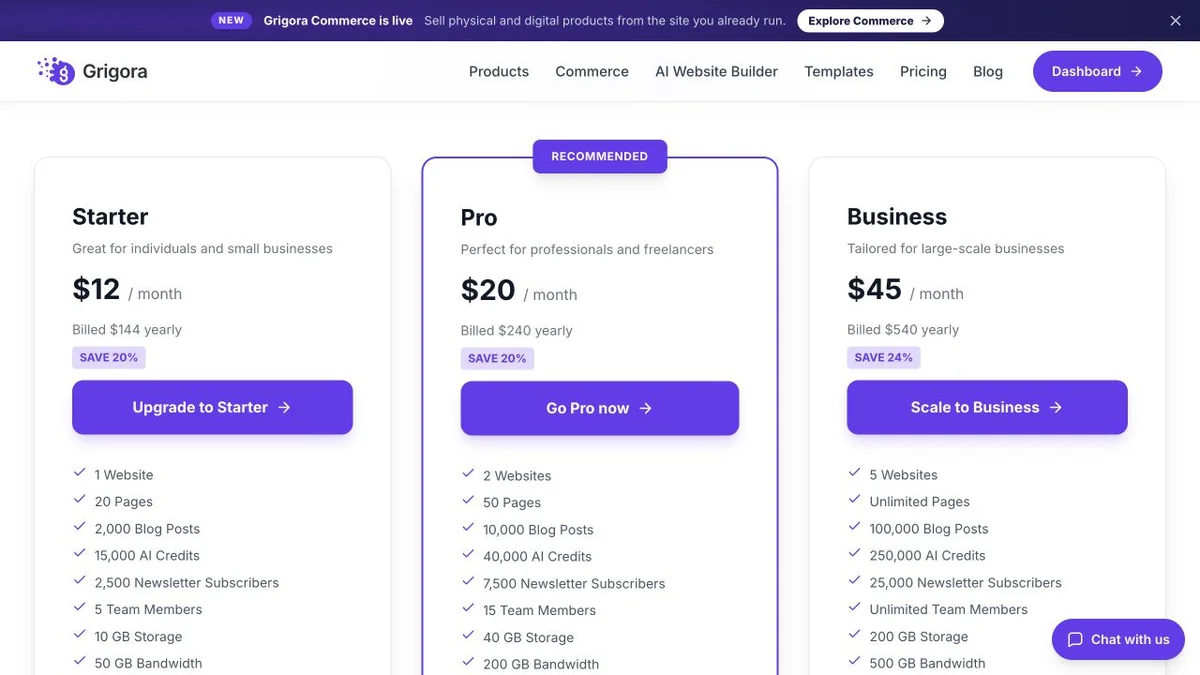
Grigora Starter, Pro and Business rates are $12, $20 and $45 per month billed annually ($144, $240 and $540 per year), or $15, $25 and $59 month to month. Plan limits apply to sites, storage, bandwidth, AI credits and newsletter subscribers. Payment-provider fees and optional paid services are additional.
Design and export tools, with plan-dependent HTML hosting
Prices read live on nicepage.com/premium on 11 September 2026. The page displays a per-month figure labelled 'Billed annually' and never shows a yearly total, so no annual total is quoted here. A one-time licence is offered instead of subscribing, at $89, $169, $269 and $439. Ultimate is $31.75/mo. Renewal pricing is stated two different ways on the same page, so it is left out.
Nicepage Personal at $6.75/mo billed annually is cheaper than Grigora Starter at $12/mo, and it should be: it buys a design tool with one connected domain, ten products and no email marketing. Grigora Starter is the site, the hosting, the CMS, the store and 2,500 newsletter subscribers in the same line item.
The real cost: Grigora vs Nicepage
Take a freelancer running one client site with a blog, a small shop and a mailing list, for a year. Nicepage covers the design. Everything below the first row is what the export lands on.
| What you pay for | Nicepage | Grigora |
|---|---|---|
| Design tool or platform plan | $6.75 to $18.75/mo billed annually, or $89 to $439 once | $12 to $45/mo billed annually |
| Hosting for the finished site | Own host, or Nicepage HTML hosting metered per site | Included with SSL and CDN |
| Blog with categories and pagination | WordPress or Joomla, installed and patched by you | Included |
| Taking payment | Cart hands off to PayPal or Stripe; commission not published | Native checkout, 0% platform commission |
| Email list and campaigns | Separate email platform | Included, 2,500 to 25,000 subscribers |
| Updates and security after launch | Core, theme and plugin updates are yours | Managed, nothing to patch |
Nicepage genuinely wins the first row, and on a one-time licence it wins it by a wide margin. Payment-processor fees apply wherever a store exists, and Nicepage publishes no platform commission either way. Nicepage figures as listed on nicepage.com/premium, 11 September 2026.
Nicepage and Grigora: public website references
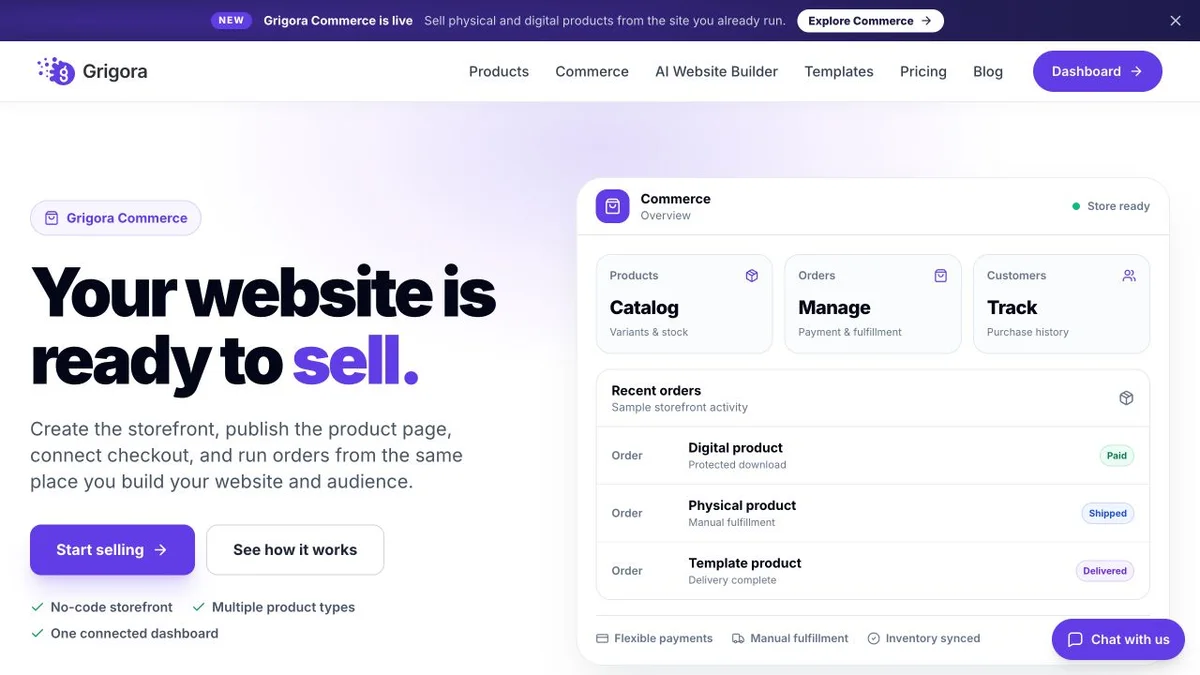
These captures show each product’s public website. See the feature and pricing sections for capabilities and plan details.


Is Grigora the right Nicepage alternative for you?
Where the hosted route wins, and where the export route is still correct.
Nicepage alternative for a business that wants one place to run the site
No export, no host to choose, no WordPress install to patch. The design, the pages, the blog and the shop are the same product, and the bill is one line.
… for publishers who need a working blog back end
Categories, tags, pagination, author profiles and moderated comments are built in, rather than arriving only once a theme has been exported into WordPress or Joomla.
… for shops that want checkout on their own site
Catalogue, variants, stock and digital downloads with 0% platform commission, and the customer never leaves your domain to pay for the thing they just chose.
Nicepage is the right call if you want to own the files
If the deliverable is a WordPress theme, a Joomla template or a folder of HTML you will host yourself, and you want to design it offline on your own machine, Grigora cannot do that and Nicepage does it well.
Which one is right for you?
Choose Grigora if…
- You want hosting, SSL and CDN inside the same subscription
- The blog has to work without a second platform behind it
- The site needs to take payment and finish the sale itself
- You want the mailing list in the same dashboard as the pages
- Nobody on your side wants to patch a WordPress install
Choose Nicepage if…
- •You want an offline desktop app and local project files
- •The output must be a WordPress or Joomla theme you can take away
- •You build many sites and a one-time licence suits you better
How to move from Nicepage to Grigora
Most of the work is deciding what the exported design was going to become. Copy moves by hand or by import, the layout is rebuilt, and the parts you were going to arrange separately are already there.
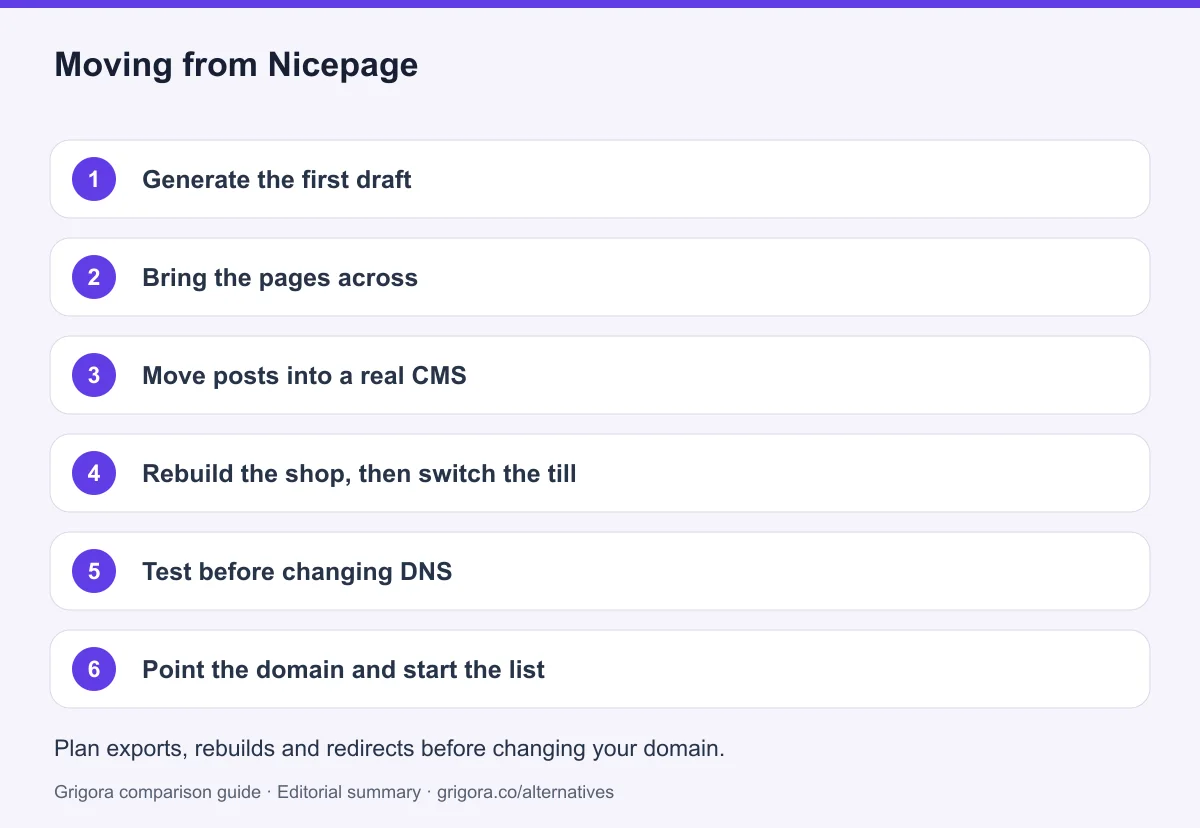
- 1
Generate the first draft
Describe the business in a sentence and Grigora produces pages, layout and copy. This replaces the blank canvas step, not the design judgement.
- 2
Bring the pages across
Work from your Nicepage project or the exported HTML and rebuild home, about, services and contact in the block editor. Reproduce freehand elements as blocks and containers rather than fighting for pixel parity.
- 3
Move posts into a real CMS
If your posts were hand-built HTML pages, recreate them as CMS posts with categories and authors. If they already went into WordPress, export and import them instead of retyping.
- 4
Rebuild the shop, then switch the till
Recreate products and variations in the Grigora catalogue and connect Stripe or Razorpay. Customers now pay without being sent to an external page, and stock is tracked.
- 5
Test before changing DNS
Save the Nicepage project and export appropriate HTML or CMS files. Identify whether posts and orders live in WordPress, Joomla or a static site, and migrate from that source rather than assuming the design file contains the content database. Check page titles, descriptions, canonical URLs, internal links, image alt text, forms and checkout on the new site. Keep an old-to-new URL map, add relevant 301 redirects and monitor indexing after launch; redirects cannot guarantee unchanged rankings.
- 6
Point the domain and start the list
Connect your domain, redirect old URLs to map previous addresses to their closest replacement, import subscribers from whichever email tool your forms were feeding, and cancel the hosting you no longer need.
Why people look for a Nicepage alternative in 2026
Nicepage has a clearer identity than most tools in this category. It is a design application first, sold with the promise that you keep what it makes: static HTML, a WordPress theme, a Joomla template, WooCommerce product pages on the upper plans. It is made by Artisteer Ltd., which has been in this business since 2007, and Nicepage is the successor to that company's earlier flagship, Artisteer, whose site now points people to Nicepage instead. That is a product pivot rather than a wobble, and Nicepage has been shipping since 2018. People rarely leave because the tool is bad. They leave when they realise the tool was only ever meant to be the first half of the job.
The export lands somewhere, and that somewhere is your problem
An exported theme is a file. A file needs a host, a certificate, a domain, and somebody who keeps the software underneath it current. If you take the WordPress route you have also taken on core updates, plugin updates and the backups that go with them. If you stay on Nicepage's own hosting you are limited to HTML sites Nicepage created, and the FAQ is explicit that regular hosting for PHP, JS and other files is not provided. Either way, the design tool has finished and the operations have started.
The blog needs a CMS Nicepage does not claim to be
This is the cleanest limitation in the product, and Nicepage states it itself: it does not create blog functionality, because that is CMS functionality. There is a Posts panel and there are Blog Posts blocks for a title, an article body and a featured image, but on an HTML site you build a separate page per post and link them by hand. Categories, tags and pagination come from WordPress or Joomla, and post counts and pagination need a Blog Template rather than the regular blocks. A publisher who chose Nicepage for the design ends up running a CMS anyway.
The meters are per site, and they are small at the bottom
Every plan puts a number against monthly visits per site, storage per site and connected domains: 1,000 visits and 250 MB on the free Starter, 25,000 visits and one connected domain on Personal, 100,000 visits and three domains on Business. Form submissions are metered too, at 50 for the lifetime of a free site and 250 a month on Personal. None of these are unreasonable for the price. They do mean that the first page which actually works is also the first page to hit a ceiling.
How Grigora compares
Grigora answers a different question. Instead of producing an artefact you then have to run, it is the running thing. You describe the business, an AI generates a first draft across pages, and from that point the site, the blog, the shop and the mailing list are one product with one login and one invoice. There is no export step because there is nowhere to export to.
The hosting, the CMS and the list are already inside the price
Starter at $12 a month billed annually covers one site with hosting, SSL and a CDN, the block editor with custom code injection, a CMS with posts, categories, author profiles, directories and moderated comments, a store with variants, stock and digital downloads at 0% platform commission, and a newsletter with 2,500 subscribers. Pro at $20 and Business at $45 raise the site count, the AI credit allowance and the subscriber limit. Nothing in that list is a separate vendor, and nothing in it needs patching on a Sunday.
Where Nicepage still wins
Ownership and offline work, and they are not small. Grigora has no desktop application, so there is no designing on a plane and no project file on your disk. Grigora does not export code, does not generate a WordPress or Joomla theme, and cannot be self-hosted. If your deliverable is literally a theme, or you build enough sites that a one-time licence at $89 to $439 beats any subscription, Nicepage is the correct tool and this page will not argue. The question is only whether the thing you are making is a design to hand over, or a business that has to be online tomorrow morning.
Frequently asked questions
Grigora is a Nicepage alternative for teams that want a managed website, CMS, newsletter and store from $12/month billed annually. Nicepage is better suited to offline design and exporting HTML, WordPress or Joomla designs, with plan-dependent commerce features. Choose according to where the site will run and who will maintain the design, CMS and hosting.
As read on nicepage.com/premium on 11 September 2026: a free Starter tier, then Personal at $6.75/mo, Business at $12.75/mo, Pro at $18.75/mo and Ultimate at $31.75/mo, all billed annually. There is no monthly billing option; the toggle switches between subscription and a one-time licence at $89, $169, $269 or $439. The page never displays a yearly total, so none is quoted here.
Not for sites it hosts. Nicepage's own guidance is that it does not create blog functionality because that is CMS functionality. There are Posts panels and Blog Posts blocks, but on an HTML site you create a page per post and link them manually, with no category, tag or pagination management. A proper blog means exporting the design into WordPress or Joomla and hosting that yourself. Grigora includes the CMS.
Partly. You get products with variations and a real add-to-cart widget, but the cart passes the line items to PayPal or Stripe and payment completes on their site. The documentation describes no shipping rates, no tax calculation, no stock tracking and no discount codes, and orders appear as a list in your Nicepage profile. Products are capped at 10 on Personal and 50 on Business, and there is no e-commerce on the free plan.
No. There is no list, campaign, automation or broadcast feature in the product. Forms can be routed to an email address, a Google Sheet, a URL or PHP script, Contact Form 7, a Joomla form, or a Mailchimp form action URL, and Nicepage notes that select, checkbox and radio fields do not work with the Mailchimp submission. Grigora includes a subscriber list, campaigns, automations and segmentation on every paid plan.
The content moves; the layout is rebuilt. Copy, images and posts come across from your Nicepage project or exported HTML, and posts already living in WordPress can be exported and imported. Grigora cannot import a Nicepage design file, so the AI first draft plus the block editor does the rebuilding. Redirect the old URLs afterwards to map previous addresses to their closest replacement.
Sources and comparison method
Published by Grigora, one of the products compared here. This is a comparison of public product documentation and published plans. Recommendations reflect the use cases described; they are not independent performance benchmarks. Homepage screenshots show how each product presents itself and do not establish feature availability.
Check the billing term, currency, regional availability, usage limits and add-ons before purchasing. A content export does not necessarily include the design, integrations or a working store. Migration steps need testing on your own site.
- Nicepage plans and licensing
Annual subscription versus one-time license; export, hosting and usage allowances.
- Nicepage features
Desktop, online, WordPress and Joomla workflows and commerce integrations.
- Grigora pricing and included features
Annual and monthly billing, plan allowances, included features and trial terms.
Grigora references: plans and limits, commerce, MCP access, and help documentation.
Compare Grigora with other platforms


Stop exporting. Start publishing.
Hosting, CMS, store and newsletter in one plan from $12/mo. Try Grigora free, no credit card required.
14-day free trial • No credit card required • Cancel anytime