A passing DNS check is useful evidence, but it does not establish inbox placement. The workflow below helps you choose the next check from the symptom instead of changing unrelated settings. It covers individual mailboxes, transactional messages, and subscriber campaigns while keeping their evidence and sending practices distinct.
Grigora Mail Karan Singh BhakuniUpdated 2 Nov 2026
Email Deliverability: Checks and Troubleshooting
Karan Singh BhakuniUpdated 2 Nov 2026- 16 min read
- 14 sections
- 7 comparison tables
- 8 questions answered
The short answer
Email deliverability concerns where a message ends up after you send it, including whether it reaches the recipient’s inbox or is filtered elsewhere. To investigate a problem, first distinguish rejection, temporary deferral, spam placement, and a message the recipient cannot find. Then check the actual sending service, authentication, recipient-provider requirements, and audience or reputation signals.
Need a mailbox on your own domain? Explore Grigora Mail
Contents14 sections

Read next25 Business Email Examples and Templates
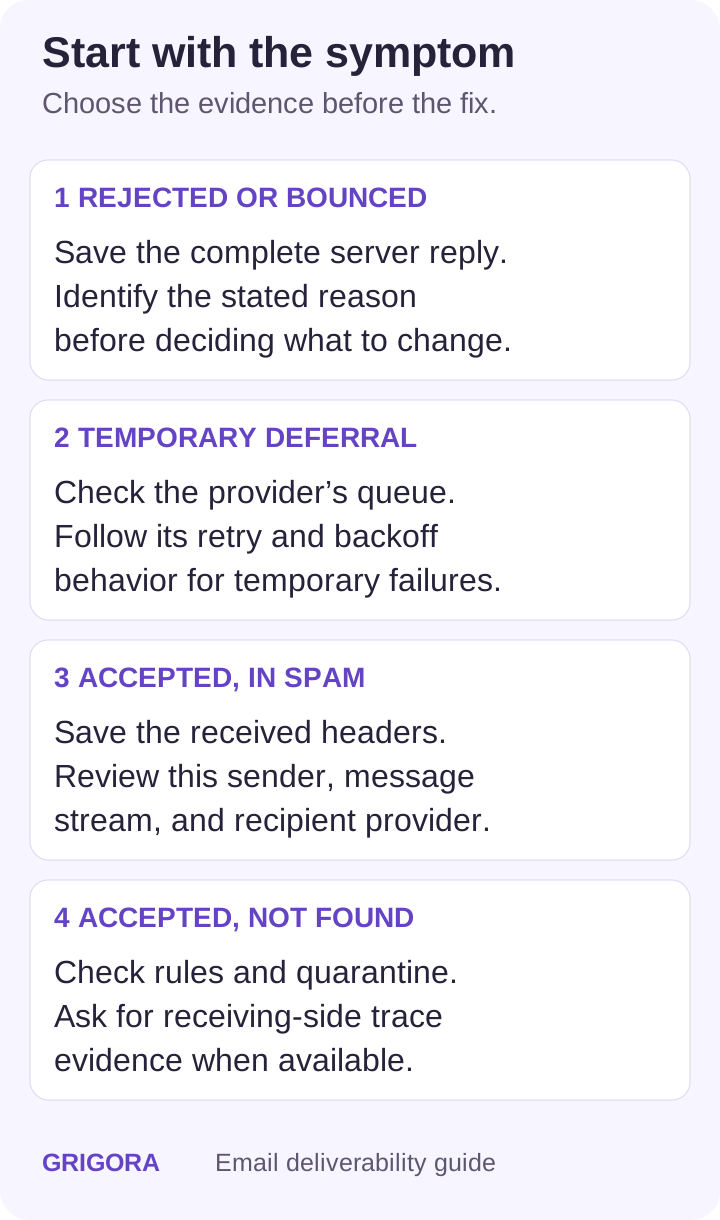
Start here: what happened to the message?
| Observed symptom | Collect first | Useful next check |
|---|---|---|
| Rejected or bounced | Complete server reply, status code, timestamp and sending-service message ID | Identify an address, authentication, policy, or content rejection. |
| Deferred or still queued | Temporary response, queue status and retry history | Check the reported reason and let the sending provider manage retries. |
| Accepted but in spam | A received sample, full headers and affected recipient provider | Check message authentication, sender practices and recipient feedback. |
| Marked delivered but not found | Message ID, recipient address, time and provider trace if available | Check folder rules, quarantine, forwarding and receiving-side trace. |
Delivery, deliverability, and engagement measure different things
A sending platform’s “delivered” status commonly means the receiving server accepted the message. It does not by itself identify the folder the recipient sees. SMTP defines server acceptance and delivery responsibility; the recipient’s filtering and mailbox handling are separate parts of the outcome.
| Evidence or metric | What it can tell you | What it does not establish |
|---|---|---|
| SMTP acceptance or delivery status | The receiving system accepted the message under the provider’s reported definition | Inbox placement or whether a person read it |
| DNS authentication lookup | Whether published records can be found and evaluated | Whether this message was signed correctly on its actual sending path |
| Received-message authentication results | How the receiver evaluated a specific sample | The placement of every message from the domain |
| Controlled inbox-placement test | What happened to the tested messages in the tested accounts | A universal inbox percentage across recipients and future sends |
| Open or click tracking | An activity signal under that system’s measurement method | A complete or certain record of human readership or inbox placement |
For example, Apple Mail Privacy Protection can download remote content in the background when a message arrives. Remote content may also be blocked. Treat an open-tracking change as a reason to investigate alongside other evidence, rather than equating it with a deliverability change.
Step 1: build a small evidence record
- Sending path: the mailbox, website form, application, invoice system, or campaign service that sent the message.
- Identity: visible From address and domain; sending IP when available; relevant envelope-sender and DKIM signing domains.
- Outcome: complete rejection or deferral text, or a received sample showing the actual folder and headers.
- Scope: first observed time, recipient provider, message type, and whether the problem affects one or several sending services.
- Recent change: DNS, provider, sending domain, application release, list source, message design, or volume change.
Keep the evidence for a single representative case together. “Mail is going missing” is difficult to diagnose; “invoice messages from the billing service are rejected by one recipient provider after a DKIM change” identifies a much smaller set of checks. When sharing a case with support, include the identifiers they need and remove unrelated private message content.
Step 2: map the service that actually sent the email
A domain can send mail through several services at once. A working staff mailbox does not establish that a website form or marketing service is configured correctly. List each sender, its purpose, the From domain, and the person responsible for its setup. Compare a failing message with a working message from the same path before changing domain-wide settings.
| Message stream | Where to look | Typical distinction |
|---|---|---|
| Individual mailbox | Mailbox send result, Sent copy, received headers | Mailbox access and the sending route are different from campaign analytics. |
| Transactional application mail | Application/SMTP event, message ID and recipient reply | A job being queued does not establish that SMTP delivery completed. |
| Subscriber campaign | Campaign delivery events, audience source, unsubscribe and complaint handling | List practices and bulk-sender requirements apply to the actual campaign workflow. |
Step 3: check SPF, DKIM, and DMARC on a real sample
| Mechanism | What it checks | Evidence to examine |
|---|---|---|
| SPF | Whether the connecting sender is authorized for the checked envelope-sender domain | SMTP MAIL FROM identity, sending IP and receiver’s SPF result |
| DKIM | Whether a signature verifies for its signing domain and signed message data | DKIM d= domain, selector s=, public key and receiver’s signature result |
| DMARC | Whether a passing SPF or DKIM identity aligns with the visible From domain, under the published policy | Visible From domain, authenticated domains, alignment and receiver’s DMARC result |
SPF: check the envelope identity and record evaluation
SPF checks authorization for an SMTP identity; it does not automatically authenticate the visible From address. Avoid publishing a second competing SPF policy for the same name. Evaluation also limits DNS-querying mechanisms and modifiers, including nested includes, to ten. An excess can cause permerror. Use your sending provider’s current instructions and review the existing record before consolidating services. Do not choose automatic “flattening” or change the final policy solely because a generic checklist suggests it. These rules are defined in the SPF standard, RFC 7208.
DKIM: verify the actual signature, not only the DNS key
A public key in DNS is only part of DKIM setup. The service must sign outgoing messages, and the receiver must be able to verify the signature using the indicated selector and signing domain. Check that a configuration change did not remove or replace a key still in use. Multiple selectors can coexist. A valid signature associates the signing domain with a message; it does not certify that every statement or link is safe. See the DKIM specification.
DMARC: a pass on an unrelated domain may not be enough
For DMARC, a valid SPF or DKIM result must also align with the visible From domain. Bulk-sender policies can require both SPF and DKIM to pass even though DMARC alignment can be satisfied by one. Google’s sender FAQ explains this distinction.
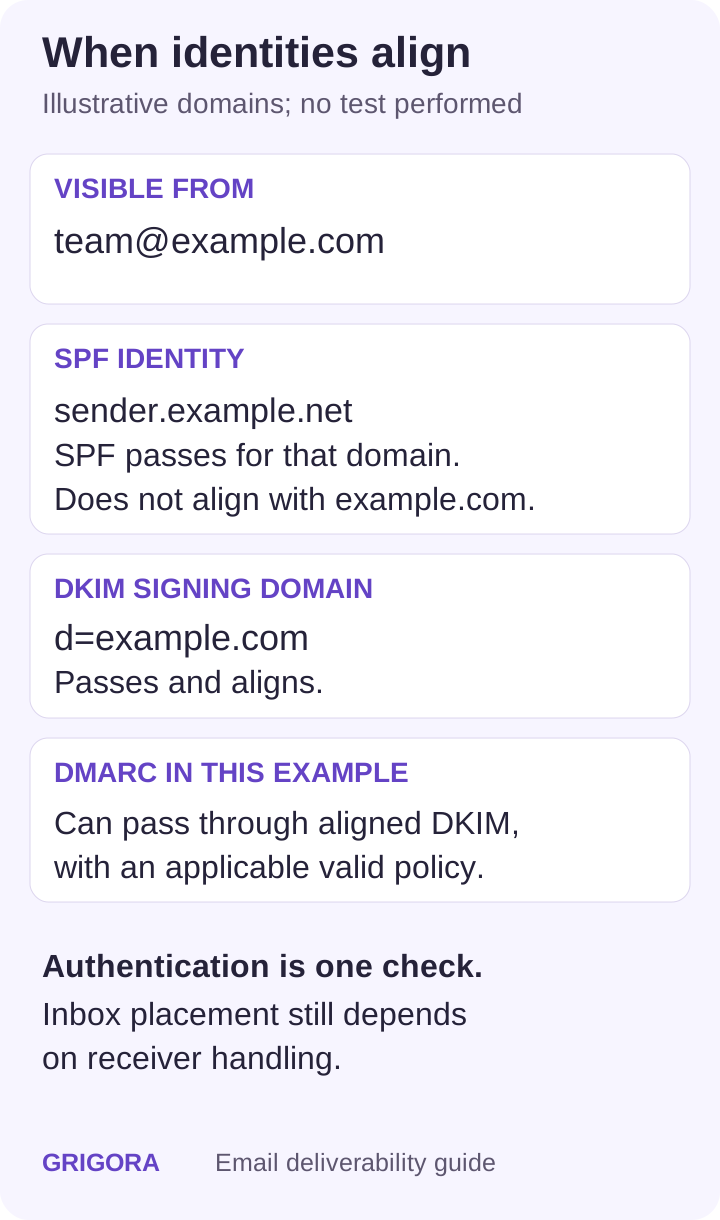
| Illustrative identity | Example value | Meaning in this example |
|---|---|---|
| Visible From | team@example.com | The author domain is example.com. |
| Envelope sender / SPF | bounce@sender.example.net; SPF pass | SPF passes for sender.example.net, which does not align with example.com. |
| DKIM signing domain | d=example.com; DKIM pass | This passing identity aligns with example.com. |
| DMARC | Pass through aligned DKIM, assuming a valid applicable policy | SPF pass on another domain is not the reason for the DMARC pass. |
A DMARC policy communicates how the domain owner wants failures assessed. p=none expresses no handling preference for failures; it does not instruct a receiver to deliver a message. Stricter policies can affect legitimate mail that has not been correctly authenticated and aligned. Inventory the legitimate streams, review aggregate reports, and fix them before deciding on enforcement. Use evidence covering your actual sending cycle rather than automatically progressing from none to quarantine to reject after a fixed number of days. The current DMARC standard, RFC 9989, describes alignment, policy, and staged domain-owner assessment.
Step 4: check the recipient provider’s current requirements
The summary below was checked on 2 November 2026. It highlights important differences; follow the linked provider documentation for the complete requirements and how the provider classifies your sending volume.
| Destination | Key authentication/sender requirements | Primary guidance |
|---|---|---|
| Personal Gmail accounts | All senders need SPF or DKIM, suitable DNS/TLS and low complaint rates. Bulk senders under Google’s daily-volume definition need SPF, DKIM, DMARC and alignment; marketing/subscribed messages need one-click unsubscribe and a visible body link. | Google sender guidelines |
| Yahoo-hosted recipients | All senders need SPF or DKIM and spam complaints below 0.3%. Bulk senders need both SPF and DKIM, a passing DMARC result with at least p=none, and easy unsubscribe for marketing/subscribed mail. Yahoo asks for unsubscribe handling within two days. | Yahoo Sender Hub |
| Microsoft consumer email services | High-volume domains must have SPF and DKIM pass, publish DMARC, and pass DMARC with at least one aligned identity. Microsoft documents 550 5.7.515 for this authentication failure. These consumer-service rules should not be generalized to every Microsoft 365 tenant. | Microsoft sender troubleshooting |
Check each provider’s definition instead of assigning a single numerical threshold to all of them. A provider’s complaint-rate ceiling is also not a target to operate close to. Investigate a worsening trend and its affected audience before expanding a send.
A body unsubscribe link and one-click headers do different jobs
For applicable list mail, confirm that the sending platform implements the required header-based unsubscribe flow as well as a visible body link. A preference page alone is not equivalent to every provider’s one-click requirement. RFC 8058 defines the one-click POST mechanism. Test the actual outgoing message and suppression flow in the campaign platform; do not add a mailbox signature link and assume the system requirement is satisfied.
Also worth readingGroup Email Tools: Which Type Do You Need?
Step 5: investigate the failure the evidence shows
Rejected or deferred messages
Read the entire response, not just the word “bounce.” In enhanced status codes, a 4.x.x class indicates a persistent temporary failure and a 5.x.x class a permanent failure for that delivery attempt. The remaining code and explanatory text distinguish an invalid address from an authentication or policy problem. A 5.x.x policy rejection does not by itself establish that the recipient address is invalid.
Follow the sending provider’s queue and retry behavior for temporary failures. Repeated manual resends can create duplicates or add load while the same condition remains. For a permanent invalid-address result, correct or suppress the address in the relevant workflow. For authentication, policy, or content failures, resolve the cause with the sender/provider rather than deleting every affected contact as though the addresses were wrong.
Accepted mail that appears in spam
Save a received sample and compare its From domain, authentication results, links, and sending path with a working sample. Check which recipient providers are affected. If only one new sending service fails, concentrate on that service’s identity and configuration. If a broad audience is affected after a list or volume change, review the audience source, expectations, complaint signals and sending schedule with the platform responsible.
For subscribed mail, Yahoo recommends mailing people who requested the messages, honoring the intended frequency, and avoiding purchased lists. A validation service may flag some invalid addresses; it does not establish that someone requested your marketing. Use subscription and unsubscribe records to determine the eligible audience.
Use clear, accurate subjects and working links. Keep important information as readable text, and review the actual HTML on the devices and clients relevant to your audience. Improve well-formatted emails for comprehension and usability; there is no fixed image-to-text ratio or list of harmless words that establishes inbox placement. Rendering checks and sending diagnostics answer different questions.
Accepted mail the recipient cannot find
Confirm the exact recipient and send time, then inspect the receiving account’s search results, spam, quarantine, rules and forwarding when the account owner can do so. In a managed organization, the receiving administrator may need the message ID for a trace. A screenshot of the sender’s Sent folder cannot establish where a remote mailbox placed the message.
Step 6: verify the fix on the same sending path
- Record the change and why the evidence supported it.
- Send a representative test through the affected application, mailbox or campaign path, using accounts you control or recipients who agreed to the test.
- Check the resulting server response and received authentication, then observe placement in the tested accounts.
- Compare the same message stream and recipient-provider group after the change. Keep message type, audience and timing reasonably comparable.
- Record the actual test coverage and remaining uncertainty before extending the conclusion to other messages or recipients.
A DNS record update, a corrected signing setup, and a reputation issue have different follow-up evidence. Avoid declaring recovery from a green DNS score alone, and avoid promising that every issue will resolve in 24–48 hours or a set number of weeks. Watch the specific error or placement symptom that started the investigation.
Choose a checker for the question you need answered
| Resource | Useful for | Interpretation limit |
|---|---|---|
| Deliverability Checker | A domain-level view of advertised SPF, DKIM, DMARC, MX, BIMI and blocklist checks | A domain lookup cannot establish every actual message’s signature or inbox placement. |
| MXToolbox deliverability report | Its published workflow asks you to send a message to its test address and then review a report | The service receives that test message. Use appropriate nonsensitive test content and interpret its results for the tested path. |
| Google Postmaster Tools dashboards | Eligible personal-Gmail authentication, spam reports, reputation and delivery-error data | Low-volume days can omit data; a blank dashboard is not evidence that no problem exists. |
| Yahoo Sender Hub | Current sender guidance and complaint-feedback resources | Understand the provider’s scope and denominator before comparing rates. |
| Microsoft SNDS | IP-related sending data for authorized network operators | Access and available data depend on the network and account; it is not a universal per-message inbox test. |
Use a check as a lead to verify, not as a replacement for the underlying record, message, or receiving-provider evidence. Review the report’s scope: domain DNS, a single sent sample, an IP, or a particular test-account set. These scopes should not be presented as interchangeable “deliverability scores.”
Monitor each message stream with defined evidence
Keep a small log by message stream and recipient provider: attempted and accepted messages under the platform’s definitions, rejection/deferral reasons, complaints when available, subscription or suppression changes, and controlled-test observations. Note the dates of DNS, provider and audience changes. This makes a later drop easier to connect to a specific route or event.
Google explains that Postmaster Tools can omit data at low volume and that its spam-rate metric concerns messages delivered to engaged recipients’ inboxes and then marked as spam. A low displayed complaint rate can therefore coexist with substantial filtering. Compare like-for-like metrics rather than treating every platform’s complaint percentage as the same measurement.
What Grigora Mail covers
Grigora Mail provides an individual mailbox on your domain as a separate paid add-on. Its domain setup displays authentication-related DNS instructions and checks published records. Your DNS owner still needs to coordinate those records with other legitimate services using the domain.
Grigora Mail’s mailbox functions are separate from subscriber campaign management. Do not assume the mailbox supplies campaign open/click analytics, complaint dashboards, automated list suppression, or a measured inbox-placement rate. Use the relevant sending platform and provider evidence for those tasks.
A practical deliverability review checklist
- Classify the symptom and retain the complete message or status evidence.
- Identify the actual sending service and all domains involved.
- Check a received sample as well as published DNS.
- Verify the requirements of the affected recipient provider and message type.
- Review audience eligibility, unsubscribe handling and complaint signals for list mail.
- Change the setting supported by the evidence, then retest the same path.
- Record the tested accounts/clients and the limits of the result.
- Continue monitoring the error or placement symptom instead of relying on a single score.
Frequently asked questions
First define the measurement. SMTP acceptance, inbox placement in a test-account set, and open tracking measure different outcomes. Compare the same message stream and recipient-provider group using a consistent method. A universal percentage without a method and denominator is not a useful diagnosis.
Authentication verifies aspects of the sending identity; it does not establish placement. Check the actual receiver results, affected provider, message stream, audience expectations, complaint signals and receiving-account handling. A domain-level lookup is less evidence than a received sample from the failing path.
No. It can identify published-record issues. To observe placement, inspect an actual received message in an appropriate test account or use a controlled test with clearly stated coverage. A successful test does not establish that all future recipients will see the same result.
No. It expresses no domain-owner handling preference for DMARC failures. A receiving system can still filter or reject mail under its own policies. Passing DMARC and meeting a provider’s other sender requirements are separate checks.
Use the evidence from your legitimate sending streams and aggregate reports to decide whether stricter enforcement is appropriate. A fixed one-week schedule can miss infrequent senders such as invoices or occasional application messages. Coordinate any policy change with the domain owner and sending providers.
It depends on the cause and the evidence being measured. Check the corrected records, actual message authentication and server results after a configuration fix. Reputation or audience issues need their own follow-up evidence. Avoid committing to a universal recovery deadline.
Decide with the sending provider based on the message stream, volume consistency, operational capacity and current reputation needs. A dedicated IP gives responsibility for that IP’s sending behavior; changing IPs does not resolve an ineligible audience or a misconfigured domain.
Grigora Mail is an individual mailbox offering. Use the actual newsletter or campaign platform’s suppression, unsubscribe and complaint-handling features for subscriber campaigns. Check those capabilities in that workflow instead of assuming they come with a mailbox.
Related email-writing guides
- Professional email examples for workplace requests and follow-ups.
- Business email templates for client and operational correspondence.
- Group email workflows for distinguishing mailbox messages from mailing-list work.
Practical writing on building a site, growing an audience and sending email people open. No more than one a week.

Karan Singh Bhakuni
118 articles on the Grigora blog
More on Grigora Mail

Grigora Mail
25 Business Email Examples and Templates
Use 25 editable templates for everyday business operations: client updates, invoices, internal announcements, proposals, hiring, and vendor conversations.
28 Feb 202629 min read

Grigora Mail
Group Email Tools: Which Type Do You Need?
A saved contact group, a shared team inbox, a discussion list, and a subscriber campaign solve different problems. Use this workflow comparison, product examples, and pilot checklist to choose…
9 Jan 202613 min read

Guides
How to Make a Blog Private: Settings and Access Checks
Choose real reader access controls, follow current WordPress.com or Blogger settings, and test logged-out access to posts, images, downloads and feeds.
13 Nov 202311 min read