Free Page Word Count Checker
Count the words on any public web page, with scripts, styles and nav menus left out, and see the words it uses most. Free, no signup.
How to use the Page Word Count Checker, step by step
Real screenshots of the tool, taken while running it with the Check Count button.
- 1
Enter a page address
The tool counts the words on one public page at a time.


- 2
A page URL in place
Here, the Grigora Commerce page.


- 3
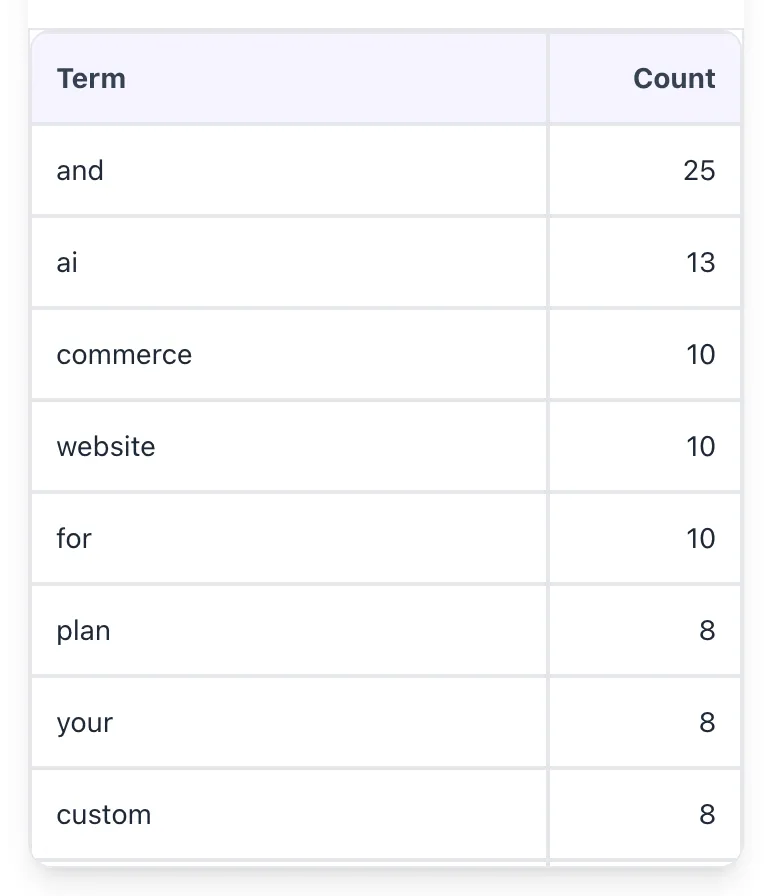
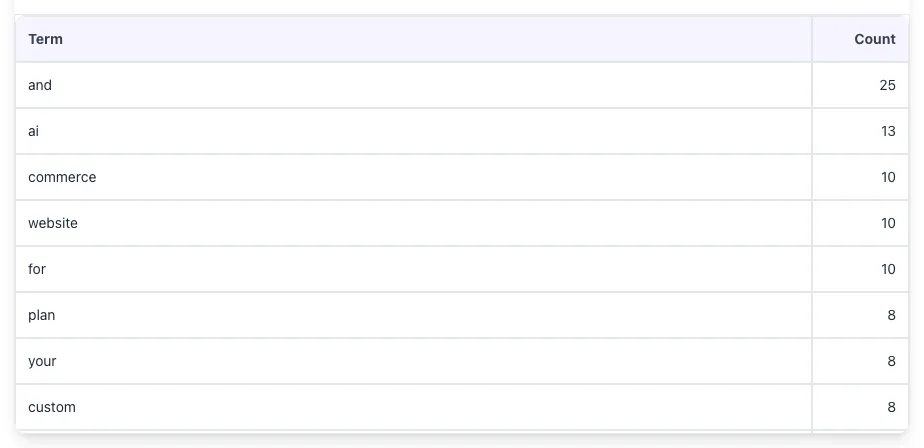
Read the count and the word list
The total leaves out scripts, styles and nav menus. Below it, the words the page uses most, ranked by count.
What this tool does
Page Word Count Checker fetches the page at the URL you enter and counts the words in its body. Scripts, styles, iframes and nav menus are removed first, and so are elements with the class names ads, sidebar, comment, breadcrumb, pagination and toc. Header and footer text outside a nav menu still counts.
Below the total you get every word on the page ranked by how often it appears. The checker reads the HTML the server sends and does not run JavaScript, so text a page adds in the browser is not counted.
How to use it
Four steps.
Paste your URL
Enter any public URL. We fetch the page and remove scripts, styles and navigation menus.
View the count
See the total word count, then every word on the page ranked by how often it appears.
Compare with other pages
Run the pages that rank for your keyword through the checker and compare their totals with yours.
Plan content refresh
Identify gaps and target an expansion that adds genuine new value.
When teams use it
Six common workflows.
SEO consultants benchmarking pages
Compare client page word counts against top-ranking competitors and quantify content gaps in audit deliverables.
Editors planning content refreshes
Spot short pages that are underperforming and prioritize them for expansion in the next quarter.
Content strategists building briefs
Set target word counts for new posts based on observed competitor depth, balancing thoroughness vs production cost.
Writers self-checking output
Check a published post against the target length in the editorial brief.
Agency teams reporting to clients
Record the word count of a client's key pages, one URL at a time, to show how content depth grows over the engagement.
Product teams auditing documentation
Find short docs pages that probably need expansion to satisfy support and developer use cases.
Platform guides
Where to find a word count on major platforms.
WordPress
- Open the post editor.
- Open Document Overview in the top toolbar and choose the Outline tab to see the word count.
- For many posts, list their URLs with WP-CLI: wp post list --field=url.
- Or use the Grigora checker on the published URL for an extracted count.
Webflow
- Publish the page or CMS item.
- Use the Grigora tool on each published URL.
- For bulk audits, export CMS items as CSV and count words in a spreadsheet.
- Alternatively, run Screaming Frog with a custom extraction.
Google Docs
- Open the doc.
- Tools > Word count or Cmd/Ctrl+Shift+C.
- Select a passage first to count just that part.
- For published URLs, use the Grigora tool.
Notion
- Open the page and click the three-dot menu at the top right.
- The word count for the whole page is shown in that menu. Select blocks to count just those.
- For published Notion sites (super.so, etc.), use the Grigora tool on the public URL.
Ghost
- Ghost editor shows word count in the bottom-right corner.
- For published URL audit, paste into the Grigora tool.
- Bulk audits: use the Ghost API and a script to extract content from all posts.
- Track word count growth over time in your editorial spreadsheet.
Common errors and fixes
Eight issues users hit.
Header and footer text in the count
Cause: The checker removes nav menus and elements with the class ads, sidebar or comment, but other header and footer text still counts.
Fix: Read the total as an upper bound. Check a short page on the same site to see how many words the template adds.
JavaScript-rendered content not counted
Cause: A static fetch returned the empty SPA shell with no content.
Fix: The checker does not run JavaScript. Check a server-rendered version of the page, or count the text in your CMS.
Code blocks inflating prose count
Cause: A developer post has long code samples, and code is counted like any other text.
Fix: There is no option to leave code out, so allow for long code samples when comparing with prose-only pages.
Hyphenated words counted differently than expected
Cause: The checker splits on spaces, so "high-quality" counts as one word in the total. Other counters may count it as two.
Fix: Compare totals from the same tool rather than mixing counters across audits.
Comments section adding to count
Cause: Comment threads were included in the page text.
Fix: Elements with the class comment, which WordPress puts on each comment, are left out. Other comment systems may not use it, so subtract those words yourself.
Hidden text counted
Cause: The checker does not apply CSS, so collapsed sections, tab panels and other hidden text still count.
Fix: Expect a higher total on pages with lots of tabbed or collapsed content.
Alt text not in the count
Cause: The checker counts page text, not attributes, so image alt text is never included.
Fix: Review alt text separately; it matters for accessibility, not for this total.
Foreign language miscount
Cause: Chinese, Japanese, or Thai do not use spaces between words.
Fix: The checker splits on spaces, so a run of text in these languages counts as one word. Use a character count instead.
Frequently asked questions
Ten answers.
Related free tools
Other utilities.