Free Image Metadata Cleaner
Strip EXIF, GPS, IPTC, and XMP from a JPEG, PNG, or WebP image. Upload, clean, download. No file retention. Free, no signup.
How to use the Image Metadata Cleaner
A real screenshot of the tool before a file is chosen.
- 1
Choose a file
Upload a JPG, PNG or WebP up to 20 MB, then click Clean Metadata. Nothing is kept on a server longer than the request needs.


- 2
Check the preview
The photo shows in the box so you can check it is the right file.


- 3
Download the clean file
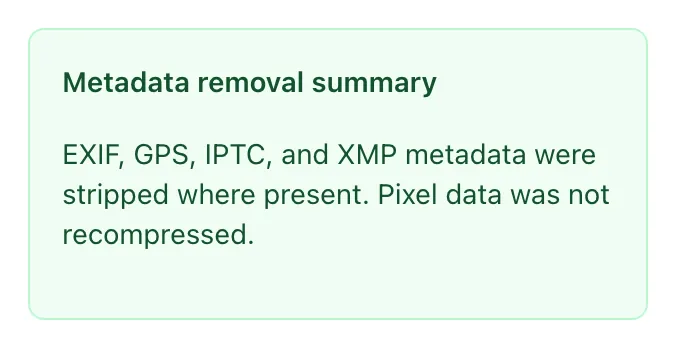
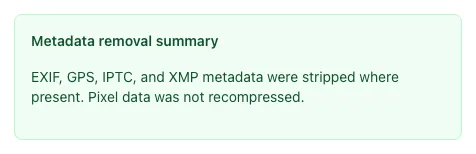
The result names the format and size it saved and lists what was removed. A JPEG or WebP goes through one more lossy save, which is why this 98 KB photo came back at 49 KB.
What the Metadata Cleaner does
Photos taken on phones can embed GPS coordinates, sometimes accurate to your front door. Stripping that metadata before a public upload is basic privacy hygiene.
This tool strips EXIF (GPS included), IPTC, XMP, comments, and the color profile, then re-saves the image in its own format. JPEG and WebP are re-saved at quality 80, and TIFF and AVIF are also saved lossily, so there can be a small quality loss. An 8-bit PNG stays lossless, while a 16-bit PNG or TIFF comes back at 8 bits per channel. A rotated phone photo is turned upright first. Files are processed in memory and discarded immediately.
How to clean metadata
Five steps from photo to privacy-safe.
Upload your image
Click to upload from your device. JPEG, PNG, WebP all work.
Click Clean Metadata
The tool strips EXIF, GPS, IPTC, and XMP and re-saves the image in its own format.
Check the result
See the file size before and after, and a summary of what the tool removes.
Download the clean version
One-click download of the metadata-free image.
Replace your original (optional)
Save the cleaned version, delete the original from your device.
When privacy-aware users use it
Six common workflows.
Pre-publish privacy hygiene
Strip metadata from a photo before posting it publicly. Phone photos can embed GPS coordinates accurate to your front door.
Sharing photos with sensitive timestamps
Photos with embedded timestamps can reveal when you were where. Strip before posting.
Real estate listing photos
Listing photos often have GPS embedded. Strip before MLS upload to avoid revealing the seller's location pattern.
Whistleblower / source protection
Photos shared with journalists need metadata stripped to protect the source's location and device.
Social media auto-stripping
Some platforms strip metadata when you upload, but not all do. Strip it yourself so you are not relying on each platform.
Archive cleanup before public release
Strip private details from photos before an archive goes public. This tool cleans one image at a time; for a whole folder, use exiftool.
Platform-specific setup guides
How to prevent metadata leaks at the source.
iPhone / iOS
- The Camera saves your location in photos while Location Services is on for it. To stop it: Settings > Privacy & Security > Location Services > Camera > Never.
- For a photo you already took: open it in Photos, tap More, tap Adjust Info, tap Adjust Location, then tap No Location.
- When sharing, tap Options in the Share Sheet and turn off Location.
Android
- Many Android camera apps can save your location. To stop it: Camera app > Settings > Save location: off (the wording varies by phone).
- For existing photos, share via this tool then download cleaned version.
- Or use a privacy app like Scrambled Exif (F-Droid).
WordPress
- Use a plugin that strips metadata on upload, or clean each file before you upload it.
- For one-off uploads, run files through this tool first.
- To check, download the published image and open it in an EXIF viewer. Response headers do not show EXIF.
Photoshop
- File > Export > Export As, then set Metadata to None before exporting.
- Save for Web (Legacy) has its own Metadata menu; set it to None as well.
- Not sure what an export kept? Run the file through this tool before you publish.
Lightroom
- Export dialog > Metadata section > set Include to "Copyright Only" and tick "Remove Location Info".
- Avoid "All Metadata" unless you need full traceability.
- To remove the copyright notice as well, run the export through this tool.
Grigora vs. exiftool
Side-by-side feature comparison.
| Capability | Grigora | exiftool |
|---|---|---|
| Price | Free, unlimited | Free, open source |
| Removes EXIF, GPS, IPTC, and XMP | Yes | Yes, with -all= |
| Where the file is processed | Grigora server, not stored | Your own computer |
| Re-encodes the image | Yes, in the same format | No |
| Turns rotated photos upright | Yes | No |
| Formats | JPEG, PNG, WebP, GIF, TIFF, AVIF | A wide variety, including HEIC and camera RAW |
| Batch cleaning | One image at a time | Whole folders in one command |
| Install or signup | Neither | Install required |
Common errors and how to fix them
Eight issues users hit when stripping image metadata.
HEIC photo fails to clean
Cause: The tool cannot read HEIC, the format an iPhone uses when its camera is set to High Efficiency.
Fix: Export the photo as a JPEG first. For new photos, Settings > Camera > Formats > Most Compatible saves JPEG.
Cleaned file is larger than the original
Cause: The tool re-saves the image. A PNG, or a JPEG first saved below quality 80, can come out bigger.
Fix: Expected for some files. If size matters, run the result through the Image Compressor or the Image to WebP Converter.
Upload fails on large file
Cause: Files over 20 MB, and images over about 268 million pixels, are refused.
Fix: Resize or compress the image first, then clean it.
Copyright info disappeared
Cause: IPTC tags stripped along with everything else.
Fix: Re-add copyright via your editing tool, or use an exiftool command to preserve specific tags only.
GPS coordinates still visible after cleaning
Cause: You used a different tool that does not strip GPS.
Fix: Re-clean with this tool. Verify by opening file properties in your OS: GPS section should be empty.
Metadata returns after editing
Cause: Image editor (Lightroom, Photoshop) re-injects metadata on save.
Fix: Strip metadata as the very last step before publishing, after all editing is done.
Browser shows different orientation than file viewer
Cause: EXIF rotation handled differently across viewers.
Fix: Run the file through this tool: it turns the pixels upright and removes the rotation tag, so every viewer shows it the same way.
Animated GIF or WebP stopped moving
Cause: The tool keeps only the first frame of an animation.
Fix: Use exiftool for animated files: it edits the metadata without re-encoding the image.
Frequently asked questions
Twelve answers about image metadata privacy.
Related free tools
Other utilities that pair with the Metadata Cleaner.
Image Compressor
Reduce image file size for page speed.
Try itImage to WebP Converter
Convert to WebP for better compression.
Try itImage Compression Rating Tool
Score image optimization with an A-F grade.
Try itImage Alt Text Generator
Generate descriptive alt text for images.
Try itImage Filename SEO Checker
Validate filenames for SEO friendliness.
Try itImage Color Palette Extractor
Pull dominant colors from any image.
Try itStrip metadata right now
Upload, clean, download. Free, unlimited, no file retention.
Try the Metadata Cleaner