SEO Audit Mini Tool
Quick SEO audit of any URL. Title, description, H1, schema, mobile, page speed. Free, instant.
How to use the SEO Audit Mini Tool, step by step
Real screenshots of the tool, taken while running it with the Run Audit button.
- 1
Add your input
Paste or type into the field SEO Audit Mini Tool works from.

- 2
A page URL in place
With a page URL entered, SEO Audit Mini Tool is ready to run.

- 3
See what Run Audit produces
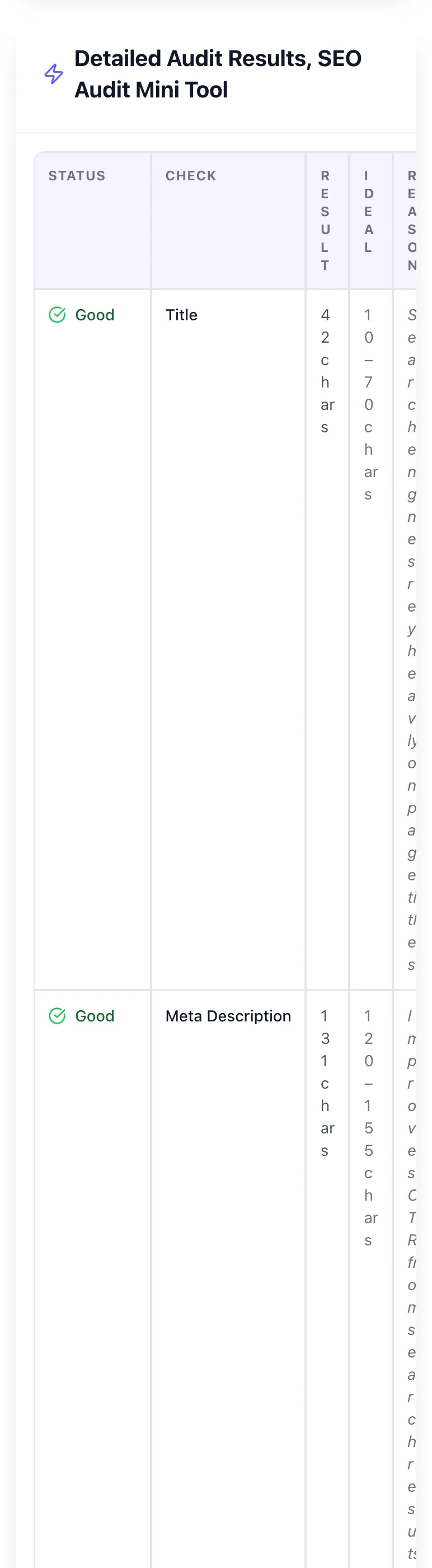
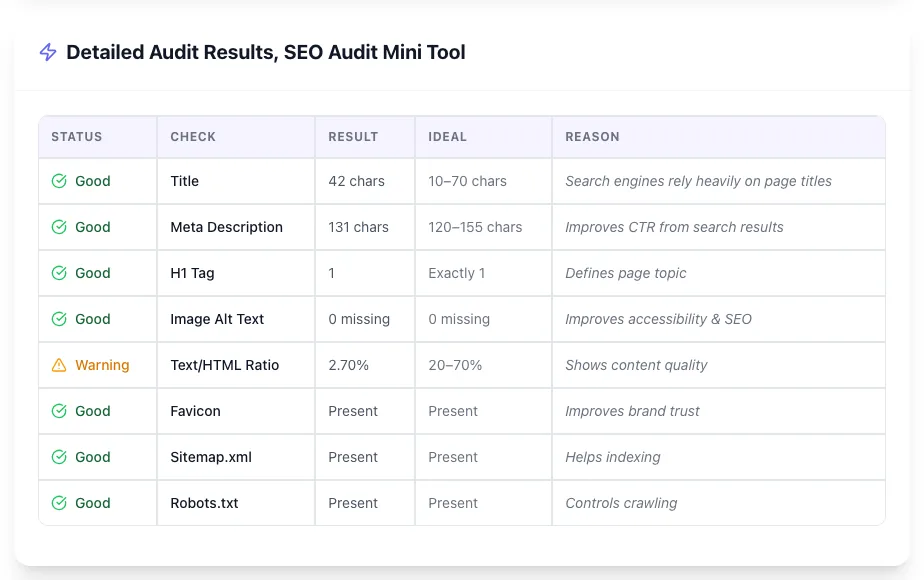
Clicking Run Audit runs the check and shows the result right below.
What this tool does
SEO Audit Mini Tool delivers fast, reliable results for quick seo audit of any url. title, description, h1, schema, mobile, page speed. free, instant.
Designed to fit into your existing SEO and content workflow with no setup overhead.
How to use it
Five steps.
Paste your URL
Enter any public URL. Your homepage, a product page, a blog post, or a competitor URL. Into the input field.
Run the audit
Click Audit. The tool fetches the page, parses HTML, and runs 25 on-page and technical checks in under 10 seconds.
Review the score
See an overall SEO score plus a breakdown across indexability, on-page, technical, mobile, and performance categories.
Prioritize fixes
Issues are sorted by severity. High-impact issues (noindex, missing H1, broken canonical) appear first.
Re-audit after fixes
Deploy your changes, then re-run the audit to validate. Submit the URL in Google Search Console for re-indexing.
When teams use it
Six common workflows.
Pre-publish content QA
Run a 60-second audit on every blog post or landing page before hitting publish. Catches missing schema, oversized titles, accidental noindex tags, and broken canonical references that would otherwise sit live for weeks.
Diagnosing why a page won't rank
A page targeting a money keyword sits on page 5 with no movement. Audit it first: 40% of stuck pages have a fixable technical issue (wrong canonical, missing H1, thin schema) before content/links become the bottleneck.
Competitor content benchmarking
Audit the top 3 ranking URLs for your target keyword. Compare title structure, schema types, page weight, and word count. Find the technical baseline you need to match before competing on backlinks.
Migration validation
After a CMS migration, redesign, or domain change, audit a sample of high-traffic URLs. Catches accidentally-changed canonicals, missing meta tags, broken schema, and 4xx/5xx status codes before traffic drops.
Bulk content audit for old pages
For sites with 200+ pages, queue audits on legacy content quarterly. Surface dead schema, outdated last-modified dates, broken images, and weight bloat from accumulated tracking scripts.
Client-facing reports for agencies
Run an audit on a prospect's top 10 pages and use the output as the basis for a free SEO consultation. Specific issues > generic advice: converts free audits into retainers at 3-5x the rate of vague offers.
Platform guides
Integrate with major platforms.
WordPress
- Install Yoast or Rank Math for automatic title/meta/canonical management
- Enable schema modules (Article, FAQ, Breadcrumb) in plugin settings
- Run our audit on a published post. Fix any flagged issues at the template level
- Submit fixed URLs in Google Search Console > URL Inspection > Request Indexing
Shopify
- Edit theme.liquid to ensure single H1 per page (often the product title)
- Use a schema app like JSON-LD for SEO to handle Product/Review/Breadcrumb schema
- Audit your top 20 product URLs. Flag duplicate titles auto-generated from variants
- Set canonical via theme settings or app to consolidate variant URLs
Next.js
- Use next/head or next/seo to set unique title and meta per route
- Implement getStaticProps for SSR/SSG so Googlebot sees rendered HTML, not a JS shell
- Add JSON-LD via Script component with strategy="afterInteractive"
- Audit the deployed URL (not localhost). Production behavior often differs from dev
Webflow
- Set page-level title and description in Page Settings > SEO
- Add canonical and OG tags via Custom Code in Page Settings
- For schema, paste JSON-LD into Before </body> custom code
- Publish, then audit. Webflow's auto-generated `<h1>` for hero sections often duplicates your H1
Squarespace
- Edit page SEO in Page Settings > SEO Title, Description, URL Slug
- Squarespace auto-generates Article schema; verify with Rich Results Test
- For custom schema (FAQ, How-To), add via Code Injection > Header
- Squarespace adds noindex to draft pages. Confirm pages are live before auditing
Grigora SEO Audit Mini Tool vs. alternatives
Side-by-side.
| Capability | Grigora | Ahrefs | Semrush | Free | Manual |
|---|---|---|---|---|---|
| Single-URL instant audit | Yes | Limited | Limited | No | Manual |
| Title, description, H1 checks | Yes | Yes | Yes | Yes | Manual |
| JSON-LD schema detection | Yes | Yes | Yes | Partial | Manual |
| Indexability + canonical audit | Yes | Yes | Yes | Yes | Yes |
| Free tier with no rate limit | Yes | Trial only | Trial only | Limited | N/A |
| Full-site crawl (1,000+ URLs) | No | Yes | Yes | Limited | Yes |
| Backlink + keyword data | No | Yes | Yes | Limited | No |
| Monthly cost for full audit | Free | $129+ | $139+ | $99+ | $209+ |
Common errors and fixes
Eight issues users hit.
Page returns 200 but is blocked by robots.txt
Cause: A `Disallow: /path/` rule in robots.txt prevents Googlebot from crawling, even though the URL responds normally to browsers.
Fix: Open /robots.txt, remove the matching Disallow rule, then resubmit the URL in Google Search Console URL Inspection. Allow 7-14 days for re-indexing.
Meta robots noindex left in production
Cause: A `<meta name="robots" content="noindex">` tag stays in the page template after dev/staging: Google obeys it and drops the page.
Fix: Remove the noindex tag from the template, redeploy, validate with curl or our audit, then trigger reindexing in GSC. Pages typically return to index within 5-10 days.
Canonical points to a different URL
Cause: The rel=canonical tag references another page (often a CMS default like the homepage), so Google consolidates ranking signals away from this URL.
Fix: Set the canonical to the page's own URL (self-canonical) using `<link rel="canonical" href="https://yoursite.com/exact-url">`. For paginated content, point to page 1 only when content is identical.
Title tag missing or duplicated across pages
Cause: CMS template falls back to site name, or a developer hardcoded the same `<title>` on multiple templates.
Fix: Ensure each page has a unique `<title>` (30-60 chars) including primary keyword and brand. Audit duplicates in GSC > Coverage > Duplicate titles. Fix template variables.
H1 missing or multiple H1s on the same page
Cause: CMS layouts wrap the page heading and a hero element both in `<h1>`, or the heading uses a styled `<div>` instead of an `<h1>`.
Fix: Use exactly one H1 per page, matching the page topic. Demote duplicates to H2. Validate with our audit or `document.querySelectorAll("h1")` in DevTools.
Schema validates but doesn't trigger rich results
Cause: Schema is technically correct but missing required fields, references invisible content, or violates Google's structured data guidelines.
Fix: Run the URL through Google's Rich Results Test (search.google.com/test/rich-results). Add missing required fields (e.g., aggregateRating needs reviewCount), ensure marked-up content is visible, request indexing.
Page weight over 5 MB and LCP over 4 seconds
Cause: Unoptimized hero images (often 2-5 MB JPEGs), render-blocking JavaScript, and uncompressed fonts inflate first paint.
Fix: Convert hero images to WebP/AVIF, lazy-load below-fold images, add `loading="lazy"`, code-split JS bundles, preload critical fonts, and audit with Lighthouse. Target LCP under 2.5s.
Mobile viewport tag missing
Cause: The `<meta name="viewport" content="width=device-width, initial-scale=1">` tag is missing, so mobile browsers render the desktop layout zoomed out.
Fix: Add the viewport meta tag in `<head>` of every page template. Mobile-first indexing means Google primarily evaluates the mobile rendering: without viewport, CWV and rankings tank.
Original data
2026 study.
Frequently asked questions
Twelve answers about the SEO Audit Mini Tool.
Related free tools
Other utilities.
Meta Tag Generator
Generate page meta tags.
Try itMeta Description Generator
AI-write descriptions.
Try itSERP Snippet Preview
Visualize SERP rendering.
Try itOpen Graph Checker
Audit OG tags.
Try itMeta Title Checker
Audit page title.
Try itLink Metadata Scraper
Pull all metadata from URL.
Try itWebsite Grader
Score a whole website out of 100 with a ranked list of fixes.
Try it