A word on where this comes from. Grigora makes a website builder with a store built in, so we have a stake in the answer. Every Gumroad figure below comes from Gumroad's own pricing page, help center, terms, blog or public code, checked on 2 November 2026, and the article says plainly where Gumroad is the better choice. During 2026 Gumroad raised its payout minimum, corrected what its help center says about refund fees and documented a high-volume fee discount, and many of the guides that rank for this question still quote the old rules.
Guides Karan Singh BhakuniUpdated 3 Nov 2026
Gumroad Fees, Payouts and Alternatives for Digital Products
Karan Singh BhakuniUpdated 3 Nov 2026- 28 min read
- 14 sections
- 6 comparison tables
- 15 questions answered
The short answer
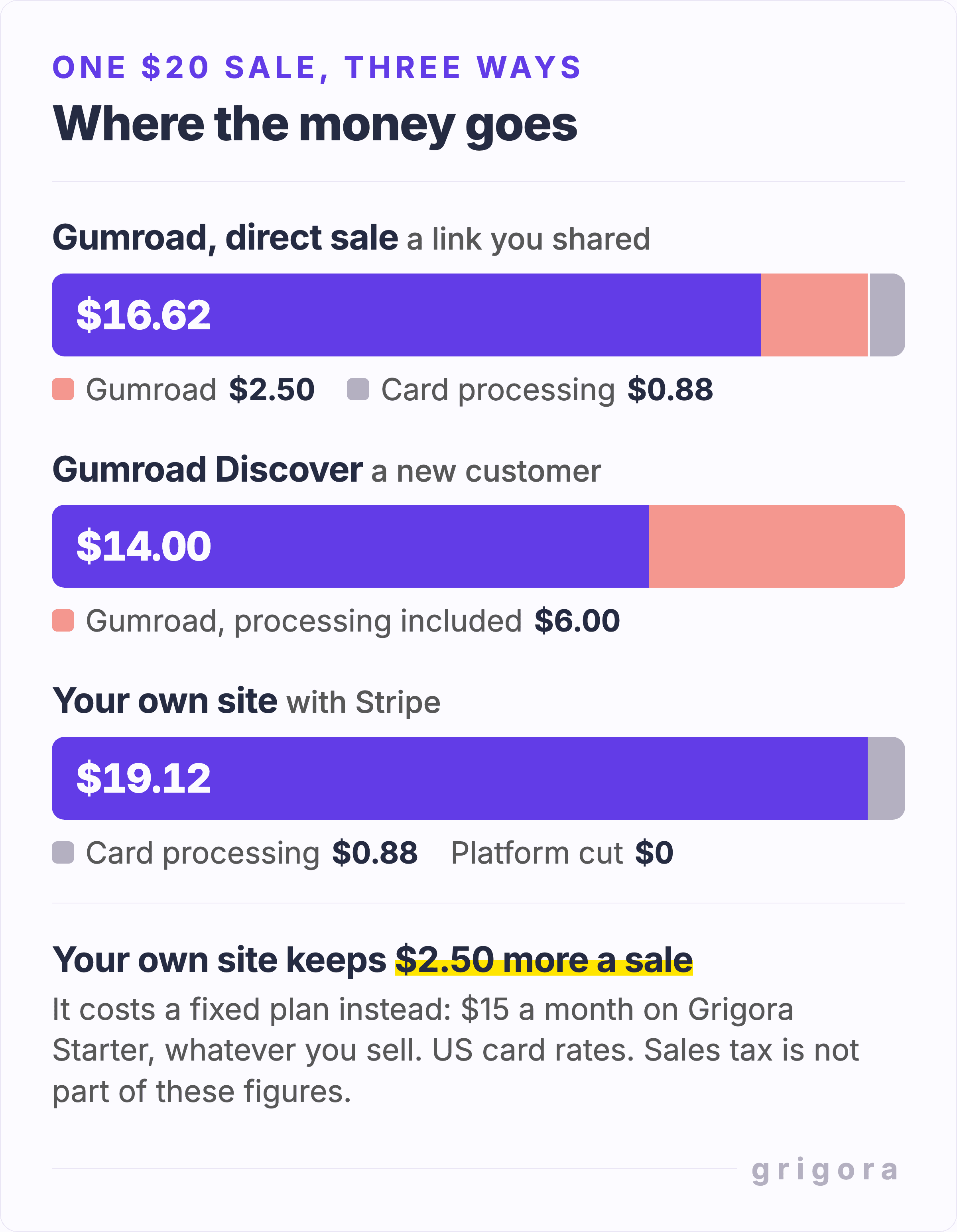
Yes, Gumroad is a good place to sell your first digital product: there is no monthly fee, it hosts and delivers the files, and as merchant of record it collects and pays the sales tax and VAT due on your sales. The cost is its cut. A direct card sale pays Gumroad 10% + $0.50 plus 2.9% + $0.30 for card processing, so a $20 ebook leaves you $16.62, and a sale to a new customer who finds you on Gumroad's marketplace costs 30%. If you already bring your own buyers, a website with its own store costs less than that cut from about the seventh or eighth sale of a $20 product each month, depending on whether you or your payment provider handles the tax.
Would rather sell from your own site? Open a shop with Grigora
Contents14 sections

Read nextHow to Sell Digital Products: Where to Sell, Fees and Tax
How much Gumroad takes from each sale
Gumroad has no plans and no monthly fee today. It earns from each sale, and the rate depends on how the buyer found you. One thing to watch: a change Gumroad merged on 29 October 2026 lets it test charging some new sellers $5 or $10 a month before their first product goes live. The test ships switched off, and the pricing page still says there are no monthly charges.
| Where the sale comes from | Gumroad's fee | Card processing |
|---|---|---|
| Your profile, or a link you shared | 10% + $0.50 | 2.9% + $0.30 on top |
| A new customer who found you on Gumroad Discover, its marketplace | 30% | Included in the 30% |
| Direct sales after $20,000 in a calendar month, per the fees article | 5% + $0.50 | 2.9% + $0.30 on top |
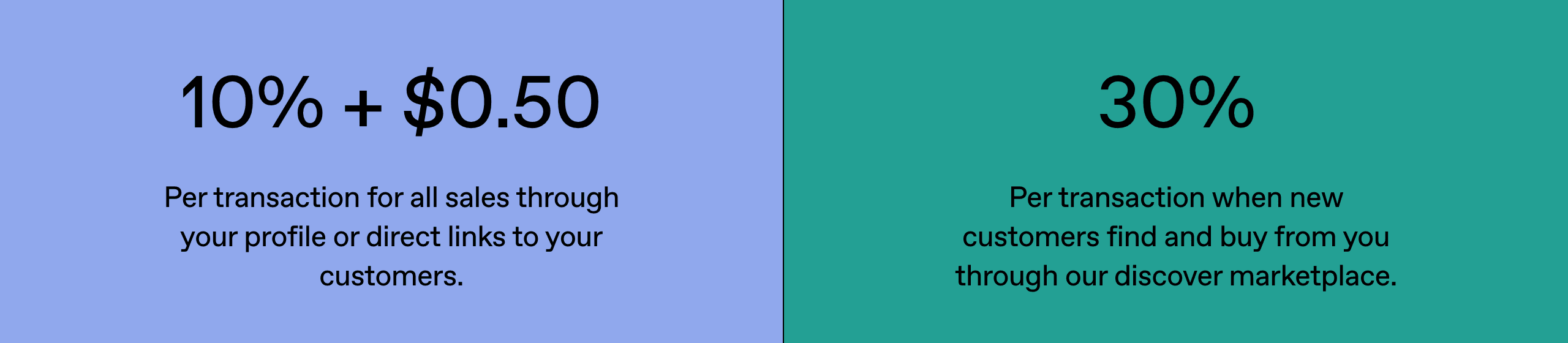
For direct sales the pricing page shows only the 10% + $0.50, with no processing charge. That charge is in Gumroad's fees article, which lists credit card processing at 2.9% + $0.30 and PayPal fees separately. The same article now says the high-volume discount applies automatically, with no application: after your paid sales reach $20,000 in a calendar month, new direct sales that month cost 5% + $0.50, plus processing. It resets on the 1st; a refund that drops you below $20,000 returns new sales to the standard rate until you qualify again. Discover stays at 30%, and a custom rate on your account takes precedence. Export the sales CSV to check the fees actually charged.
What you keep from a direct card sale
| Price | You keep | Total fees | Gumroad's fee | Card processing |
|---|---|---|---|---|
| $5 | $3.55 | $1.45 (29.0%) | $1.00 | $0.45 |
| $10 | $7.91 | $2.09 (20.9%) | $1.50 | $0.59 |
| $20 | $16.62 | $3.38 (16.9%) | $2.50 | $0.88 |
| $50 | $42.75 | $7.25 (14.5%) | $5.50 | $1.75 |
| $100 | $86.30 | $13.70 (13.7%) | $10.50 | $3.20 |
Gumroad publishes no worked example, so these figures are arithmetic from its published rates. The fixed $0.80 is what makes cheap products expensive to sell: on a $5 template it is more than half of the fees. If most of your catalogue is under $10, bundle it. Five $5 products sold as one $25 bundle pay the fixed $0.80 once instead of five times, so you keep $20.97 instead of $17.75: $3.22 more of the same $25.
How to work out the Gumroad fee on any price
On a direct card sale, Gumroad's fee and card processing together come to 12.9% of the price plus $0.80, so you keep 87.1% of the price minus $0.80. To keep a set amount, add $0.80 and divide by 0.871: to keep $10 a sale, charge $12.40; to keep $20, charge $23.88; to keep $50, charge $58.32. On a Discover sale you keep 70% of the price, whatever it is. Each charge is rounded to the cent, so a real sale can differ from these by a cent.
Why a sale was charged 30%
Gumroad Discover is the marketplace on gumroad.com. A sale to a new customer who found you there costs a flat 30% with processing included, which turns the $20 ebook into $14.00. Getting listed takes work first. Under Gumroad's Discover rules the account needs a $100 balance from genuine sales and a risk review that takes about three weeks on average, and each product needs a sale, a category and ratings turned on. Listed products are also opted into the Gumroad Affiliates program, which pays affiliates 10%, unless you opt out.
Refunds are fairer than many guides say. On sales Gumroad processes itself, it returns its own fee on the amount you refund but not the processing charge, and you can refund only when your Gumroad balance covers the amount you are refunding. Sales through a connected Stripe or PayPal account work differently. Several fee guides still say no fees come back at all.
When Gumroad pays you
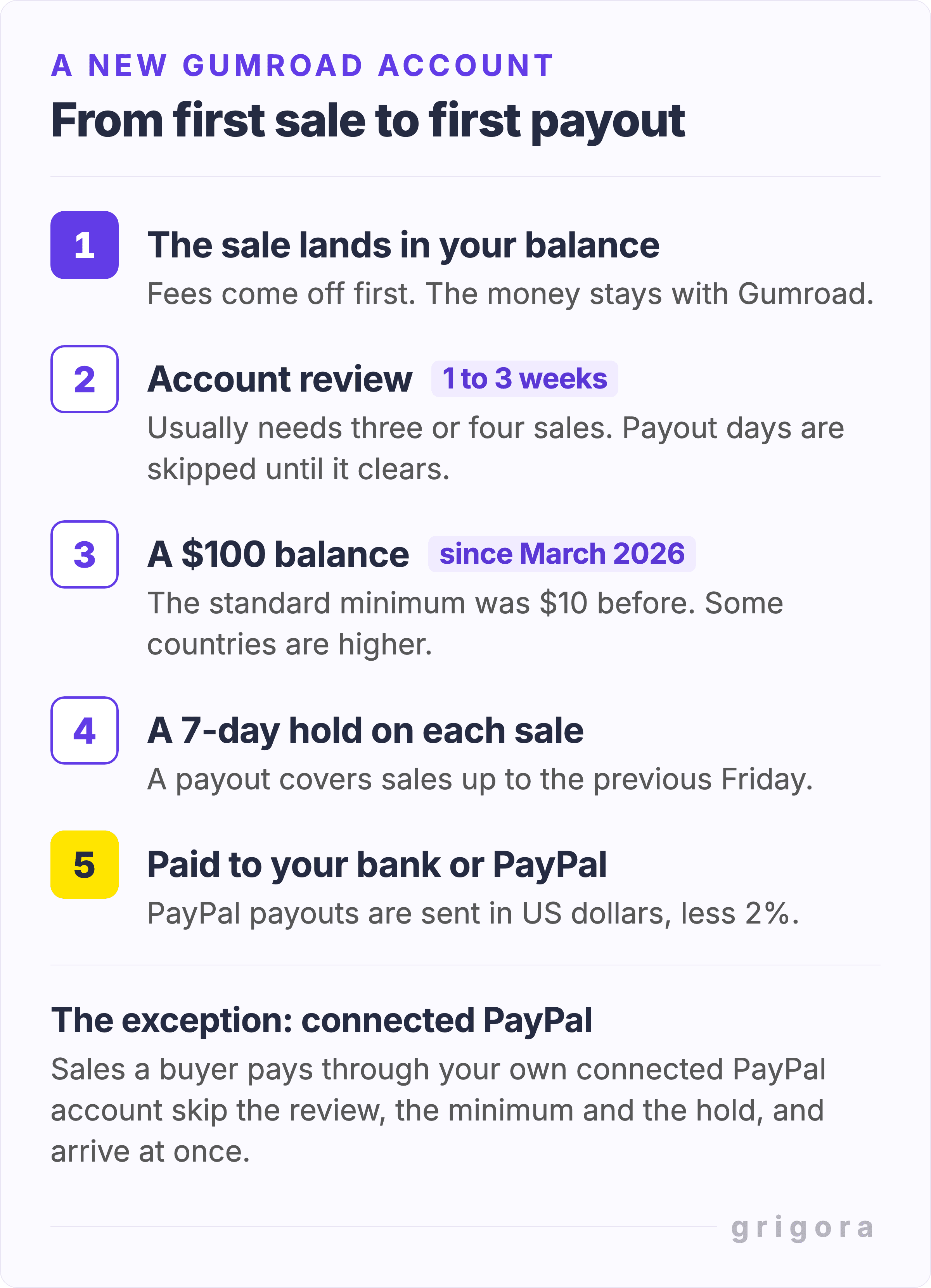
Money reaches your Gumroad balance at the moment of sale and your bank some time later. The exception is PayPal: if you connect your own PayPal account to checkout, which Gumroad allows in most countries but not in India, Brazil, Japan, Türkiye and a few others, PayPal sales land in that account straight away. Everything else follows the rules in Gumroad's getting paid article:
- A $100 minimum. Gumroad raised the standard minimum payout from $10 to $100 in March 2026. Some countries have a higher minimum in local currency.
- A review before your first payout. Every new account is reviewed first. Gumroad says this takes one to three weeks and usually needs three or four sales and a balance over $100. Until the review is done, each payout day is skipped without an email.
- A seven-day hold. On weekly, monthly and quarterly schedules each sale waits at least seven days, and a payout covers sales up to the previous Friday. Daily payouts are for eligible US accounts only.
- Bank or PayPal. Gumroad pays by local bank deposit in the US and 119 other countries, and through PayPal in most other places. PayPal payouts are sent in US dollars with a 2% fee. There is no Payoneer, Wise or wire transfer, and in some countries where PayPal cannot pay out either, such as Russia, Syria, Iraq and Zambia, Gumroad currently has no way to pay you unless your PayPal account is registered in another country.
- Instant payouts cost 3%. US creators with at least one completed payout and 60 days of processing with Gumroad can take instant payouts of up to $10,000 for a 3% fee, with no $100 minimum.
- Check your actual payout day. Gumroad now lists different weekdays by payout rail and country: US bank payouts on Thursday, several other bank currencies on Wednesday, many remaining bank countries on Tuesday, and PayPal on Friday. The dashboard shows your date; bank arrival can take another 2–7 business days.
Gumroad can also keep part of your balance back. If chargebacks pass 1.5% of your sales over the last 365 days, it holds 25% in reserve until the rate falls again. If more than 1% of your customers dispute a purchase, it sets a refund policy for the whole account, so a "no refunds" setting becomes a 30-day money-back guarantee. If more than 15% of your sales are refunded, its terms let it hold 25% of your unpaid balance for 90 days on a rolling basis. The terms also allow it to hold funds or pause payouts during a review with no fixed end date.
Gumroad handles your sales tax and VAT
This is Gumroad's strongest advantage, and the best reason to stay even when the fees sting. Since 1 January 2025 Gumroad has been the merchant of record for every sale. Under its terms it is the seller for sales tax, VAT and GST, so it works out what each buyer owes, collects it and pays it to each tax authority. You have no tax settings to manage, and Gumroad charges no extra fee on sales that carry VAT.
It does not cover your income tax, and outside the US Gumroad's own fees can carry VAT or GST. Selling from your own site hands the sales tax work back to you: registering where the rules require it, charging the right rate and filing the returns. The exception is a payment provider that sells as merchant of record itself, such as Paddle, which charges 5% + 50¢ a sale for that. Paddle has to accept you first, though: it reviews every seller and website and says it is built for software companies.
How to start selling on Gumroad
- Create a free account at gumroad.com. There is nothing to pay until you sell.
- Add a product. Choose a type, such as a digital product, an ebook, a course or a membership, set a price or pay what you want, upload the files and write the description.
- Fill in your payout settings. Add a bank account or PayPal, and connect PayPal to checkout if you want PayPal sales paid straight away.
- Test before sharing. Use Gumroad's built-in test purchase to check the buyer receipt and download. Do not buy your own product or ask household members to buy it to meet review or Discover thresholds; those require genuine sales.
- Share the product link or your profile page with your own audience. Discover only lists you once you have a $100 balance and have passed the risk review.
- Expect the first payout to wait for the account review: typically one to three weeks, once you have three or four sales and a balance over $100.
What to put on your first Gumroad listing
Use a specific preview and a short file list so a buyer can judge the product before checkout. Here is an illustrative listing for an original freelancer worksheet pack; adapt the fields to what your files actually contain.
| Field | Example to adapt |
|---|---|
| Name and outcome | Freelancer Monthly Budget: plan spending around irregular income. |
| Files and compatibility | A PDF printable in A4 and US Letter; state whether it is fillable and which app you tested. |
| Preview | Show a completed sample page and one blank page, with any sample figures labeled. |
| Price and licence | One-time $20 price; describe personal or client use, redistribution restrictions and any separate editions. |
| Delivery and support | Explain the download, how to open it, a support contact and your refund policy. |
Create the content yourself and check every included asset's licence. Gumroad's prohibited-products policy bans PLR, MRR and other resale-rights products even if the supplier gave you a resale licence. A third-party bundle advertised as ready to resell can still breach the platform's rules. Pay-what-you-want pricing also does not remove the normal fee on a paid sale.
What Gumroad does well
For a creator starting from nothing, Gumroad covers most of what a digital shop needs on day one.
- Big files and streaming. Products priced above $0.99 can hold files of up to 20 GB each, and video can stream without a download. Free products are capped at 250 MB in total.
- Flexible pricing. Pay what you want with a minimum and a suggested price, discount codes with limits, location-based discounts of 20% to 60%, and installment plans.
- Memberships and software. Recurring memberships with tiers and free trials, bundles, and license keys with an API to check them.
- Upsells and affiliates. Checkout upsells, recommended products, and your own affiliates at 1% to 75% commission with a 30-day cookie.
- Local checkout. Since September 2026 buyers in supported countries can pay in their own currency, and in some countries with local payment methods.
Where Gumroad falls short
The limits show up once you have an audience of your own and want the shop to feel like part of it.
- Checkout always happens on Gumroad. The overlay and embed widgets show a product on your site, but the buyer still pays on Gumroad's checkout page. With a custom domain, buyers still download through Gumroad links.
- Design control takes code. Without a custom page, store-wide styling is one of six fonts plus a background and a highlight colour, and the profile layout is a stack of sections. For more, Gumroad lets you replace your whole profile page and any product page with your own HTML, written by its built-in agent or your own AI coding tool, but there is no visual editor for those pages and they run in a sandbox that blocks outside images and video embeds.
- Email comes later, from Gumroad's address. You cannot send broadcasts or automated emails until you have earned $100 after fees and received a payout. They carry your name but go out from a gumroad.com address, with replies to your support email, and the help center says you cannot import an existing list.
- Rules on what you sell. Gumroad does not allow reselling anything you did not create, including PLR and resale-rights products, or access to AI tools, chatbots and AI generation services, among other things. Services such as calls and commissions need an account at least 30 days old.
- Your income waits on someone else's review. Held, skipped and reviewed payouts are a common complaint from sellers in Gumroad's Trustpilot reviews. Gumroad's suspension article explains how accounts are reviewed and suspended, and its payout delays article covers paused and skipped payouts.
Is Gumroad legit, and do sellers make money?
Gumroad is a legitimate, long-running business. It says it has paid creators more than $1 billion in its 2026 annual update, it publishes its code openly on GitHub, and as merchant of record it is the legal seller on every sale, which is how it collects tax for you. The risks sit on the seller's side: the reviews, holds and occasional suspensions described above.
A public Gumroad code-change note reports that 36,073 of the 337,020 accounts created in October 2025 published a product, and 6,039 ever made a sale. These are account signups, including buyers; the note says about 90% of signups are buyers. Among the accounts that published, roughly one in six made a sale in that cohort. That is a historical observation, not the probability that your product will succeed.
The note does not explain the products, promotion or goals of those accounts. Use a small original product, a clear offer and feedback from likely buyers to test your own demand. Our guide to selling digital products includes a buyer-validation exercise and a checklist for diagnosing visits, checkout and delivery problems.
Also worth readingWhat Has Replaced Blogging? Compare the Alternatives
Gumroad or your own website: the numbers
The comparison that matters is Gumroad's share of each sale against the fixed price of a site you own. For a US seller whose buyers pay with US cards, card processing costs about the same either way: Stripe's standard US rate is also 2.9% + 30¢, so it drops out of both sides. Stripe adds 1.5% for international cards and 1% when it converts currency, and Stripe Tax costs 0.5% of each sale where you are registered, so treat this table as the best case for your own site.
| Monthly sales of a $20 product | Gumroad's fee | Grigora Starter plan |
|---|---|---|
| 5 sales ($100) | $12.50 | $15 |
| 15 sales ($300) | $37.50 | $15 |
| 50 sales ($1,000) | $125 | $15 |
| 125 sales ($2,500) | $312.50 | $15 |
| 250 sales ($5,000) | $625 | $15 |
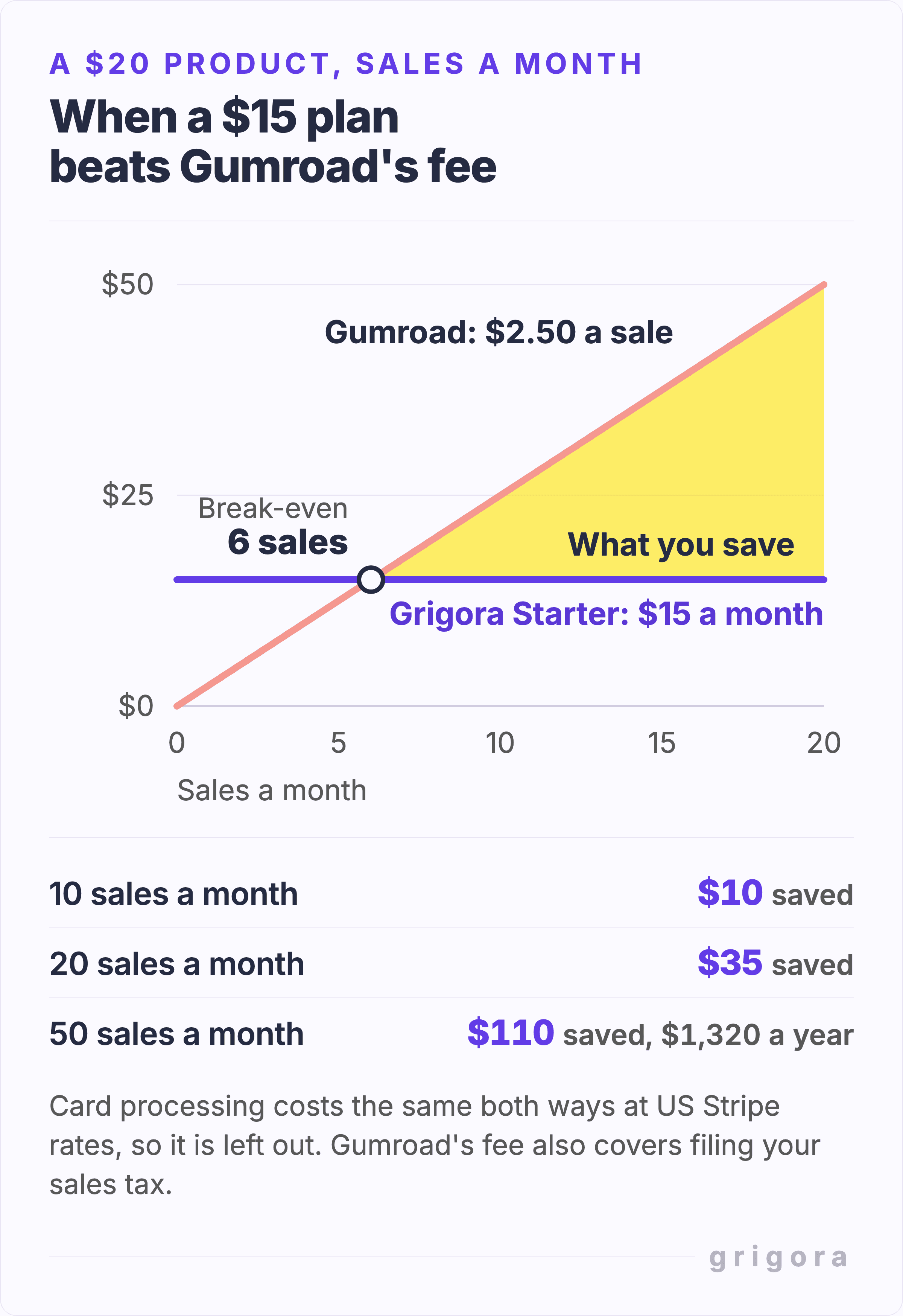
With Stripe, the lines cross at six sales a month for a $20 product, ten for a $10 product and fifteen for a $5 one. The like-for-like comparison is Paddle, one of the payment providers Grigora connects to, because Paddle also sells as merchant of record and handles the tax: at 5% + 50¢ a sale, the lines cross at about eight, fourteen and twenty-two. That assumes Paddle approves your account and site, so check that it takes your kind of product before you plan around it. Starter is $15 a month, or $144 a year, which comes to $12 a month. Gumroad's 5% rate only starts once a month's sales reach $20,000, so it changes nothing below that. These comparisons price platform and processing fees. Budget separately for product creation, marketing, refunds, support and any tax-filing work; a fee saving is not the same as business profit.
Be honest about the other side, though. If many of your buyers are in the EU, the UK or other places that tax digital sales, and you would rather not use Paddle, Gumroad's merchant-of-record service saves you registrations and returns, and that can be worth its cut. Grigora's plans include the store, but Grigora itself does not file tax for you.
Gumroad and an own-site store, side by side
| Gumroad | Your own site on Grigora | |
|---|---|---|
| Monthly cost | None | $15 a month, or $144 a year ($12 a month), after a 14-day free trial |
| Fee on each sale | 10% + $0.50, or 30% for new customers from Discover | None from Grigora |
| Card processing | 2.9% + $0.30, charged by Gumroad | Your provider's rate, in your own account |
| Where checkout happens | Gumroad's checkout page | Your own site for most Stripe and Paddle sales; PayPal, Stripe Tax, pay what you want and some Razorpay checkouts open the provider's page |
| When you are paid | Card sales after a review, a $100 minimum and a 7-day hold; connected PayPal sales at once | On your provider's schedule: Stripe, PayPal and Razorpay have no $100 minimum, and Paddle pays once a month from a $100 balance |
| Sales tax and VAT | Gumroad collects and pays it | You collect and file it, or use Paddle as merchant of record |
| File size | Up to 20 GB per file | Up to 200 MB per file |
| How buyers download | Through Gumroad download links | An emailed link, good for 14 days and five downloads |
| Subscriptions and memberships | Yes | Recurring checkout disabled; course/member listings require merchant-managed access |
| License keys and affiliates | Yes | No |
| Marketplace | Discover, at 30% | None |
| Email to buyers | After $100 earned after fees and a first payout, from a gumroad.com address | A built-in newsletter for buyers who choose to subscribe; from a Grigora address up to 1,000 emails a day, or through your own SMTP |
| Design | A theme and sections, or agent-built HTML pages in a sandbox | Your whole website: template sites in a block editor, AI-built sites by prompt |
Gumroad alternatives compared
Gumroad is not the only way to sell without a monthly bill, and several platforms that do charge a monthly plan take nothing per sale. The figures below come from each vendor's own pricing or help pages, checked on 2 November 2026, for the cheapest plan that sells digital downloads. The kept column is what is left of a $20 sale after the platform's fee and, where processing is extra, US Stripe card rates of 2.9% + 30¢. These examples exclude sales tax, refunds, advertising, currency conversion, cross-border and other surcharges.
| Platform | Monthly cost | Fee per sale | Kept from $20 | Sales tax handled |
|---|---|---|---|---|
| Gumroad | $0 | 10% + $0.50 plus processing; 30% on Discover | $16.62 | Yes, merchant of record |
| Payhip | $0 | 5% plus processing | $18.12 | Yes: EU/UK VAT, US sales tax and Canadian GST/HST/PST; Quebec QST remains yours |
| Lemon Squeezy | $0 | 5% + $0.50, processing included | $18.50 | Yes, merchant of record |
| Ko-fi | $0, or $12 for Gold | 5% on shop sales (0% on Gold) plus processing | $18.12 | No |
| Etsy | $0, plus $0.20 a listing and, for some new shops, a one-time set-up fee | 6.5% plus 3% + $0.25 processing | $17.65 | Yes: US sales tax, and VAT on digital items in many countries |
| Stan Store | $29, or $25 a month billed yearly | None, plus processing | $19.12 | No |
| Sellfy | $29, or $22 a month billed yearly | None up to $10,000 of sales a year (then upgrade or pay 2%), plus processing | $19.12 | No |
| Podia | $49, or $42 a month billed yearly | 5% plus processing | $18.12 | No, you file it |
| Shopify | $39, or $29 a month billed yearly | None with Shopify Payments, plus processing | $19.12 | No, you file it |
| Grigora | $15, or $12 a month billed yearly | None, plus your provider's rate | $19.12 | Only if you sell through Paddle |
Three things the table cannot show. First, a monthly plan only pays off once you sell enough: against Gumroad's $2.50 on a $20 sale, Grigora's $15 plan is cheaper from the seventh sale of the month, Stan Store's and Sellfy's $29 from the twelfth, and Shopify's $39 from the sixteenth. Second, if all you want is a lower cut with no monthly bill, Payhip's free plan takes half of Gumroad's percentage and drops the $0.50, so it costs less than Gumroad at any volume, and less than Grigora's plan below fifteen $20 sales a month. Third, Lemon Squeezy now belongs to Stripe. Its January 2026 update says support has slowed while the team builds Stripe Managed Payments, Stripe's own merchant-of-record service, and that the goal is an easy way for Lemon Squeezy users to move to it. Its sign-up form now asks about your business first and may recommend a Stripe product instead, so check what you are signing up for.
What a flat plan buys you, besides the maths, is the rest of the business in one place. On Grigora the store sits inside your own website, next to the blog, the email signup and the newsletter, under your own domain, for the same $15. Our Gumroad alternative comparison sets the two side by side feature by feature, including what moves across when you switch.
Gumroad or Etsy for digital downloads?
Etsy is the other big place to sell printables, planners and templates, and it works more like Gumroad Discover than a direct link: buyers come to Etsy to search. Etsy charges $0.20 to list an item for four months, 6.5% of the sale and, in the US, 3% + $0.25 for payment processing, so a $20 download keeps about $17.65. If the buyer came through one of Etsy's Offsite Ads it takes another 15%, or 12% once your sales pass $10,000 a year. That makes Etsy cheaper than Gumroad for a sale either platform finds for you, but your shop lives inside Etsy's search results next to competitors' listings, and Gumroad allows far bigger files, memberships and license keys.
Who should stay on Gumroad
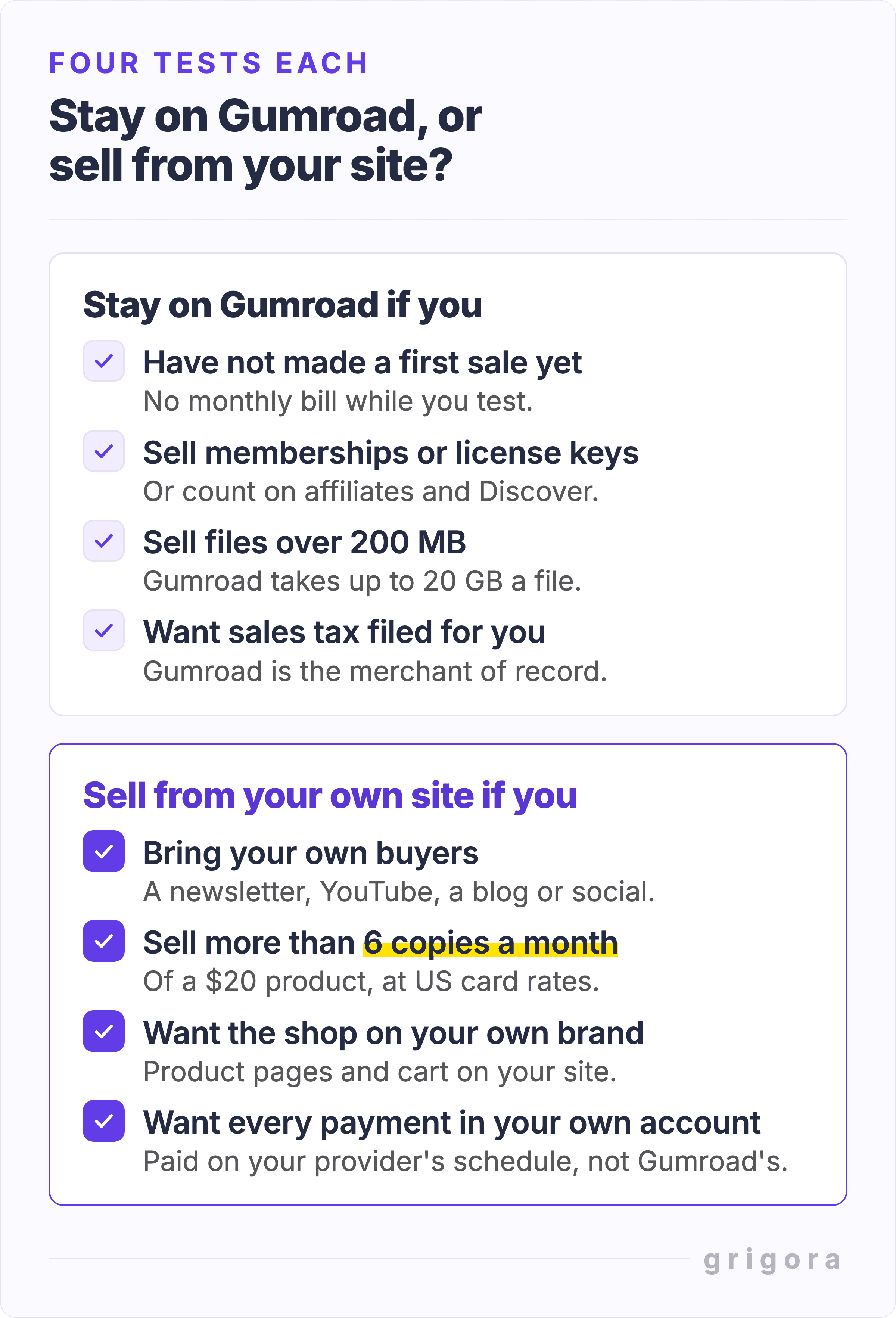
- You are testing whether anyone will pay, and want no monthly bill before the first sale.
- You need recurring membership billing, managed course/member access or software licence-key management. Grigora’s course/member listings require merchant-managed access, and recurring checkout is disabled.
- You sell large files, such as video courses or sample libraries. Gumroad takes files of up to 20 GB, and Grigora takes 200 MB a file.
- Many of your buyers are in places where you would otherwise register for VAT or sales tax, and you would rather pay Gumroad's cut than file returns.
- You count on affiliates, or on Discover, to find buyers for you.
Who should sell from their own site
- You bring your own buyers, from a newsletter, YouTube, a blog or social accounts, so Discover adds little, and the 10% + $0.50 mostly pays for checkout, hosting and tax handling you may be able to cover yourself.
- You sell more than a few copies a month. From the seventh $20 sale of the month, or the eighth if Paddle handles your tax, a $15 plan costs less than the cut.
- You want the shop to look like the rest of your brand, with the product pages and cart on your own site.
- You want every payment, not only PayPal ones, in your own Stripe, PayPal, Paddle or Razorpay account on that provider's schedule. Stripe, PayPal and Razorpay have no $100 minimum; Paddle pays once a month when your balance is at least $100.
How to sell a digital product from your own site with Grigora
Grigora builds the website and the store together, on AI-built and template sites alike, and takes no fee on sales. Five steps get a product live. The screens below are the real Grigora dashboard and buyer email, filled in with a sample product.
Step 1: Create the product
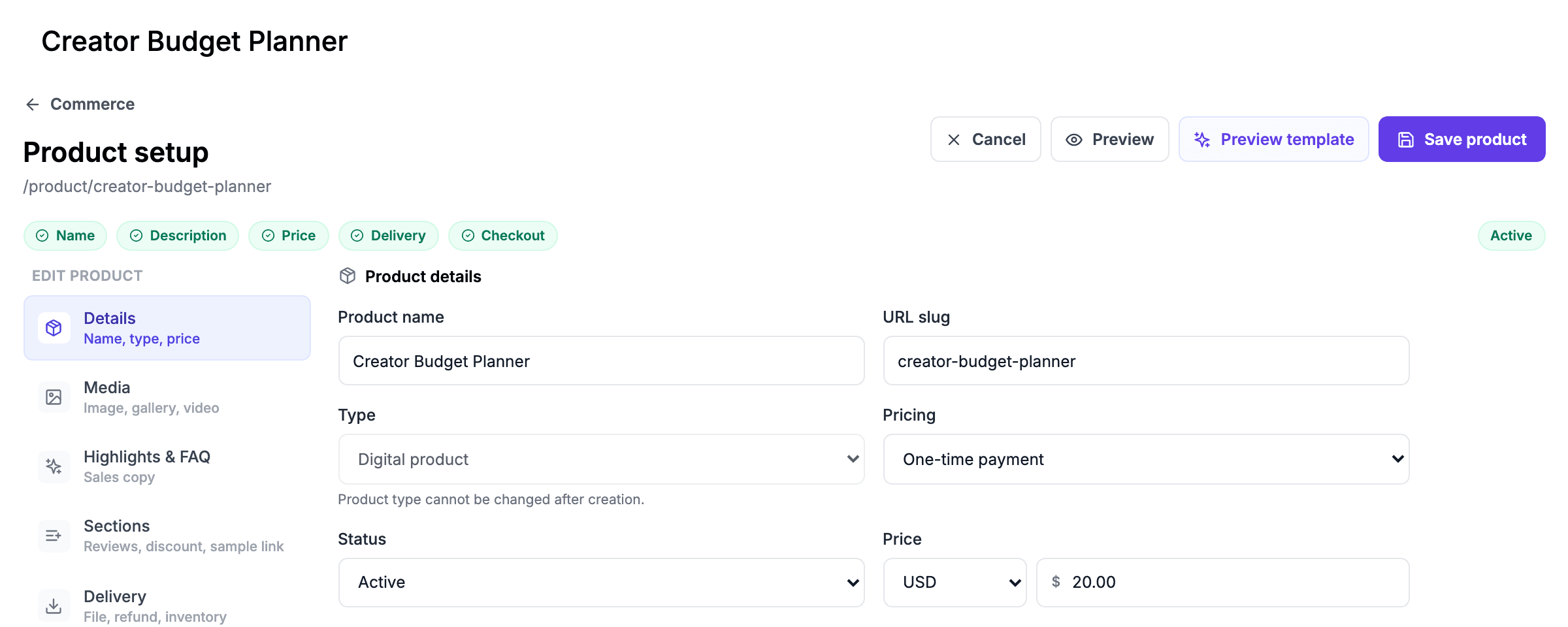
In Commerce, add a product, choose the digital type and upload the file, up to 200 MB. Each variant can carry its own file, for example a PDF and an EPUB edition of the same book.
Step 2: Set the price
Choose a one-time price, or pay what you want with your price as the minimum; pay what you want works only while Grigora's own tax setting is off. A $0 price makes a free download that is delivered by email like a paid one, which makes a simple lead magnet.
Step 3: Connect payments
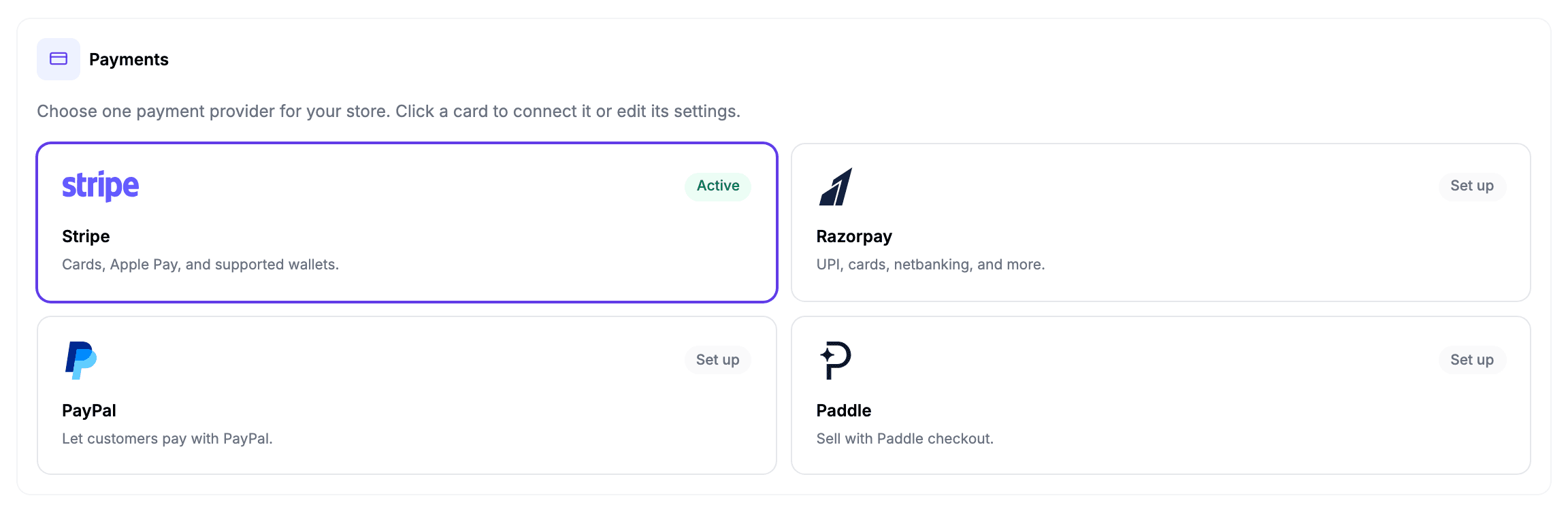
Connect Stripe, PayPal, Paddle or Razorpay with your own keys and add the webhook, so orders confirm and the file goes out on its own. The money goes straight into that account, on that provider's payout schedule.
Step 4: Decide on tax
Tax is off until you turn it on. Choose manual rates by country, or Stripe Tax on your own Stripe account, which Stripe charges at 0.5% of each sale where you are registered. Filing and paying it stays with you unless Paddle approves your account and you sell through it; if you do, leave tax off in Grigora, because Paddle adds the tax at checkout. Grigora sends every product to Paddle as a standard digital good, so ebooks are charged the standard VAT rate rather than a reduced ebook rate.
Step 5: Publish and share the link
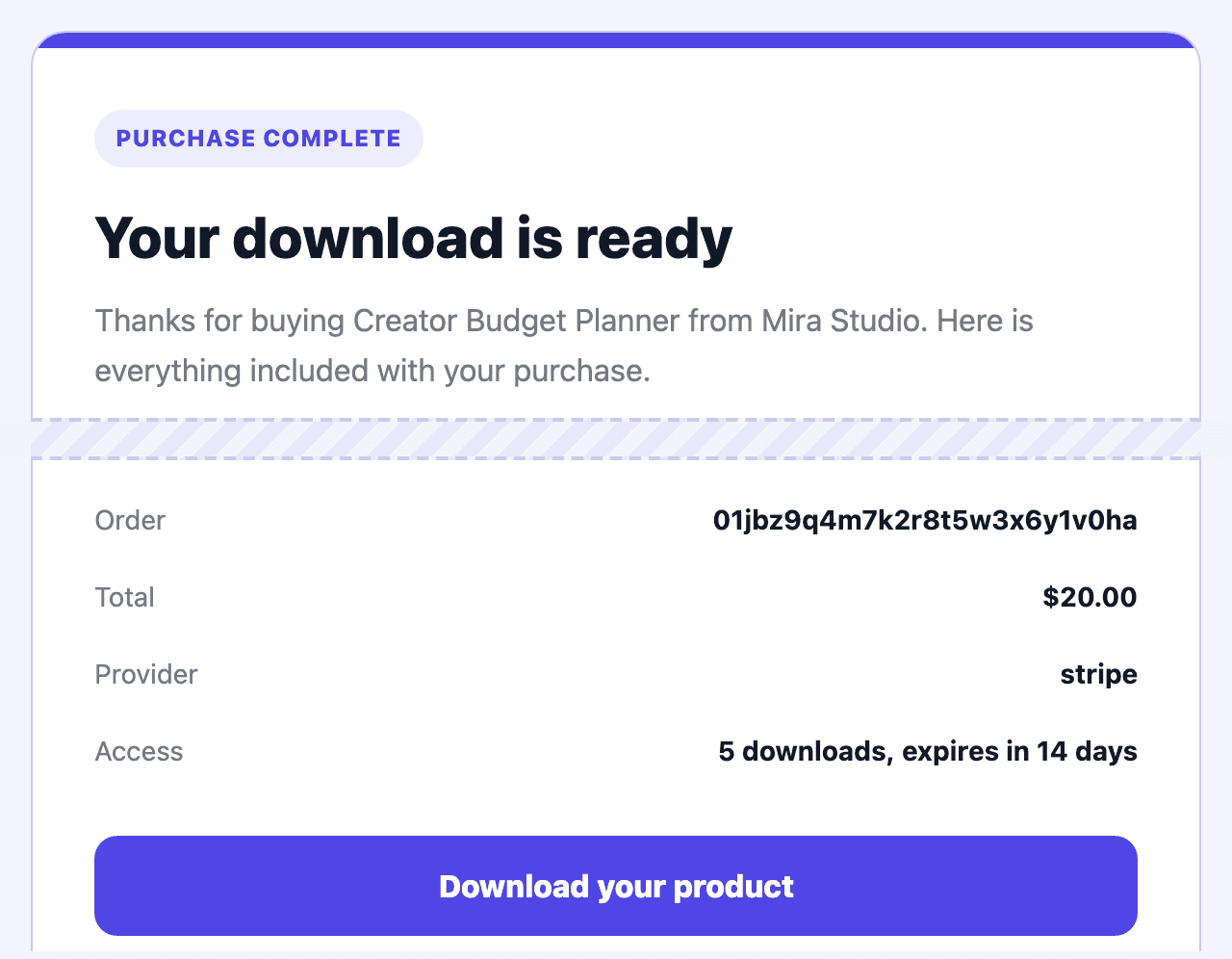
After payment the buyer gets an email with a download button that works for 14 days and up to five downloads, plus an invoice with a PDF copy. The email names your store and the product.
Discount codes, refunds from the dashboard and buyer invoices are built in. A protected digital order is limited to one distinct product or variant, so bundle related resources in one ZIP or use separate orders for separate products. Course and membership type labels do not provide an LMS or paid-member access system; arrange that access yourself. Recurring checkout, native software-licence issuance and affiliate tracking are not available.
Writing the product page itself? Our guide to how long a product description should be covers the length and shape that sells, and the free refund policy generator drafts the policy buyers look for before they pay.
Try it on your own product first. The 14-day trial needs no card, so you can build the site, add the product, connect your payment account and make a test purchase before you pay anything or move a single link.
How to move from Gumroad to your own site
You do not have to switch all at once: you can keep memberships or license-key software on Gumroad and sell one-time products from your own site. Whatever you move, this order keeps buyers and links intact.
- Export your buyers and followers. In Gumroad, download the sales CSV from the Sales tab and your followers from the Audience page. The sales file has a "Do not contact" column: leave out every buyer marked 1, because they opted out of your emails.
- Rebuild each product on your site. Add the file, price and description, and keep the same product names so returning buyers recognise them.
- Bring your list with you. Import followers who subscribed to your newsletter, preserve opt-outs and check that their permission covers your ongoing messages, so launch emails go out under your own name, from a Grigora sending address or, through your own SMTP, from your own domain. On Grigora's trial the newsletter holds 50 subscribers and sends one campaign a month.
- Change every link you control. Point the links in your bio, video descriptions, emails and old posts at the new product pages, and make a test purchase on each one.
- Close Gumroad last. Leave old products up while past buyers still use their Gumroad download links, and download your sales and payout CSVs before you delete the account: Gumroad says an unpaid balance can be forfeited.
Gumroad for digital products: FAQs
On a direct sale, 10% + $0.50, plus 2.9% + $0.30 for card processing: $3.38 on a $20 sale. A sale to a new customer who found you through Gumroad Discover costs a flat 30%, processing included.
Today there is no monthly fee and no plan to buy, though Gumroad has built a switched-off test that would charge some new sellers $5 or $10 a month to publish. You pay per-sale fees when you sell, plus a 2% fee if Gumroad pays you through PayPal, or 3% if you take a US instant payout.
No. Gumroad's fees article lists card processing at 2.9% + $0.30, and PayPal fees, as not included in the 10% + $0.50. Only Discover's 30% includes processing.
Yes. Since 1 January 2025 Gumroad has been the merchant of record for all sales, so it collects and pays sales tax, VAT and GST. Your income tax is still yours.
$100 for a standard payout since March 2026, up from $10. New accounts are also reviewed before the first payout, which Gumroad says takes one to three weeks. PayPal sales through a connected PayPal account skip the minimum and arrive straight away.
The buyer was a new customer who found your product through Gumroad Discover, its marketplace. Those sales cost a flat 30% instead of 10% + $0.50.
Yes, for your whole profile or a single product, through a CNAME record. Checkout and downloads still run through Gumroad.
For a first product, yes: nothing to pay up front, files hosted for you and tax handled. Plan for the $100 payout minimum and the first-payout review, and bring your own audience, because Discover only opens once your account has a $100 balance from genuine sales and has passed a risk review that takes about three weeks on average.
It depends on your volume and on who handles tax. A website with its own store takes no fee per sale: on Grigora you pay a flat plan from $12 a month billed yearly, plus your payment provider's rate, and you handle sales tax unless Paddle approves your account and you sell through it at 5% + 50¢, in which case Paddle handles it. For a $20 product, Gumroad's no-monthly-fee model usually costs less than a $15 monthly plan below about six to eight sales a month, and a cheaper product takes more sales to break even: about fifteen to twenty-two for a $5 one. Payhip's free plan, at 5% a sale, costs less than Gumroad at any volume.
Yes. Gumroad says it has paid creators more than $1 billion, and as merchant of record it is the legal seller on every sale, so buyers get a normal receipt and tax is handled. The risks are on the seller side: payout reviews, holds and occasional account suspensions, which its help center documents.
A new account's first payout waits for a review of one to three weeks and a $100 balance. After that, each sale is held at least seven days, and a weekly payout covers sales up to the previous Friday. Sales through a connected PayPal account arrive at once.
Yes. Gumroad's current fees article says the rate applies automatically, with no application: after $20,000 of paid sales in a calendar month, new direct sales cost 5% + $0.50 plus processing. The threshold resets on the 1st, refunds can drop you below it, Discover stays at 30%, and a custom account rate takes precedence. Check the sales CSV for the rate charged.
Yes. The Sales tab exports a CSV with each buyer's email and a "Do not contact" flag for buyers who opted out, and the Audience page exports your followers. Gumroad will not import a list, but you can take yours elsewhere.
Etsy keeps less of a sale: about $2.35 of a $20 download in the US, against $3.38 on a Gumroad direct sale and $6.00 on Discover, though an Offsite Ads sale costs another 12% to 15%. Etsy brings its own search traffic; Gumroad allows bigger files, memberships and license keys.
Payhip or Lemon Squeezy for a lower cut with sales tax handled, though Lemon Squeezy's sign-up now asks about your business and may recommend a Stripe product instead; Stan Store or Sellfy for a flat monthly plan with no fee per sale, and a website with its own store, such as Grigora, if you want the shop, the site and the newsletter under your own name for one flat price.
Practical writing on building a site, growing an audience and sending email people open. No more than one a week.

Karan Singh Bhakuni
118 articles on the Grigora blog
More on Guides

Guides
How to Sell Digital Products: Where to Sell, Fees and Tax
Where to sell digital products and what each route leaves you from a $20 sale, when your own site starts costing less than a marketplace, how delivery and refunds work, and the sales tax and VAT…
1 Nov 202629 min read

Guides
What Has Replaced Blogging? Compare the Alternatives
No single format replaces every job a blog does. Compare written articles, social updates, video, audio, newsletters and communities, then choose a manageable publishing mix with a useful archive and…
20 Oct 202310 min read

Guides
What Size Should Blog Post Images Be? Widths and KB
Measure the space the image fills, choose a sensible density target, and check the file visitors actually download. Practical widths, file budgets and format comparisons.
23 Sept 202615 min read