A note on where this comes from. Grigora makes a website builder with a store built in, so we have a stake in the answer, and we say where other routes are the better choice. Every fee below comes from the vendor's own pricing or help pages, checked on 2 November 2026. The tax and refund rules come from official EU, UK and US state sources, and they are general information, not tax or legal advice.
Guides Karan Singh BhakuniUpdated 3 Nov 2026
How to Sell Digital Products: Where to Sell, Fees and Tax
Karan Singh BhakuniUpdated 3 Nov 2026- 29 min read
- 14 sections
- 4 comparison tables
- 12 questions answered
The short answer
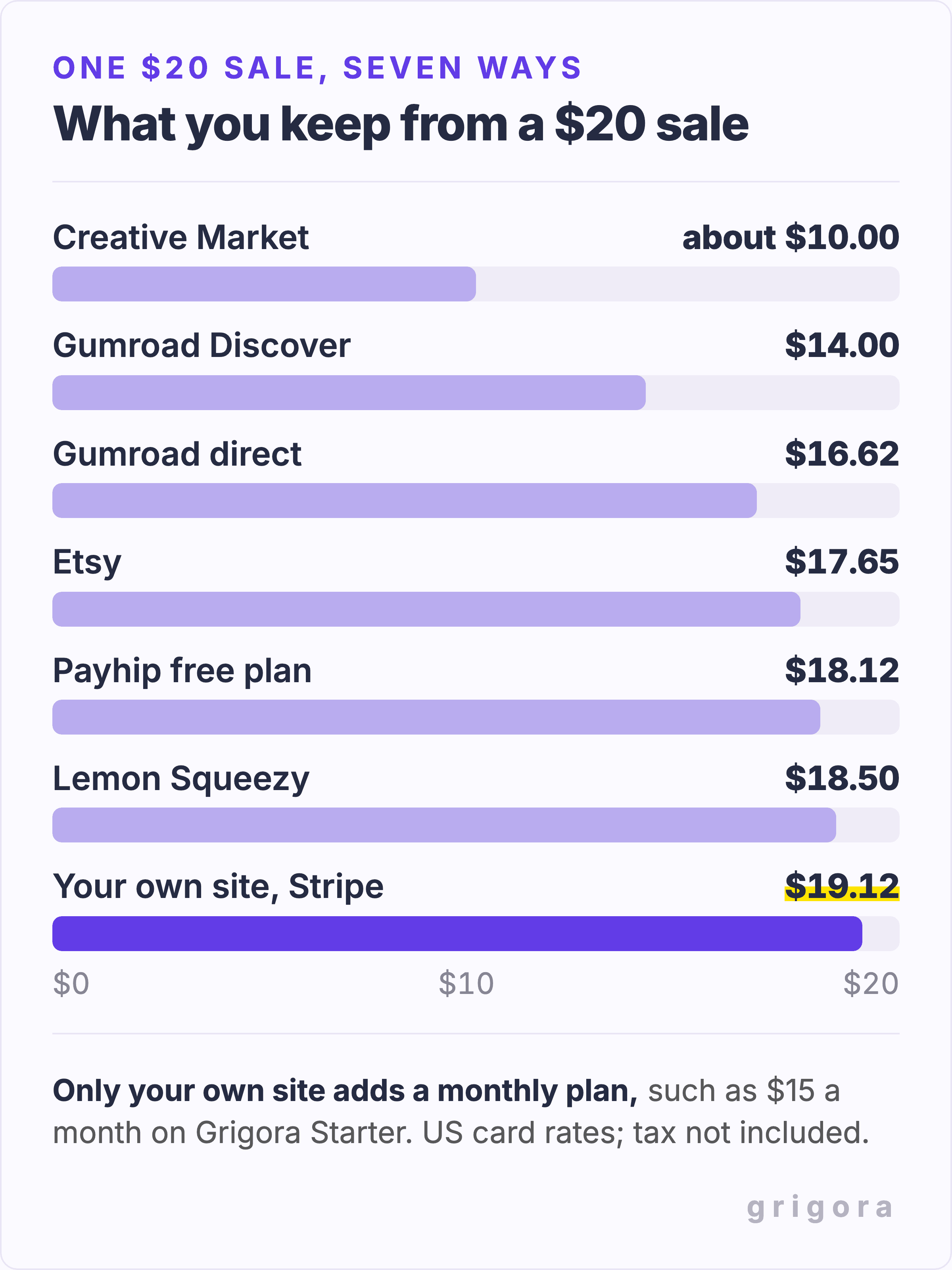
To sell a digital product you need three things: a file people will pay for, a place to sell it, and a plan for sales tax. The place is the big decision, and there are three kinds: a marketplace such as Etsy, a creator platform such as Gumroad or Payhip, or your own website with a store. On a $20 sale to a US buyer, Etsy leaves you about $17.65, Gumroad $16.62 and Payhip's free plan $18.12, while your own site keeps $19.12 and costs a monthly plan instead. If buyers already come to you from a newsletter, a channel or social accounts, a site on a $15 plan costs less than Gumroad from the seventh $20 sale a month, less than Etsy from the eleventh and less than Payhip's free plan from the sixteenth, and the customer list and the brand are yours from the first. If nobody knows you yet, start where buyers already search, and add a site once they start finding you.
Would rather sell from your own site? Open a shop with Grigora
Contents14 sections
Read nextGumroad Fees, Payouts and Alternatives for Digital Products
What counts as a digital product
A digital product is anything a buyer pays for and receives as a file or a link, with nothing to ship. That covers more than ebooks. What matters for selling is the format, because it decides how the product is delivered and which platforms can carry it.
| Product | Usual format | What to watch |
|---|---|---|
| Ebooks and guides | PDF or EPUB | Offer both as two editions if readers ask for EPUB |
| Printables and planners | Say the paper size (A4 or US Letter) on the product page | |
| Design templates (Canva, Notion, Figma) | A share link, usually inside a PDF | The template tool's own licence decides what you may sell |
| Presets, brushes and actions | A ZIP of small files | List the app and version they work with |
| Stock photos and graphics | JPG, PNG, SVG or a ZIP | Spell out personal and commercial use |
| Fonts | OTF or TTF in a ZIP | Desktop, web and app use usually need separate licences |
| Music, beats and sample packs | WAV or MP3, often a large ZIP | Check the file size limit before you pick a platform |
| Video lessons and courses | MP4 files or a hosted course | Large files and lesson structure need a course platform |
| Software and plugins | A ZIP plus a licence key | Licence keys need a platform that issues them |
Most first products are small files: a guide, a planner, a pack of templates or presets. Those fit every route below. Video courses, big sample libraries and software with licence keys narrow the choice, so check file limits and features before you build the shop.
Validate the problem before building the whole product
Start with a small version that lets a likely buyer try the main task. As a planning example, the freelancer budget planner shown below could begin as one monthly worksheet with a completed example. The question to answer is specific: can someone with irregular income use it to decide what they can spend? Use that task to guide the first version.
- Find the existing workaround. Ask likely buyers how they handle that task now, what they have tried and where they get stuck. Read reviews of competing products for recurring complaints. Keep a note of the exact problem, rather than treating a popular keyword as proof that somebody will pay.
- Watch the sample being used. Give the worksheet to a few people who fit that buyer. Let them try it without a running explanation. Note the confusing instructions, missing fields and compatibility problems, then fix those before adding more pages.
- Test a specific offer. Show a preview, a file list, the proposed price and a clear delivery date. Ask what would make it worth buying and what would stop them. A compliment or an email signup is useful feedback; it is not a paid order. If you take preorders, label them clearly and explain delivery and refunds.
- Choose the next step. Build the full version when people understand the result and you can reach them. If they want a different outcome, revise the sample or the audience first. Keep the first release small enough that you can improve it after real use.
Keep your notes together: the buyer, their existing workaround, the sample feedback, the proposed price and how you can reach them. Use those observations to choose the product; the fee tables below help choose how to sell it.
Three ways to sell digital products
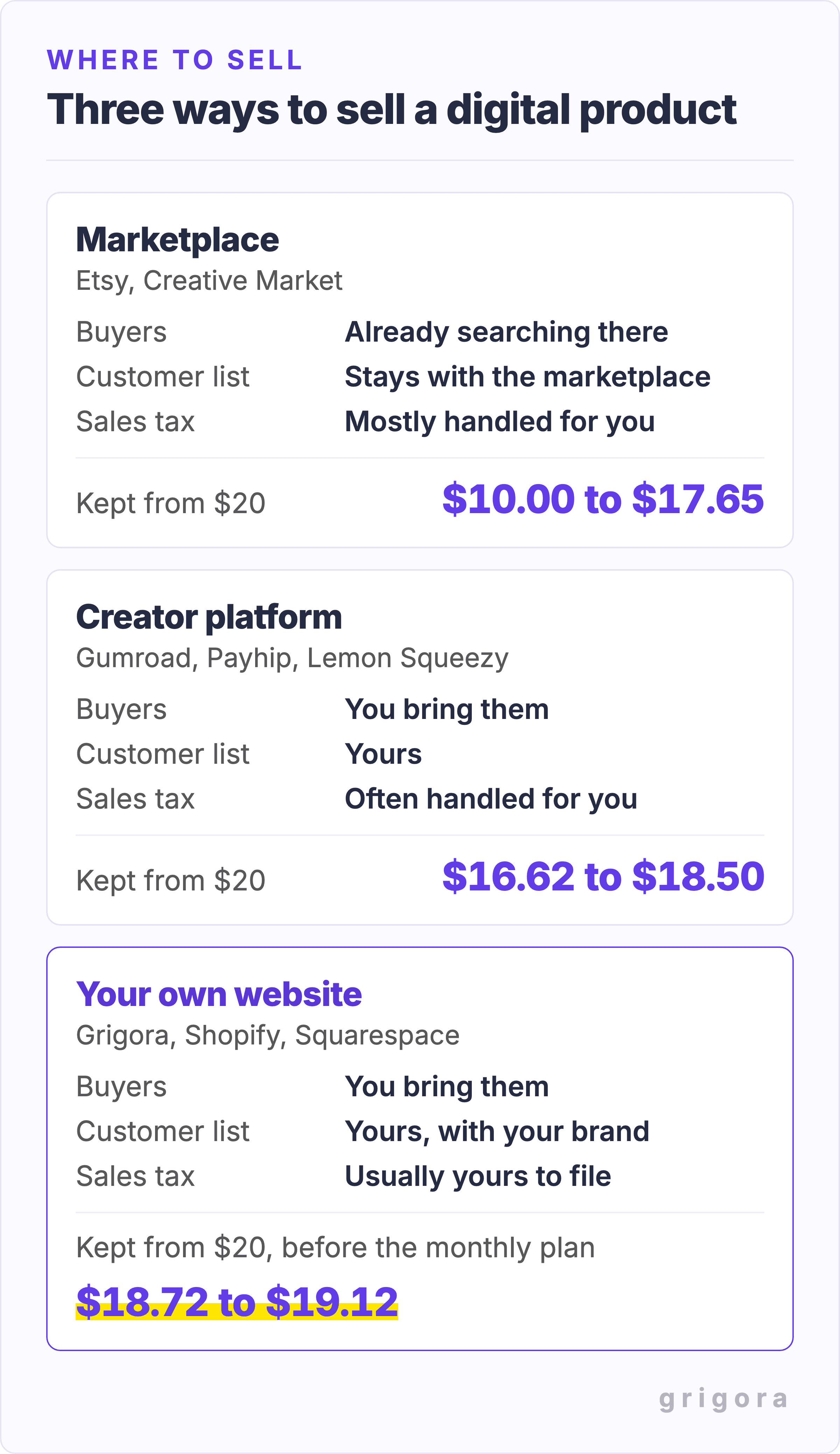
Every option falls into one of three groups, and the differences that matter are who brings the buyers, who keeps the buyer's email address, and who deals with the tax.
Marketplaces: buyers come to you, on the marketplace's terms
On Etsy, Creative Market or Amazon Kindle Direct Publishing, people arrive already searching for products like yours. Built-in product search is the main attraction, though being listed does not guarantee visibility. The price is control: your listing sits next to competitors, the marketplace sets the rules, and the customer relationship mostly stays with the marketplace. Etsy collects and pays US sales tax on digital orders, and VAT on digital items in many countries, so that work is done for you.
Creator platforms: a checkout and delivery you do not have to build
Gumroad, Payhip, Lemon Squeezy, Stan Store and Sellfy give you a product page, a checkout and file delivery, and you normally send your own audience to them. Some also offer discovery features: Gumroad Discover, for example, charges a different fee when it brings the buyer. You get your buyers' email addresses, which a marketplace mostly keeps. Several of these platforms also take the tax off your hands: Gumroad and Lemon Squeezy act as merchant of record, and Payhip collects and pays EU and UK VAT, US sales tax and most Canadian sales tax. Our full breakdown of Gumroad covers its fees, payout rules and limits in detail.
Your own website: the most control, and the most to set up
A website with its own store, on Grigora, Shopify, Squarespace or Wix, puts the shop on your own domain, next to your blog, your email signup and everything else you publish. Payments go to an account in your name, such as your own Stripe or PayPal account or the builder's own payment service, like Shopify Payments. Most of these builders take little or nothing per sale and charge a monthly plan instead. The trade is that you are usually the seller for tax purposes, and nobody sends you buyers. If you are weighing builders, our comparisons of the Shopify, Squarespace, Wix, Podia and Gumroad alternatives set each one against Grigora feature by feature.
What you keep from a $20 sale
Here is what each route leaves you from one $20 sale to a US buyer paying by card. Where the platform charges card processing separately, the figure uses Stripe's standard US rate of 2.9% + 30¢, which Shopify, Squarespace and Wix also charge on their basic plans. These are fee examples, not profit figures: they exclude sales tax, refunds, chargebacks, advertising, currency conversion and any cross-border or other payment surcharges. The table separates fixed plans from per-sale fees; your country and payment method can change both.
| Route | Monthly cost | Fee per sale | Kept from $20 | Sales tax handled for you |
|---|---|---|---|---|
| Etsy | $0, plus $0.20 a listing | 6.5%, plus 3% + $0.25 processing and $0.20 to renew the listing | $17.65 | Yes: US sales tax, and VAT on digital items in many countries |
| Creative Market | $0 | 50% of net revenue | About $10.00 | In some US states |
| Gumroad | $0 | 10% + $0.50, plus 2.9% + $0.30 processing; 30% on Discover | $16.62 | Yes, merchant of record |
| Payhip | $0 on the Free plan | 5%, plus processing | $18.12 | Yes: EU/UK VAT, US sales tax, and Canadian GST/HST/PST; Quebec QST remains yours |
| Lemon Squeezy | $0 | 5% + $0.50, processing included | $18.50 | Yes, merchant of record |
| Stan Store | $29, or $25 a month billed yearly | None, plus processing | $19.12 | No |
| Sellfy | $29, or $22 a month billed yearly | None up to $10,000 of sales a year, plus processing | $19.12 | No |
| Squarespace Basic | $25, or $19 a month billed yearly | 2%, plus processing | $18.72 | No, it calculates tax but you file it |
| Shopify Basic | $39, or $29 a month billed yearly | None with Shopify Payments, plus processing | $19.12 | No, you file it |
| Grigora Starter | $15, or $144 a year ($12 a month) | None, plus your payment provider's rate | $19.12 with Stripe, $18.50 with Paddle | Only if you sell through Paddle |
Three things the table cannot show. Etsy also charges a one-time shop set-up fee in some countries, and if a buyer arrives through one of its Offsite Ads it takes another 15%, or 12% once your sales pass $10,000 a year. Creative Market pays half of what it calls net revenue, so its figure is approximate. And Lemon Squeezy now belongs to Stripe: its January 2026 update says support has slowed while Stripe builds a replacement, so check its status before you build on it.
When a monthly plan beats a percentage cut
A flat plan only wins once you sell enough. The chart below adds up the monthly cost of selling a $20 product three ways, card processing included: Gumroad at $3.38 a sale, Etsy at $2.35 a sale, and a website on Grigora's $15 Starter plan paying $0.88 a sale to Stripe.
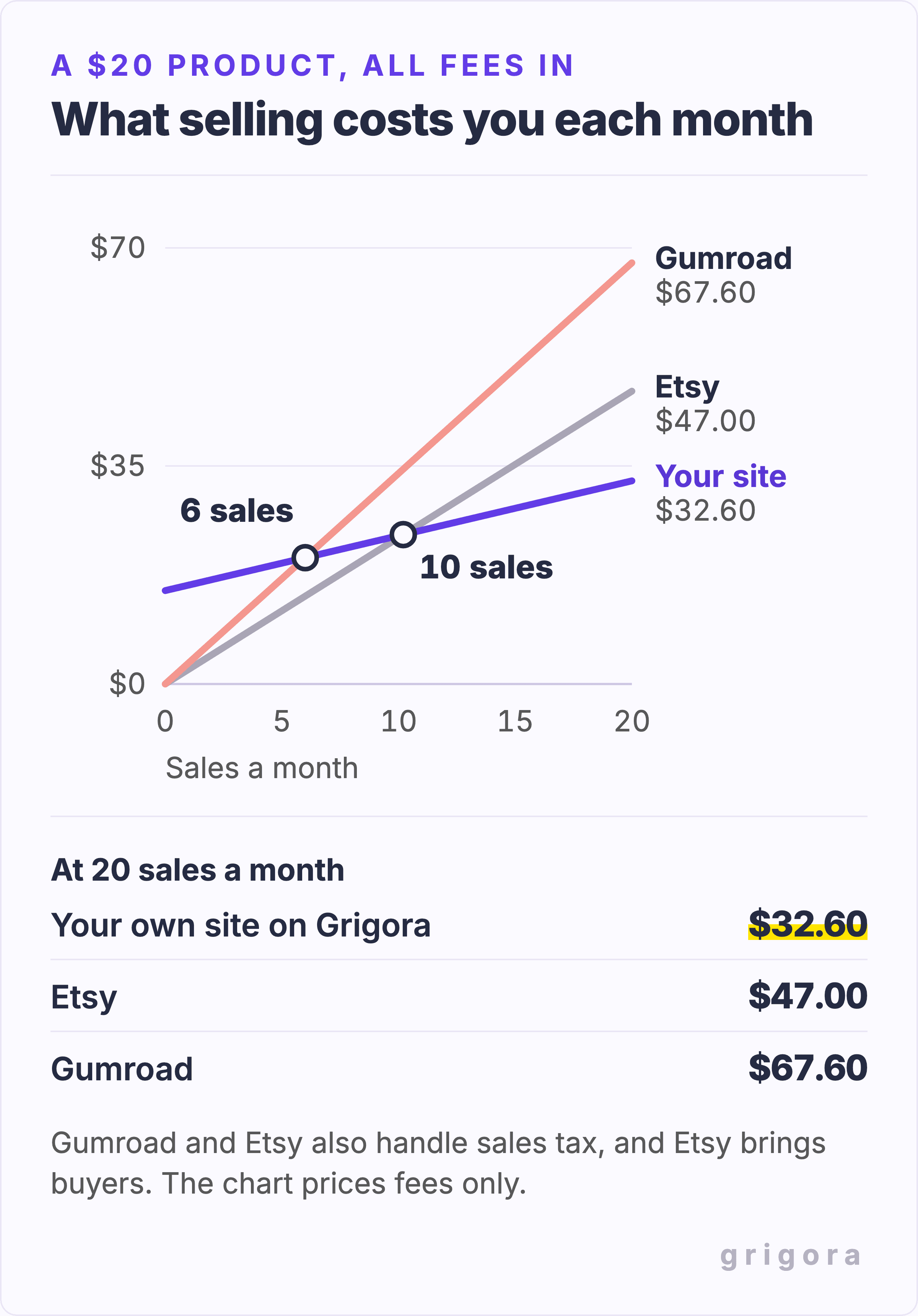
So the own-site plan is cheaper than Gumroad from the seventh $20 sale of the month and cheaper than Etsy from the eleventh. Billed yearly, Grigora's plan comes to $12 a month, which moves those points to the fifth and ninth sale. The comparison is not quite like for like, because Gumroad and Etsy also deal with the sales tax. If you want that too, apply to Paddle and connect it to your Grigora store once it approves you: Paddle sells as merchant of record for 5% + 50¢ a sale, and against Gumroad the plan then pays for itself from the eighth sale. Paddle reviews every seller and website first and says it is built for software companies, so get approved before you count on it. Against the smaller cuts a plan takes longer to pay off: Grigora's $15 beats Payhip's free plan from the sixteenth $20 sale and Lemon Squeezy from the twenty-fifth, and bigger plans need more sales still: Stan Store's $29 overtakes Gumroad at the twelfth and Shopify's $39 at the sixteenth.
A fee saving is only one part of the decision. Add the time and cost of making the product, maintaining the shop, bringing buyers and handling support. For example, 10 hours of work valued at $20 an hour is a $200 creation cost; at $18.12 left per sale it takes 12 sales to cover that cost alone, before any other expenses. Those are illustrative assumptions, not an earnings forecast. A marketplace that brings an extra buyer can be worth a larger fee.
Want to see your own numbers? Build the store on a 14-day free trial with no card, add your product and connect your payment account in test mode. You only pay once you decide to keep it.
How to sell your first digital product, step by step
Whatever route you choose, the work happens in the same order. The figure is the short version; the steps below explain each one.
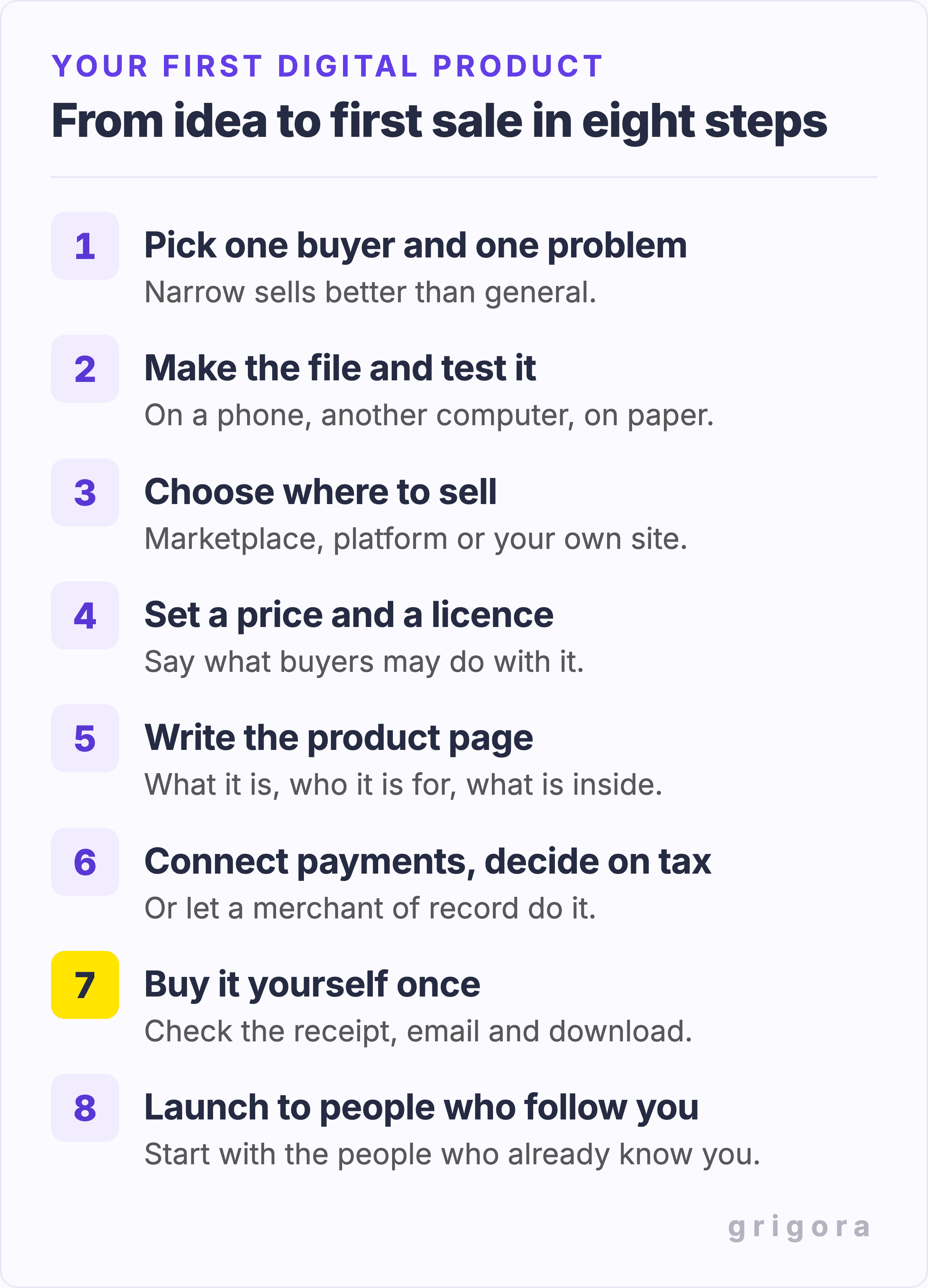
- Pick one buyer and one problem. "A budget planner for freelancers whose income changes every month" explains the intended buyer and task more clearly than "a planner". Use the sample exercise above to check whether that buyer wants it.
- Make the file and test it. Open it on a phone and another computer, print a page if it is a printable, and check every link inside it. Name the file so the buyer recognises it in their downloads folder.
- Choose where to sell. No audience yet: start on a marketplace or a free creator platform. An audience of your own: a creator platform or your own site, using the numbers above.
- Set the price and the licence. Decide what buyers may do with the file, such as personal use only or use in client work, and write it on the product page. More on both below.
- Write the product page. Say what it is, who it is for, exactly what is inside (pages, files, formats, sizes) and how it is delivered. Our guide to how long a product description should be covers the length and shape that sells, and if your platform does not add Product structured data for search engines, the free product schema generator writes it.
- Connect payments and decide on tax. On a marketplace or merchant-of-record platform this is mostly done for you. On your own site, connect Stripe, PayPal or a merchant of record such as Paddle, and read the tax section below.
- Test the purchase and delivery. Use the platform's test-purchase feature and check the receipt, delivery email and download on a phone and a computer. Gumroad provides a test purchase; do not buy your own Gumroad product to test it or try to speed up review. The free website launch checklist covers the rest of the site.
- Launch to people who already follow you. If you have an email list, a channel or social accounts, start there; on a marketplace with no audience yet, its own search is where your first buyers will find you.
How to price a digital product
Price by what the result is worth to the buyer, not by how long the file took to make, and check what similar products sell for on Etsy or Gumroad before you settle. A few pricing facts are specific to digital products.
- Fixed fees punish cheap products. Gumroad's $0.50 plus 30¢ card fee is 16% of a $5 sale but 4% of a $20 one. If most of your products cost under $10, sell them as a bundle in one ZIP, or choose a platform with a percentage-only fee.
- Editions are a price ladder. Sell a basic and a deluxe version, or a personal and a commercial licence, as two variants of one product at two prices.
- Pay what you want works for a first product or a community audience: set a minimum, and some buyers will pay more.
- A free product can introduce the paid one. Deliver the $0 download by email, then offer a clear, separate choice to receive your newsletter or product updates. An address needed to deliver a file is not by itself a request for ongoing marketing.
- Amazon caps its better royalty. Kindle ebooks earn 70% only when priced between $2.99 and $12.99 on Amazon.com; above that the royalty is 35%. A 2 MB ebook at $12.99 earns about $8.88 after Amazon's delivery charge, more than the $7.00 the same book earns at $20.
- Launch discounts with a code and an end date give your first followers a reason to buy now instead of later.
Also worth readingHTML Tags for Blog Posts: Cheat Sheet and Working Example
Sales tax and VAT on digital products
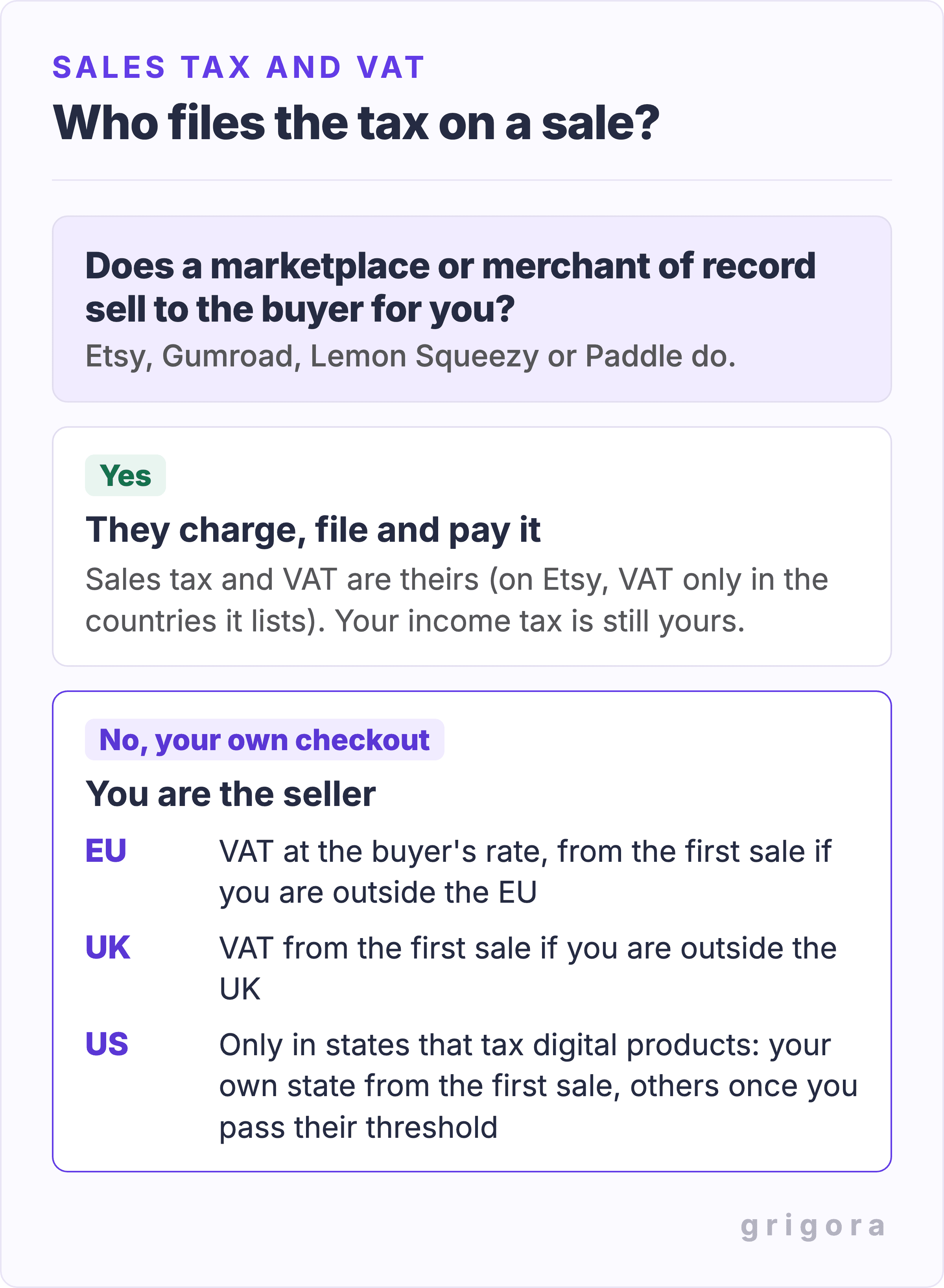
Whether you have to charge tax depends less on what you sell than on who the seller is in the eyes of the tax office. If you sell through a merchant of record, such as Gumroad, Lemon Squeezy or Paddle, that company is the seller and it collects and pays the tax. Some marketplaces do much of it too: Etsy collects and pays US sales tax and VAT in the countries it lists, while Creative Market's terms leave most tax to you, so check each one. If you sell through your own checkout, you are the seller.
Selling to buyers in the EU
For automated digital downloads sold to consumers in the EU, the starting rule is VAT in the customer's country, at that country's applicable rate. A seller established in only one EU country can use its home-country rules while qualifying cross-border consumer sales stay within €10,000 in both this calendar year and the last; above that, destination-country rules apply. Eligible EU-established small businesses can also apply for the cross-border SME VAT exemption, introduced in 2025: it requires EU-wide turnover of no more than €100,000, compliance with each country's national threshold, and prior approval. It is not automatic and is unavailable to non-EU businesses. A seller outside the EU has no small-seller threshold for these supplies: account for VAT from the first taxable sale to an EU consumer. The One Stop Shop can replace separate registrations with one quarterly return. Keep evidence of where the buyer is; the normal requirement is two non-conflicting items, with a limited one-item concession for qualifying EU-established suppliers.
Selling to buyers in the UK
A seller outside the UK must register for UK VAT from the first sale of digital services to UK consumers; the £90,000 threshold only applies to UK businesses. Ebooks have been zero-rated since 1 May 2020, so they carry no VAT, and a seller whose UK sales are all zero-rated may be able to apply to HMRC for exemption from registration. Most other digital products, including audiobooks and printables meant to be filled in, such as planners and workbooks, are taxed at the standard rate.
Selling to buyers in the US
There is no federal sales tax, and each state decides whether digital products are taxable. Washington taxes digital products, and Tennessee taxes specified digital products, while California generally does not tax downloads, though from 1 January 2027 it will tax software, including downloaded software; ebooks, music, video and digital art stay untaxed there. Your home state's rules apply from your first sale. A physical presence, such as employees or property in another state, can also create an obligation before a sales threshold is reached. For a remote seller without that presence, check the state's economic nexus threshold. That is commonly $100,000 a year, but some states, such as New Jersey, also count 200 or more sales, which a $20 product reaches at $4,000; California's is $500,000.
The practical choices: sell through a merchant of record or a marketplace that handles it, or register where you have to and charge the tax yourself. A tool such as Stripe Tax works out and collects the right amount where you are registered, for 0.5% of each sale made through Stripe's own checkout, but you still register and file the returns yourself, or pay Stripe or a filing service to do it. Your income tax is yours in every case. If you are unsure, an hour with an accountant before your first international sale is cheap.
How delivery works
Most platforms deliver a download link by email after payment, and many also show it on the thank-you page or in a buyer account. The limits differ more than people expect.
| Route | File size limit | How the buyer gets it |
|---|---|---|
| Gumroad | 20 GB per file when the product price is above $0.99; free/PWYW-minimum-$0 products allow 250 MB total | A download page and a Gumroad library |
| Shopify Digital Products app | Up to 5 GB per variant in all | An email with download links |
| Wix | Up to 1 GB for documents and ZIPs | An email link that stays active for 30 days |
| Squarespace | 300 MB, one file per product | A link that expires after 24 hours; using an expired link sends a fresh one to the buyer's email |
| Grigora | 200 MB a file, one downloadable product per order | An email link that works for 14 days and five downloads |
Two practical rules. Put a set of files in one ZIP when your platform allows only one file, and test the ZIP after downloading it. Tell buyers the format, required software and how delivery works before checkout. Explain how to request access again if an email is missing or a link expires; expiry does not necessarily end their right to use the product.
Licences, copyright and AI-made products
You can only sell material you have the right to distribute. Check the licence for every third-party font, photo, icon and illustration in the product, including editable source files. Permission to use an asset in a finished PDF is different from permission to redistribute the asset itself. For example, Adobe Fonts permits protected font embedding in ebooks, but does not permit packaging the font files for buyers. Other licences differ, and a template tool's terms also control what you can sell.
Then decide what your buyers may do. Labels such as "personal use" and "commercial use" do not describe every permitted use by themselves, so write out the rights and restrictions: for example, "use in your own projects and client work, but do not resell or share the file". Put it on the product page and in the file itself, and add it to your site's terms; the free terms and conditions generator gives you a starting draft. Our guide to which images you can use on a website explains image licences in more detail.
Products made with AI need extra care. The US Copyright Office protects only material that a human created, and its 2025 report says prompts alone are not enough; the Supreme Court declined to hear the leading challenge to that rule, Thaler v. Perlmutter, in March 2026. A product made mostly by AI may be legal to sell but hard to stop others copying, so add your own writing, editing and design.
Refunds and chargebacks
Write your refund policy before your first sale and show it on the product page: buyers look for it, and it is your first evidence in a dispute. The free refund policy generator drafts one, and our list of the legal documents a website needs covers the rest.
If you sell to consumers in the EU, the law sets a floor. Buyers normally have 14 days to cancel an online purchase. For a download, they lose that right only if they expressly agreed to the download starting straight away, acknowledged that they would lose the right, and you confirmed both, for example in the receipt email. Without those three steps, an EU buyer can cancel within 14 days and get a full refund even after downloading. And since 19 June 2026, a site that sells online must also give buyers who still have that right a way to cancel online, through a clearly labelled button or link such as "withdraw from contract here" that stays available for the whole 14 days. A faulty file has to be fixed or refunded regardless.
For chargebacks, keep each order's receipt and delivery email, and answer disputes promptly within the payment provider's deadline. A clear product page and an accessible preview help buyers understand what they will receive; they cannot eliminate disputes.
Finding your first buyers
Publishing a product does not create demand. A public note in Gumroad's code repository reports that, among 337,020 October 2025 account signups, 36,073 published a product and 6,039 eventually made a sale; half of those who sold made under $10. These are all account signups, including buyers, not a sample of people trying to sell. The note itself says about 90% of signups are buyers, so the figures are not a seller failure rate or a forecast for your product. Work on these channels alongside the product:
- People who already follow you. Share a useful preview with a relevant email audience, YouTube channel, Instagram account or blog. Judge the audience by its fit with the problem, rather than by follower count alone.
- A free product. Offer a small version, such as one page of the planner, and make the newsletter choice clear. The free newsletter signup page generator drafts the page, a privacy policy explains what you collect, and our welcome email examples help with the first message to subscribers.
- Search. A blog post or guide that answers the question your product solves can keep bringing readers for years once it ranks, and each one is a link away from the product page. Here is why blogs are good for SEO, and the free long-tail keyword generator finds the questions worth answering. If you already run a blog, our guide to monetizing a blog from day one covers the other income routes.
- Pinterest for printables, planners and templates, where people save ideas they mean to come back to. The free pin title and pin description generators help each pin get found.
- Communities where your buyers already talk, if you help first and share the product only where the rules allow it.
- A marketplace listing alongside your own shop, so that buyers who search there can find you too.
What to check after the launch
Record a baseline before changing the price or adding more products: where visitors came from, relevant product-page visits, checkout starts, completed orders, refunds and delivery questions. Compare the same traffic source and time period. A handful of visits cannot establish a reliable conversion rate, and a payment or delivery problem needs a test purchase, not more traffic.
| What you observe | What to inspect next |
|---|---|
| Few visits from likely buyers | The channel and search intent. Share the preview where people already discuss the problem. |
| Relevant visits, few checkout starts | The promised outcome, preview, file details, compatibility and price. Ask a likely buyer what is unclear. |
| Checkout starts, few paid orders | The final total, payment availability and checkout errors. Test on a phone as well as a computer. |
| Orders, but repeated access questions | The receipt, spam folder, download link, expiry message and instructions for opening the file. |
| Returns or requests for missing features | Whether the promise matches the product. Fix the common mismatch and explain the update to affected buyers. |
These are diagnostic questions, not proof of a cause. Change one important part at a time, keep a record, and compare with your own baseline. Do not treat somebody else's conversion rate or revenue screenshot as your target.
Can you sell digital products without a website?
Yes. Etsy, Gumroad, Payhip, Lemon Squeezy and Stan Store all give you a product page and a checkout without a site of your own, and a link in your social profile is enough to start; the free social bio link generator builds a simple link page. That is the right way to test a first product.
Add your own website when one or more of these is true: buyers come from your own audience rather than the marketplace; you sell more than six $20 products a month where the alternative is Gumroad, ten where it is Etsy or fifteen where it is Payhip's free plan; you want the customer list and the brand to be yours; or you want the shop to sit next to your blog and newsletter instead of on someone else's domain. Our Gumroad guide has a simple test for when that point arrives.
How to sell digital products on your own website with Grigora
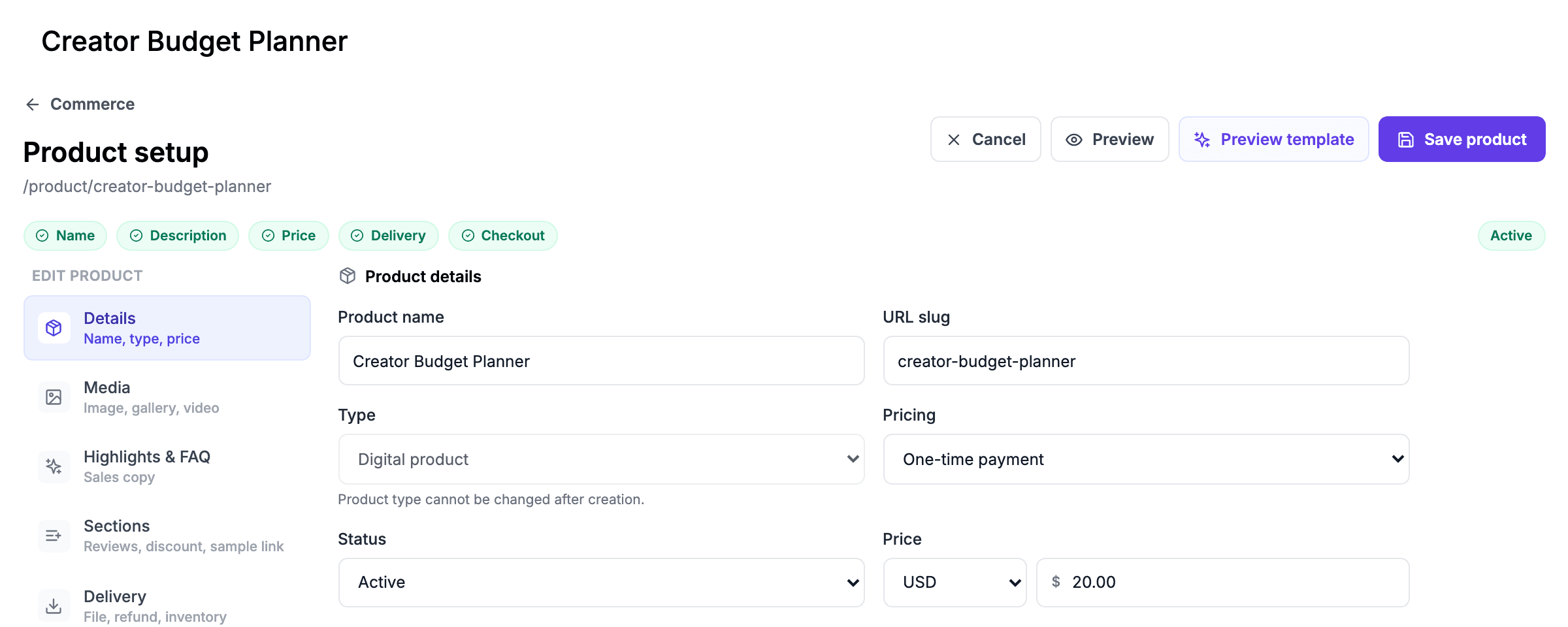
Grigora builds the website and the store together and takes no fee on sales. You can describe the site to its AI builder and ask it for a shop, or start from a template. Here is what selling a product looks like. The screens are the real Grigora store, filled in with a sample product.
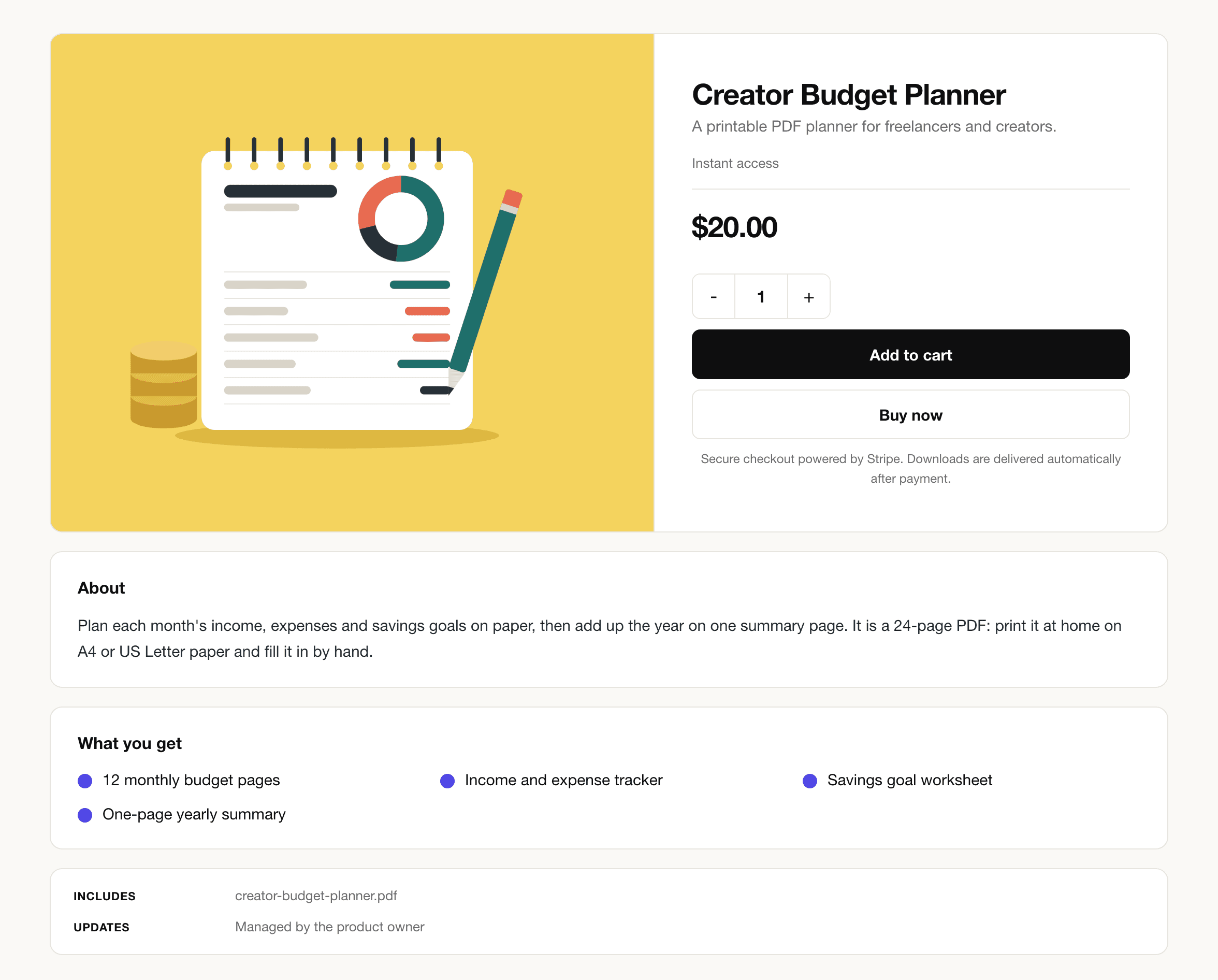
- Create the product. In Commerce, add a product, choose the digital type, upload the file (up to 200 MB) and write the description. Each variant can carry its own file, such as a PDF and an EPUB edition.
- Set the price. A one-time price, or pay what you want with your price as the minimum. A $0 price makes a free download delivered by email.
- Connect payments. Connect Stripe, PayPal, Paddle or Razorpay with your own account. The money goes to your account with that provider, not through Grigora, and Grigora takes no cut; Paddle pays out once a month.
- Decide on tax. Add tax rates yourself, which Grigora sets by country rather than by US state, or, if Stripe is your payment provider, use Stripe Tax, which can work out US state rates; either way you file the returns. Or, once Paddle approves your account, sell through Paddle, which handles the tax as merchant of record, and leave Grigora's own tax setting off. Paddle treats every Grigora product as a standard digital good, so ebooks do not get reduced ebook VAT rates.
- Publish and share the link. Every active product gets its own page on your site. After payment the buyer gets an email with a download button that works for 14 days and five downloads, plus an invoice with a PDF copy.
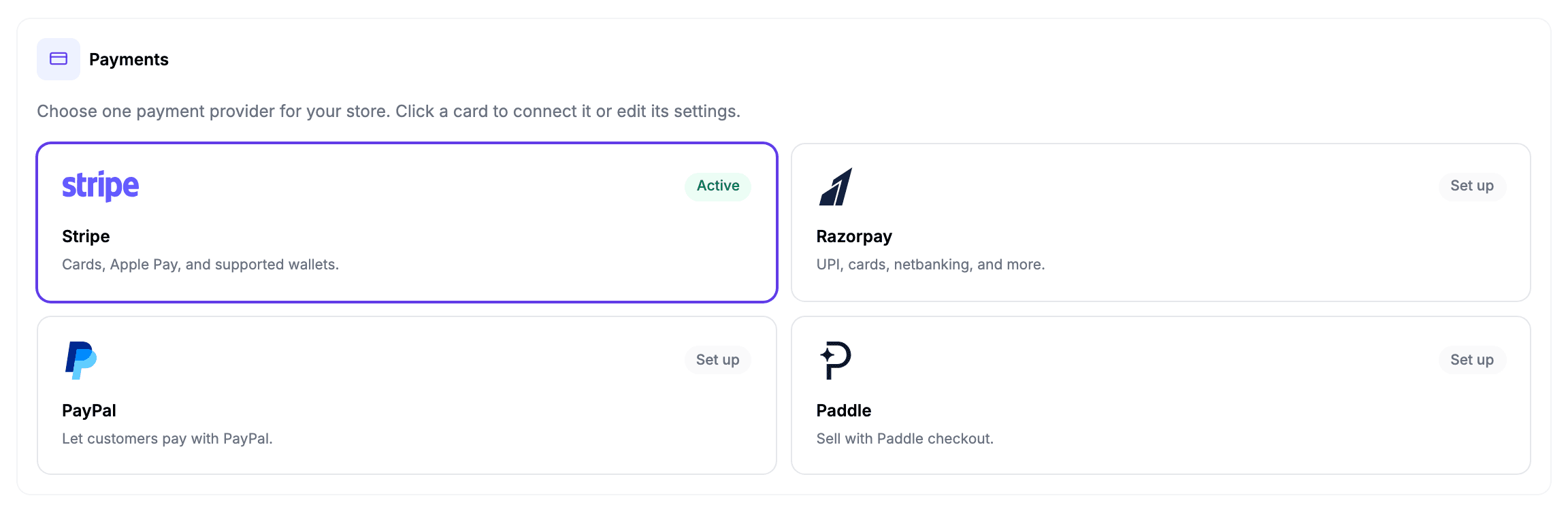
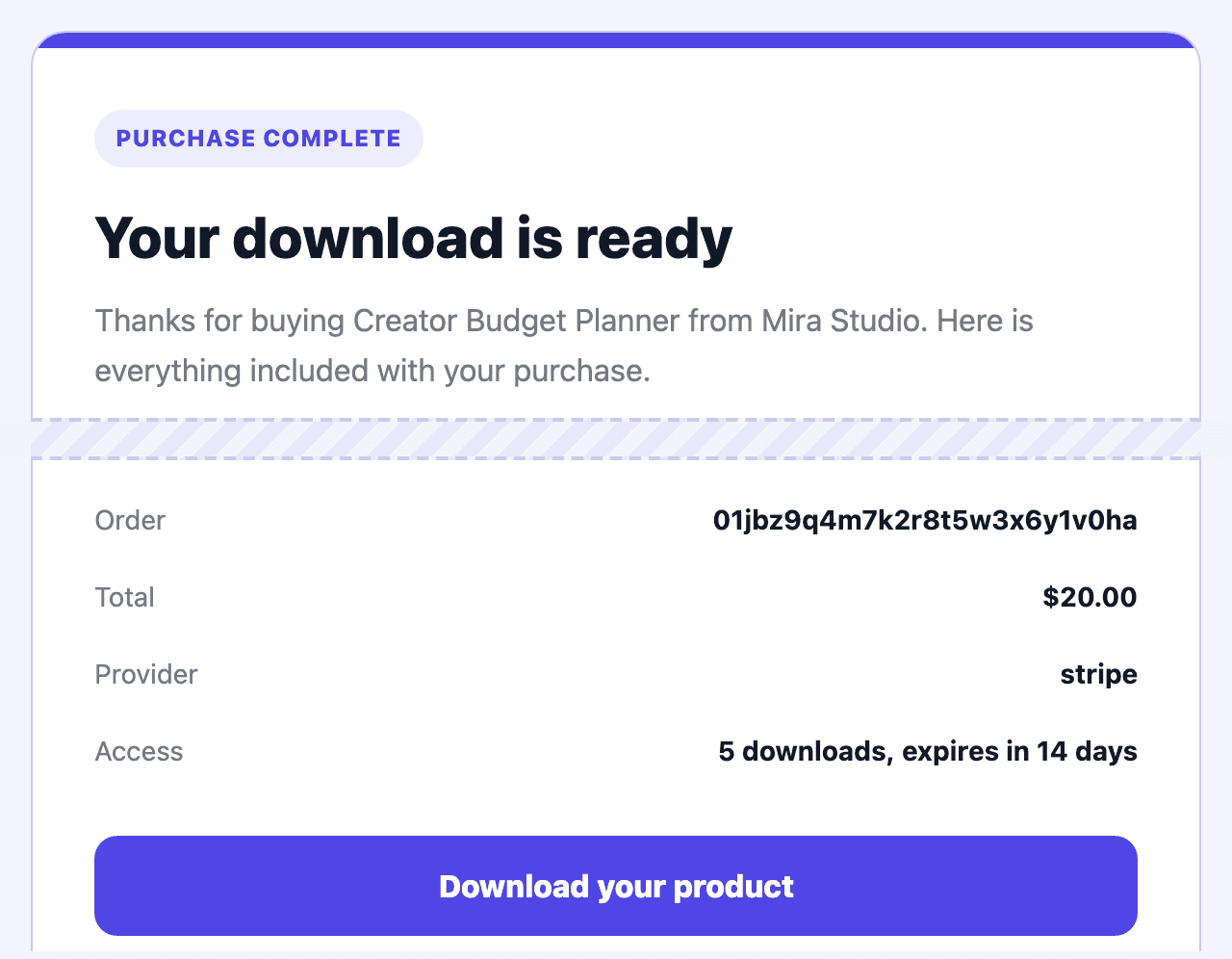
Discount codes, refunds from the dashboard (a refund also cancels the download link), collections and a newsletter for buyers who choose to subscribe are built in. Be clear about the limits before you choose it:
- One-time purchases and eligible pay-what-you-want checkout; recurring subscriptions are disabled. Course/member listings do not include a built-in lesson or member-access system, and Grigora does not issue software licence keys.
- Each protected digital order supports one distinct product or variant. Use a ZIP to bundle files; separate products or variants need separate orders.
- 200 MB a file, so very large video or sample libraries belong on a platform built for them.
- No upsells, affiliate links or abandoned-cart emails.
- Pay what you want works only while Grigora's own tax setting is off.
If those fit, it is the cheapest way here to sell from a site that is fully yours: $15 a month, or $144 a year ($12 a month), with no cut of your sales.
Try it with your own product first. The 14-day trial needs no card, so you can build the site, add the product, connect your payment account in test mode and buy it yourself before you pay anything.
Selling digital products: FAQs
It depends on the product, buyer location and who is the seller. A marketplace or merchant of record handles the transaction taxes it covers. With your own checkout, check EU VAT and its small-business exceptions, UK VAT including zero-rated ebooks, and each relevant US state's taxability and nexus rules. Physical presence can require collection before an economic threshold. The tax section above links to official guidance.
If nobody knows you yet, a marketplace such as Etsy, because buyers are already searching there. If you have an audience, a creator platform such as Payhip or Gumroad, or your own website, which on a $15 plan costs less than Gumroad from the seventh $20 sale a month and less than Payhip's free plan from the sixteenth, and keeps the customer list yours from the first.
Yes. Etsy, Gumroad, Payhip, Lemon Squeezy and Stan Store give you a product page and checkout without a site, and a link in your social profile is enough to start. A website of your own becomes worth it once your buyers come from your own audience.
Gumroad, Payhip's Free plan and Lemon Squeezy have no monthly fee, but each takes a cut of every sale: about $3.38, $1.88 and $1.50 of a $20 sale. Etsy charges $0.20 a listing plus its fees. Nothing is free once you sell; you choose between a cut and a monthly plan.
On a $20 sale to a US card: Gumroad $3.38, Etsy about $2.35, Payhip's free plan $1.88 and Lemon Squeezy $1.50, while your own site pays only card processing, $0.88 with Stripe, plus its monthly plan.
It can be, but make a small useful version, check demand and budget for your time as well as platform fees. Gumroad's published signup cohort includes buyers, so its account-to-sale figures do not measure an aspiring seller's chance of success. Your audience, price, product fit and support costs determine your own result.
Usually by an emailed download link, sometimes also on the thank-you page or in a buyer account. Link lifetimes vary: Squarespace links expire after 24 hours and can be renewed through the expired link, Wix links after 30 days, and Grigora links after 14 days or five downloads. Explain the access and recovery steps before checkout.
Use a specific buyer outcome and comparable products as starting points, then test a clear offer. Include creation time, payment and platform fees, support and expected refunds in your costs. A preview or a basic and deluxe edition can help buyers choose; a free download should offer a clear newsletter choice.
Have a written policy either way. For EU consumers, a buyer keeps a 14-day right to cancel a download unless they agreed to immediate delivery, acknowledged losing the right and you confirmed it, for example in the receipt. Faulty files must be fixed or refunded.
You cannot fully stop it once a file is downloaded. Download limits and expiring links reduce casual sharing, a clear licence sets the rules, and adding the buyer's value to updates and support gives them a reason to buy rather than borrow.
Often yes, but check the licence of the tool you design in, and remember that in the US purely AI-generated material has no copyright protection, so others may copy it. Add your own writing and design.
Etsy brings buyers who are already searching, and takes about $2.35 of a $20 sale plus 12% to 15% when an Offsite Ads sale lands. Your own site brings none, but keeps $19.12 of $20 and the customer list. Many sellers use both.
Practical writing on building a site, growing an audience and sending email people open. No more than one a week.

Karan Singh Bhakuni
118 articles on the Grigora blog
More on Guides
Guides
Gumroad Fees, Payouts and Alternatives for Digital Products
Gumroad takes $3.38 of a $20 sale and pays out only once you have $100. What you keep, when you get paid, where a $15 website store costs less, and how nine Gumroad alternatives compare on fees and…
30 Oct 202628 min read

Guides
HTML Tags for Blog Posts: Cheat Sheet and Working Example
A practical guide to the markup behind a readable blog post: a tag cheat sheet, an original HTML example, accessible image and heading rules, and a publishing checklist for Bing and Google.
23 Sept 202617 min read
Guides
Which Pages Should Not Be in Your Sitemap: 12 Types
A sitemap is the list of pages you want in Google. Twelve URL types do not belong on it, and five pages people commonly cut actually do.
23 Sept 202617 min read