Google puts it in one sentence. Its guide to building a sitemap says: "Include the URLs in your sitemap that you want to see in Google's search results." The rest of this post is that sentence applied twelve times, plus five pages people cut by mistake.
Guides
Which Pages Should Not Be in Your Sitemap: 12 Types
Karan Singh Bhakuni23 Sept 2026
- 16 min read
- 10 sections
- 2 comparison tables
- 8 questions answered
The short answer
Leave out any URL you would not be happy to see as a Google result. In practice that is twelve kinds of URL: duplicates of a canonical page, pages you have noindexed, pages blocked in robots.txt, redirects, 404s, login and account pages, cart and checkout pages, internal search results, filter and sort URLs, endless calendars, thin tag and author archives, and staging hosts.
Want the site rather than the reading? Build one free with Grigora
Contents10 sections

Read next[Answered] How Does a Microblog Differ from a Personal Blog
Which pages should not be in your sitemap: the 12 types
Find your URL type and read across. The third column is what to use instead.
| URL type | How you spot it | What to use instead |
|---|---|---|
| Non-canonical duplicates | www and non-www, trailing slash and not, ?utm_source= | A 301 or rel=canonical, list the canonical only |
| Noindexed pages | A meta robots tag or X-Robots-Tag | Keep the noindex, drop the URL |
| URLs blocked in robots.txt | A Disallow rule matches it | Keep the Disallow, drop the URL |
| Redirects | It answers 301, 302, 307 or 308 | List the destination instead |
| 404s and soft 404s | Deleted pages, typos, old feeds, empty 200s | 410 if gone, 301 if moved |
| Login, account and private files | /login, /my-account, a staff-only PDF | A login wall, and noindex on the login page |
| Cart, checkout and thank-you pages | A session token or order id in the URL | noindex, and keep it crawlable |
| Internal search results | /?s=, /search?q= | Disallow the search path |
| Filter, sort and facet URLs | ?sort=price, ?size=m, facets | Disallow the parameters |
| Calendars and endless spaces | A next-month link that never ends | Disallow the pattern |
| Tag, date and author archives | /tag/, /author/admin, date archives | noindex the archive type |
| Staging, previews and other hosts | staging., a preview subdomain, a CDN | Password-protect the host |
The four-question test that decides every URL
You do not have to memorise twelve types. A sitemap is a list of nominations, not an inventory, so the question is whether you would nominate this URL. Four gates, in order.
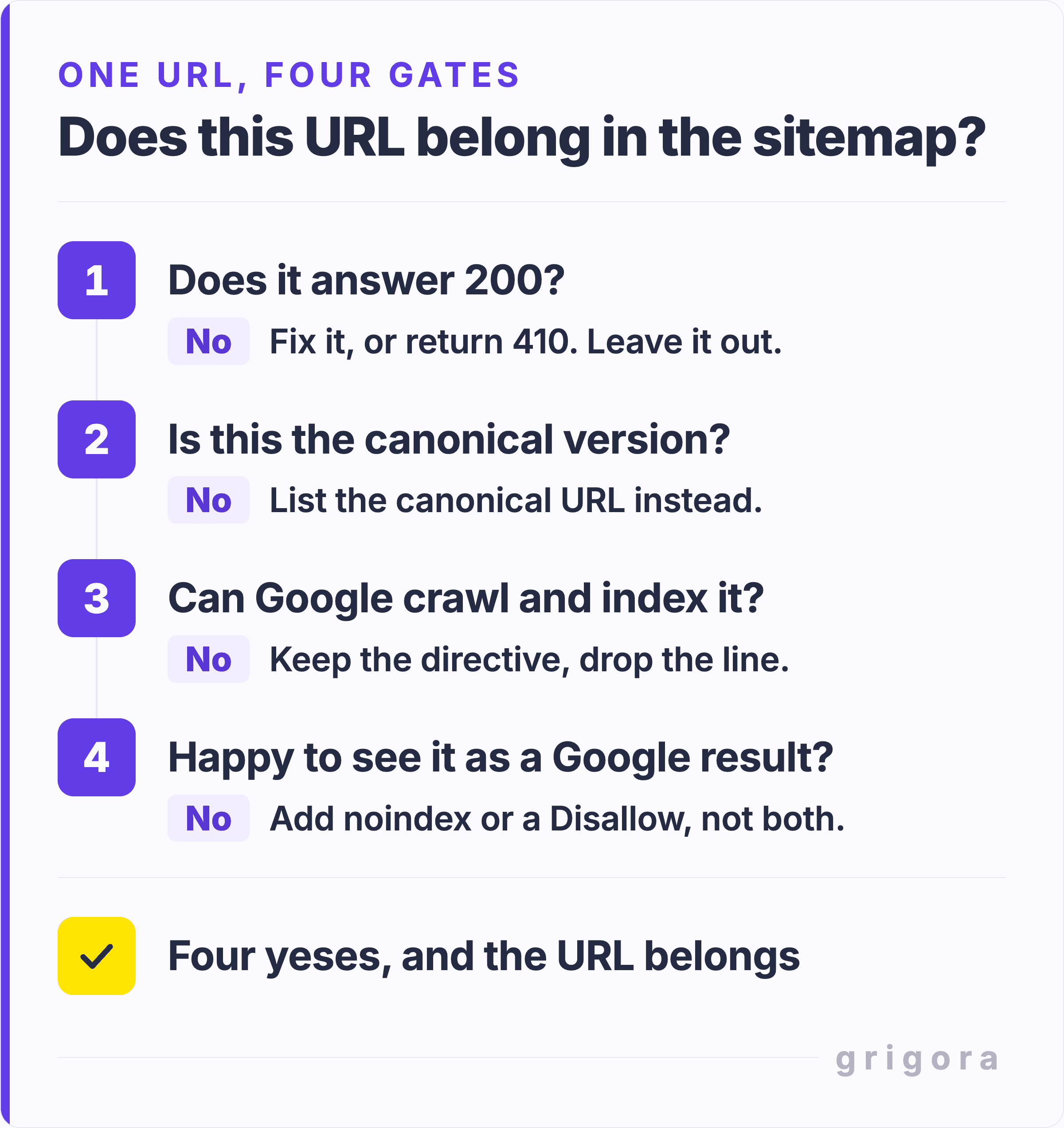
- Does it answer 200? A redirect or a 404 nominates a URL that does not exist.
- Is this the canonical version? If another URL is the one you want ranking, list that.
- Can Google crawl and index it? No robots.txt block, no noindex, no login wall. If any apply, the directive stays and the sitemap line goes.
- Would you be happy to see it as a Google result? If a stranger landing there would be confused, or the page only makes sense halfway through a checkout, no. It gets noindex or a robots.txt Disallow, never both.
The test covers the XML file, not the HTML sitemap page some sites keep for visitors, which is an ordinary indexable page. Skip the priority number beside each URL too: Google's June 2023 sitemaps post says it "still doesn't use the changefreq or priority elements at all". The date is different. Google uses lastmod to schedule crawls, but only while it is honest. As Gary Illyes put it there: "if your page changed 7 years ago, but you're telling us in the lastmod element that it changed yesterday, eventually we're not going to believe you anymore".
Why sitemap bloat hurts, and why crawl budget is the wrong reason
Nearly every guide gives one reason for pruning: crawl budget. It is the wrong reason for almost everyone who reads it.
Google's crawl budget guide opens by telling most people to stop reading: "If your site doesn't have a large number of pages that change rapidly, or if your pages seem to be crawled the same day that they are published, you don't need to read this guide." It targets sites with a million or more pages changing weekly, or ten thousand changing daily.
The page on myths about crawling goes further. Pages that serve a 4xx status, with 429 the exception, "don't waste crawl budget" at all. And "Improving your crawl rate won't necessarily lead to better positions in Google Search results."
Two reasons survive, and neither is about budget.
- Every URL you list is a nomination. Google's canonicalisation guide says "All pages listed in a sitemap are suggested as canonicals", a "weak signal" but a signal. List a duplicate and you argue against the page you want ranking.
- Search Console fills with errors you caused. The Page indexing report documentation names it as a cause of error spikes: "you might have submitted a sitemap that includes URLs that are blocked for crawling by robots.txt, noindex, or a login requirement."
None of this is a penalty. It shows up as your best pages competing with your worst, and as a report you stop opening because it is always red.
What to do with each type instead of listing it
Duplicates and non-canonical URLs
This is the group that costs you something. A www and a non-www copy, a trailing-slash twin, one product under three category paths. Pick one URL per piece of content, point the rest at it with a 301 or rel=canonical, and list only the one you picked. The canonical checker shows what a page actually claims, which is often not what its owner assumes.
Pages you have already blocked or noindexed
Submitting a URL you told Google to ignore is a contradiction, so keep the directive and drop the line. The rule can sit in the page's own HTML as a meta robots tag, or in the response as an X-Robots-Tag. The same goes for anything behind a login, such as a private blog, and for pages you only hand out by link, like an unlisted portfolio page for work under NDA.
Broken and moved URLs
404s, soft 404s and anything answering a 3xx. Google's advice is narrower than most people assume: "In general, we recommend fixing only 404 errors that you link to yourself or list in a sitemap." A sitemap entry is you vouching for a URL, so a dead one is yours to fix. The redirect checker gives you the URL at the end of the chain. List that one.
Private and transactional pages
Cart, checkout, order confirmation, thank-you, account, password reset. None work as a search entry point, and a thank-you page in the index collects people who skipped everything meant to convince them. Policy pages are the exception people get wrong: your terms and privacy pages are ordinary indexable pages and belong in the file.
Machine-made URLs: search, filters and calendars
Nobody wrote these pages. They are generated by combination, so they multiply faster than real content: picking one of four options in each of five filters already gives 1,024 versions of one category page. Google's faceted navigation guidance says that if you do not need these URLs in Search, "Use robots.txt to disallow crawling of faceted navigation URLs." Note the directive: facets are a crawling problem first, which is why noindex is the wrong tool here.
Archives you never chose to publish
WordPress has shipped a sitemap at /wp-sitemap.xml since version 5.5, covering every public post type and taxonomy "as well as for author archives and of course the homepage of the site". On a one-author blog that means an author sitemap listing one person, plus a tag cluster nobody planned. Category pages usually earn their place. A tag on two posts does not: it is a thinner version of the posts it links to.
Staging, previews and other hosts
The sitemaps protocol says "all URLs in a Sitemap must be from a single host", so staging and preview URLs have no place in your live file. If a staging copy is turning up in search, the fix is a password on that host, not an edit to the file.
noindex, robots.txt, 410 or canonical: which one you need
Taking a URL out of the file is half a fix. The other half is telling Google what the URL is, and the four directives do different jobs.
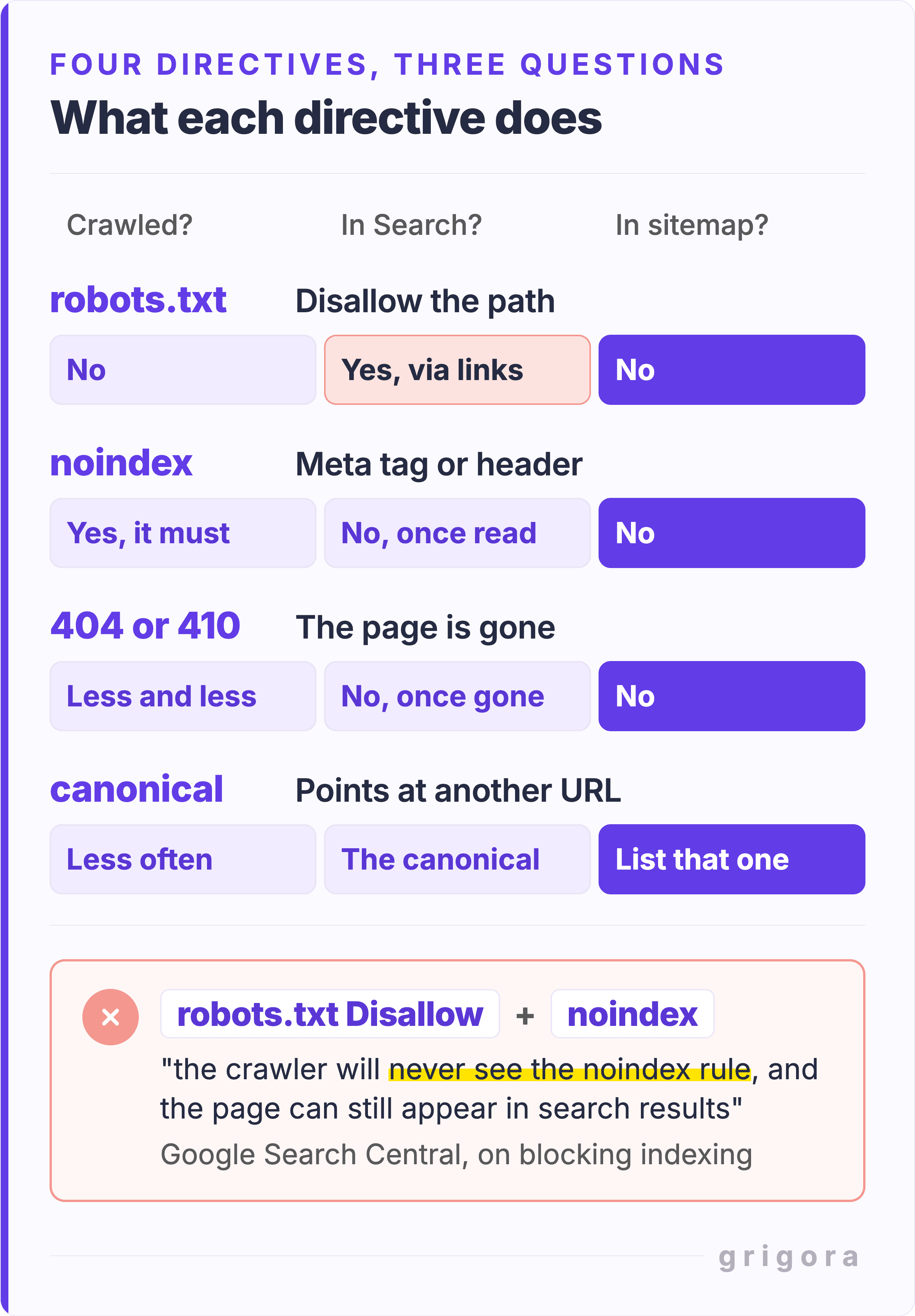
| Directive | Still crawled? | Can it still appear in Search? | Keep it in the sitemap? |
|---|---|---|---|
robots.txt Disallow | No | Yes, if linked elsewhere, without a description | No |
noindex tag or header | Yes, it must read the rule | No, once the rule is seen | No |
| 404 or 410 | Less and less often | No, once the page is dropped | No |
rel=canonical elsewhere | Yes, less often | The canonical shows instead | List the canonical, not this |
The trap is combining the first two. Google's guide to blocking indexing with noindex spells it out: "If the page is blocked by a robots.txt file ... the crawler will never see the noindex rule, and the page can still appear in search results." The Page indexing report even has a status for the result: Indexed, though blocked by robots.txt. Leave the page crawlable until the rule is read, and expect to wait: Google warns it "may take months for Googlebot to revisit a page".
For URLs that are merely unimportant rather than sensitive, Google prefers robots.txt, because with noindex it "will still request, but then drop the page". For pages gone for good it wants a 404 or 410, calling a 404 "a strong signal not to crawl that URL again". The robots.txt generator writes the syntax, and the meta robots tag generator does the tag.
Also worth readingStart Earning Now: How to Monetize Your Blog from Day One
Five pages people wrongly leave out
Pruning has its own failure mode. These five get cut by people working down a checklist, and every one is a page a sitemap is useful for.
- Category, collection and hub pages. They get lumped in with tag archives and cut alongside them. A category page with a real description and curated items is often the one ranking for the broad term.
- Orphan and weakly linked pages. Some guides say exclude orphans, which is backwards: discovery is one of the few jobs a sitemap genuinely does. Run the hub page that should point there through the internal link finder, add the missing link, and keep the URL listed.
- Page 2 onwards of a paginated sequence. Google's pagination guidance says to "Give each page a unique URL" and "Don't use the first page of a paginated sequence as the canonical page". Those are self-canonical, indexable pages.
- PDFs and downloads you do want found. A price list, a spec sheet, a sample chapter. Media gets cut as a category when the question is per file.
- Brand-new pages with nothing linking to them yet. This is the moment a sitemap earns its keep, and part of why a blog helps your SEO: every new post starts with no inbound links.
Audit your sitemap in 15 minutes
Five free tools, then the report that tells you whether any of it worked.
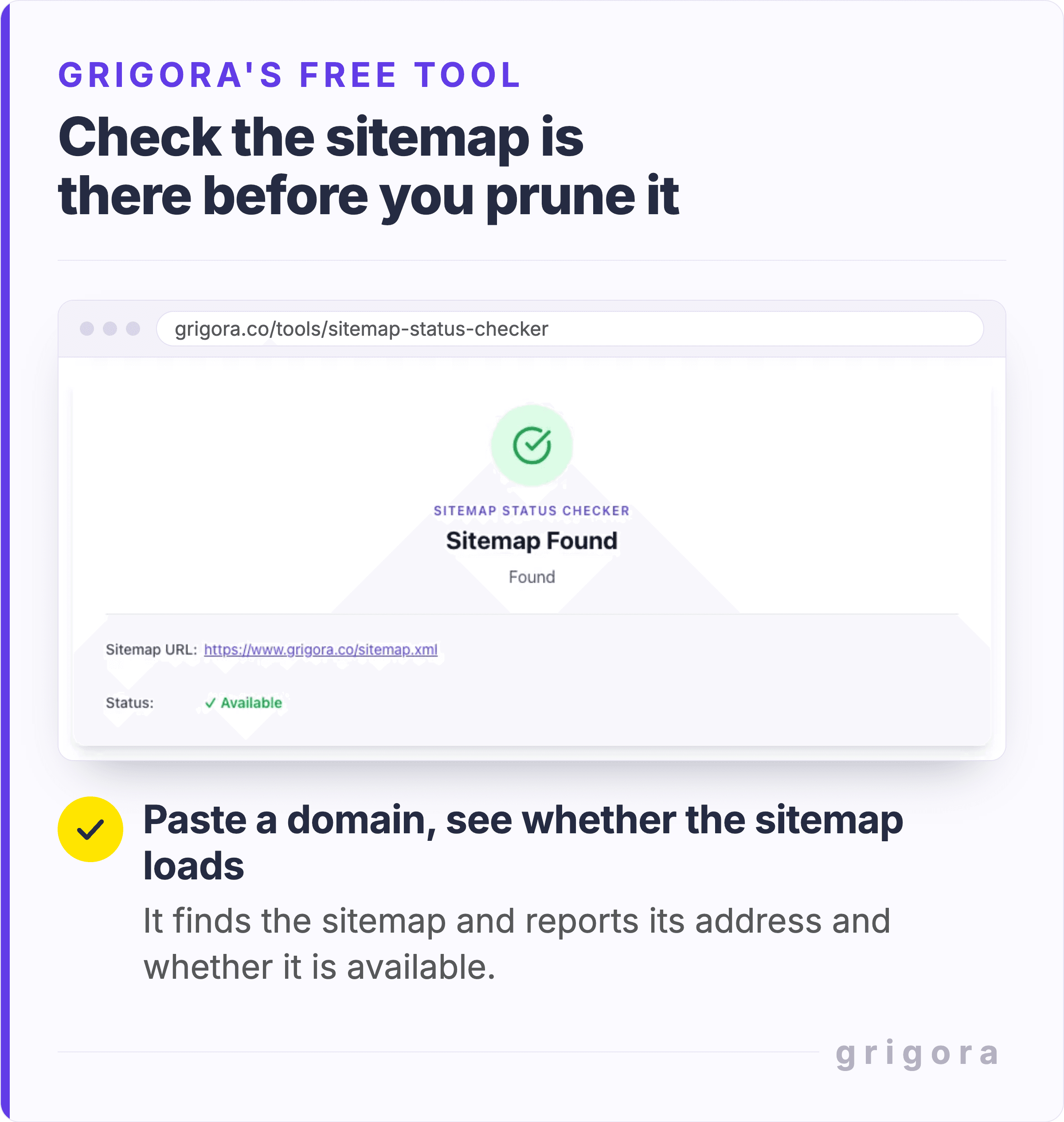
1. Confirm the file loads. Paste your domain into the sitemap status checker. It finds the sitemap and reports its address and whether it is available, which is worth knowing before you start deleting lines from it.
2. Read what is in it. The sitemap visualizer lists every URL in the file with its last-modified date and tells you how many there are. Read down it for /tag/, /author/, ?sort= and anything on a staging host.
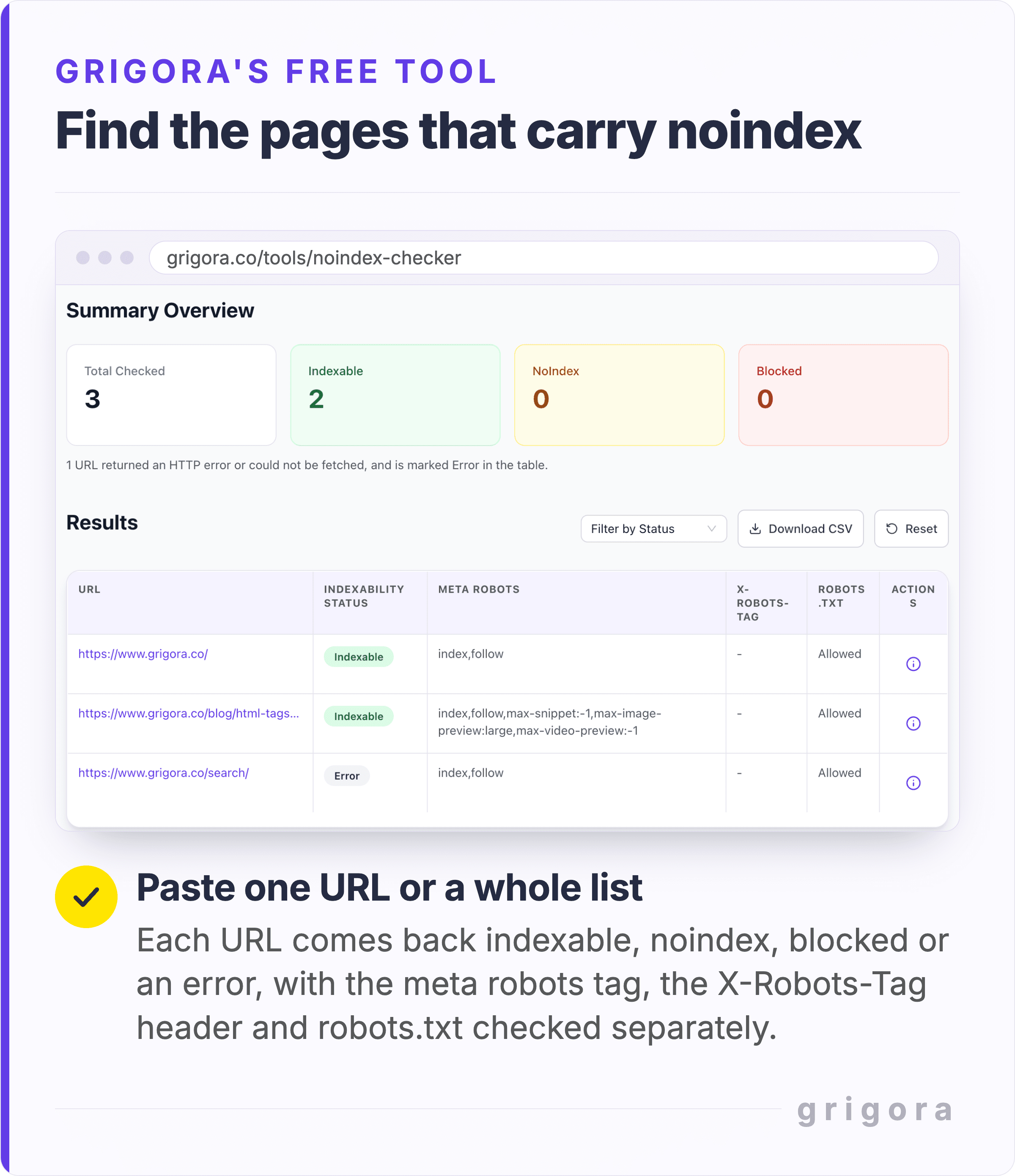
3. Bulk-check for noindex. Paste the URLs into the noindex checker, one per line, or upload a CSV. The summary counts how many are indexable, noindex or blocked, and the results table has a column each for the meta robots tag, the X-Robots-Tag header and robots.txt, so you can see which one is doing the blocking. Anything not indexable either leaves the sitemap or loses its directive.
4. Test the rule before you ship it. The robots.txt tester takes your live file or an unpublished draft and quotes the exact line behind each verdict.
5. Regenerate, if you write the file yourself. The XML sitemap creator crawls your site to a depth of 1 to 5 levels, up to 10,000 URLs, with include and exclude path filters for the patterns you found.
Then finish in Search Console, where the Page indexing report filters to a single sitemap. Google's tip there is worth stealing: to speed up a fix validation it suggests you "create and submit a sitemap containing only your most important pages, then filter the report by that sitemap". A twenty-URL sitemap of the pages that pay the bills tells you more than one with five thousand lines.
How to exclude a page on WordPress, Yoast, Shopify and Grigora
On almost every modern platform the sitemap is generated, not written: you change what the page says about itself and the file follows.
WordPress on its own includes author archives by default, which is where unexplained /author/ URLs come from. Change it with the wp_sitemaps_post_types and wp_sitemaps_taxonomies filters, drop a whole provider with wp_, or switch the lot off with wp_sitemaps_enabled.
With Yoast SEO installed, the plugin takes over the file and builds it from what you let search engines index. Its documentation gives the example that "Post Types marked as noindex will not appear in the sitemap." So you exclude something by setting it to noindex in Yoast, not by keeping a second list in sync.
On Shopify every store generates a sitemap.xml with "links to all your products, primary product image, pages, collections, and blog posts", and it updates itself as you add things. You exclude items at the source. Shopify's guide to hiding pages from search engines says an Unlisted product is hidden from the sitemap, and a seo.hidden metafield set to 1 hides a page, blog post or product from sitemaps and search engines. Crawl rules for filter and search URLs go in the robots.txt.liquid template.
On Grigora the sitemap is rebuilt from your published pages each time you publish, and pages you set to noindex are left out automatically. The switches are in Settings, then SEO, under Sitemap Configuration. Two cover the archives argued over above: Add Author Pages in Sitemap and Add Category Pages in Sitemap. Leave the author one off on a single-author site. Two others, Blog Sitemap Frequency and Blog Sitemap Priority, write the changefreq and priority elements Google ignores, so their defaults are fine. Try Grigora free for 14 days, no card needed, or start from a website template.
What removing a URL from your sitemap does not do
It does not remove the URL from Google. Search Console's Sitemaps report documentation says deleting a sitemap "removes the sitemap from this report, but Google won't forget the sitemap or any URLs listed in it". To stop Google visiting a URL it names three methods: a robots.txt rule, deleting the page, or a noindex rule. Only the last two take a page out of results, because a URL blocked in robots.txt can still appear from links.
The Removals tool is not the answer either. Google says requests there last for about 6 months, and that permanent removal means removing or updating the content, password-protecting the page, or adding noindex. Not robots.txt, for the reason above.
So for a page you need gone today, in this order:
- Add
noindexand leave the page crawlable, so Googlebot can read the rule. - Take the URL out of the sitemap, so you stop nominating it.
- Request a temporary removal in Search Console. Google says it usually takes up to a day to process, and it blocks the URL from results for about six months, long enough for the noindex to be read.
- Once it has dropped out, return a 410 if the page should never come back.
The cheaper version is deciding what should be visible before anything goes public. Our list of things to do before others can view your blog covers that, and it is shorter work than unpicking it later.
Sitemap exclusion FAQs
Should noindex pages be in my sitemap?
No. The sitemap asks Google to index the page and the tag tells it not to, and Google lists that mix as a cause of error spikes in the Page indexing report. Most generators handle it for you: Yoast drops post types marked noindex, and Grigora leaves noindexed pages out of the file. If you write the file by hand, run it through a bulk noindex check.
Does my sitemap affect my Google rankings?
Not directly. Google calls submitting a sitemap "merely a hint" that does not even guarantee the file is downloaded, and its crawling myths page says crawling is necessary to appear but "it's not a ranking signal". The indirect effect is canonical choice: a URL in the sitemap gets a weak vote to be the version that ranks.
Should category and tag pages be in my sitemap?
Split them. Category and collection pages usually deserve to rank and belong in the file. Tag archives usually do not, because a tag used on two posts is a thin page competing with those posts. On WordPress without a plugin, the
wp_sitemaps_taxonomies filter removes them.Should thank you pages, cart and checkout pages be in my sitemap?
No. They only make sense in the middle of a purchase, so a searcher landing on one arrives with nothing in the cart. Give them noindex, keep them crawlable so Google can read the rule, and leave them out of the file. A robots.txt block is the wrong tool, because a blocked URL can still appear in results from links.
If I remove a URL from my sitemap, does Google remove it from search?
No. Google says deleting a sitemap "removes the sitemap from this report, but Google won't forget the sitemap or any URLs listed in it". To take a page out of results, add noindex and keep it crawlable, or delete it so it returns 404 or 410. The Removals tool can hide it for about six months while that happens.
Do 404 pages in a sitemap hurt my SEO?
Not as a penalty, and not by wasting crawl budget: Google's myths page says pages serving a 4xx status, 429 aside, do not waste it. They count because a sitemap entry vouches for the URL, and Google recommends fixing "only 404 errors that you link to yourself or list in a sitemap". Restore the page, redirect it to its replacement, or delete the line.
Should paginated pages like page 2 and page 3 be in my sitemap?
Yes, if the items they list are worth finding. Google treats each page in a sequence as a separate page, asks for a unique URL for each, and says not to use page 1 as the canonical for the rest. List them like any other indexable page.
How many URLs can one sitemap have, and when do I need more than one?
50,000 URLs or 50MB uncompressed, whichever comes first, per the sitemaps protocol. Past that, split the file and list the parts in a sitemap index, which carries the same limits. Splitting helps below the limit too: Search Console can filter its report by one sitemap.
Practical writing on building a site, growing an audience and sending email people open. No more than one a week.
KS
Karan Singh Bhakuni
117 articles on the Grigora blog
More on Guides

Guides
[Answered] How Does a Microblog Differ from a Personal Blog
Introduction The essence of blogging is about sharing your voice; the format you choose simply shapes how that voice is heard. Unknown Why Understanding the Difference Matters In today's digital…
9 Oct 20238 min read

Guides
Start Earning Now: How to Monetize Your Blog from Day One
Introduction Don't focus on having a great blog. Focus on producing a bllog that's great for readers. Brian Clark In the digital age, blogging has become more than just a platform for expressing…
5 Oct 20238 min read

Guides
How to Start a DIY Blog That Wows: From Craft Room to Blogosphere
Introduction "The only limit to your DIY project is your imagination." The Popularity and Impact of DIY Blogs DIY blogs have surged in popularity over the last few years, becoming a go-to resource…
2 Oct 20238 min read