One thing has changed. FAQ rich results stopped appearing in Google Search on 7 May 2026, and Google removed the documentation on 15 June 2026. If you have been adding questions to win that expandable list under your result, the payoff is gone.
Guides
How Many Questions Should an FAQ Page Have?
Karan Singh Bhakuni23 Sept 2026
- 16 min read
- 11 sections
- 1 comparison table
- 8 questions answered
The short answer
There is no correct number, and Google's FAQ documentation never set one. Count what people actually ask you: five questions can cover a simple product, and fifty is defensible for a complicated one. A better way to ask how many questions an FAQ page should have is to ask where the page stops working. Around 10, a flat list stops being easy to scan. Around 25, it needs grouping. Past about 40, you are running a help centre. If you want a figure to start from, aim for 8 to 20 and let your inbox move it.
Want the site rather than the reading? Build one free with Grigora
Contents11 sections

Read nextCan You Have a Landing Page Without a Website?
How many questions should an FAQ page have?
The one published number I could find is ten. Towson University's web guidelines say FAQs "should ideally be limited to 10 questions and answers", and that past ten you should group similar questions under headers. They do not say where ten comes from. It is a sensible house rule for a university site, not a rule for yours.
Two real pricing pages show the spread better than any range. Both publish their questions as FAQPage structured data, so they can be counted exactly. On 23 September 2026, Stripe's pricing page carried 5 questions: how fees are calculated, tax, refund fees, setup and monthly fees, discounts. GitLab's pricing page carried 51, covering renewals, what counts as a user, compute minutes, storage limits, GitLab Credits and Flex contracts.
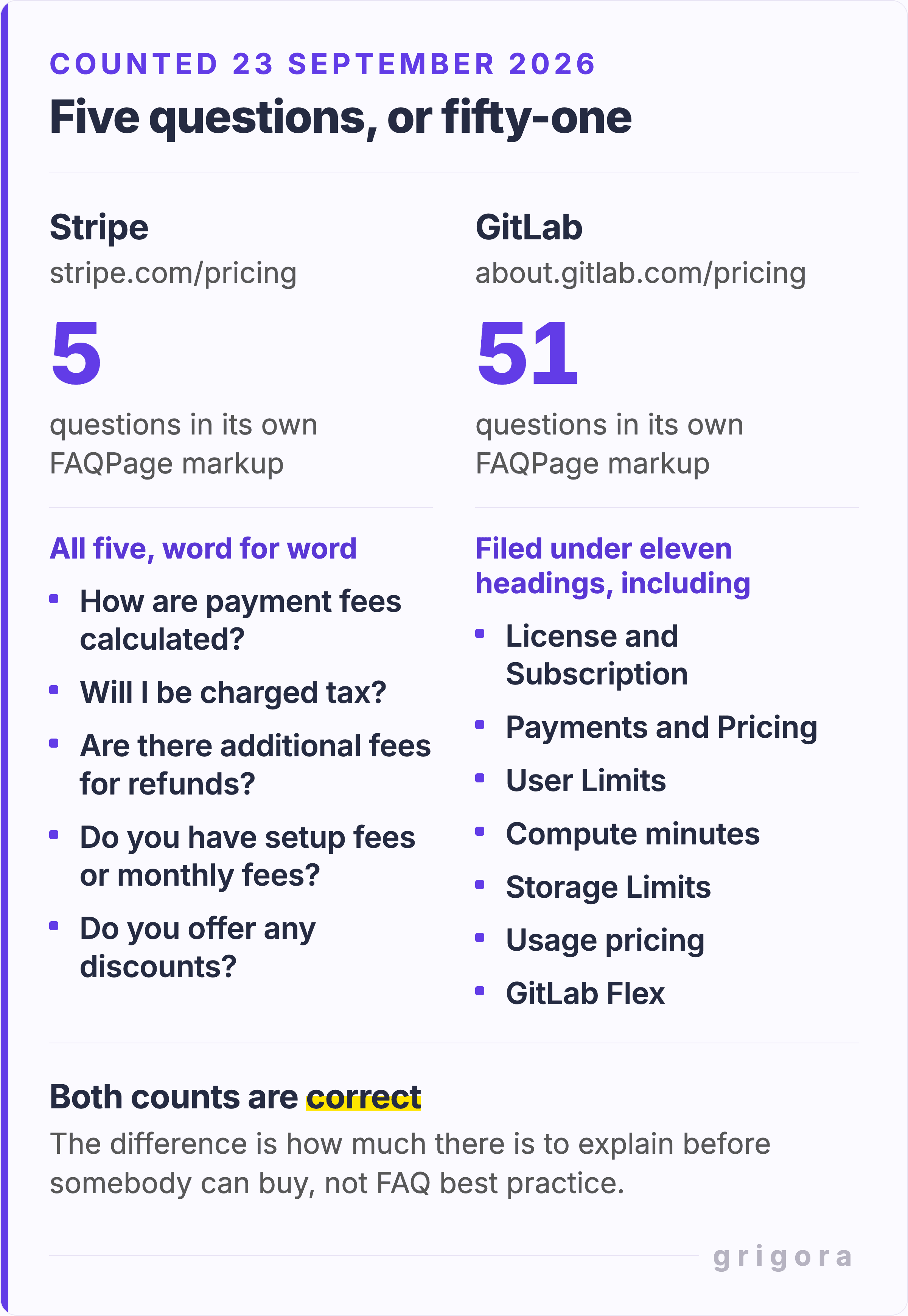
Neither is wrong. Stripe's headline card price is a percentage plus a fixed fee, so five questions cover the common doubts. GitLab sells seats in three tiers and adds compute minutes, storage, GitLab Credits and Flex contracts on top, and a buyer who does not understand compute minutes cannot approve the purchase. The count follows what you sell and how much support you field. What you actually decide is the format, and that has thresholds you can see coming.
Count your questions from real messages, not from a competitor page
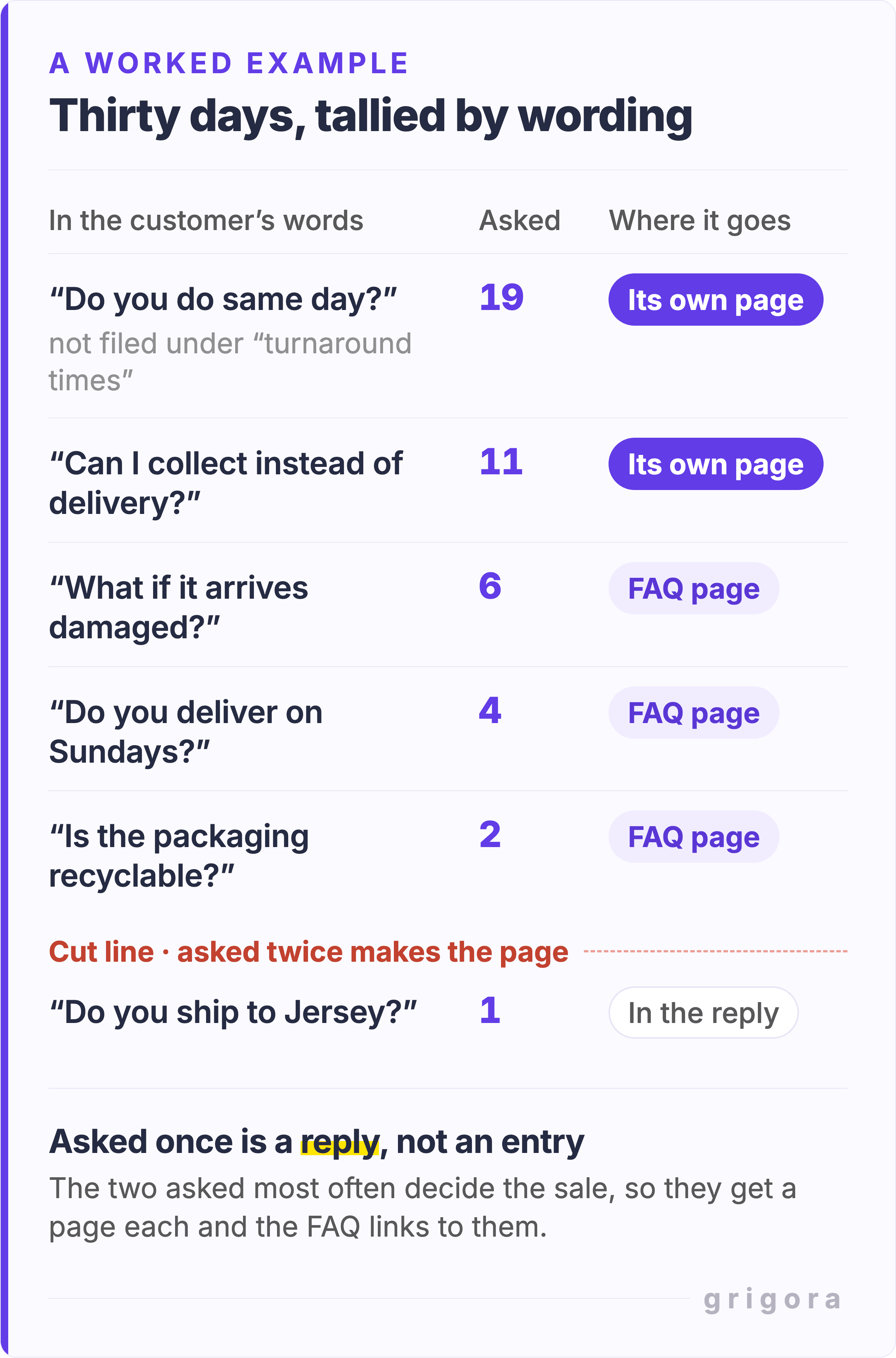
Open the last 30 days of support email, chat transcripts, DMs and notes from phone calls, and tally what people asked. Tally by wording, not topic. "Do you do same day?" and "how long does delivery take?" are two different searches, though a topic tally merges them into turnaround times.
- Write each question in the customer's words. Nielsen Norman Group's position is that questions should echo the real concerns people contact you about and "reflect the vocabulary and phrasing of your visitors". Translating into your internal vocabulary is how a page ends up answering questions nobody asked.
- Keep anything asked twice or more. Asked once is a one-off, and a one-off belongs in a reply. NN/g listed "Infrequently Asked Questions in FAQ" seventh among the top 10 web design mistakes of 2002, and still warns against made-up questions.
- Mark the ones that decide a purchase. Refunds, delivery times, sizing, cancellation. The most asked of these often deserve a page of their own, with the FAQ linking to it.
- Then look for what people ask Google but never ask you. Type your topic into Google and read the autocomplete suggestions and the People also ask box. Nobody emailed you about those, because they found somebody else's answer first. The free question keyword generator drafts who, what, why and how phrasings to check there. Keep only the ones you can see people asking.
Do not pad it, and check you need it at all
The failure mode this topic invites is generating 40 questions to look thorough. Google's spam policies define scaled content abuse as "when many pages are generated for the primary purpose of manipulating search rankings and not helping users". That policy is about many pages, but forty invented questions on one page fail for a simpler reason: they bury the few questions people actually have.
There is a stronger argument against FAQ pages, worth hearing before you build one. GOV.UK tells its own content designers, in its A to Z style guide: "Do not use FAQs on GOV.UK. If you write content by starting with user needs, you will not need to use FAQs." The reasoning is sound. A question you get repeatedly usually means the answer is missing from the page where the decision happens. If four people a week ask whether delivery is free over a threshold, the fix is the product page and the cart.
Do both, in that order. Fix the page where the question arises, which usually means rewriting the copy that caused it. Then keep the FAQ for the cross-cutting questions that belong to no single page: returns, data, who to contact when something breaks.
The three points where an FAQ page breaks
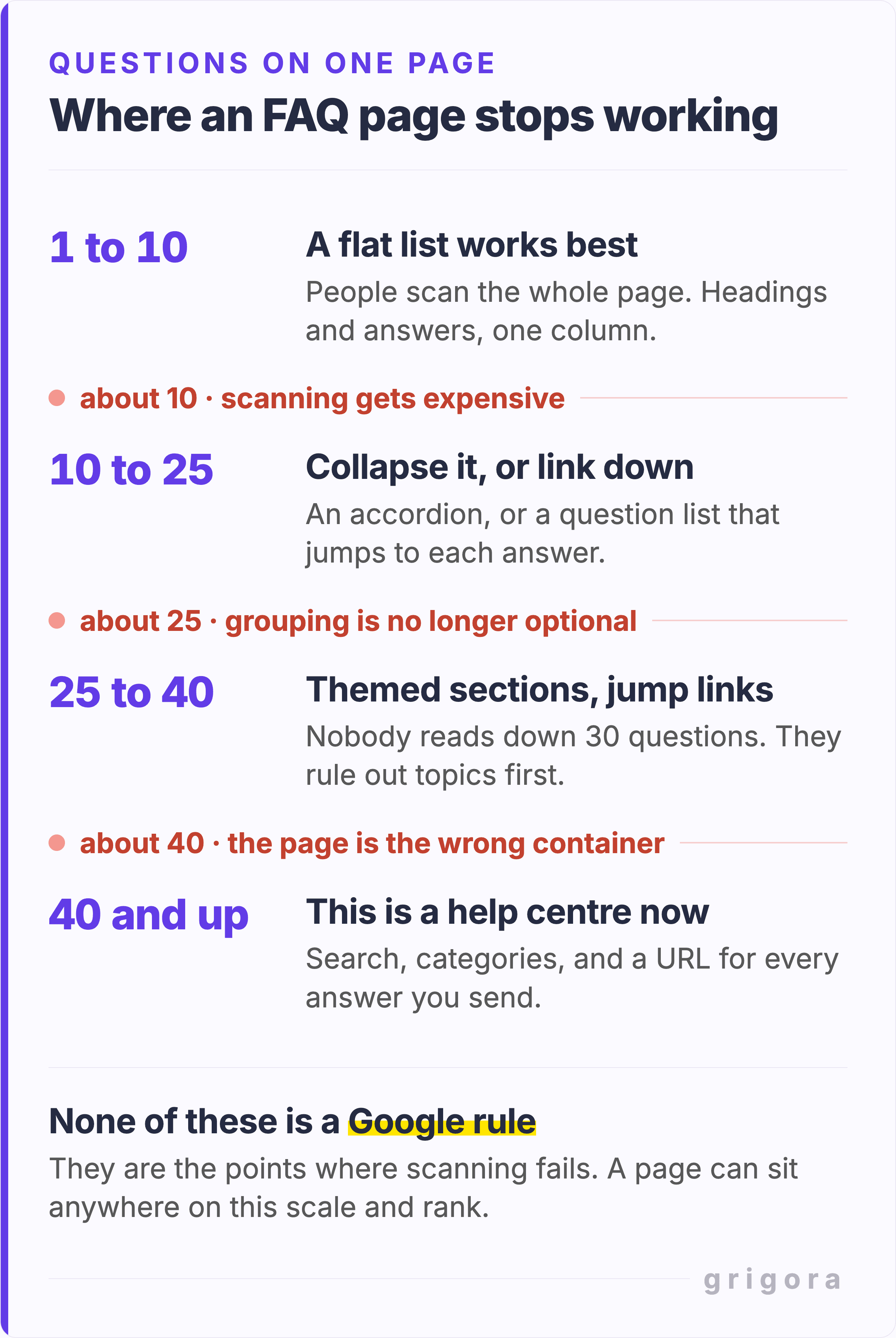
Once you have a real list, its length decides the format. The thresholds below are rules of thumb, not measured limits, and none of them is a ranking factor: a page can sit anywhere on this scale and rank. What changes is whether a reader finds the answer.
Around 10 questions: a flat list stops being scannable
Below that, plain headings and answers in one column work: a reader takes in the whole page in a scroll or two. Above it, the answer somebody wants is usually several answers down, and people do not read their way there. Jakob Nielsen's 2008 analysis of reading behaviour found that users have time to read at most 28% of the words on an average page, and 20% is more likely. That is where an accordion, or a list of questions at the top that links down to each answer, starts to pay for itself. NN/g calls that second layout, a question list followed by the answers, "the best underlying design" for FAQs up to about ten pages long.
Around 25: grouping stops being optional
One unbroken run of 25 questions is an archive, not a page. NN/g found that good, large FAQs "are chunked by topic and designed to be visually scanned", so a reader can rule out most topics and read only the part that matters. Towson draws the line earlier: past ten questions, it says, group them under headers. Put the group names at the top as jump links and keep each group to about five. GitLab files its 51 under eleven headings, from License and Subscription to GitLab Flex, with a menu that jumps between sections.
Past about 40: it is a help centre, not a page
At this size the reader needs search rather than scrolling, and you need to be able to link somebody to one answer. For longer FAQs, NN/g recommends a list of questions that lead to separate answer pages. In practice that means a URL per answer, categories and a search box. Getting there is a migration, not an edit, so notice when you cross 40.
| Questions on the page | What changes | What to build |
|---|---|---|
| Up to about 10 | Nothing. People scan the lot. | A flat list of headings and answers |
| 10 to 25 | Scanning gets expensive | An accordion, or a question list that links down |
| 25 to 40 | Scanning fails without labels | Themed sections, headings and jump links |
| Past about 40 | The page is the wrong container | A help centre: search, categories, a URL each |
Accordion or a flat list?
NN/g's accordion research gives the useful rule. Expose everything when people need most of the content, because "it is easier to scroll down the page than to decide which heading to click on", and collapse it when they need only a few pieces. Somebody reading an FAQ usually wants one answer, so an FAQ is the second case. Under about ten questions, do not bother.
If you build one, use the native elements. Each details element with a summary inside opens and closes on its own, with no JavaScript. MDN notes that giving several of them the same name attribute connects them, "with only one open at a time". Leave that off for an FAQ: the same NN/g article says to "give people the capability to open multiple sections at a time". Hand-roll an accordion instead and the W3C's accordion pattern wants each header to be a button inside a heading, with aria-expanded and aria-controls, toggled by Enter or Space. That is a lot of work to reproduce two HTML elements you already have.
Two worries you can drop. Collapsed answers get indexed: Google's mobile-first indexing guidance suggests moving "content into accordions or tabs to save space" rather than cutting it, as long as it matches the desktop version. And in a hand-rolled accordion, find in page can still reach collapsed text: in Chrome, the hidden=until-found attribute has made hidden regions searchable since Chrome 102. On a phone an accordion is also part of making a website mobile friendly: it turns a screen of scrolling into a screen of choices.
Also worth reading11 Reasons Why Every Doctor Should Have a Website
When a question deserves its own page instead
Some questions are big enough to carry a page of their own. Move one off the list when it passes all three of these tests:
- It has its own search demand. People type it into Google without your brand name attached, so a page could meet them there.
- The honest answer runs past four or five sentences. Towson's guidelines make the same point: if an answer needs several paragraphs, the question "might not be appropriate for an FAQ page".
- The answer decides whether somebody buys. Refunds, shipping, pricing and warranty usually qualify.
When a question moves, keep a one sentence version in the FAQ linking to the full page. The reader scanning the list still gets an answer, and the page that needs to rank gets the depth. List the new page in your sitemap as well: a new page with few links pointing to it is one of the cases where a sitemap earns its keep, as the guide to which pages to leave out of your sitemap explains.
Where the FAQ block belongs: its own page, or the page that sells
Most sites need both, and the split is where people go wrong. Three to five questions inline on a pricing, product or service page, answering the objection at the moment somebody hesitates. Everything else goes on the FAQ page. People do go looking first: Harvard Business Review reported in 2017 that "fully 81% of all customers attempt to take care of matters themselves" before contacting a live representative.
We do not follow our own advice here. Grigora's pricing page carried 13 questions when I checked it on 23 September 2026, and six of them are about Commerce: whether it is live, which plans include it, Stripe and Razorpay, other checkouts, provider fees, and shipping and tax. The plan and fee questions earn their place. The other four belong with Commerce, next to the thing they describe, not in front of somebody comparing plan prices. Stripe manages five on the same kind of page.
On product pages, Baymard Institute's testing found site-authored FAQs and community Q&As do different jobs, because shoppers find answers from other customers more credible than the same claim from the seller. Its benchmark found 55% of e-commerce sites carry no community Q&A on product pages, and 70% "don't have the ideal combination of both". One result, Baymard says, is product descriptions that run long trying to answer every detailed question. Our guide to how long a product description should be shows where those questions go instead.
Schema markup, after Google switched FAQ rich results off
FAQPage structured data used to earn an expandable list of questions under your Google result. That ended in four dated steps.
- 8 August 2023. Google announced that FAQ rich results would only be shown for "well-known, authoritative government and health websites", and that "for all other sites, this rich result will no longer be shown regularly".
- 7 May 2026. The feature stopped appearing in Google Search. The changelog entry dated 8 May reads: "This feature will no longer appear in Google Search starting May 7, 2026."
- June 2026. Google's notice, reported by Search Engine Journal, set June for dropping the FAQ search appearance, the rich result report and Rich Results Test support. The documentation went on 15 June, and the old FAQPage guide now redirects to a changelog entry reading "The FAQ rich result feature is no longer shown in Google Search results". By 23 September, FAQ was no longer on Search Console's list of rich result reports.
- August 2026. The same notice set August for removing FAQ from the Search Console API.
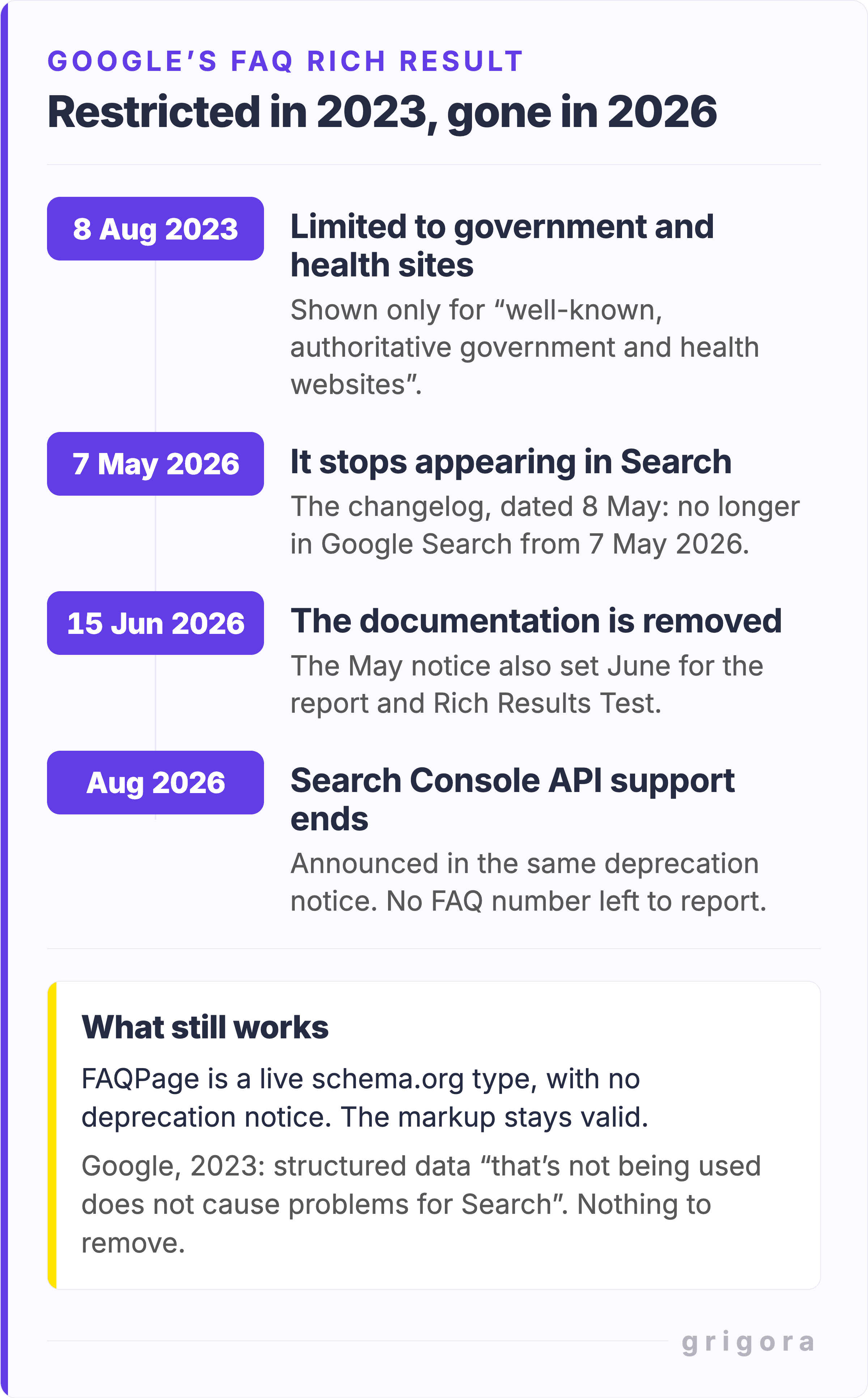
Two things still hold. FAQPage is a live schema.org type with no deprecation notice, so the markup stays valid and machine readable. It just no longer buys a Google rich result. And Google's 2023 wording settles whether to strip it out: "structured data that's not being used does not cause problems for Search, but also has no visible effects in Google Search".
So stop shaping answers for a feature that no longer exists. Answers trimmed to two sentences to fit a search result, and FAQ impressions tracked in Search Console, are effort spent on nothing. If you still want the markup, the free FAQ schema generator builds FAQPage JSON-LD from your question and answer pairs.
Build the page
Once you have the list, the free FAQ page generator turns it into a block. It has six templates, and the export is plain HTML and CSS built on native details and summary, with no script to paste. Link to the finished page from the pages that raise the questions, not only from the footer.
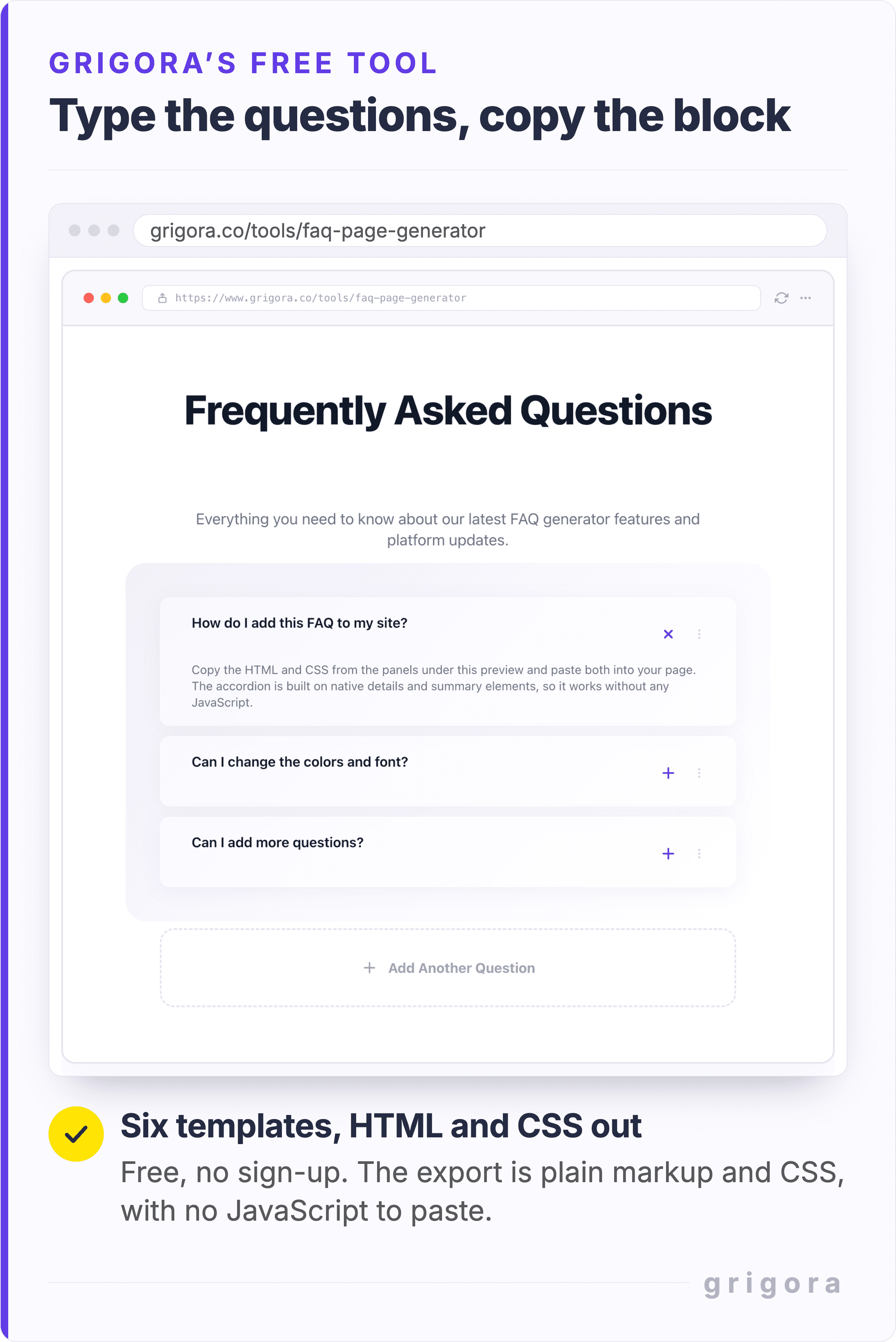
On Grigora you can paste that export into a Custom HTML block on any page, use the editor's own FAQ block, or describe your business to the AI builder, ask it for an FAQ section and edit what it writes. Grigora keeps the site and the shop in one workspace, so the shipping rates you set in Commerce and the FAQ answer that quotes them are edited in the same place. The trial is 14 days, no card needed.
Review the list, cut it, and date it
An FAQ page decays faster than the rest of a site because it encodes policy, not description. A courier changes, a refund window moves from 14 days to 30, and the FAQ is the last place anyone edits. An outdated answer is worse than a missing one: the reader trusts it, then finds out.
Do a pass every quarter. Delete anything nobody has asked in six months. Rewrite anything a current support reply contradicts, taking the wording from that reply. Add whatever came up twice last quarter. Then date the page, so a reader knows whether to trust the refund window. It belongs in the routine you already use to update a website.
FAQ page FAQs
Is 50 questions too many for one FAQ page?
For one flat list, yes. GitLab publishes 51 on its pricing page, but files them under eleven headings with a menu that jumps between them. Past about 40, most sites are better served by a help centre with search, categories and a URL per answer.
How many FAQs should I put on a pricing or product page?
Three to five, each answering an objection that stops the purchase at that point. Stripe's pricing page carries five. On product pages, Baymard found shoppers trust answers from other customers more than the seller's, so add community Q&A where you can. Send everything general to the FAQ page.
Does FAQ schema still do anything now that Google removed FAQ rich results?
Not for Google rich results. Those stopped appearing on 7 May 2026, and Google removed the documentation on 15 June 2026. FAQPage is still a live schema.org type with no deprecation notice, so the markup stays valid. It just no longer changes how your result looks in Google.
Should I delete the FAQPage structured data from my site?
No. Google said in 2023 that structured data that is not being used does not cause problems for Search, and that it has no visible effect either. What to drop is the habit of tracking FAQ impressions in Search Console: FAQ is no longer among its rich result reports.
How long should each FAQ answer be?
Two to four sentences. That is long enough to answer the question and short enough that somebody scanning ten answers does not give up. When the honest answer needs more than five, give it its own page and leave a one line summary with a link.
Are FAQ pages bad for SEO?
No, but a padded one is useless. Genuine questions in your customers' wording are ordinary good content, and invented ones bury the answers people came for. Generating pages in bulk to rank is what Google's spam policies call scaled content abuse. GOV.UK goes further and tells its writers not to use FAQs at all, because content written from user needs should not need them.
Should FAQs be in an accordion or all visible at once?
An accordion, once you are past about ten questions. Nielsen Norman Group's rule is to expose everything when people need most of the content and collapse it when they need only a few pieces, and an FAQ reader usually wants one answer. If you use one, let several answers stay open at once. Under ten, scrolling beats deciding which heading to click.
When should an FAQ question become its own page?
When it passes three tests: it has its own search demand, the honest answer runs past four or five sentences, and it decides whether somebody buys. Refunds, shipping, pricing and warranty often pass all three. Move the answer to its own page, keep a one line version in the FAQ that links to it, and add the new page to your sitemap.
Practical writing on building a site, growing an audience and sending email people open. No more than one a week.
KS
Karan Singh Bhakuni
117 articles on the Grigora blog
More on Guides

Guides
Can You Have a Landing Page Without a Website?
Introduction Let’s get something straight: landing pages and websites are not the same thing. A landing page is a single, focused page designed to convert visitors into leads. A website, however, is…
28 Aug 202311 min read

Guides
11 Reasons Why Every Doctor Should Have a Website
In the world of healthcare, accessibility is not just about physical location; it's about information availability. In today's digital era, a doctor's website is a crucial bridge, extending their…
9 Dec 202312 min read

Guides
How Many Hours Does It Take to Design a Website?
Introduction "Time is the most valuable thing a man can spend." Theophrastus The Importance of Time Estimation In the digital age, where everything moves at the speed of light, understanding the time…
22 Oct 20236 min read