Set your expectations from Google's own sentence: the filename "can give Google very light clues about the subject matter of the image". Getting it right costs nothing while the file is still on your desktop; fixing it after it goes live costs you a URL. To check the form of a single name, paste it into the free image filename SEO checker.
Guides
How to Name Image Files for SEO: 7 Rules and Examples
Karan Singh Bhakuni23 Sept 2026
- 16 min read
- 9 sections
- 1 comparison table
- 8 questions answered
The short answer
To name image files for SEO, describe what is in the picture in three to five lowercase words joined by hyphens, match the extension to the real file format, and rename the file before you upload it. Once it is uploaded, the name is part of the image URL, and changing it later means changing that URL.
Want the site rather than the reading? Build one free with Grigora
Contents9 sections

Read next[Answered] Do I Need to Trademark My Blog Name?
What Google actually says about image file names
Google's image SEO documentation, last updated on 2 March 2026, gives filenames one paragraph. Use names that are "short, but descriptive": my-new-black-kitten.jpg beats IMG00023.JPG. Avoid generic names such as image1.jpg, pic.gif and 1.jpg. If you have thousands of images, consider automating the naming, and if you localise your images, translate the filenames too. A separate section adds that it is "a good idea" for the extension to match the file type.
The page sets no length limit and no keyword rule, and mentions no penalty for a poor name.
The more useful answer came from a podcast. On Search Off the Record in October 2022, Lizzi Sassman asked John Mueller what would happen if she renamed every image on the site. Descriptive filenames are good, he said, but "I don't think you would see a significant change if you already do the other things around images, like the alt texts, the text surrounding the image. Those are really, really strong signals."
Then the exception: "if you don't do the alt text, or if you don't have good surrounding text, then, of course, the filename might be the only place where you mention what this image is about." A gallery photo with no caption and no alt text has one description on the page, and it is the filename.
Put Google's advice together and one good name looks like this, with what WordPress does to a careless one underneath.
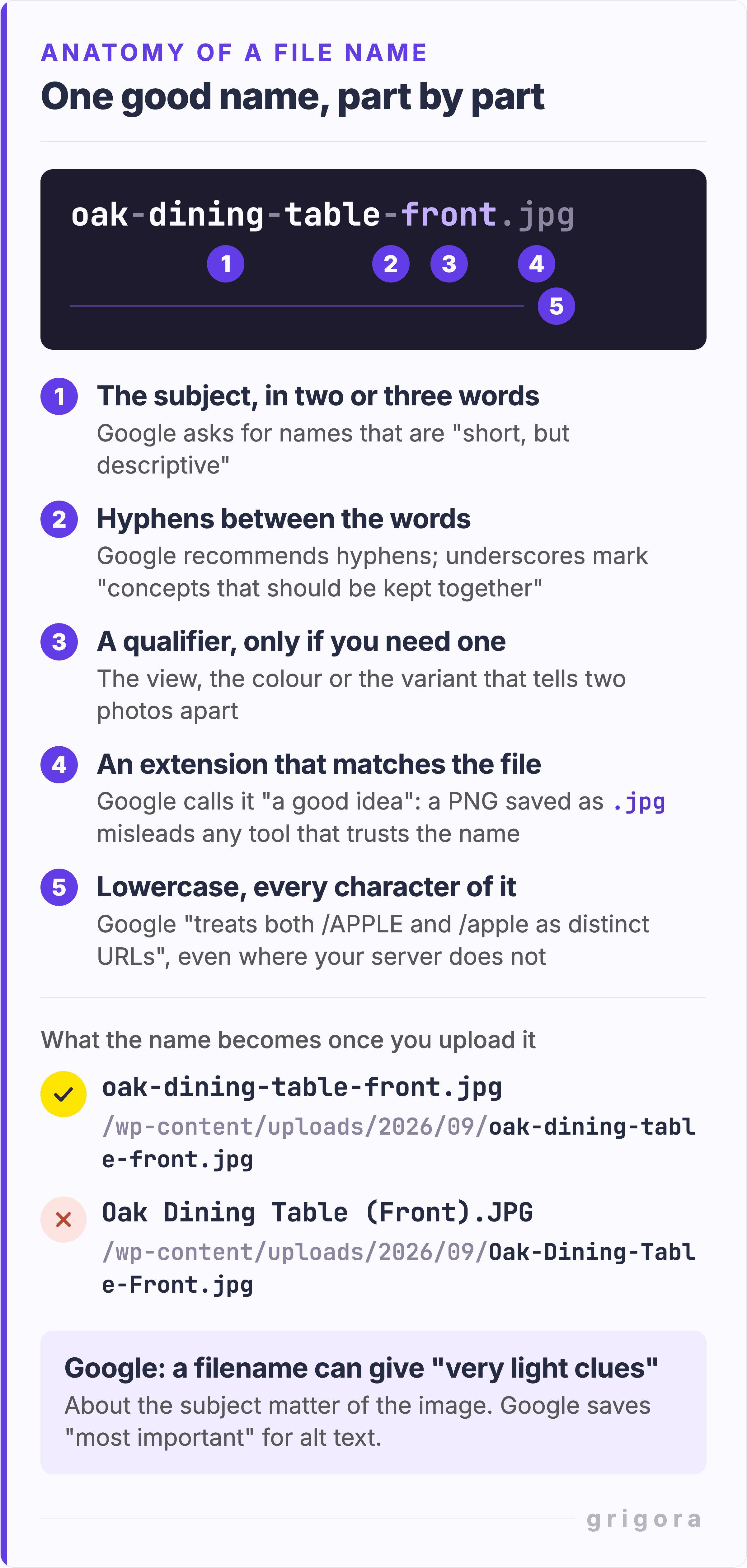
Seven rules for naming an image file
All seven happen before you upload.
- Describe the picture, not the page. Spend the name on what the image shows:
oak-dining-table-front.jpg, notdining-furniture-guide-image-2.jpg. - Hyphens, never underscores or spaces. Google recommends hyphens instead of underscores, "as it helps users and search engines better identify concepts in the URL", and says underscores are "commonly used for denoting concepts that should be kept together". A space cannot travel in a URL as itself, so it arrives as
%20or+(MDN). Wix's home page is carryingFrame%202147239390.jpgas I write this. - Lowercase, the whole thing. The same page says Google "treats both
/APPLEand/appleas distinct URLs with their own content". Mixed case also breaks links: on a server that is strict about case, a link tooak-table.jpgwill not findOak-Table.jpg. - Three to five words. Google sets no limit and asks only for "short, but descriptive". Under three words you have rarely described anything (
table.jpg). Past 50 or so characters, the extra words are usually about the sale, not the picture. - Make the extension match the real format. Google calls it "a good idea". A PNG saved as
.jpgstill displays, but it misleads any tool that trusts the name. - Keep every name unique across the site. Duplicates are one reason a platform rewrites your name: Shopify adds a unique identifier when "a file with the same name already exists in your store", so upload four files called
hero.jpgand three can come back with names you did not choose. - Leave out dates, camera codes and version numbers unless they are the subject.
-v3,-finaland-copy-2describe your afternoon, not the photograph.
Here is one photo of an oak table under six names, from the camera default to the one worth keeping. The long one is the trap: solid-oak-dining-table-for-sale-best-price-uk-free-delivery.jpg is 63 characters, one table and then a sales pitch. Google's warning about keyword stuffing names the alt attribute rather than the filename, but the reasoning carries over: it "results in a negative user experience and may cause your site to be seen as spam".
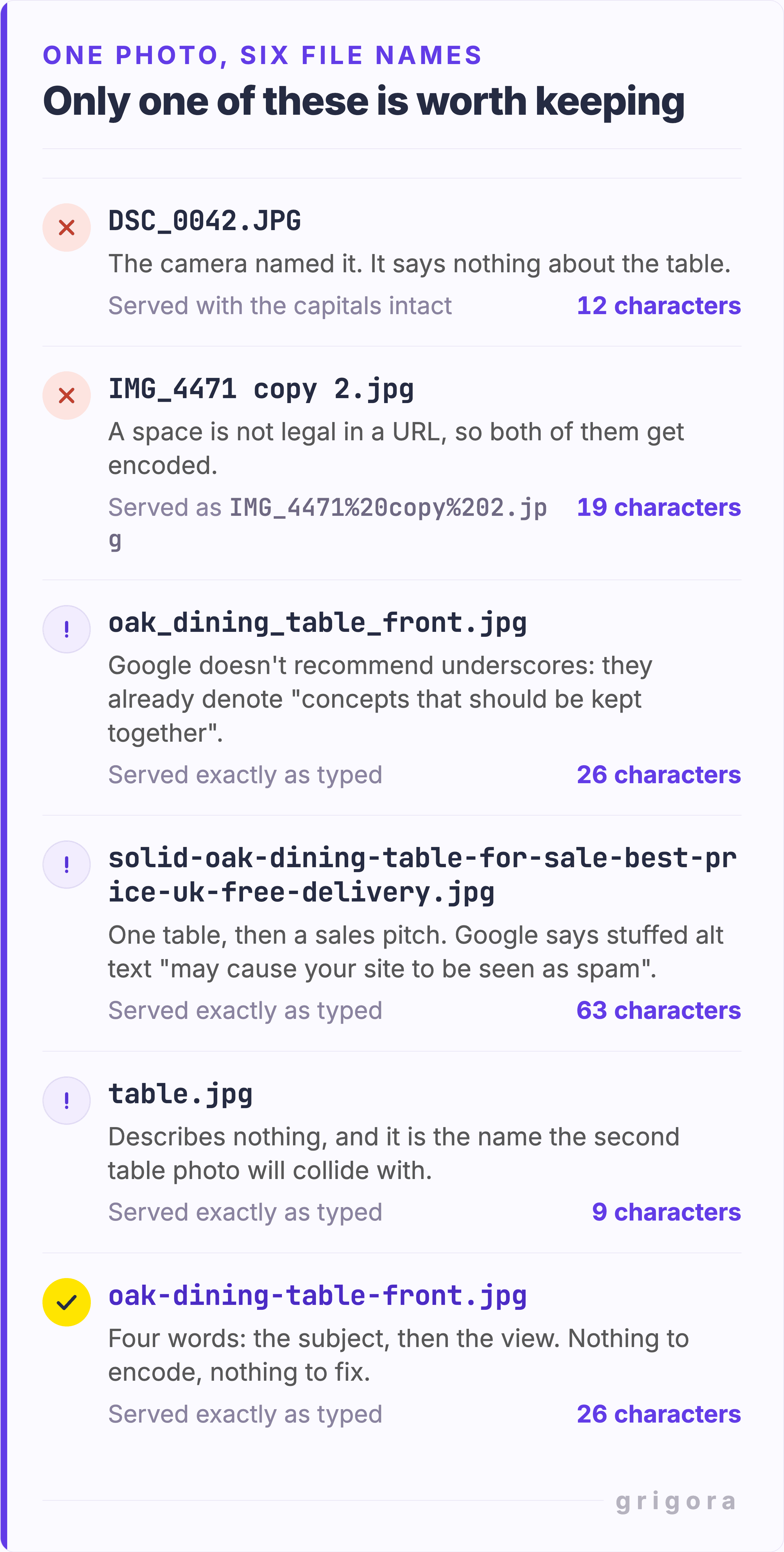
Good and bad image file names, side by side
Every name in the first column comes off a real phone, design tool, camera or browser. The middle column is how the name is served if the platform leaves it alone: spaces and brackets get encoded. The second row is live on wix.com, and the last row on Squarespace's own Hester template demo, beside a file called pickels.jpeg.
| The name it arrives with | How that name is served | A name that works |
|---|---|---|
Phone photo of a product: IMG_4471.HEIC | IMG_4471.HEIC, and HEIC is not on Google's list of supported formats (BMP, GIF, JPEG, PNG, WebP, SVG and AVIF) | oak-dining-table-front.jpg |
Design tool export: Frame 2147239390.jpg | Frame%202147239390.jpg | pricing-table-three-plans.jpg |
Camera headshot: DSC_0042.JPG | DSC_0042.JPG, capitals preserved | priya-nair-head-chef.jpg |
Stock download: download (7).jpeg | download+%287%29.jpeg | brushed-steel-kettle-side.jpg |
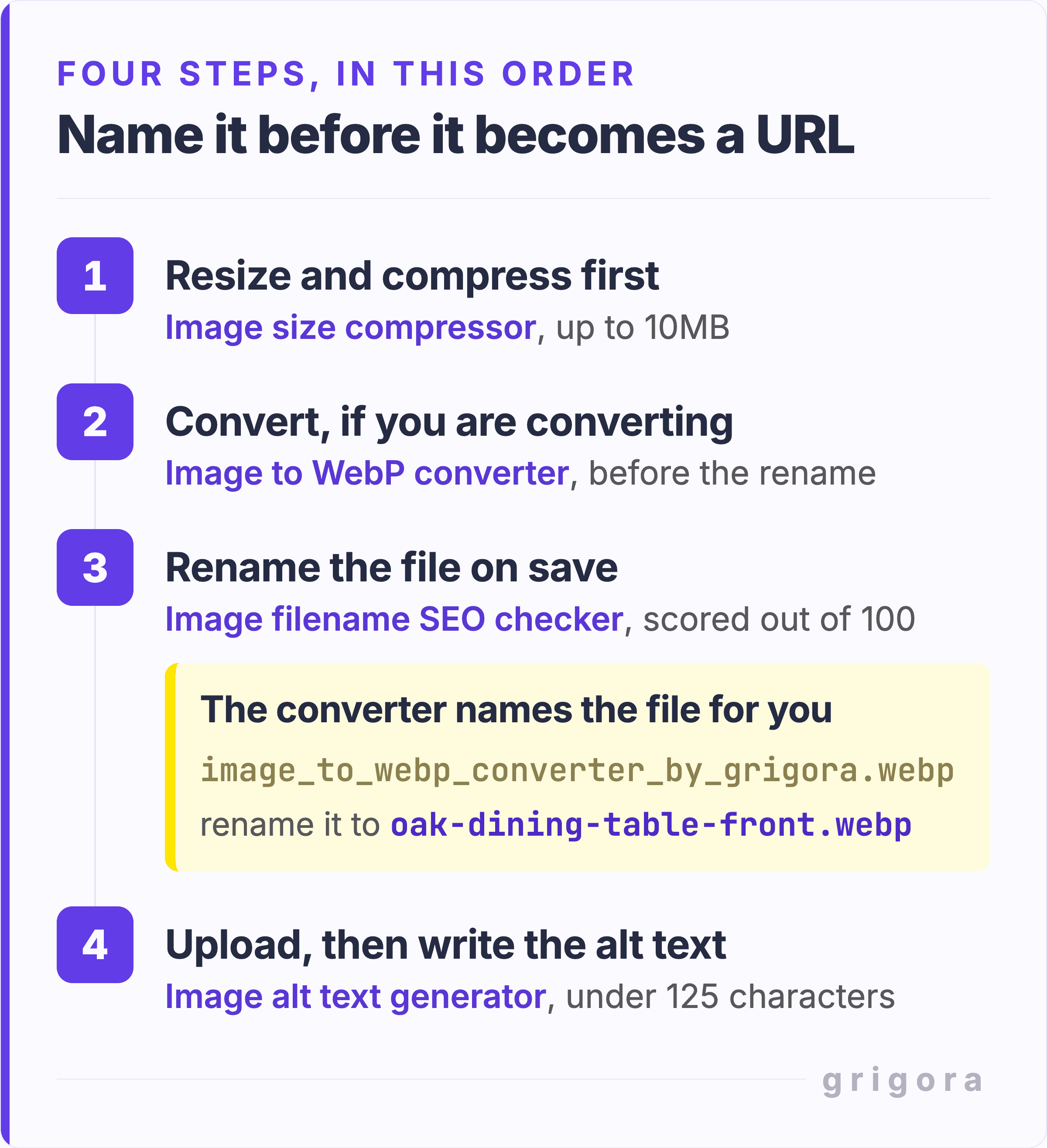
How to name image files for SEO in four steps
The order matters: two of these steps hand the file back with a name you did not pick.
- Resize and compress first. Get the file to the right width and file size before you think about the name. The free image size compressor takes one JPEG, PNG or WebP at a time, up to 10MB, and always hands back a JPEG.
- Convert, if you are converting. The image to WebP converter turns a JPEG or PNG into WebP. Do it before the rename, not after.
- Rename on save. Both tools save the result under a fixed name of their own, whatever you uploaded: the converter's is
image_and the compressor's isto_ webp_ converter_ by_ grigora.webp image_. Then check the new name with the image filename SEO checker.size_ compressor_ by_ grigora.jpg - Upload, then write the alt text. This is the part that carries weight, so give it the sentence the filename cannot hold. The image alt text generator drafts one from a JPG, PNG or WebP, aiming for under 125 characters; add the context it cannot see.
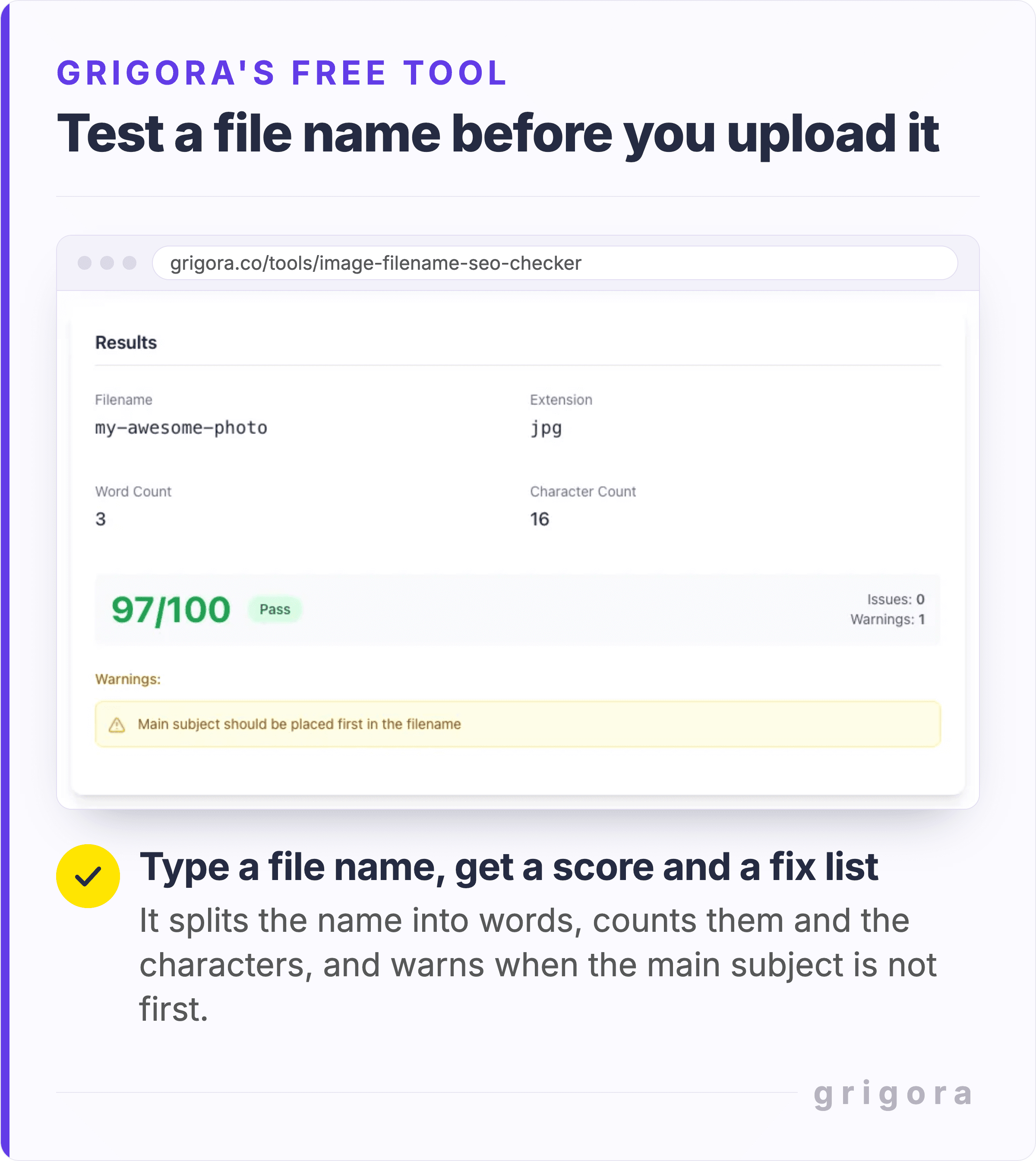
The image filename SEO checker scores a name out of 100. Given my-awesome-photo.jpg, as in the screenshot, it splits the name into three words and 16 characters, finds no issues and one warning (the main subject should come first) and passes it at 97. Read the score with that in mind: it checks the form of a name, not whether the words describe the picture. It takes 10 points off for each issue, such as capitals, spaces, underscores, the characters @, #, % and &, a generic start like IMG, photo or screenshot, or more than 60 characters before the extension, and 3 for each warning, such as a date, a stop word or the same word three times. It never sees the image, so it cannot tell you whether the extension matches the file.
Naming hundreds of product photos without losing a day
Google suggests automating the naming once you have thousands of images. A pattern that scales is product-variant-view, so that within one product only the view changes: oak-dining-table-front.jpg, then -detail, then -in-room.
Batch rename on your own machine with Finder or any bulk renamer, not in the admin afterwards, and keep every name unique so the platform has no collision to resolve. Do it before the import, whether the catalogue lands in Grigora Commerce or anywhere else. The copy beside each photo carries more weight than its name; for how much of it to write, see how long a product description should be.
What your website builder does to the file name after you upload it
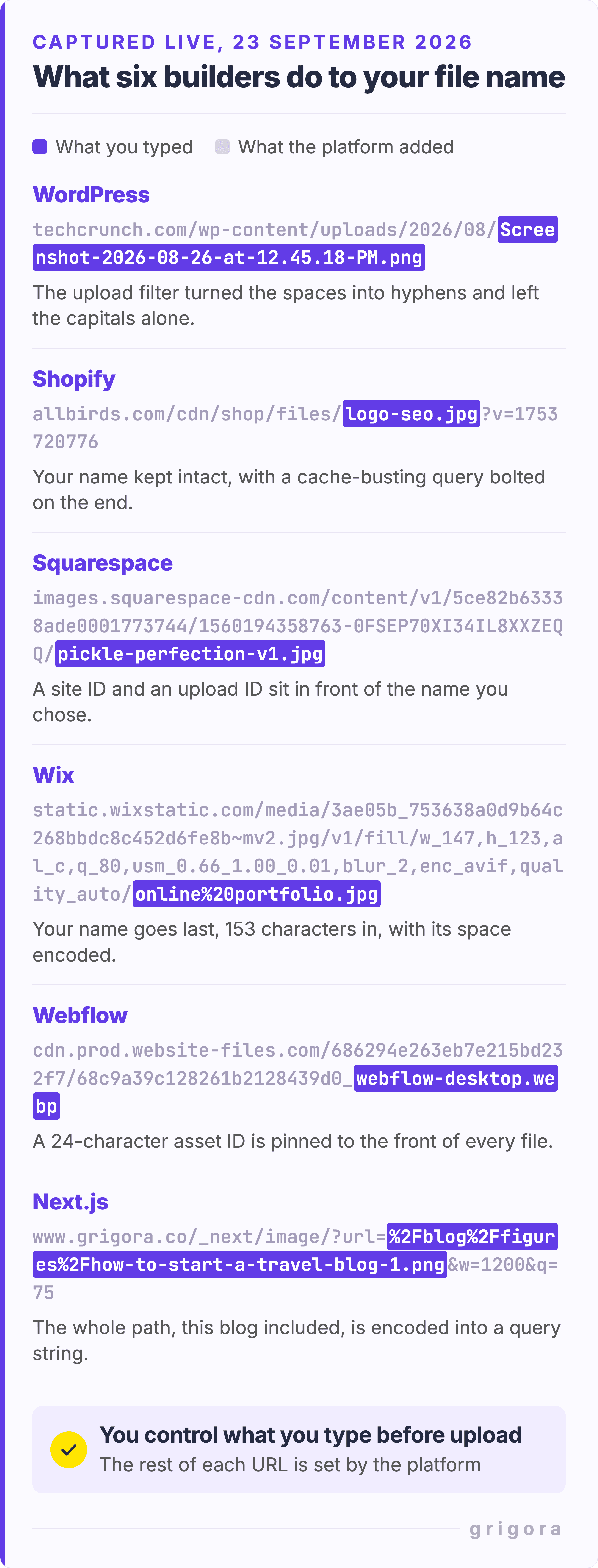
You type a name, the platform stores something else, and the URL a crawler sees is not the one you wrote. Here is what six platforms had done to images on live sites on 23 September 2026.
- WordPress runs every upload through sanitize_file_name(), which replaces spaces and consecutive dashes with a single dash and strips characters such as brackets,
#and&, but leaves capitals alone. Since 5.3 it also scales down any image wider or taller than 2560px and adds -scaled to the name, sooak-dining-table-front.jpgbecomesoak-dining-table-front-scaled.jpg. TechCrunch's home page shows what survives:GettyImages-1225201409.jpg,54657380116_(a Flickr download) and66c449690d_ k.jpg Screenshot-2026-08-26-at-12.45.18-PM.png. - Shopify keeps your name and appends a cache-busting query, which is why Allbirds serves its logo as
/. Its documentation is unusually specific: a unique identifier can be added when a name collides, an underscore should not sit immediately before dimensions (cdn/ shop/ files/ logo-seo.jpg ?v=1753720776 product-image-5x4.jpeg, notproduct_image_5x4.jpeg), and a name cannot end in words such as thumb, small, medium, large or grande, which the CDN can mistake for resize requests. - Squarespace keeps your name but files it behind a site ID and an upload ID, then adds
?format=1000w. Its own Hester template demo servespickle-perfection-v1.jpganddownload+%287%29.jpeg. - Wix inverts the order: a hash comes first, your name is tacked on the end after the resize instructions, which is where
online%20portfolio.jpgandwebsite_security.jpgsit on wix.com's own home page. - Webflow prefixes a 24-character asset ID, so a file uploaded as
agency-d-2.webpis served as6a904cdb0f76d625a477188f_.agency-d-2.webp - Next.js sites, this blog included, percent-encode the whole path into a query string:
/_next/image/?.url=%2Fblog %2Ffigures %2F...png &w=1200 &q=75
On all six, the part you choose is the name you type before upload; the platform decides the rest. A hotlinked stock photo carries a name you cannot choose at all, one more reason to host your own copy.
Also worth readingBest Ways to Name Your Portfolio Website
Should you rename images that are already on your site?
Usually not. Use good names for every new upload, but renaming the old ones tends to cost more than it returns.
Mueller's reasoning in the same podcast: "when we crawl images, we tend not to crawl them as often, because usually, they don't change a lot." So a site-wide rename does not look like a rename to Google. It looks like the old images vanishing and unfamiliar ones arriving slowly: "a couple of months at least" of being "kind of annoying in Image Search", for something that "probably would have minimal effect". When Google moved its own blog off Blogger, Mueller thinks the images were simply ported over, names and all.
Three cases where it is worth doing:
- The page is being rewritten anyway, so the images move regardless.
- You are migrating platforms, the exception Mueller gave himself: when the files change URL anyway, fix the names on the way through.
- The name is wrong: the wrong product, or a client name in a file about to be published.
If you do it, go one template or one collection at a time, and put a permanent redirect on the old URL wherever your host allows one. Google follows a permanent redirect and uses it as a signal that the target should be canonical, which is how the old file gets connected to the new one. Then fix every page that embeds it.
Shopify is the awkward case. Renaming a file there means editing its URL Handle, and its documentation says "the previous URL for that file no longer works". It mentions no redirect for the old address.
File name, alt text and caption do three different jobs
Write each one for the reader it actually has.
- The filename is a weak hint that also becomes part of the image URL. Three to five words is plenty.
- The alt text is the strong signal and the accessibility requirement. Google calls it "the most important attribute when it comes to providing more metadata for an image", and grades its own examples: missing and keyword-stuffed alt text are bad,
alt="puppy"is better andalt="Dalmatian puppy playing fetch"is best. - The caption is the only one sighted readers read, so it carries what the picture does not show: the date, the source, the point. In hand-written markup it sits in a
<figcaption>, one of the tags worth knowing for blog posts.
Mueller's rule for alt text is worth copying: not "a photo of a beach" but "the beach before the chemical spill happened". People searching images, he said, "want information which is attached to that image".
The accessibility case is stronger than the SEO one. WebAIM notes that when an image is the only content inside a link and its alt is empty or missing, screen readers "might read the image filename or the URL of the linked page". DSC_0042.JPG read aloud is the real cost of a lazy name.
Coverage is worse than it looks. In the July 2025 crawl behind the Web Almanac 2025, the median mobile page had alt attributes on 60% of its images, and 15% of its images carried a blank alt; at the 90th percentile, 90% were blank. The image alt text extractor pulls every img tag and its alt attribute from a list of URLs into a CSV, and lists a blank alt as missing. It reads the HTML as served, so it misses images added by JavaScript and CSS backgrounds, and Google does not index CSS images either.
What else is inside the file: EXIF and IPTC
Google reads IPTC photo metadata embedded in the file itself: Creator, Credit Line, Copyright Notice, Web Statement of Rights, Licensor URL and Digital Source Type, the field that can mark an image as AI-generated. Google Images uses them to show who made an image and how it can be licensed, including the Licensable badge, and structured data on the page does the same job if the embedded metadata does not survive your tools. If the photo is someone else's, read whether you can use any image on your website first.
EXIF is a privacy question rather than an SEO one. An iPhone embeds the coordinates where a photo was taken whenever Location Services is on for the Camera app, as Apple explains in its personal safety guide. Grigora's compressor and WebP converter already drop all metadata, EXIF and IPTC alike. If you skip them, run the image metadata cleaner before you rename, not after: it also saves under a name of its own: image_, with the extension of the format it hands back.
How to read other advice on image file names
While writing this I opened the images on one of the dedicated guides to image filename SEO. Its hero is served as Image_: capitals, underscores between every word, a CMS hash on the end. The author photo beside it is uros_ccceff3608.jpg. That is not a gotcha, it is the point: both images carry alt text, the page reads perfectly well, and the writing does the work the names do not.
One claim to ignore while you read around: the share of all searches that supposedly happens on Google Images. It rests on clickstream data Jumpshot collected in 2018 from US browsers, with Android as the only mobile source, and Avast announced it was winding Jumpshot down on 30 January 2020.
So name the file properly because it takes thirty seconds, not because it will move a ranking. Spend the time you save on the alt text and the copy around the image, which is where the signal is. On Grigora that means naming the file on your desktop, then filling in Alt Text on the image block after upload. The trial runs 14 days, no card.
Image file name FAQs
Do image file names still matter for SEO?
A little. Google says a filename "can give Google very light clues" about what an image shows, and John Mueller has said it "doesn't provide any real unique information, usually" once the alt text and surrounding copy are good. It counts for more when those are missing, as on a gallery image whose filename is its only description.
Should I use hyphens or underscores in image file names?
Hyphens. Google recommends them over underscores in URLs because they help "users and search engines better identify concepts in the URL", and notes that underscores are "commonly used for denoting concepts that should be kept together", as in the function name format_date. If a live image already uses underscores, that alone is not worth a rename.
How long should an image file name be?
Three to five words is a good target. Google asks only for "short, but descriptive" and sets no limit.
oak-dining-table-front.jpg is 26 characters; the Grigora filename checker flags anything over 60 before the extension.Should the image file name be the same as the alt text?
No. The filename is a short label that becomes part of the image URL; the alt text is what a screen reader speaks, and what Google calls "the most important attribute" for image metadata. Name the file
oak-dining-table-front.jpg and give the alt text the full description, such as "Solid oak dining table for six, seen from the front".Should I rename the images that are already on my website?
Usually not. Google tends to recrawl images less often than pages, so a site-wide rename reads as old images disappearing and new ones arriving slowly, and John Mueller put the disruption to Image Search at "a couple of months at least". Rename when you are rewriting the page anyway, migrating platforms, or fixing a name that is wrong.
Does renaming an image break my page or my links?
It can. Changing a filename changes the image URL, so any page still pointing at the old name shows a broken image, and links or search results for the old file find nothing unless you add a permanent redirect. On Shopify, where renaming means editing the file's URL handle, "the previous URL for that file no longer works".
How should I name multiple photos of the same product?
Pick one pattern and change one part at a time, such as product, variant, then view:
oak-dining-table-front.jpg, oak-dining-table-detail.jpg, oak-dining-table-in-room.jpg. Rename the batch on your own computer before the import, and keep every name unique: on Shopify, a duplicate name is one of the things that gets an identifier added to yours.Why does my website builder change my image file names after I upload them?
Because the name you type is an input, not the final URL. WordPress turns spaces into hyphens and adds -scaled to anything wider or taller than 2560px, Shopify adds an identifier when a name collides, Webflow puts a 24-character asset ID in front, and Wix puts a hash first and your name last. The words you chose usually survive; everything around them is the platform's.
Practical writing on building a site, growing an audience and sending email people open. No more than one a week.
KS
Karan Singh Bhakuni
117 articles on the Grigora blog
More on Guides

Guides
[Answered] Do I Need to Trademark My Blog Name?
Introduction to Trademarking In the bustling world of digital content creation, your blog's name is not just a label. It's an embodiment of your brand's essence and an intellectual asset that…
18 Nov 202314 min read

Guides
Best Ways to Name Your Portfolio Website
Importance of a Portfolio Website In today’s digitally connected world, having a portfolio website is more than just a trend; it’s a necessity. Whether you’re a freelancer, artist, entrepreneur, or…
18 Aug 202316 min read

Guides
9 Reasons Why Blogs Are Good For SEO
You might wonder, "Why are blogs so special?" Blogs offer a unique platform to create fresh, relevant content regularly, which is a significant factor in SEO rankings. They also provide opportunities…
29 Sept 202310 min read