A note on where this comes from. Grigora makes a website builder with hosting included and a white-label plan for agencies, so we have a stake in both halves of this question. The prices are the agencies' own, read from their websites on 14 and 15 November 2026 and shown as listed; most do not say whether tax is included. They are 100 small shops, mostly one to five people, from a list we had already gathered in which many showed monthly prices, so read the numbers as a snapshot of these agencies, not of the whole market.
Guides Karan Singh BhakuniUpdated
Website Maintenance Packages: What 41 Agencies Charge and Include
Karan Singh BhakuniUpdated - 32 min read
- 9 sections
- 8 comparison tables
- 18 questions answered
The short answer
A web maintenance package is a monthly plan in which someone keeps your website updated, backed up, secure and current, usually with a small allowance for content edits. We checked the published prices of 100 small web agencies in the US, UK, Canada and Australia in November 2026: 41 publish a price for a care plan for an existing site, and the cheapest of those plans has a median price of $127 a month in the US, £60 in the UK, C$95 in Canada and A$69 in Australia, from 9 to 11 agencies in each country. How much of that work your site needs depends mostly on its platform. A WordPress site needs its plugins kept up to date, with security fixes applied as soon as they come out, while on a hosted website builder the platform looks after the server, the certificate and the software, so a package is mostly about content and checks.
Paying for updates every month? On Grigora there are none to apply. Try it free for 14 days
Contents9 sections
Read nextHow to Update a Website: 10 Steps, Checklist and Platform Guide
What is a web maintenance package?
A web maintenance package, also called a website maintenance plan, care plan, support plan or maintenance retainer, is a recurring fee for keeping a site that already exists working, safe and up to date. It is not the same as hosting, which is the server the site runs on, although many packages include hosting. And it is not a website-as-a-service plan, where the monthly fee also pays for building the site in the first place.
The agencies we checked show how blurred the lines are. Of the 100, 41 publish a care plan for an existing site, 15 sell only website-as-a-service, 5 sell managed hosting with updates, 3 sell something else monthly, 35 publish no monthly price at all, and one site could not be reached. The rest of this guide uses the 41 care plans.
The work itself falls into four types: preventive (updates, backups and monitoring), corrective (fixing broken links, forms and errors), adaptive (keeping up with outside changes, such as PHP 8.2 losing security support on 31 December 2026 and certificate lifetimes falling to 100 days on 15 March 2027) and perfective (speed, SEO and content improvements). Entry plans are mostly preventive: 78% of the 41 list backups and 71% list updates, against 32% for speed work and 10% for SEO.
What's included in website maintenance packages
Most packages list backups and software updates: 32 and 29 of the 41 cheapest plans list them. After that they differ a lot, which is why two plans at the same price can be very different value. Here is what the cheapest plan of each of the 41 agencies lists.

| Item listed in the cheapest plan | Plans listing it (of 41) | Share |
|---|---|---|
| Backups | 32 | 78% |
| Software updates | 29 | 71% |
| Content edits | 25 | 61% |
| Hosting | 23 | 56% |
| Uptime monitoring | 22 | 54% |
| Security monitoring | 17 | 41% |
| SSL certificate | 16 | 39% |
| Reports | 15 | 37% |
| Speed work | 13 | 32% |
| SEO | 4 | 10% |
| Malware removal | 2 | 5% |
Read the low numbers with care: an item a plan does not list is not necessarily excluded. SSL, for example, often comes with the hosting rather than being named as its own line. Malware removal and SEO are rarely named on an entry plan, and where SEO is named it is usually a basic check, so ask whether a hack clean-up is covered or billed by the hour.
| Task | How often | Why it matters |
|---|---|---|
| Software updates (WordPress core, plugins, themes) | Security fixes the same day; everything else at least weekly | Most WordPress security holes are in plugins |
| Backups, plus a test restore | Daily or weekly backups; a test restore every few months | A backup that has never been restored may not work |
| Uptime and security monitoring | Continuous | You hear about a problem before your visitors do |
| SSL certificate renewal | Automatic renewal, plus an expiry alert | Certificates last at most 200 days, and 100 days from 15 March 2027 |
| PHP version (WordPress) | Quarterly; upgrade before support ends | PHP 8.2 gets no security fixes after 31 December 2026 |
| Content edits | As needed, within the allowance | Keeps prices, opening hours and offers accurate |
| Broken links, forms and speed | Monthly | Small faults cost enquiries quietly |
| SEO and analytics review | Monthly or quarterly | Shows what to update next |
| Domain renewal | Yearly | An expired domain takes the whole site down |
Why updates matter more every year
On WordPress, keeping plugins, themes and core up to date is the core of the job, and once a week is too slow for security fixes. Patchstack's report on 2025, updated 25 February 2026, counted 11,334 new vulnerabilities in the WordPress ecosystem that year, 42% more than in 2024. 91% were in plugins, 9% in themes and only 6 in WordPress core itself. Almost half, 46%, had no fix from the developer by the time they were made public, and for the most heavily exploited flaws Patchstack puts the weighted median time to the first attack at five hours. In Patchstack's own tests (it sells a WordPress firewall), common hosting defences blocked only 12% of attacks on WordPress-specific flaws, so ask whether a plan patches known plugin flaws, not just whether the host has a firewall. Turn on automatic updates for plugins you trust, which WordPress has offered plugin by plugin since version 5.5, and apply security releases the day they come out. Our guide to why website security matters covers what a compromised site can expose and what to review.
Versions need watching too. On 17 November 2026, a third of the sites reporting to WordPress.org (33.6%) were on an older major version than the newest one at the time, 7.1, three weeks before the scheduled release of WordPress 7.2 on 8 December 2026, and each major release resets that count. PHP, the language WordPress runs on, is the bigger job: PHP 8.2 gets its last security fixes on 31 December 2026, and on 17 November 2026, 54% of WordPress sites reporting their version ran PHP 8.2 or older. A site still on PHP 8.2 in 2027 runs without PHP security fixes, so moving to PHP 8.3 or newer is the first compatibility job for a WordPress care plan: before 31 December 2026 where possible, and as early in 2027 as you can otherwise. PHP 8.3 itself is supported until 31 December 2027 and 8.4 until 31 December 2028, so test your plugins and theme on the newest version they support.
The maintenance dates to plan for in 2027
Several maintenance deadlines are already fixed. On a self-hosted site, a care plan, or you, has to handle each of them. None of them needs action from the customers of a hosted builder, because the platform renews certificates and runs the server software.

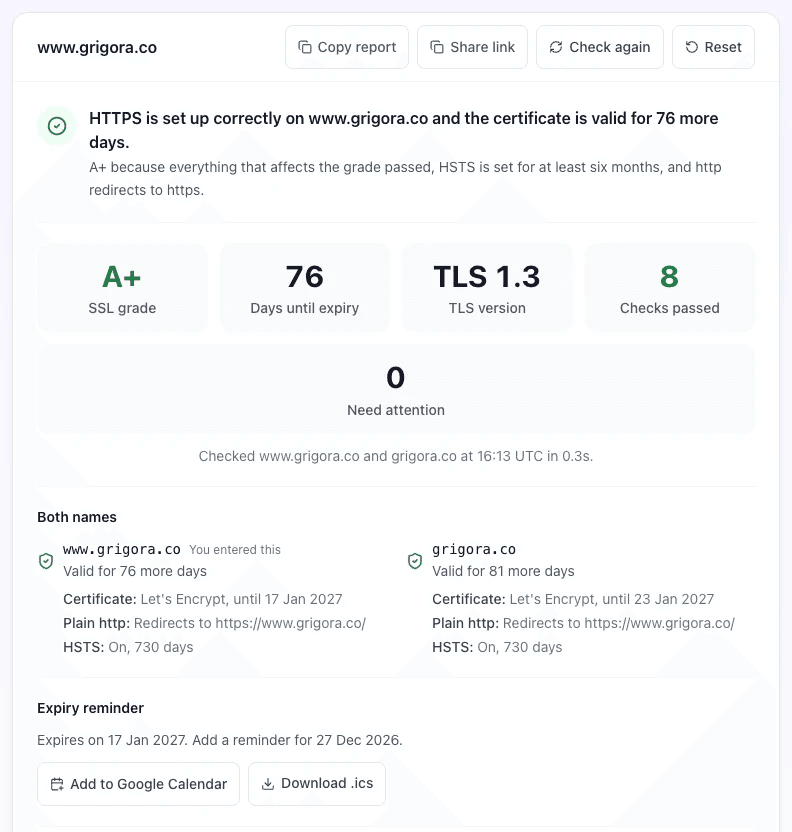
Certificates are the other moving date. Since 15 March 2026 a publicly trusted SSL certificate can last at most 200 days; from 15 March 2027 the limit is 100 days, and from 15 March 2029, 47 days, under a CA/Browser Forum ballot that every major browser maker voted for. Let's Encrypt, the free certificate authority many hosts use, moves its default from 90 to 64 days on 10 February 2027 and to 45 days on 16 February 2028, and it stopped sending expiry emails on 4 June 2025. So renewal has to be automatic, and someone needs their own expiry alert: ask a provider whether renewal is automatic and who gets the alert if it fails. You can check any site's certificate, expiry date and renewal health with the free SSL checker.
How much does website maintenance cost?
Among the agencies we checked, the cheapest care plan had a median price of $127 a month in the US, £60 in the UK, C$95 in Canada and A$69 in Australia, with a wide range inside each country. Over a year, those medians come to about $1,524 in the US, £720 in the UK, C$1,140 in Canada and A$828 in Australia. Here is the cheapest care plan of each agency we checked, one dot per agency, with the middle value marked.

| Country | Agencies | Median entry plan | Range | Median top plan | Highest plan listed |
|---|---|---|---|---|---|
| United States | 10 | $127 a month | $44 to $199 | $189 | $599 |
| United Kingdom | 11 | £60 a month | £15 to £150 | £149 | £350 |
| Canada | 9 | C$95 a month | C$40 to C$297 | C$190 | C$720 |
| Australia | 11 | A$69 a month | A$19 to A$109 | A$99 | A$299 |
The data behind these charts, 41 anonymised care plans with their prices, inclusions, edit time and terms, is a free CSV download. If you use it, please credit Grigora with a link to this page.
A few patterns stand out. Most agencies sell a ladder: 15 offer a single plan, 12 offer two, 12 offer three and 2 offer four, and where there is more than one tier the top one costs a median of about three times that agency's own entry plan, with most between two and four and a half times. At the 26 agencies that sell more than one plan, the top plan had a median price of $225 a month in the US (7 agencies), £149 in the UK (9), C$412 in Canada (4) and A$169 in Australia (6), and the dearest plan on any list was $599, £350, C$720 and A$299. The median top plan column in the table counts an agency with one plan at that plan's price, which is why it sits closer to the entry column. Where the cheapest plan states its edit or support allowance, it is usually between 30 minutes and an hour a month (21 plans state it; the range runs from 5 minutes to 3 hours), and 9 of the 41 entry plans include no edits at all. On terms, 21 of the 41 say month-to-month or no lock-in, 8 ask for a minimum term or payment up front, and 12 do not say. Nine say unused time does not roll over into the next month, and none promise that it does.

To see what upkeep adds up to, the free website cost calculator puts an agency, a freelancer and building the site yourself side by side, including what each costs every year after launch.
The pricing models you will see
- Flat monthly tiers. The most common shape: two to four plans at fixed monthly prices, each with a set list of tasks and an edit allowance.
- Annual prepay. Several agencies discount a year paid up front, typically by a month or two.
- Hours banks. A block of support hours each month or quarter, used on whatever the site needs.
- Per-visit updates. A fixed price for each scheduled round of updates, rather than a monthly fee.
- Website as a service. One monthly fee that also pays for building the site. Read the terms on ownership: in four of the plans we read, the agency keeps the site while you pay or charges a buyout to hand it over, and one hands it over only after six months of payments.
What pushes the price up
- Edit time. The biggest difference between tiers is usually how many minutes or hours of changes you get each month.
- Speed work. The 13 entry plans that list speed work had a median price 1.4 times their country's median, against 0.8 times for the other 28.
- Response time. Upper tiers promise faster replies; check whether that means a reply or an actual fix.
- A shop. Online stores carry more plugins, payments and stock to watch, and several agencies price them separately.
- Marketing work. Five of the 41 care-plan agencies put an SEO or marketing retainer at the top of their price list, which is a different service with a maintenance plan attached.
- Hosting does not, at the median. The 23 entry plans that include hosting cost the same as the 18 that do not, measured against each country's median (1.00 against 1.01 times), so a plan without hosting is the dearer deal once you add a host.
A package or pay as you go?
This is the real choice behind what it costs to pay someone to maintain a website. A package buys a fixed routine plus a small allowance: entry plans that state one usually include 30 to 60 minutes of edits or support a month, and 9 of the 41 include no edits at all. Hourly or ad hoc help suits a site that rarely changes, but then nobody owns the updates and checks, so they wait until someone remembers. An hours bank sits between the two; check the small print, because nine of the plans we read say unused time does not roll over.
For a sense of hourly rates, the US Bureau of Labor Statistics puts the median wage for web developers and digital designers at $47.85 an hour in May 2025, and freelancers and agencies charge more than wages to cover overheads, tools and unbilled time. Prices above our small-shop sample exist too: one US agency lists its monthly maintenance plans at $299 for Basic, $599 for Premium and $900 for Custom, checked November 2026, against a top price of $199 among the ten US entry plans in our data and $599 for the dearest US plan of any tier.
Maintenance for an online store
A shop adds its own routine on top of the checklist below, whoever does the work.
- Place a test order after every update, and check the checkout, the payment and the confirmation email.
- Check that payment and shipping connections still work.
- Keep prices, stock and tax settings current.
- Back up product and order data separately, since page version history does not always cover it.
- Watch for failed payments after any change.
WordPress maintenance packages vs hosted builders: who does what
The platform decides how much of a package is needed at all, which is why WordPress maintenance packages, often sold as WordPress care plans, are a category of their own. On self-hosted WordPress you, or whoever you pay, are responsible for the server software, the plugins, the theme and the backups. On a hosted builder the platform runs the server, the certificate and the core software: Wix says every Wix site gets HTTPS automatically, Squarespace says its sites get fully managed hosting and free SSL certificates, and Shopify says all Shopify updates are automatic. Backups and themes still vary by platform: Shopify, for example, updates only themes from its Theme Store, and new theme versions are yours to add.

| Job | Self-hosted WordPress | Hosted builder |
|---|---|---|
| Server and hosting | Your host | The platform |
| SSL certificate | Your host | The platform |
| Core software | You; minor updates are automatic, and major ones too on new sites since version 5.6 | The platform |
| Plugins and themes | You, with security fixes the same day | Mostly the platform; on Shopify, new theme versions and uploaded themes are yours |
| Backups | You or your host | Partly you: version history covers pages, not always store or blog data |
| Content edits | You | You |
| SEO and checks | You | You |
| Domain renewal | You | You |
That does not make a builder maintenance-free. Backups are partly yours: on Wix, restoring an old version does not bring back store products or blog posts, and Shopify points owners to exports and apps, so export what your platform lets you. Platforms can also close: Weebly took sites offline in 67 countries on 27 September 2026, which is why a copy of your content matters on any builder. Someone also has to update the content, answer form enquiries, watch search performance, renew the domain and check that everything still works after each change. It does mean a package for a hosted-builder site has less technical work in it, and the time you pay for can go on the content and checks that actually change results.
Also worth readingWhy Website Security Is Important: 6 Reasons + 2026 Checklist
How to choose a maintenance package
Most packages look alike on a price card. These questions show the difference before you sign.
- What counts as an edit, and how much time is included? "Small changes" can mean a text tweak or a new page. Ask for minutes or hours in writing.
- Does unused time roll over? Usually it does not, so an hour you never use is an hour you paid for.
- How fast do they reply, and how fast do they fix? A four-hour response time is not a four-hour fix.
- What happens when an update breaks something? Ask whether updates are tested on a copy of the site first, and whether fixing a breakage is inside the plan or billed by the hour.
- Do they test restoring a backup? Daily backups matter only if a restore actually works.
- Where are the backups kept, and can you download them? They should sit off the web server, in a place you can reach without the agency.
- Who is your contact, and do you get a report? Ask for a named person and a monthly note of what was updated; only 15 of the 41 entry plans we checked list reports.
- Who owns the domain, the hosting account and the admin logins? They should be in your name, or handed over on request.
- What happens when you cancel? You should get every login and, without an exit fee, either a full copy of the site or, on a builder such as Wix that cannot export one, the site moved into your own account.
- Is tax included, and is there a minimum term? Most of the price cards we read did not say whether tax was included, and 12 of the 41 did not state a term.
If the site is hacked or goes down
- Ask how a clean-up is billed. Only 2 of the 41 entry plans we checked list malware removal, so a hack clean-up is usually charged on top. Get the hourly or per-incident price in writing.
- Ask how fast security fixes go on. Patchstack puts the weighted median time to the first attack on the most exploited WordPress flaws at five hours, which is why same-day security updates matter.
- Put a number on downtime. Hours offline, times the enquiries or sales you usually get in an hour, times what each one is worth. That is the figure to weigh a faster response tier against.
If you would rather keep the content side yourself, our guide to updating a website covers what to change and how often. Be wary of a plan that lists no backups, promises "unlimited" changes without a fair-use limit, registers your domain in the agency's name, or has no written scope. And if you are leaving an agency, our guide to how long a website redesign takes and the cost of a website audit help with the next step.
Do you need a maintenance package at all?
If your site runs on WordPress with several plugins, takes payments, or would cost you money every hour it is down, a package is usually worth it: keeping updates current is the part people skip. If it is a small site on a hosted builder and you can spare an hour a month, you can probably do it yourself. If you have not picked a platform yet, our guide to what to consider when choosing a platform covers the rest of that decision. Here is how the routes compare.
| Route | What it costs | Your time each month | Best for |
|---|---|---|---|
| DIY on a hosted builder (the platform handles updates and SSL) | The platform fee, for example Grigora Starter at $15 a month, or $144 a year ($12 a month), with hosting and SSL included, plus your domain | About an hour on content and checks | Small sites with no plugins to patch |
| DIY on self-hosted WordPress (you apply updates, security fixes the same day) | Hosting, the domain and any paid plugin licences, plus a backup and monitoring tool if you want one, free or from $1.99 a month for one site (see the tools table below) | Weekly updates and backups, plus monthly checks | Owners at home in the WordPress admin |
| Agency care plan, entry tier (the agency handles updates) | A median of $127 a month in the US or £60 in the UK, about $1,524 or £720 a year | Approving changes | WordPress sites with several plugins, and stores |
| Agency care plan, top tier | About three times the entry plan, at agencies that sell more than one | Approving changes | Sites that publish often or have several editors, and sites that need SEO work or a faster response |
This is the routine either way.

Most of these checks take a few minutes with a free tool, and none of the Grigora tools below needs an account:
- Forms: send a test enquiry through each one and confirm it arrives; this one stays a manual job.
- Links and images: the broken link checker and the broken image checker.
- Redirects after a change of page addresses: the redirect checker.
- Mixed content after a certificate or theme change: the mixed content checker finds images and scripts still loading over plain http.
- Sitemap: the sitemap status checker.
- Phones: the mobile-friendly test checks the viewport set-up; confirm the layout on a real phone too.
- Page titles and descriptions: the SEO audit mini tool.
- Accessibility, once a year: the free accessibility checker lists WCAG problems with the code that causes them.
For a new site, the website launch checklist covers the first pass, and our guides to finding bugs in a website and making a website mobile friendly go deeper.
How to package and price website maintenance (for agencies)
If you sell maintenance, the data above is your market. Most of the agencies we checked sell two or three plans, and where there is more than one, the top plan costs a median of about three times the entry plan.

| Essentials | Growth | Pro | |
|---|---|---|---|
| Goal | Keep it running | Keep it current | Keep it growing |
| Hosting and SSL | Included | Included | Included |
| Security fixes | The same day | The same day | The same day |
| Backups | Weekly | Weekly | Weekly |
| Uptime checks | Yes | Yes | Yes |
| Edit time each month | Up to 30 minutes | Up to 2 hours | Up to 2 hours |
| Form and link checks | No | Monthly | Monthly |
| Short monthly report | No | Yes | Yes |
| SEO and speed work | No | No | Yes |
| Priority response | No | No | Yes |
| Quarterly review call | No | No | Yes |
Price from your cost per site first: the hours you expect to spend each month at your rate, plus hosting and any paid plugins or tools, plus a margin for the month something breaks. Then check the result against the local medians above. Write the scope so nobody argues about it later: minutes of edits per month and whether they roll over, response time and fix time as two separate promises, what is out of scope (new pages, redesigns, emergencies), and what the client gets when they leave. Month-to-month with no lock-in was the most common term we saw, in 21 of the 41 plans, and seven plans ask for 30 days' notice to cancel, three of them only after a minimum term. Our guide to website terms and conditions covers the wording side.
What it costs to deliver: the tools
On WordPress, many agencies run maintenance from one dashboard that updates, backs up and monitors every client site. These are the US list prices of three such tools, checked November 2026.
| Tool | What it does | US price as listed, November 2026 |
|---|---|---|
| GoDaddy Pro Site Maintenance Pack | The Hub dashboard is free for sites hosted elsewhere, with a monthly backup and manual security and performance scans. The paid pack adds backups as often as every 6 hours on WordPress sites and every 12 hours on others, automatic daily or weekly scans, and uptime checks every 1 to 15 minutes | $1.99 a month for 1 site, $6.99 for 5, $29.99 for 25, $99.99 for 100 |
| ManageWP | Free dashboard for WordPress updates and basic checks, with paid add-ons per site | Per site a month: backups $2, uptime $1, automated security check $1, automated performance check $1, advanced client reports $1, white label $1, vulnerability protection $2; bundles for agencies with over 25 sites |
| MainWP | Self-hosted WordPress dashboard; the core is free | Pro $29 a month, or $199 a year at list price (on sale for $149 when checked), or $599 once for life |
ManageWP's paid backups, uptime monitor, automated security and performance checks and advanced client reports come to $6 a site a month, under 5% of the $127 US median entry plan in our data. So a maintenance price is mostly time: testing updates, making edits and answering the client. ManageWP and MainWP manage WordPress sites only; GoDaddy's pack also lists backups for non-WordPress sites. On a hosted platform, the platform does most of this work itself.
The cheapest maintenance to deliver is maintenance you do not have to do. That is the case for hosted platforms in agency work: if the platform handles the server, the certificate and the software, your hours go on edits and growth, which clients notice, rather than updates, which they do not. Our guide to building an agency website covers selling the service itself.
Selling maintenance on Grigora
Grigora for Agencies is $199 a month, billed yearly ($2,388), for your own name, logo, colours and dashboard address, your own Stripe keys, and client plans at the prices you set, for up to 100 client sites.
The arithmetic is short. At the US median entry price in our data, $127 a month, two clients cover the $199 white-label fee and a $15 Starter plan, and ten clients bring in $1,270 a month, $1,056 after both, before your own time, payment fees and taxes. At $49 a client, the example on the agencies page, five clients cover them. White label is billed yearly, so the $2,388 is paid up front; the monthly figures are that cost spread over twelve months.
On Grigora, the Essentials tier changes shape: there are no updates to run and no uptime alerts to sell, so it becomes hosting and SSL, a set number of edits, and monthly form and link checks. The same agencies page shows example packages: website care at $49, growth at $99 and a store at $149 a month.
Maintaining a site on Grigora
Grigora is a hosted builder, so a Grigora site has less to maintain. Here is what that means in practice, including the parts it does not cover.
- Hosting and SSL are included. Custom domains get a certificate issued and renewed automatically; you keep the domain renewed at your registrar and its DNS records pointing at Grigora.
- Nothing to update. There are no plugins, themes or core versions to patch. Platform fixes reach a live site the next time it is published.
- Edits by prompt. On AI-built sites, changes are typed into the AI Editor; each edit uses 1,000 AI credits, and Starter includes 30,000 a month (Pro 100,000), refreshed each calendar month.
- Version history. AI-built sites keep every version with a preview and restore; template sites keep the last 50 revisions of each page and post.
- Site checkup. A weekly scan (still in beta) flags broken links, redirects, mixed content and missing page titles and descriptions.
What you still do on a Grigora site: content changes, SEO, checking form leads, renewing the domain, writing any client reports, and taking an occasional export. Grigora does not offer an uptime guarantee or uptime alerts, malware scanning, or a way to restore a site after it is deleted, so do not sell those as part of a Grigora package.
Already on WordPress? Moving is a rebuild, not a copy of your theme. Grigora's content importer brings in your posts, pages, categories, tags and authors, the AI builder can draft the new design from your current address, and you keep your domain, with redirects so old links still work. Our website migration guide covers the steps, and the WordPress alternative page compares the two.
A care plan or a Grigora plan?
| Entry care plans we checked | Grigora Starter | |
|---|---|---|
| Monthly price | US median $127, from $44 to $199 (UK median £60) | $15 a month, or $144 a year ($12 a month), for one website |
| Hosting | Included in 23 of 41 plans | Included |
| SSL certificate | Listed in 16 of 41, often with the hosting | Included, issued and renewed automatically |
| Plugin, theme and core updates | Listed in 29 of 41 | Nothing to update |
| Backups | Listed in 32 of 41 | Version history; keep your own exports too |
| Content edits | Usually 30 to 60 minutes a month; 9 of 41 include none | You make them by prompt in the AI Editor (about 30 a month on Starter's AI credits), or pay someone to |
| Uptime monitoring | Listed in 22 of 41 | Not offered |
So the comparison is not $127 against $15. A Grigora plan covers the hosting and technical half of a care plan; edits, SEO and checks still need someone's time, yours or a freelancer's. Pro is $25 a month, or $240 a year, for two websites, and every plan is on the pricing page.
Building a site for yourself? Grigora's 14-day trial needs no card: build the site, publish it on a Grigora address during the trial and see how little is left to maintain. Connecting your own domain takes a paid plan, from $15 a month.
Web maintenance packages: FAQs
In the 41 small-agency care plans we checked in November 2026, the cheapest plan had a median price of $127 a month in the US, £60 in the UK, C$95 in Canada and A$69 in Australia, as listed. Where an agency sells more than one plan, the top one costs a median of about three times its entry plan. The dearest plan on any of the lists was $599 a month in the US, £350 in the UK, C$720 in Canada and A$299 in Australia.
With an agency care plan, about $1,524 a year in the US, £720 in the UK, C$1,140 in Canada and A$828 in Australia at the median entry prices we found in November 2026, plus hosting where the plan leaves it out (18 of the 41 entry plans do) and the yearly domain renewal. A small site on a hosted builder costs the platform fee plus your own time: Grigora Starter, for example, is $144 a year with hosting and SSL included.
A small agency's cheapest care plan had a median price of $127 a month in the US, £60 in the UK, C$95 in Canada and A$69 in Australia in the 41 we checked in November 2026. The alternative is ad hoc or hourly help: for scale, the US median wage for web developers and digital designers was $47.85 an hour in May 2025, and freelancers and agencies charge more than wages. Hack clean-ups usually cost extra, since only 2 of the 41 entry plans list malware removal.
Most list backups and software updates; about three in five include some content edits; about half include hosting and uptime monitoring. SEO and malware removal are rarely listed. Of 41 entry plans, 78% listed backups, 71% updates, 61% edits and 10% SEO.
PHP 8.2 gets its last security fixes on 31 December 2026, so WordPress sites on it need PHP 8.3 or newer. Let's Encrypt moves its default certificate lifetime from 90 to 64 days on 10 February 2027, and from 15 March 2027 no publicly trusted certificate can last more than 100 days, so renewal must be automatic.
Often, but not always. Hosting is the server your site runs on; maintenance is the work of keeping the site updated, backed up, secure and current. Of the 41 entry plans we checked, 23 include hosting, and at the median they cost no more than the plans without it, so ask before comparing prices. On a hosted builder such as Grigora, hosting and SSL come with the paid plan.
Rarely on entry plans: 2 of the 41 we checked list malware removal. Ask whether a clean-up is covered or billed by the hour, and get the rate in writing.
Start from your cost per site: expected hours at your rate, plus hosting and tools, plus a margin. Tools are a small part: ManageWP's backup, uptime, security, performance and client-report add-ons come to $6 a site a month as listed in November 2026. Then compare with the local market: among the agencies we checked, entry plans had a median of $127 a month in the US and £60 in the UK, and where an agency sells more than one plan, the top one costs a median of about three times its entry plan.
Apply WordPress security updates as soon as they come out, or turn on automatic updates, and check plugins, themes and backups at least weekly. Check forms, links, analytics and that the certificate renewed every month, and keep an expiry alert, since certificates last at most 100 days from 15 March 2027. Review speed, page titles, user access and the PHP version quarterly, and the domain, prices, accessibility and old content yearly.
A package is usually worth it for WordPress sites with several plugins, online stores, and any site that costs money when it is down, because keeping updates current is the part people skip. You can do it yourself if you set aside regular time: back up before updating, apply WordPress security updates as soon as they come out, and run monthly checks on forms, links and the certificate. A small site on a hosted builder can often be kept up by its owner in about an hour a month.
Less of it. The platform handles hosting, SSL and its own software, so there are no core updates to apply, although apps, custom code and Shopify theme versions still need someone to check them. Content, SEO, forms, backups and the domain still need someone, so a lighter package or regular time of your own is enough for most sites.
Less of one. Grigora includes hosting and the SSL certificate on paid plans and has no plugins, themes or core versions to update, so what is left is content edits (made by prompt in the AI Editor on AI-built sites), SEO, checking form leads and renewing your domain. A small site can often be kept up by its owner in about an hour a month.
Grigora Starter is $15 a month, or $144 a year ($12 a month), for one website, and Pro is $25 a month, or $240 a year ($20 a month), for two, with hosting and SSL included. That covers the hosting and update half of a care plan, not edit time; among the US agencies we checked, the cheapest care plan had a median price of $127 a month. There is a 14-day free trial with no card needed, and no free plan after it.
Yes, as a rebuild rather than a copy of the theme. The content importer brings in posts, pages, categories, tags and authors, the AI builder can draft the new design from your current address, and redirects keep old links working once your domain is connected.
Yes. Care plan, maintenance plan, support plan and maintenance retainer are different names for a recurring fee to keep an existing site working. Website-as-a-service plans are different: their monthly fee also pays for building the site.
An unmaintained WordPress site misses security fixes, and most WordPress security holes are in plugins: Patchstack counted 11,334 new WordPress vulnerabilities in 2025, 91% of them in plugins. A site left on PHP 8.2 gets no PHP security fixes after 31 December 2026. Unmaintained sites also break quietly: forms stop sending, links go dead, a certificate that fails to renew shows visitors a warning, and an expired domain takes the whole site offline.
Usually not. Nine of the 41 plans we checked said unused time does not roll over, and none promised that it does. If it matters to you, ask for rollover in writing before you sign.
It depends on the contract. Make sure the domain, hosting account and admin logins are in your name, and that the agency hands over a full copy of the site on cancellation. Month-to-month with no lock-in was the most common term we saw, in 21 of the 41 plans.
Practical writing on building a site, growing an audience and sending email people open. No more than one a week.

Karan Singh Bhakuni
120 articles on the Grigora blog
More on Guides

Guides
How to Update a Website: 10 Steps, Checklist and Platform Guide
Where to edit on WordPress, Wix, Google Sites, Grigora or a hand-coded site, what makes a change live, why an update may not show, how often to update each part and when to rebuild instead. With…
23 Oct 202325 min read

Guides
Why Website Security Is Important: 6 Reasons + 2026 Checklist
Six reasons website security matters, with 2026 data, plus what HTTPS misses and an owner checklist for accounts, updates, backups and recovery.
5 Sept 202319 min read

Guides
How to Make an Agency Website: 8 Steps and a Launch Checklist
Make an agency website in 8 steps: position the agency, plan the pages buyers check before they call, publish case studies you can back up, and test the site before launch.
23 Aug 202323 min read